MIGRAINE & HEADACHE JOURNAL

MigraineLog
Track headaches. Spot triggers.
One attack is an anecdote. Forty of them is a chart.
A neurologist has fifteen minutes and one question: what is the pattern. How often, how bad, how long, what set it off, what you took and whether it worked. MigraineLog collects those six things attack by attack, in about fifteen seconds each, and prints them as a table you can hand over.

From $1.99/month. Android.
A journal, not a diagnosis. The app carries its own line at onboarding, in the entry footer, in Settings and on the front of every report: this app is not a medical device. It helps you log and track headaches — it does not diagnose or treat. Consult a healthcare professional for diagnosis and treatment.
The shape of one attack
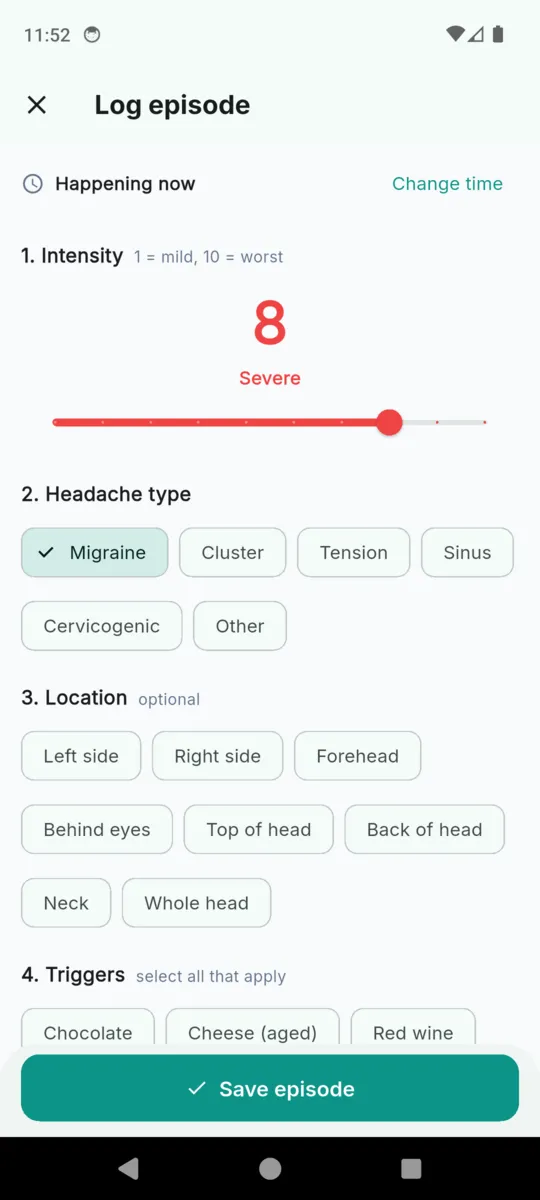
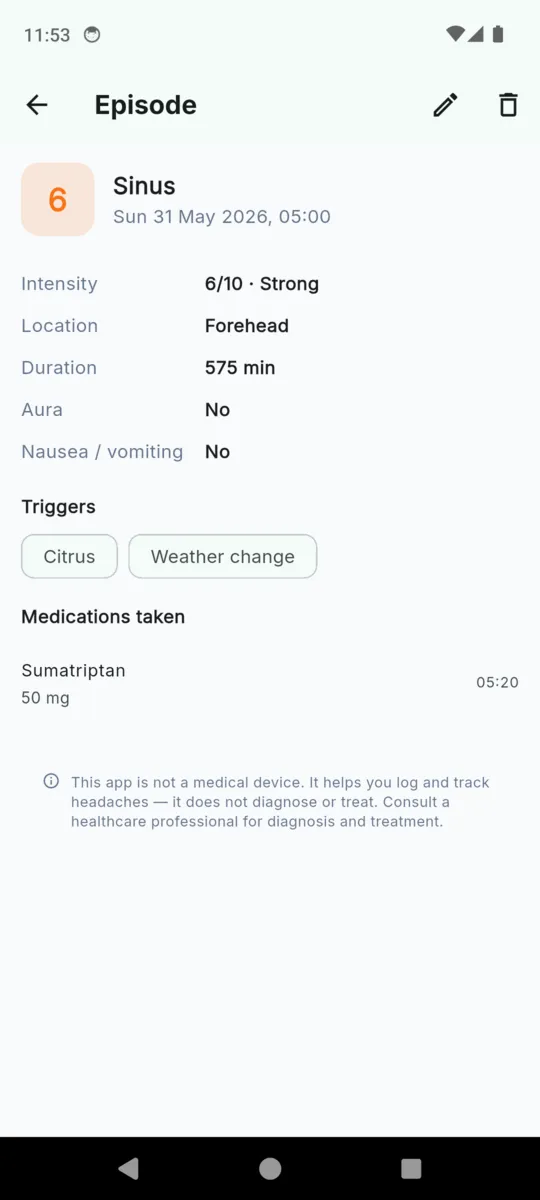
The log screen is seven numbered steps and it opens on "Happening now" with the clock already running, because you are usually filling this in with the curtains shut. Only the first two need answering.
- 1
Intensity 1 = mild, 10 = worst
One slider. The number gets a word next to it — Mild, Moderate, Strong, Severe — and a colour that runs blue, amber, orange, red. Nothing turns green, because a quiet day is not an achievement.
- 2
Headache type six options
Migraine, cluster, tension, sinus, cervicogenic, or other. It defaults to migraine.
- 3
Location optional
Left side, right side, forehead, behind eyes, top of head, back of head, neck, whole head. Which side it was is the sort of thing you forget by Thursday.
- 4
Triggers select all that apply
Thirty-two are seeded on first run across eight categories, and you can add your own.
- 5
Symptoms
Aura, yes or no. Nausea or vomiting, yes or no. Two taps.
- 6
Medications and relief
Pick from your own list, confirm the dosage, then answer "Did it help?" — not noted, a little, moderate, a lot. That answer is what makes the medication chart worth reading later.
- 7
Notes optional
Free text. It goes into the PDF under its own heading with the date attached.
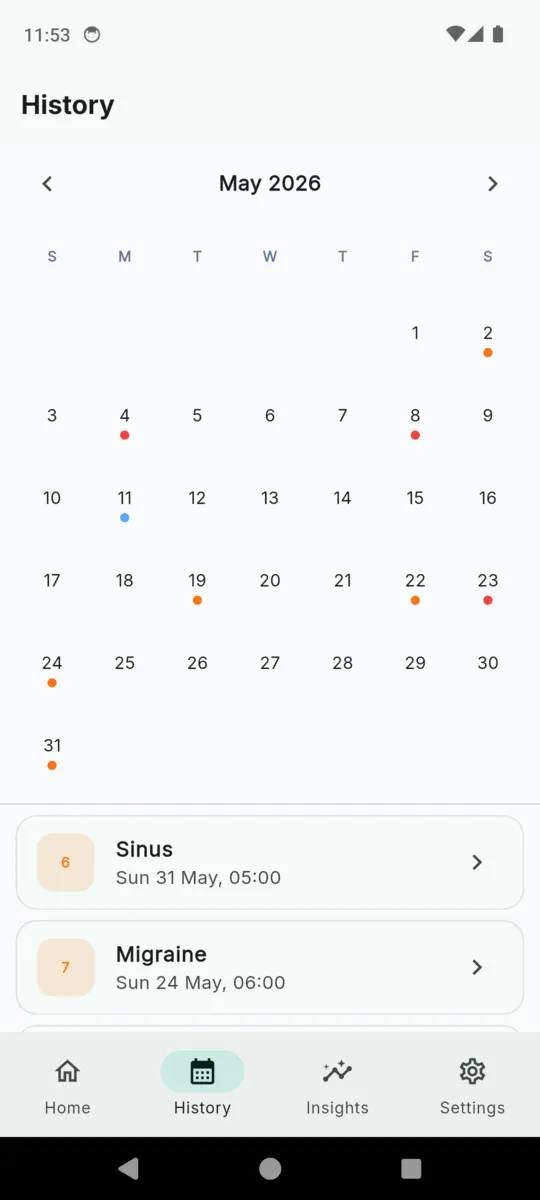
Nothing closes the record. An attack that is still going has no end time until you give it one, and everything on the detail screen stays editable — the duration on a real entry reads in minutes because it was worked out from two timestamps, not guessed.
Thirty-two triggers, already there
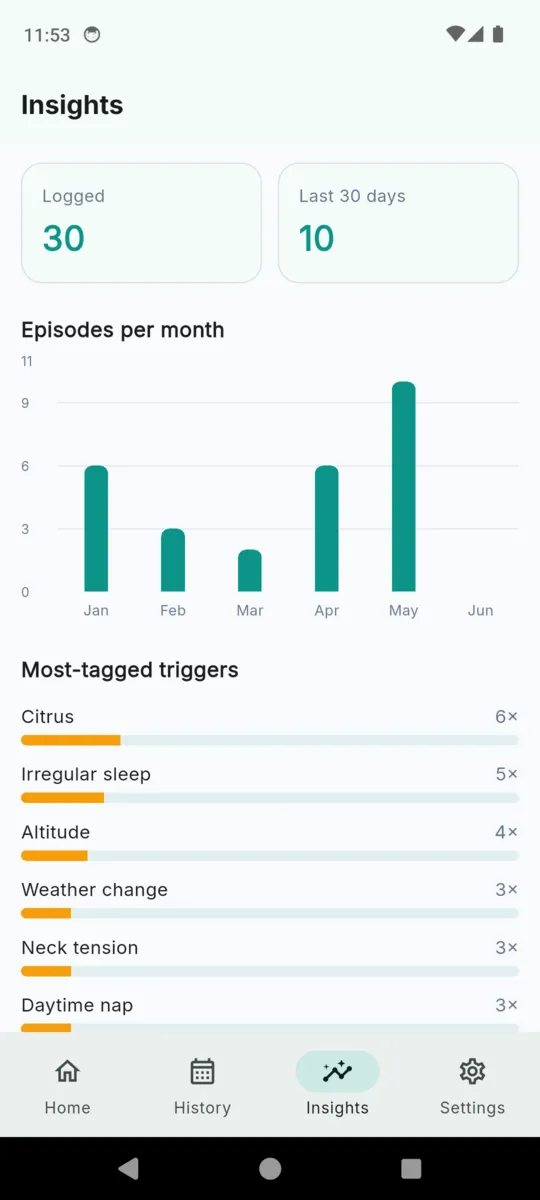
Seeded on first run so the first attack you log has something to tag. Add your own and they sit in the same list. Tagging one is a note that it happened, not a claim that it caused anything.
Food
- Chocolate
- Cheese (aged)
- Red wine
- MSG
- Citrus
- Caffeine
- Alcohol
- Processed meat
- Artificial sweeteners
- Skipped meal
Environment
- Bright light
- Loud noise
- Perfume / strong smell
- Smoke
- Weather change
- Barometric drop
- Altitude
- Heat
Sleep
- Too little sleep
- Too much sleep
- Irregular sleep
- Daytime nap
Stress
- Acute stress
- Stress release (weekend)
- Work stress
Other
- Jaw clench / teeth grinding
- Intense exercise
- Travel
- Neck tension
- Dehydration
- Screen time
- Cycle phase
The days in between count too
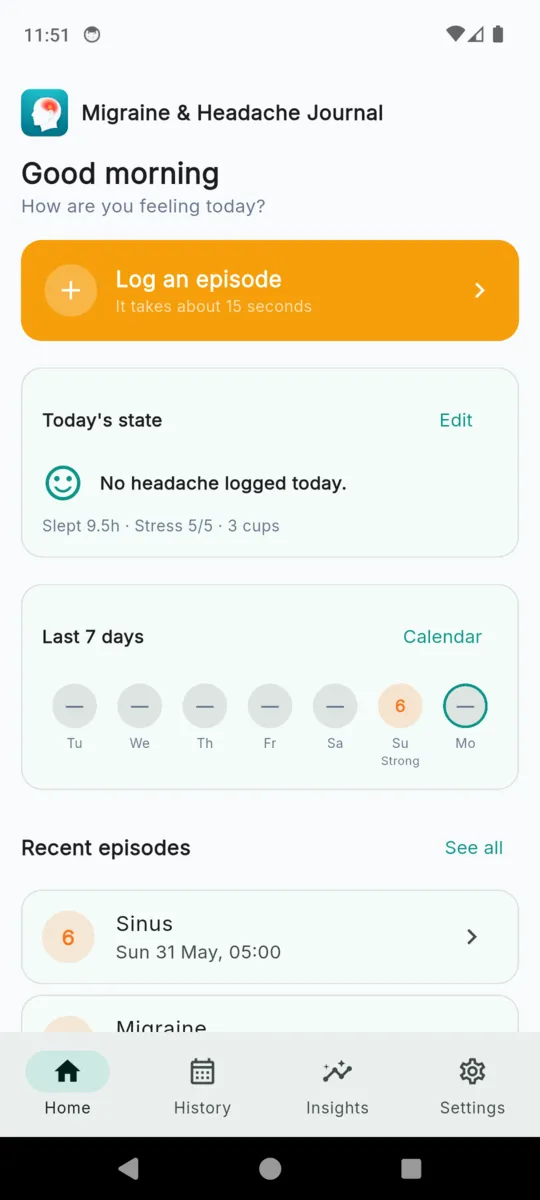
A trigger only means something against a background. Six hours of sleep is unremarkable on its own and interesting on the two days before every attack in a month. So the home screen has a second card — today's state — and it takes a few seconds.
Fill it in or don't. Skipped days are simply absent; nothing chases you for them and there is no streak to break.
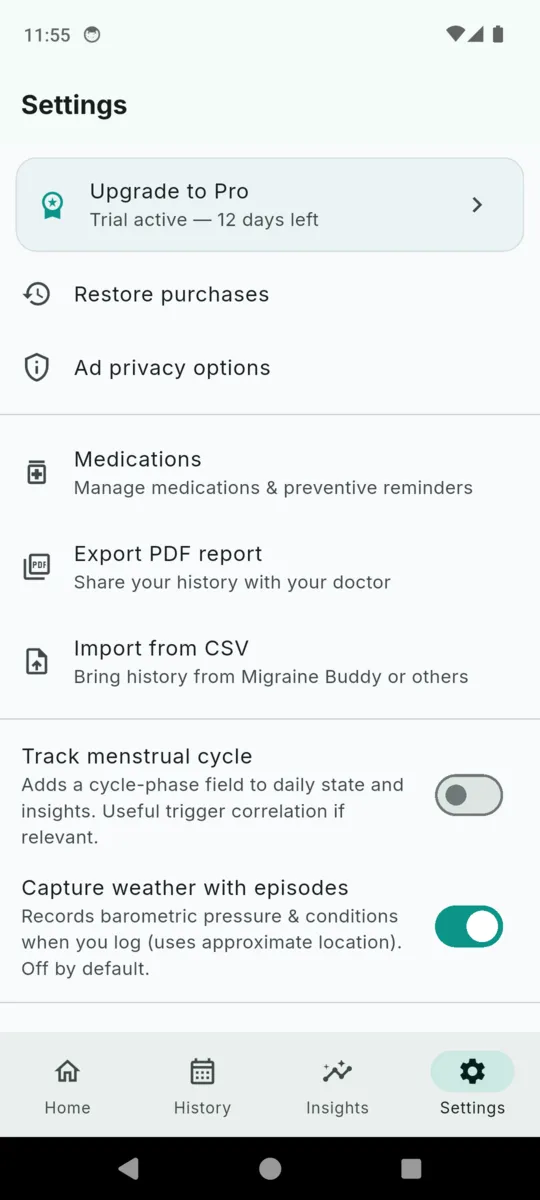
Turn on the optional weather capture and logging an attack also stores the barometric pressure, the twenty-four-hour pressure change, temperature and humidity from Open-Meteo. It uses a coarse location, it is off by default, and if permission is refused the attack is simply logged without it.
| Hours slept | A number, to the half hour. |
|---|---|
| Sleep quality | 1 to 5. |
| Stress | 1 to 5. |
| Hydration | Cups. |
| Screen hours | A number. |
| Cycle phase | Off by default. Menstruation, follicular, ovulation, luteal, perimenopausal, menopausal. |
| Notes | Free text for the day rather than the attack. |
Medications, and whether they worked
Your list, your words
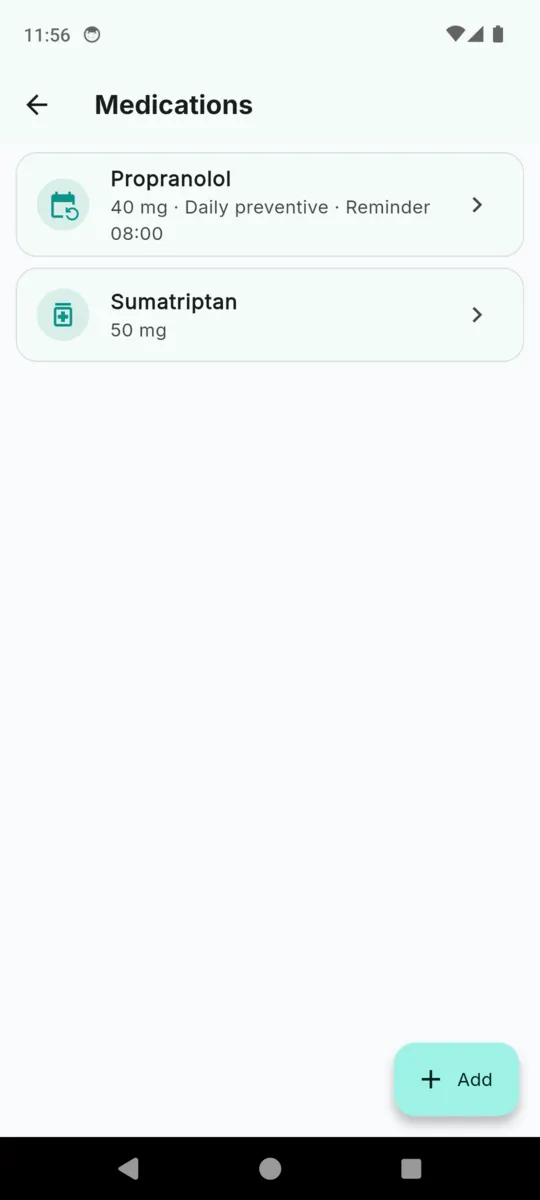
A name, a dosage as free text, and an optional note. The app does not classify medications, does not check interactions and does not advise on any of them. Archive one and it leaves the picker without touching your history.
Preventives get a reminder
Mark a medication as a daily preventive, set a time, and the phone reminds you once a day at that time. That is the only notification the app sends — nothing ever reminds you to log an attack.
Four answers to "Did it help?"
Not noted, a little, moderate, a lot. Logged per dose, against that attack. Insights averages them per medication under a heading that says what it is: by your own relief ratings, not medical advice.
The report is the point
Pick a date range and the app builds a PDF you can email ahead or hand over at the desk. This is what comes out, in this order.
- 01
Header
Migraine & Headache Report, the date range you picked, and the time it was generated.
- 02
Disclaimer
A grey box before the data: not a medical device, it helps you log and track headaches, it does not diagnose or treat.
- 03
Summary
Episodes logged, average intensity out of ten, and a count by headache type. Three descriptive lines with nothing inferred from them.
- 04
Episodes
The table: date and time, type, intensity, triggers, medications. One row per attack, oldest first.
- 05
Notes
Every note you wrote, each with the date of its attack.
The summary stays descriptive on purpose — a count, an average, a tally by type. The app does not tell a neurologist what it thinks is going on. One honest limitation: the report prints Latin characters only, so accented letters and non-Latin scripts in your notes come out as question marks.
Columns it looks for
- Datestart time · date · time · start
- Intensitypain · intensity · severity · level
- Typetype · kind
- Notesnote · comment · description · symptom
Nine date formats are recognised, including day-first and month-first. Rows it cannot date are skipped rather than guessed at.
Bring the history you already have
Years of entries in Migraine Buddy or a spreadsheet are the most valuable thing you own for an appointment, and they are the reason people stay on trackers they have stopped liking. Export a CSV, open Import from CSV, and the app matches your headings itself.
It reads the word in the type column and maps cluster, tension, sinus and cervicogenic onto its own types. Every import is recorded as a job, so you can see what came in and when.
Import is a Pro feature. Export runs the other way as a PDF on any tier, once per calendar quarter on the free one.
The app itself
Scroll sideways, or use the arrow keys
Pricing
Everything is open for fourteen days from install, with no card and no sign-up. After that, logging stays unlimited and free — this is a health condition and the app does not cap how much of it you can record — and a banner ad appears.
- Free keeps Unlimited attacks, unlimited daily states, the medication list with its reminders, the full history, the Insights tab, and one PDF export per calendar quarter.
- Pro adds Unlimited PDF reports, CSV import, and it removes the ads.
- Nothing is locked No entry is hidden or deleted on the free tier. Everything you logged stays readable and editable.
Questions
How long does logging one attack take?
The button says fifteen seconds and that is about right. Intensity and type are the only two things it insists on. Location, triggers, symptoms, medications and notes are all optional and can be added afterwards.
Does MigraineLog diagnose or treat anything?
No. Its own disclaimer, printed on the report and shown at onboarding, reads: this app is not a medical device, it helps you log and track headaches, it does not diagnose or treat. Consult a healthcare professional.
What is in the PDF?
A header with your date range, the disclaimer box, a descriptive summary, a table of every attack with its triggers and medications, and your notes. It prints Latin characters only, so accented or non-Latin notes come out as question marks.
Can I bring history from another app?
Yes, by CSV. Import reads a column of dates, one of pain or intensity, one of type and one of notes, matches the headings itself, and understands nine common date formats. It is built for Migraine Buddy exports and generic spreadsheets.
Does it need the internet?
Not for your data, which is stored on the phone with no account. The optional weather capture calls Open-Meteo when you log an attack, and the free tier shows an ad. Turn weather off and logging works fully offline.
Are there reminders?
One kind. A medication marked as a daily preventive can carry a reminder at a time you choose, and it fires once a day. Nothing reminds you to log an attack.
What language is the app in?
English. The store listing is translated into nine more languages, and dates and numbers follow your phone, but the screens themselves are English.
What is free and what needs Pro?
Logging is unlimited and always free, and no history is ever locked. The free tier includes one PDF export per calendar quarter. Pro removes that limit, adds CSV import, and removes the ads.
Headache organisations and reading are on the MigraineLog resources page. How the app handles your data is in the privacy policy.
Log the next one while it is still happening
A few months of entries, one PDF, and an appointment that starts from the pattern instead of from memory.