
Sea service log
SeaProof
A licence is earned in days. Keep the proof of yours.
The days have to be shown by vessel, tonnage, waters and capacity long after the voyage, and mariners lose real time because the paper log got wet, the company folded, or nobody wrote it down. SeaProof records the day while you are still on the ship.
What the total means
Your total is a count of dates, and it says so
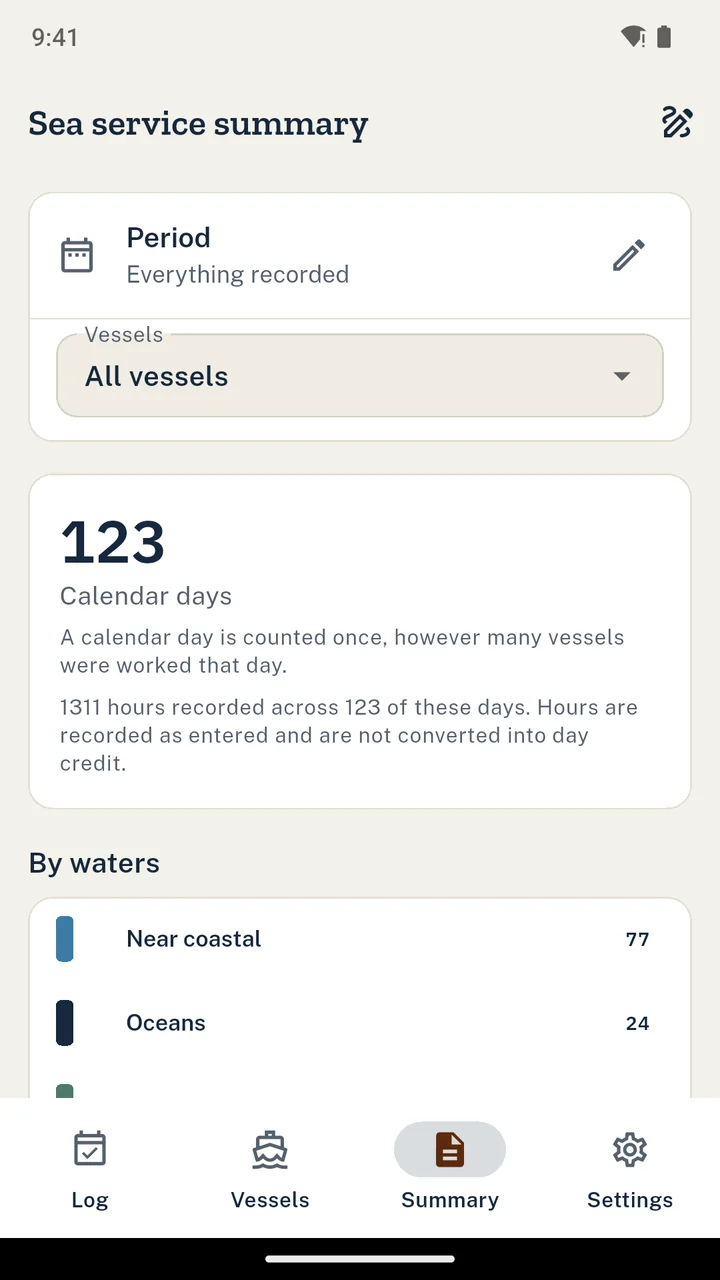
Work two vessels on one date and SeaProof adds one day, not two. The per vessel rows underneath can therefore add up to more than the total, which looks like an arithmetic error until you know why, so the app states it on the screen and again on the summary rather than quietly showing you the larger number.
It is deliberately the conservative figure. Crediting rules are the administration's: under 46 CFR 10.107 a day is eight hours, and a twelve hour day on a vessel authorised to run a two watch system may be credited as one and a half days. SeaProof does not apply that arithmetic for you, and it keeps your hours in the record so whoever does can see them.
Vessel
Referenced, never retyped. The day points at a vessel you entered once, so two entries for the same ship cannot disagree about her tonnage.
Waters
Inland, near coastal, oceans, Great Lakes or other, with the body of water named. Totals are kept per category as well as overall.
Capacity
Master, mate, engineer, deckhand or other, carried over from your last entry because most days are the same as the one before.
Hours
Optional, and recorded as you worked them. They stay in the record, which matters where an administration credits by hours rather than by dates.
Day targets
It counts. It does not judge.
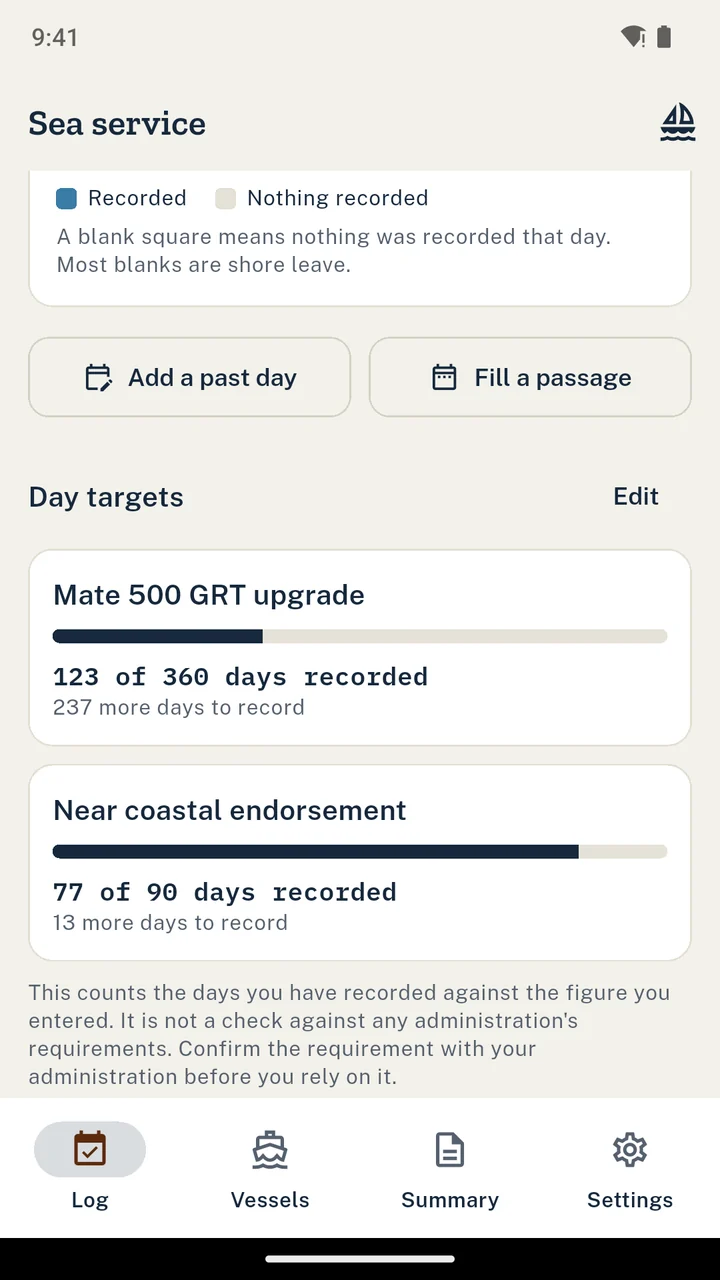
Enter the number of days you were told you need and SeaProof counts your recorded days against it, filtered by waters and by a start date if your requirement has one. You get a count and a bar.
What you never get is a verdict. There is no eligibility flag anywhere in the app, because requirements vary by credential and by administration and they change. Embedding a table of them could give a misleading impression of eligibility, and the app cannot know whether your figure is the right one or whether your days are of the right kind.
In the code
The progress object has no isEligible, no qualifies and no met boolean that a screen could render as a green tick. The one flag it does carry is named for what it is: the count you entered has been reached.
target_engine.dart
The real screens
What it looks like on the phone
Entered once
A tonnage that cannot disagree with itself
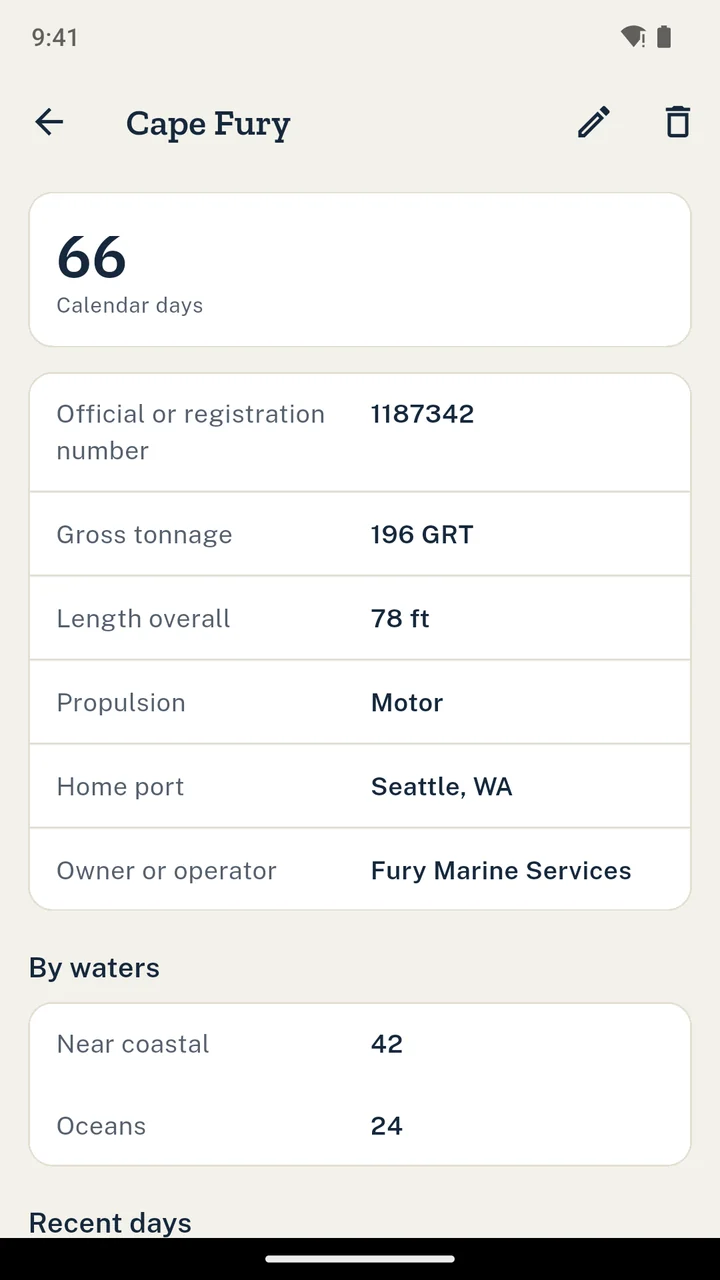
Record each vessel once: name, official or registration number, gross tonnage, length, propulsion and home port. Every day references the vessel, so tonnage is never retyped and two entries for the same ship can never carry two different figures.
Tonnage is stored with its basis, because a vessel has two gross tonnage figures and they are different numbers. GRT is the regulatory measurement used for national endorsements. GT under the 1969 Convention is used for STCW thresholds. SeaProof asks which one you were given rather than guessing, and prints it beside the figure.
Tonnage basis
Two measurements of the same ship, used for different thresholds. A figure with no basis attached is worth little on a service record.
The habit
Built for a quick daily entry
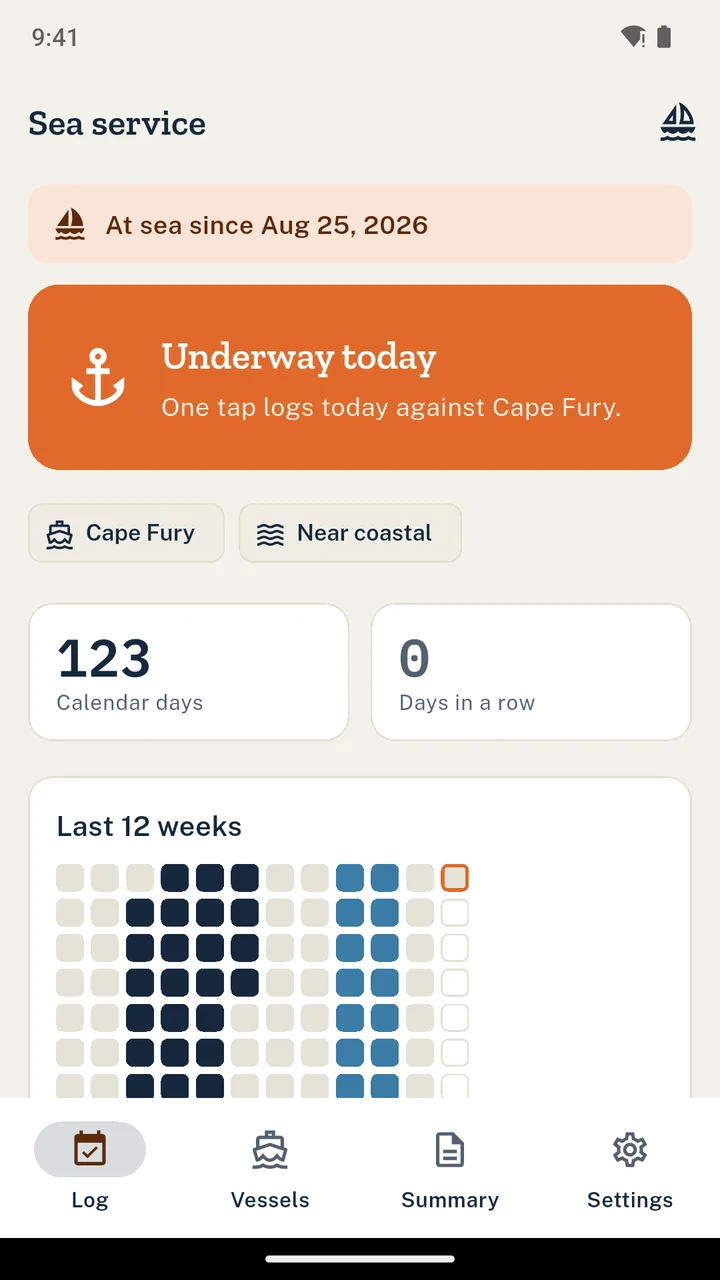
Underway today logs the day against your current vessel, with waters and capacity carried over from your last entry. Two taps to change either. Open a voyage when you sail and an optional prompt asks you to record the day while you remember it; it runs only while a voyage is open, so you are not nagged on shore leave.
A calendar strip shows the last twelve weeks, so a stretch with nothing recorded is visible now rather than years later when it cannot be reconstructed. The app says nothing recorded, never missing, and it never suggests you enter service you did not perform. What that span was is yours to know.
The handover
A summary you can hand over
The sea service summary is a vessel by vessel table with dates, waters, body of water, capacity and hours, totals per vessel and per waters category, and a countersignature block for the appropriate person to complete, whether that is a master, an owner or an operator.
It is deliberately not laid out like any official form, and it carries a line under the title saying what it is, so it cannot be mistaken for one. It is your own record, offered for signature. Creating and sharing it is available at every tier.
The summary is produced in English, because the fonts bundled with the app are Latin and a translated document would not print reliably. The app itself ships in ten languages.
On the summary
- Every day, grouped by vessel
- Waters and the body of water named
- Capacity served and hours where you recorded them
- Totals per vessel and per waters category
- The overlap figure, stated rather than netted away
- A countersignature block, left blank
Custody
The record stays on your phone
There is no account and no sign in, and nothing is uploaded. Recording, summaries and backups all work with no connection, which is the state you are in for most of the time the record is being made.
Export one file holding every vessel, day, voyage, target and countersignature, and restore it on another phone. Restoring merges into what is already there and deletes nothing. Backup and restore are available at every tier, because it is your record.
Worth being clear about
What SeaProof will not do
It is a record-keeping tool. It reduces the risk of losing sea time that was never written down. It is not an official document, it does not determine eligibility for any licence or endorsement, and it does not replace the service letters and forms your maritime administration requires.
Price
One record, three ways to pay for it
Standard
Included
The record holds 60 days. Vessels, targets, the summary and backup are all included, with a banner ad.
Full record
$24.99 once
Or $3.99 a month, or $14.99 a year. Unlimited days and no ads. A 14 day trial you start yourself, with no card.
Get SeaProofQuestions
Before you log the first day
Does SeaProof tell me when I qualify for a licence?
No, and it is built not to. It holds no requirement tables and shows no eligibility verdict anywhere. You enter the number of days you were told you need, and it counts your recorded days against it. Requirements vary by credential and administration, so a built-in table could give a misleading impression of eligibility.
I worked two vessels in one day. Does that count twice?
Not in SeaProof. The total is a count of distinct calendar dates, so a date you worked two ships is one day, and the app tells you when your per vessel rows add up to more than that total. How your administration credits service is its own question, and SeaProof does not answer it.
Why record a tonnage basis as well as a tonnage?
Because a vessel has two gross tonnage figures and they are different numbers. GRT is the regulatory measurement used for national endorsements. GT under the 1969 Convention is used for STCW thresholds. A tonnage with no basis attached is worth little on a service record, so SeaProof stores which one you were given.
Is the summary an official form?
No. It is your own record, laid out so the appropriate person can countersign it, and it is deliberately not laid out like any official form. It does not replace the service letters and forms your maritime administration requires.
Does it work at sea with no signal?
Yes. Recording, summaries and backups all work with no connection, there is no account and no sign in, and your records never leave the phone. Being straight about the rest: the app sends crash and usage diagnostics and the standard tier serves ads, and those two need a connection.
Can I move my record to a new phone?
Yes. Export one file holding every vessel, day, voyage, target and countersignature, and restore it on the new phone. Restoring merges into what is already there and deletes nothing. Backup and restore are available at every tier.
Keep your own record of the days you worked.
The voyage you cannot evidence is the one nobody wrote down at the time.
Get it on Google Play