SOBER DAY COUNTER
SoberTrack
One day at a time.
The counter goes back to zero. Your history doesn't.
Most day counters treat a reset as a deletion — the number goes, and everything you built goes with it. SoberTrack stores the streak that just ended, asks four short questions about what happened, and starts counting again. The screen is titled "Reset counter", not "You failed".

14-day trial, no card.
From $1.99/month. Android.
A self-help tracker, not a treatment programme. SoberTrack keeps a record and gives you something to do when a craving lands. It is not a medical service and it does not manage withdrawal. Stopping alcohol suddenly after heavy, long-term drinking can be medically dangerous and sometimes needs supervision — speak to a doctor before you stop. If you are in immediate danger, call your local emergency services.
What happens when you reset
This is the screen that decides whether an app like this survives a bad week. Here is all of it, in the app's own words.
Slipping doesn't erase what you've built.
Logging what triggered it helps you spot the pattern next time. Your prior streak is kept — nothing is erased.
The panel at the top of the reset screen, word for word.
Save it and the app answers with one line: "Tomorrow is Day 1 again. You've done it before." That is the whole response. No badge is revoked, no chart turns red, nothing is congratulated and nothing is scolded.
- 01
Nothing is deleted
The relapse is stored with the length of the streak that came before it, so your history keeps every stretch you ever put together.
- 02
HALT, if you want it
Four chips — Hungry, Angry, Lonely, Tired. Tap any that fit, or none. There is a free-text box underneath for anything they miss.
- 03
A note to future-you
Optional. It sits with the entry so the next hard evening has something to read.
- 04
Two buttons, no drama
"Log it and start Day 1 again" and "Cancel — keep my streak". Both are one tap and neither one lectures you.
Before it gets that far
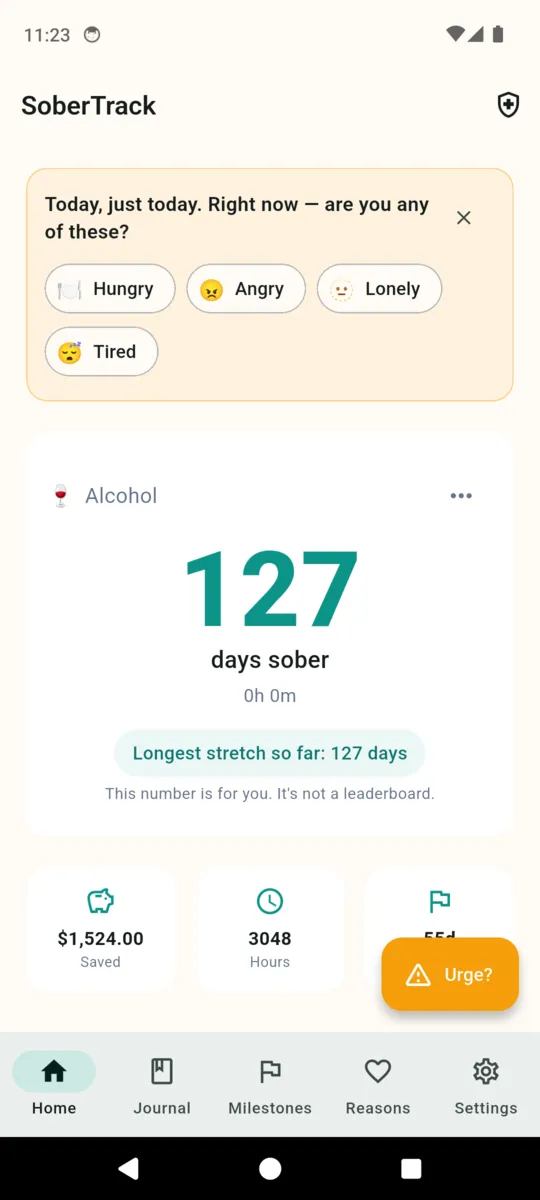
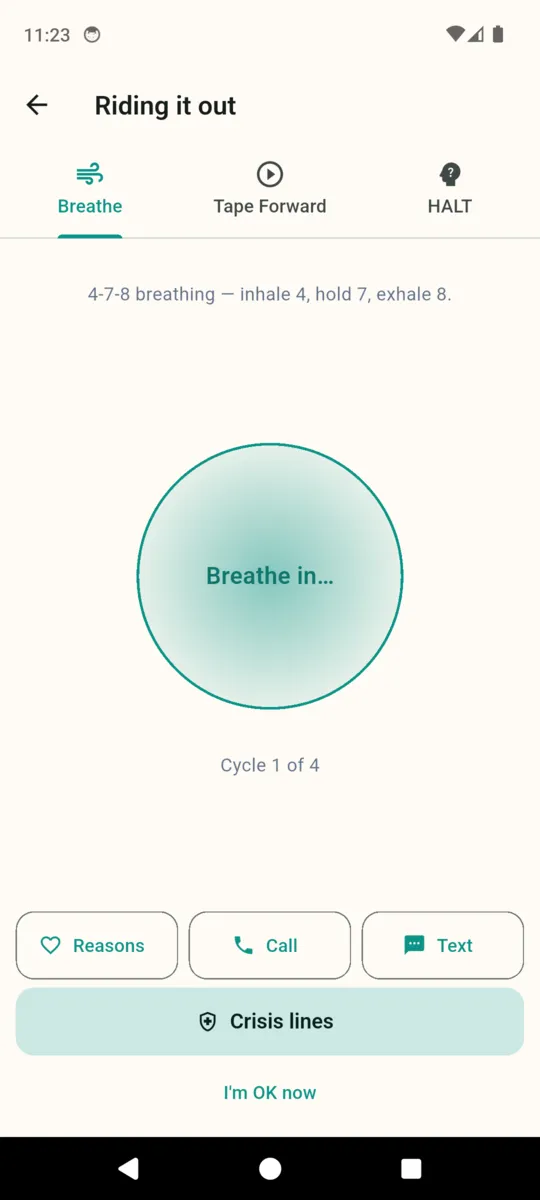
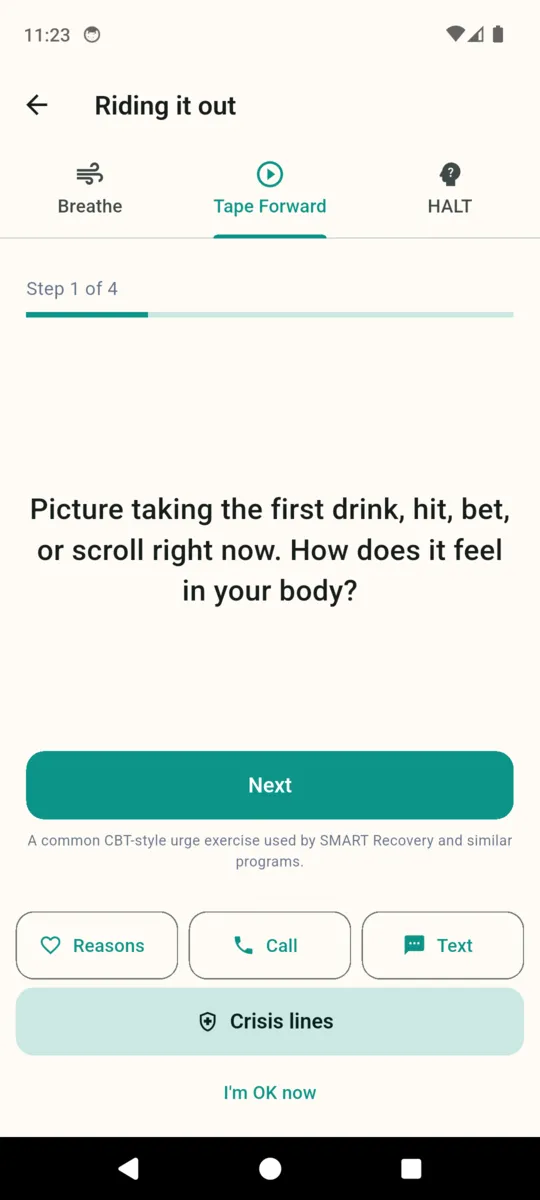
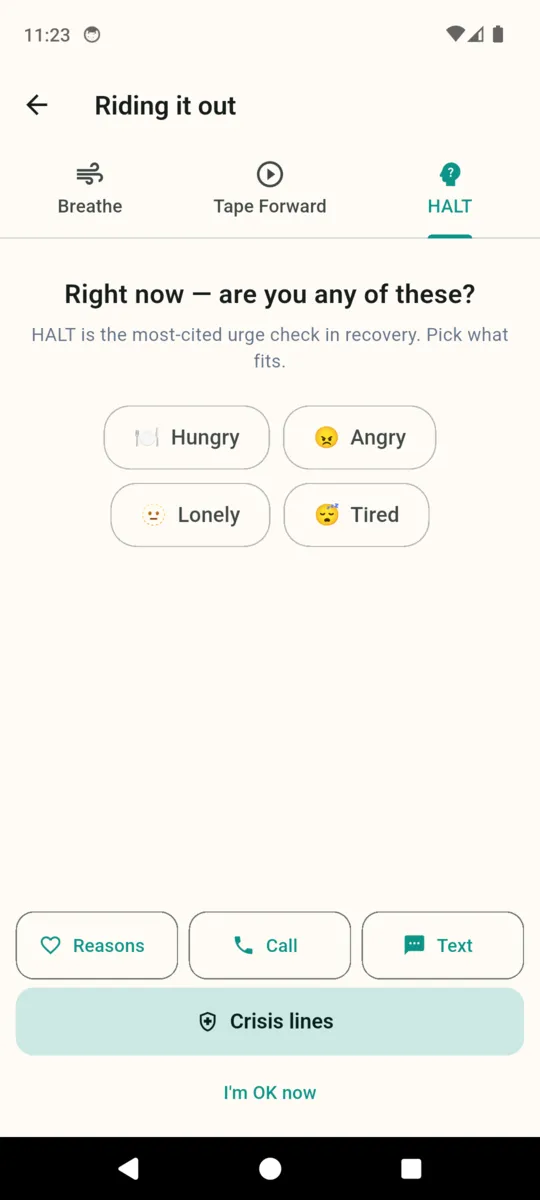
An orange button sits on the home screen the whole time, labelled "Urge?". Tapping it opens one screen with three tabs, and you can leave from any of them by tapping "I'm OK now".
Breathe
A circle that expands and contracts through four cycles of 4-7-8 breathing — inhale four, hold seven, exhale eight.
Tape Forward
Four screens that walk the craving to its end: the first drink, hit, bet or scroll; then the second and third; then tomorrow morning; then a week from now if you say no.
HALT
The same four questions the reset screen asks, asked before instead of after. Hungry, Angry, Lonely, Tired.
Milestones that name their source
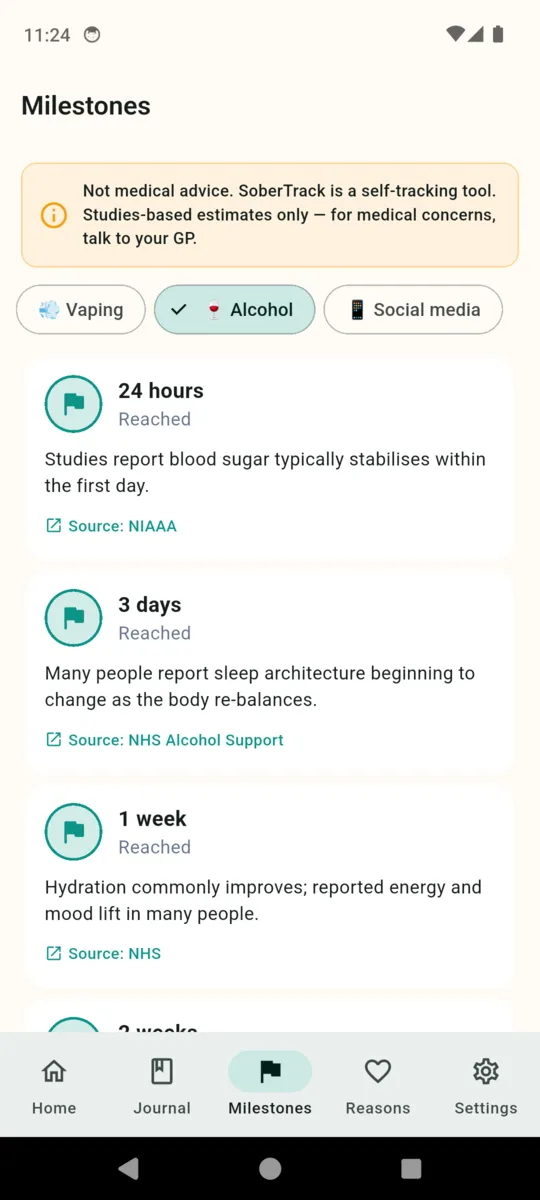
Every milestone tile carries a citation underneath it, because the alternative is an app telling you what is happening inside your body on no authority at all. The header of the screen carries this line: "Not medical advice. SoberTrack is a self-tracking tool. Studies-based estimates only — for medical concerns, talk to your GP."
| Habit | Tiles | Sources cited |
|---|---|---|
| Alcohol | 7 | NIAAA, NHS Alcohol Support, NHS |
| Smoking | 7 | CDC Tobacco, NHS Stop Smoking, American Lung Association |
| Vaping | 4 | Truth Initiative, American Lung Association, NHS |
| Weed | 4 | NIDA, JAMA Network 2018 |
| Gambling | 3 | GamCare, NHS Gambling Harms, NCRG |
| Sugar | 3 | American Heart Association, WHO, Diabetes UK |
| Social media | 3 | APA, Sleep Foundation, University of Pennsylvania 2018 |
| Anything else | 7 | General long-term tiles, unsourced and marked as such |
Shorter tracks are topped up with general long-term tiles at six months, a year and two years. Each tile shows a countdown to the next one, and reaching it does not unlock, award or announce anything.
Days, hours, minutes
Counted from the quit date you set, down to the minute, updating while the screen is open.
Money not spent
You enter a cost per day, per week or per pack, and pick the currency. Each habit keeps its own, and nothing is converted between them.
Hours reclaimed
Total hours since the quit date, shown as a plain number.
Longest stretch
Your best run so far, printed under the counter with the app's own footnote: this number is for you, it's not a leaderboard.
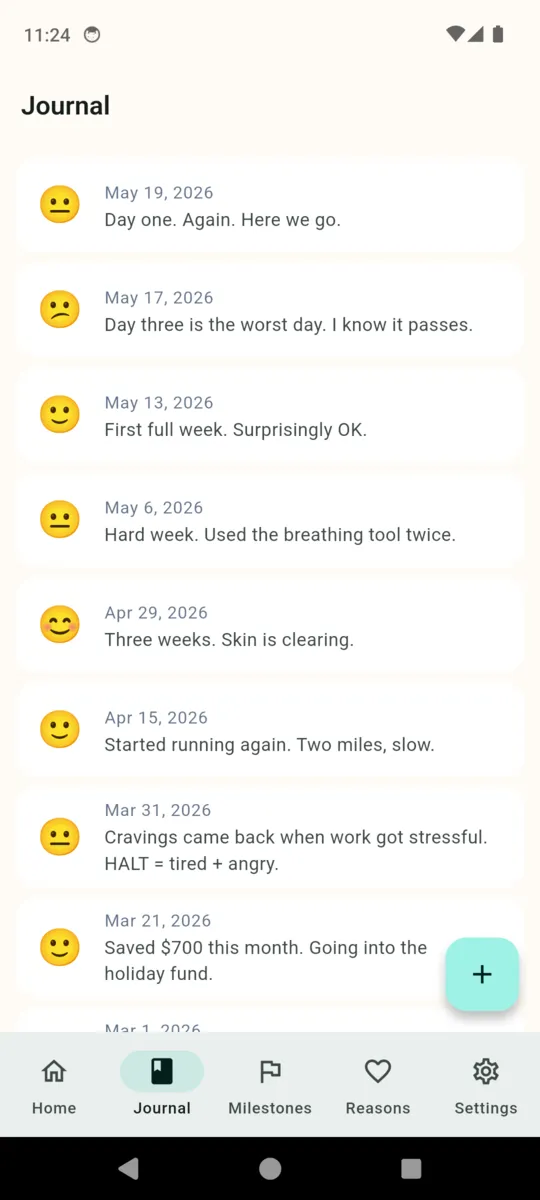
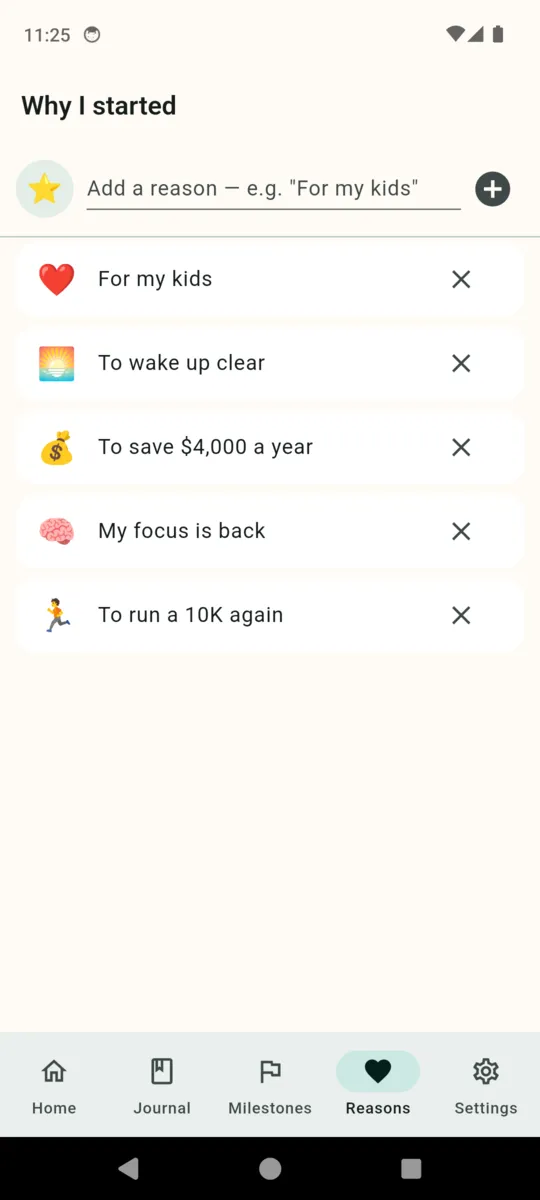
Alongside it there is a journal — a mood face from rough to great, free text, and a photo if you want one — a Reasons list you build yourself, and a daily line from a set of fifty paraphrased and public-domain quotes bundled with the app.
The app itself
Scroll sideways, or use the arrow keys
What it doesn't do
Worth knowing before you install it rather than after.
It never notifies you
No daily reminder, no streak nudge, no milestone alert. There is no notification code in the app at all. You open it when you want to.
English only
The interface ships in English. The crisis-line list covers sixteen locales, and you can override the locale by hand in Settings.
No account, no cloud
Everything is in local storage on the phone. Nothing syncs, nothing signs in. Reinstalling loses the data unless you kept a backup.
Habits are chosen at the start
You pick what you are tracking in the welcome flow. There is no screen for adding another one later.
Pricing
Everything is open for fourteen days from install, with no card and no sign-up. After that the counter, the urge tools, milestones, your reasons and the last thirty days of journal keep working, and a banner ad appears.
- Pro adds The PDF progress report, journal entries older than thirty days, more than one habit, and it removes the ads.
- Nothing is ever deleted Older journal entries are hidden behind a lock, not erased. Unlock at any point and they are all still there.
- The backup is free A full JSON export of habits, journal, reasons, relapses and milestones, from Settings, on every tier. Restore reads it back.
Questions
What happens the day after a relapse?
You tap Restart counter, tag Hungry, Angry, Lonely or Tired if any fit, and write a note if you want one. The old streak is kept, not erased. The app answers: "Tomorrow is Day 1 again. You've done it before."
Is SoberTrack a treatment programme?
No. The app says so on its own unlock screen: tracker only, not a treatment programme. It is a self-help record. For medical help, contact a professional or a crisis line.
Is it safe to just stop drinking?
Not always. Withdrawal after heavy, long-term drinking can be medically dangerous and sometimes needs supervision. Speak to a doctor before you stop. This app counts days; it cannot manage withdrawal.
Does it send reminders?
No. There are no daily reminders, no nudges and no notifications of any kind. Nothing in the app will interrupt you.
What can I track with it?
Alcohol, smoking, vaping, weed, gambling, sugar, social media, or something you name yourself. You choose in the welcome flow when you first open the app.
Where does my data live?
On the phone. There is no account, no sign-in and no cloud sync. Settings has a JSON backup you can export and restore on any tier, free included.
What stays free after the trial?
Your counter, the urge tools, milestones, your reasons and the last thirty days of journal. Older entries are hidden behind the unlock, never deleted. The PDF report needs Pro.
Helplines and reading are on the SoberTrack resources page. How the app handles your data is in the privacy policy.
Start the count today
And if it resets, it resets. The app keeps the record either way.