
EV CHARGING COST LOG

VoltLog icon

VoltLog

EV Charging Cost Log

Your car does not cost 28p a kWh. It costs something per mile.

Most charging logs multiply kWh by one flat rate and stop there. If you charge overnight on a cheap window that number is wrong, sometimes by a factor of three. VoltLog prices each charge by the time it started and divides by the miles your odometer actually recorded.

14-day trial, no card.
From $1.99 a month.

  • Vehicles
  • Android
  • Works offline
  • No account
The VoltLog launch screen: the app mark above the wordmark and the line Know your true cost per mile

The same 30 kWh, two prices

Here is the whole argument, worked out. One car, one top-up of 30 kWh, doing 3.9 miles per kWh. The only thing that changes is the hour you plugged it in.

Plugged in at 19:00 — standard rate

Rate
24.5p / kWh
Energy
30.0 kWh
Cost
£7.35
Distance
117 mi

6.3pper mile

Plugged in at 01:00 — cheap window

Rate
8.5p / kWh
Energy
30.0 kWh
Cost
£2.55
Distance
117 mi

2.2pper mile

Two rules that keep the numbers honest

01

Distance comes from the odometer, never a guess

The gap between two consecutive charges that both carry an odometer reading is one leg. Distance, energy and cost are all taken from that same set of legs, so they cannot drift apart. A charge you logged without a reading still counts its energy and its spend, it just adds no miles. A reading that goes backwards, or jumps implausibly, is dropped rather than allowed to wreck every derived figure.
02

Currencies are never added together

Charge in Calais and Dover in the same month and VoltLog shows you two subtotals, not one meaningless sum. Cost per mile is worked out inside a single currency, using only the legs paid for in that currency, because dividing one currency's spend by everybody's miles quietly understates the answer.

Home, public, work

Every charge carries where it happened, and the dashboard shows the split by energy, not by number of sessions. A 3 kWh top-up at a supermarket and a 60 kWh motorway stop are not the same event, and counting them as one each hides where the money went.

Public charges take a network name, so the app can rank the average price per kWh you have actually paid at each one, cheapest first. Saved places, "Home", "Office", the Tesco you always use, prefill the network, the location type and the usual rate, which is what turns logging a charge into a few taps. They are labels you typed: no coordinates, no GPS, no location permission.

  • HOME Priced by the tariff you attached to it, cheap windows and all.
  • PUBLIC Priced by what the receipt said, with the network recorded.
  • WORK Kept separate, because it is usually free and would flatter your average.

Screens from the app

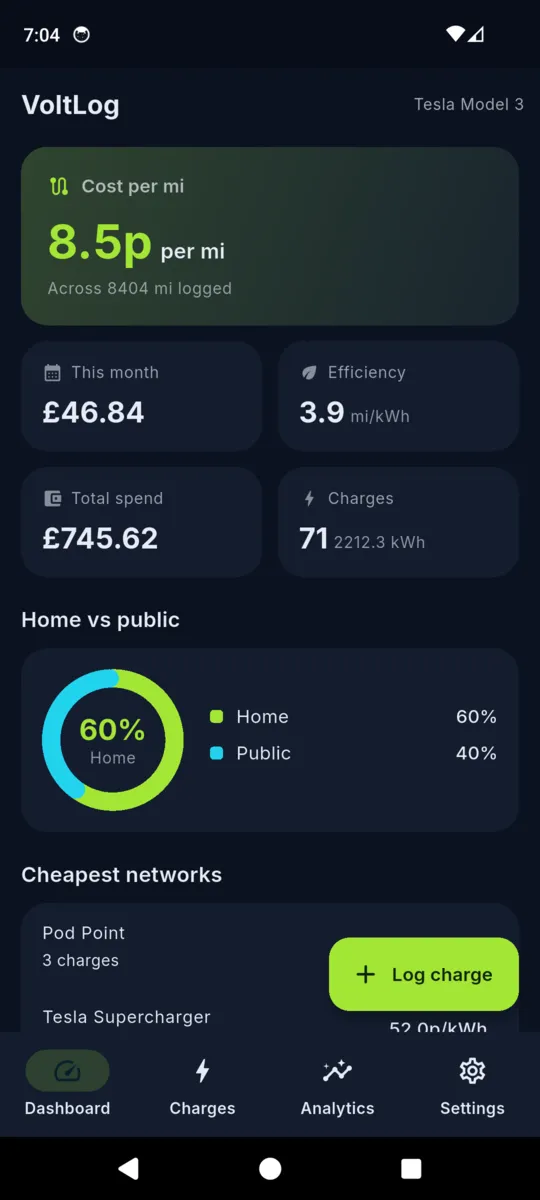
The VoltLog dashboard showing cost per mile, spend this month, efficiency in miles per kWh, a home versus public donut and a cheapest networks list
The dashboard leads with cost per mile, not kWh.
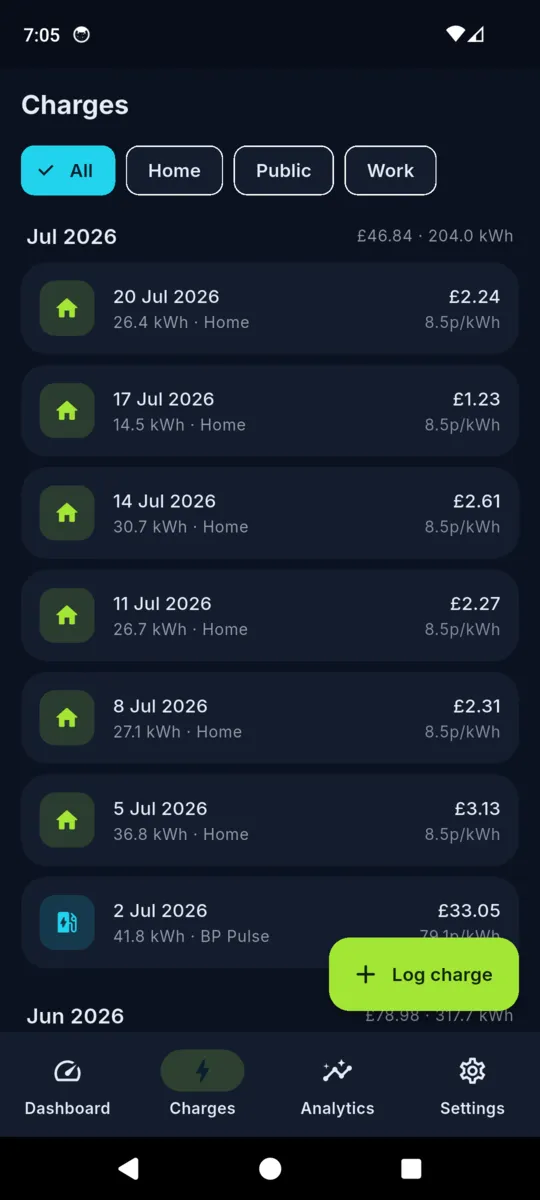
The VoltLog charges list grouped by month, each row showing date, kWh, location and the price paid per kWh
Every charge, with the price per kWh it worked out at.
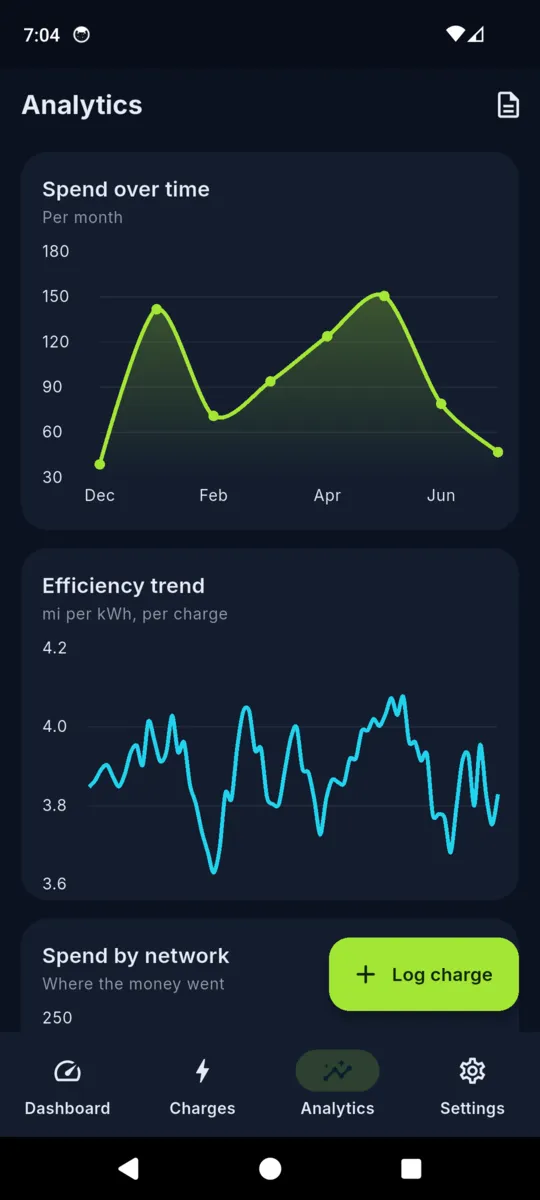
VoltLog analytics with a spend over time area chart and an efficiency trend line in miles per kWh
Spend over time, and a smoothed efficiency trend.
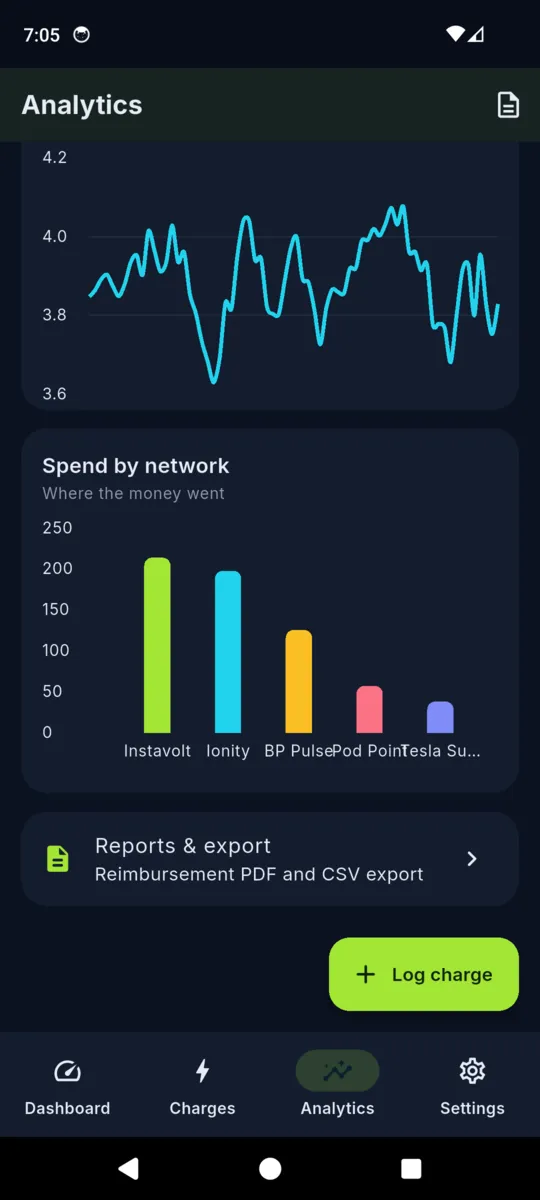
A VoltLog spend by network bar chart naming several charging networks, above a reports and export tile
Spend by network, so the expensive one is obvious.
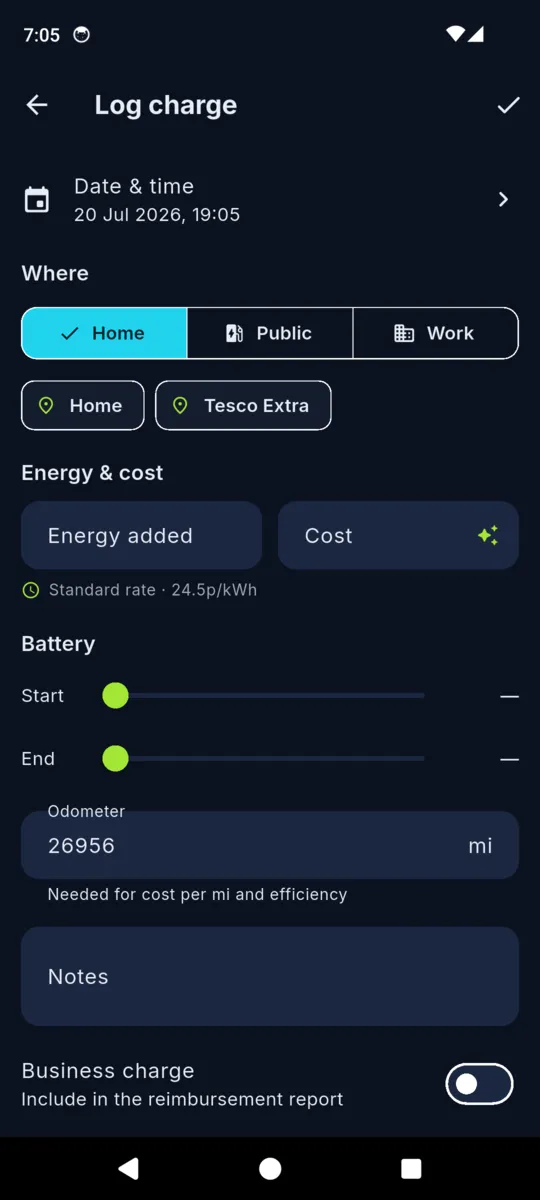
The VoltLog log charge form with home, public and work options, saved places, energy and cost fields, battery sliders and an odometer field
Logging a charge. Saved places prefill most of it.
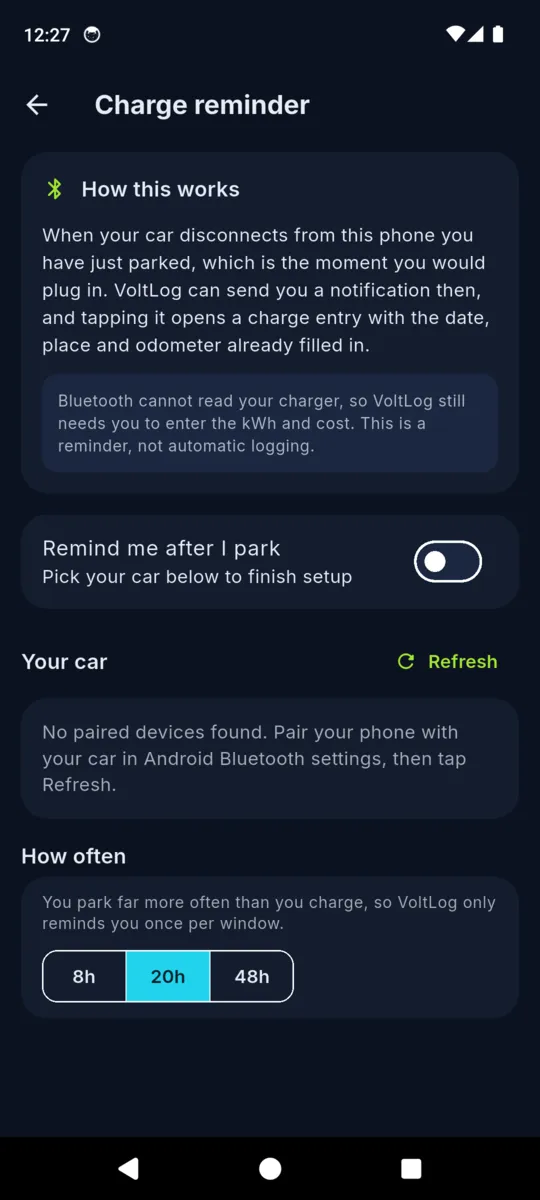
The VoltLog charge reminder screen explaining that Bluetooth cannot read your charger and that this is a reminder, not automatic logging
The reminder screen says plainly what it does not do.
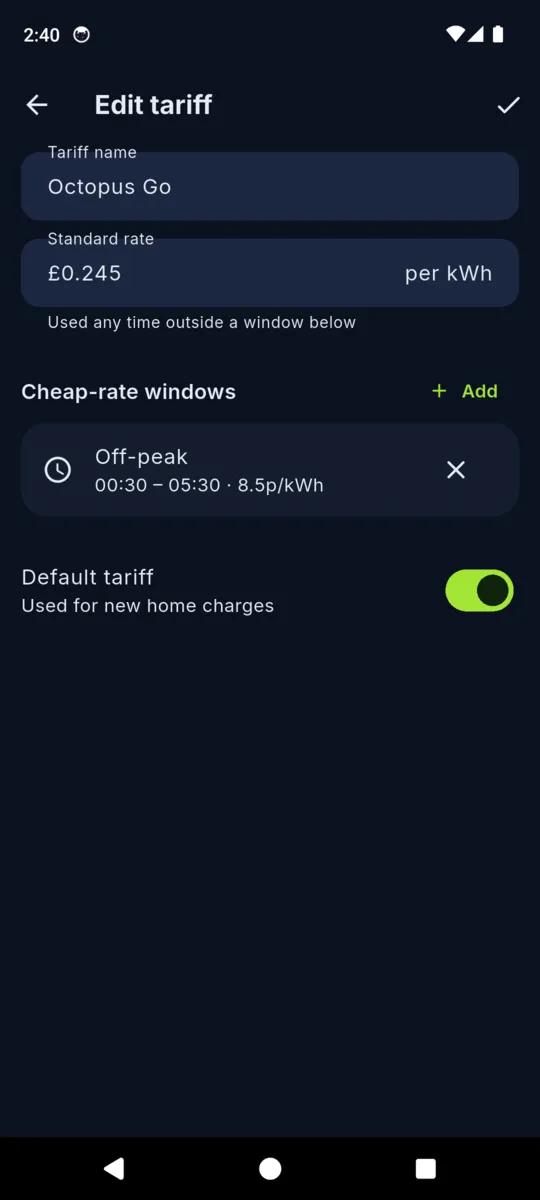
The VoltLog edit tariff screen with a standard rate per kWh and a cheap-rate window running from half past midnight to half past five
A tariff: a standard rate plus your cheap-rate windows.
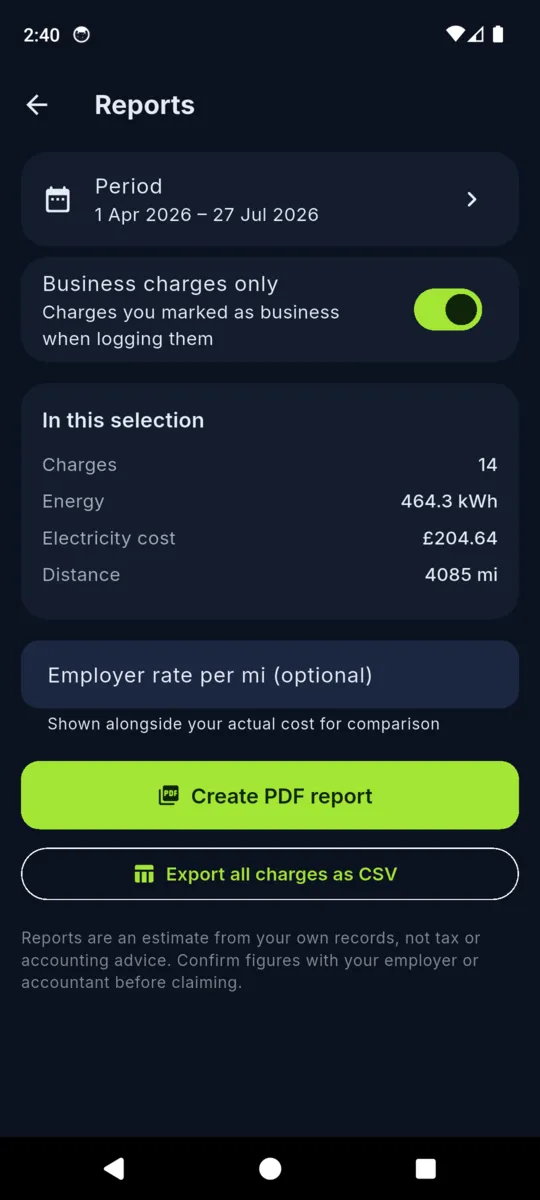
The VoltLog reports screen with a date period, a business charges only toggle, totals for charges, energy, cost and distance, and buttons to create a PDF report or export CSV
Reports: a period, the totals, then PDF or CSV.

Vehicles, rates and totals in these screens are the app's built-in sample data.

SAID PLAINLY

The Bluetooth feature is a reminder, not automatic capture

Nominate the car's stereo as your car, and when it disconnects from the phone, which is the moment you parked, VoltLog can raise a notification that opens a charge entry with the date, the place and your odometer already filled in. You still type the kWh and the cost.

It works that way because a phone cannot see a charging cable, cannot read kWh, and cannot know what a charge point billed you. Anything on a phone claiming otherwise is reading the car's telematics account, which VoltLog does not do. The reminder exists because forgotten entries are what kill a manual logbook, and you can set how often it is allowed to prompt.

Getting it back out

  • Reimbursement PDF. Pick a period, tick business charges only, and the report totals the charges, the kWh, the spend and the distance. An employer rate per mile can sit alongside your actual cost for comparison.
  • Full CSV. Every charge you have logged, in a file any spreadsheet opens.
  • Built off the phone's own data. Nothing is fetched, so a report works with the aeroplane mode on.
  • Your figures, not a claim. A report is a record of what you entered. Confirm anything you submit with your employer or accountant.

PRICING

$9.99a year

$1.99 monthly · $19.99 once, and it never renews

Fourteen days of everything on install, no card. After that, logging charges and reading your history stay free with a banner ad, and nothing you have entered is ever locked away.

  • Off-peak tariff windows applied to each charge
  • Spend, efficiency and network charts
  • Reimbursement PDF and CSV export
  • No ads
Get VoltLog

Questions

Is VoltLog free?

Logging charges, the dashboard and everything you have already entered are free, with a banner ad. Pro adds off-peak tariff pricing, the charts and the reports: $1.99 a month, $9.99 a year, or $19.99 once. Every install starts with a 14-day trial of all of it.

Does it read my charger or talk to my car?

No. You enter the kWh and what it cost, or let a saved tariff work the cost out from the time you plugged in. Nothing connects to a charge point, a network account or a vehicle API.

What does the Bluetooth reminder actually do?

When the car you nominated disconnects from your phone, which is the moment you parked, VoltLog can send a notification that opens a part-filled charge entry. It is a prompt so the entry does not get forgotten, not automatic logging.

Can it handle an overnight off-peak tariff?

Yes. A tariff holds a standard rate plus any number of cheap-rate windows stored as wall-clock times, so they survive the clocks changing. The session start time picks the rate, and a session that crosses a boundary is split across both rates when you give it a duration.

Where does cost per mile come from?

Your odometer. The gap between two consecutive charges that both carry a reading is one leg, and distance, energy and cost are all taken from the same legs. A charge with no reading still counts its energy and spend but adds no miles, so the figure does not get diluted.

Do I need an account, and what happens if I stop paying?

There is no account and no sign-up. If a subscription lapses, nothing you have logged is hidden or deleted. New charges simply go back to being priced at your standard rate.

Find out what a mile actually costs you

Put in your tariff, log the next three charges with the odometer, and the number stops being a guess.