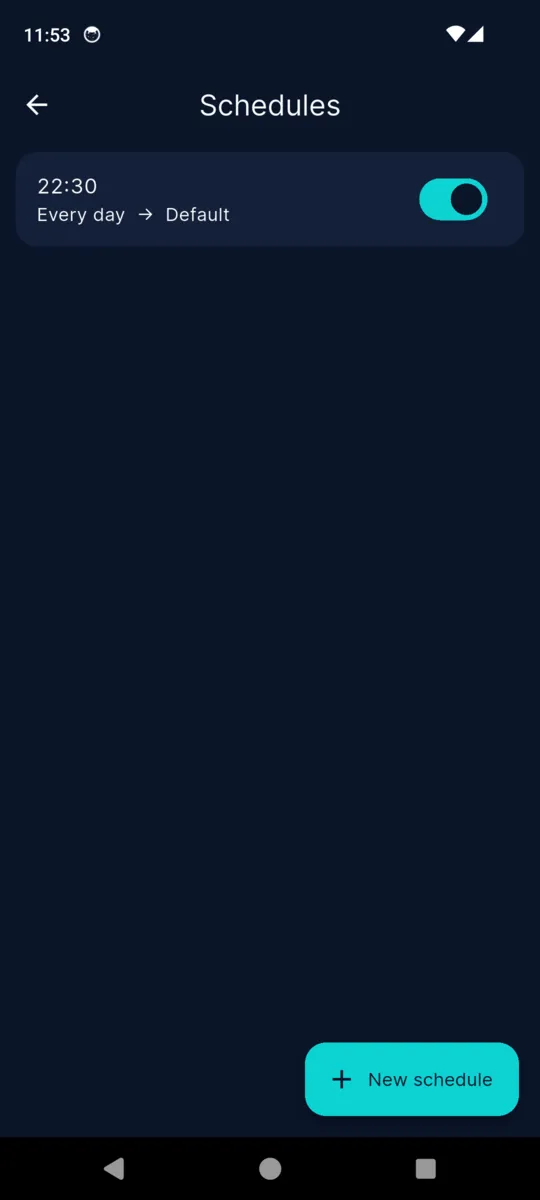
Schedules are the system's, not ours
Each schedule is registered with Android's own alarm service, and the profile is applied by a receiver rather than by the app. Swipe VolumeMate away and 22:30 still happens.
VOLUME PROFILES & LOCKS
VolumeMate
Profiles, schedules, triggers and locks
VolumeMate puts all seven on one screen, lets you save a whole set as a profile, and applies that profile on a timetable, when your headphones go in, or the moment you tap it. Then it can pin the lot so nothing moves them back.

Free with ads.
$4.99 once to unlock it all.
WHAT YOU ARE ACTUALLY ADJUSTING
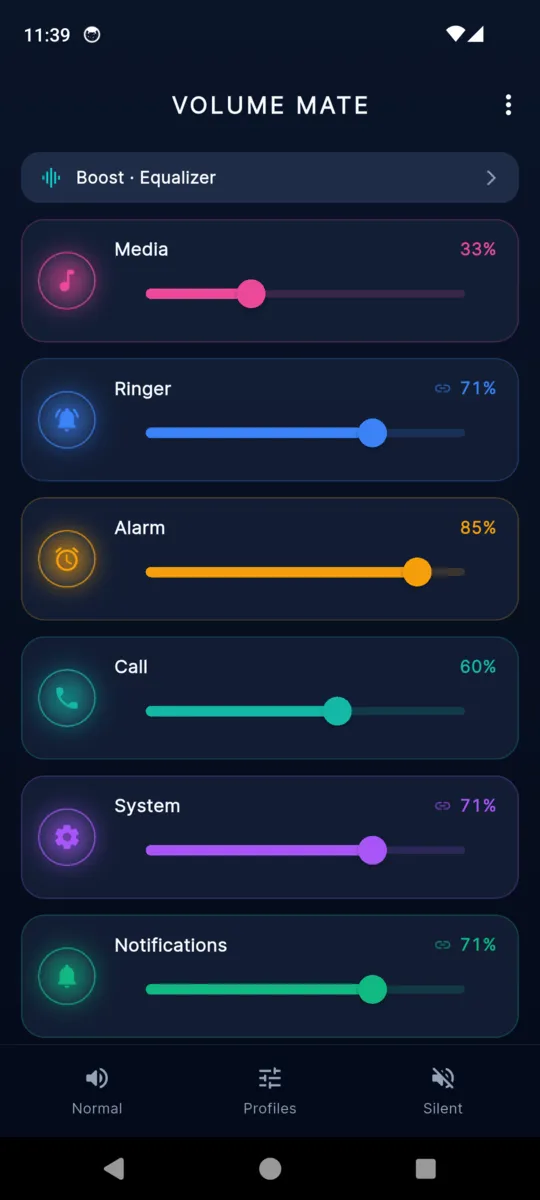
The volume key only ever moves whichever stream the system thinks you mean. These are the seven it is choosing between, described the same way the app describes them.
Two of those overlaps are Android's, not VolumeMate's: System is tied to Ringer on most devices, and Notifications follows Ringer unless the app has been given Do Not Disturb access. The app says so beside the sliders instead of letting you conclude it is broken.
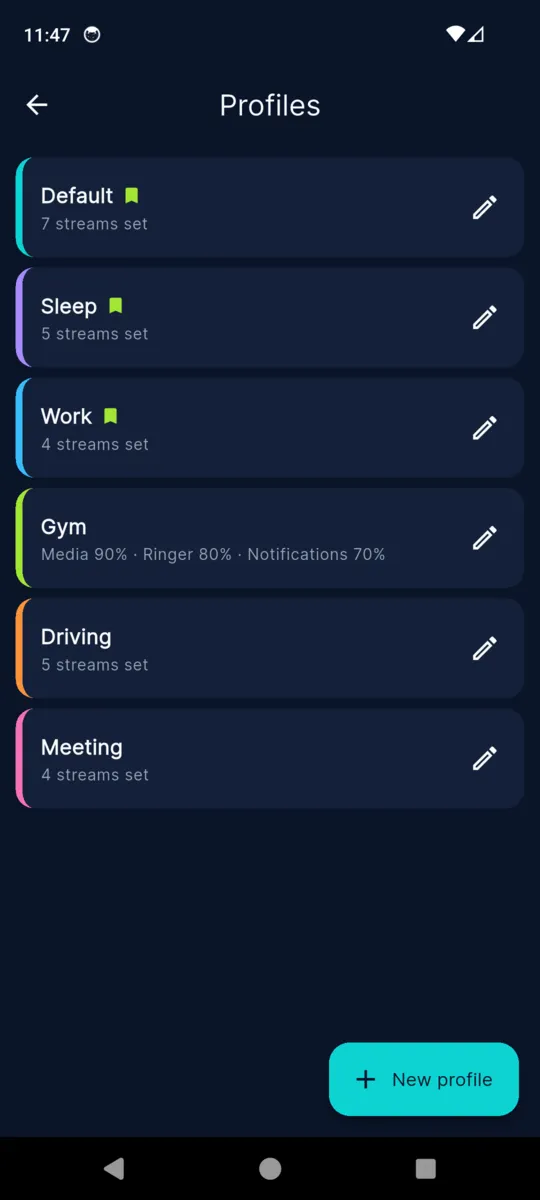
Sleep, Work, Gym, Driving, Meeting. Each one stores the levels you want across the streams you care about, plus whether the phone should ring, vibrate or go silent, and applies all of it in a single tap.
Profiles are reachable from the bar at the bottom of the home screen, from a Quick Settings tile you can drag into your notification shade, and from a notification that keeps your favourites one swipe away. A profile can also be applied on a timer — an hour of Meeting, then whatever was set before comes back. And after a phone call ends, VolumeMate reapplies the active profile, because the call itself often moves the ringer.
THE PART THAT USUALLY DOES NOT WORK
This is where volume apps quietly fail, so here is exactly how VolumeMate does it.
Each schedule is registered with Android's own alarm service, and the profile is applied by a receiver rather than by the app. Swipe VolumeMate away and 22:30 still happens.
Alarms do not survive a reboot on Android, so a boot receiver re-arms every schedule when the phone starts up and again after the app updates itself.
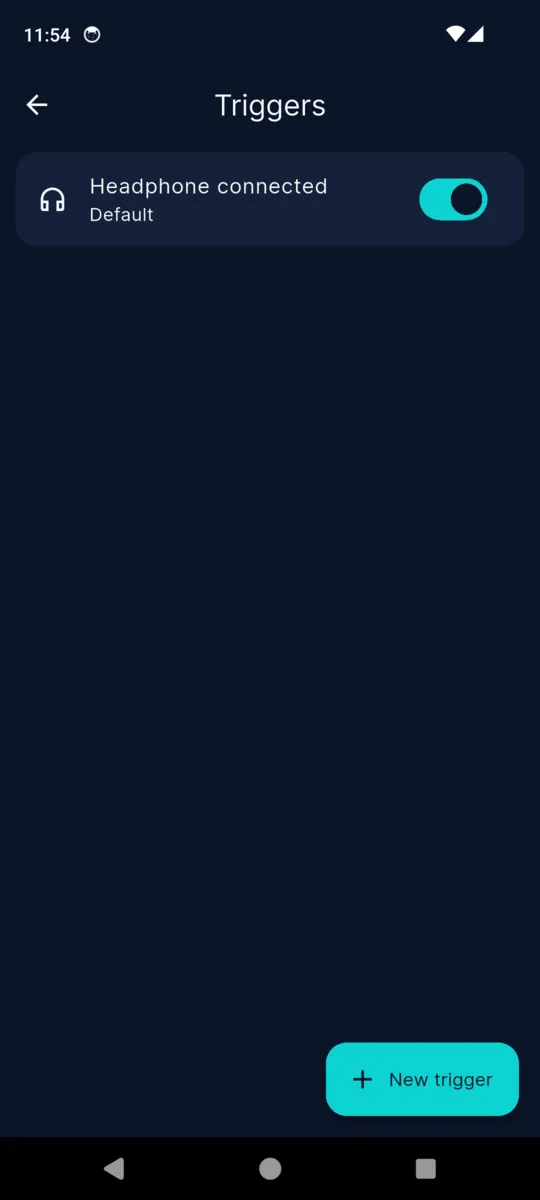
Headphones plugged in, and a Bluetooth device connecting — either any device or one you pick. Calendar and app-launch triggers were dropped before release rather than ask for calendar and usage-tracking permissions.
Exact timing needs the alarm permission Android hands out in system settings. Without it a schedule still runs, but the system may batch it a little rather than hitting the minute.
While your phone is on silent, vibrate or Do Not Disturb, Android refuses to let any app change the ringer or the notification volume unless that app holds Notification Policy access. VolumeMate checks first and leaves those two streams alone rather than failing loudly, so a profile applied under Do Not Disturb sets everything else and skips them.
Grant the access once, in system settings, and the same profile sets all seven. There is a Permissions screen in the app that lists each one with a green tick or a button to fix it, because on Android the honest answer to "why did nothing happen?" is nearly always a permission.
THE LOCK
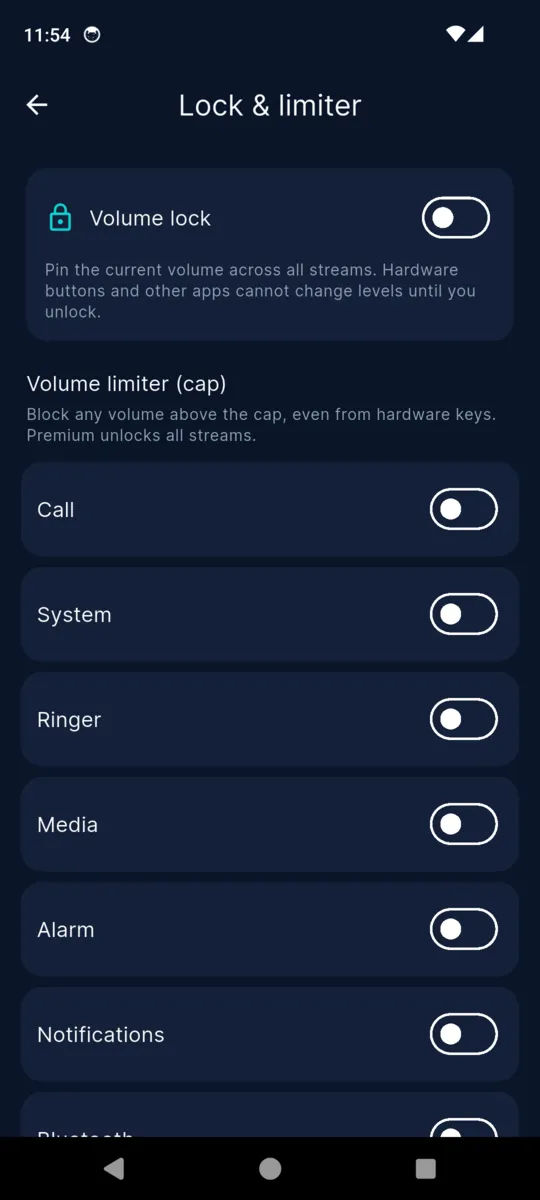
Turn the lock on and VolumeMate takes a snapshot of every stream. If anything moves one afterwards — a volume key in a pocket, a game, an app being helpful — it is put back where it was, and the change is written down. The reason locks in other apps quietly stop working is that their listener gets killed when you swipe the app away or the phone dozes. VolumeMate runs the lock as a foreground service with a visible notification, which is precisely what stops Android from killing it.
Scroll sideways, or use the arrow keys
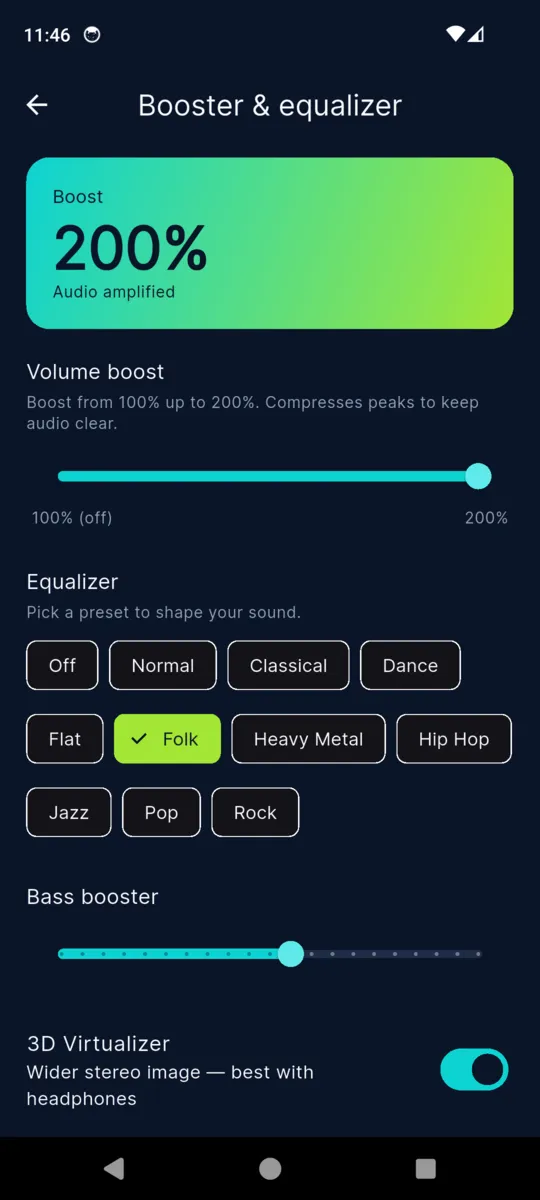
The boost is loudness enhancement layered on top of your device maximum: roughly +7.5 dB on the free tier and +15 dB unlocked. A few manufacturers block the audio effects entirely, and the app greys out whichever ones your phone will not run. The first time you push past 100% it stops to warn you about your hearing.
PRICING
One payment, no subscription, and nothing expires. The free tier is a real app with a banner on the home screen and an occasional full-screen ad; buying the unlock removes them.
| Feature | Free | Unlocked |
|---|---|---|
| All seven sliders and the mode bar | Yes | Yes |
| Saved profiles | 2 | As many as you like |
| Schedules | 1 | As many as you like |
| Triggers | 1 | As many as you like |
| Volume boost | To 150% | To 200% |
| Equalizer presets, bass, virtualizer | — | Yes |
| Volume lock | — | Yes |
| Volume limiter | Media only | All seven streams |
| Ads | Banner and occasional full screen | Removed |
$4.99once, not a subscription
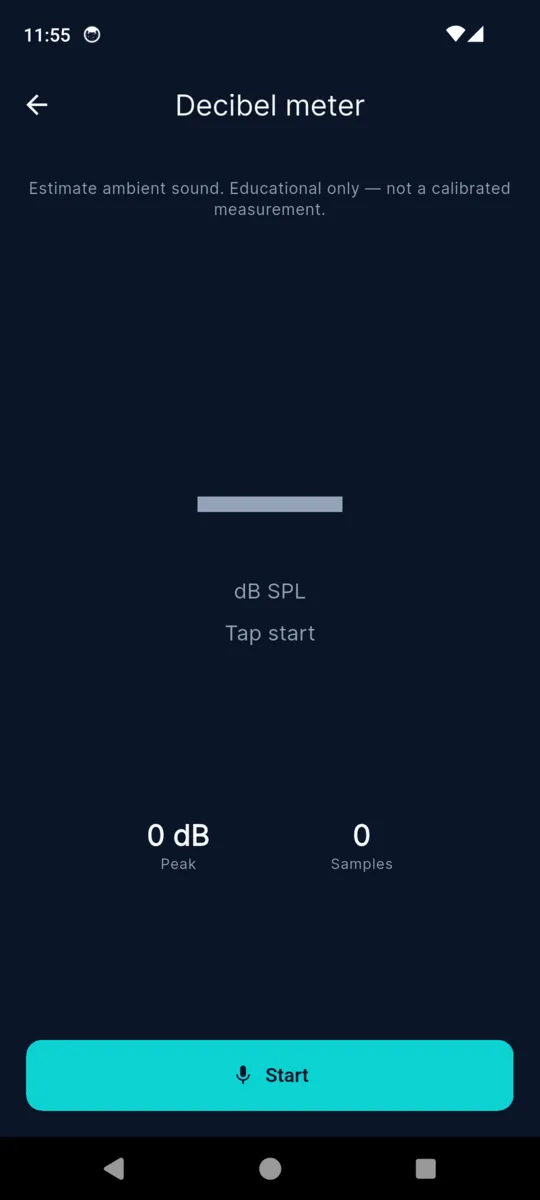
The decibel meter, the change log, the Quick Settings tile, the profile timer and JSON backup are in the app either way.
Get VolumeMateNo, and nothing on Android can. The system mixes audio into seven streams, so the closest thing is Media, which every app that plays audio shares. VolumeMate controls those seven.
Yes. Schedules are handed to Android’s alarm service and applied by a receiver, so they fire with the app shut. They are re-armed after a restart too.
Android refuses ringer and notification changes unless the app has Notification Policy access. Grant it once in Settings and profiles work through Do Not Disturb; without it, those two streams are left alone.
Because most Android builds tie those two streams together at the system level. VolumeMate says so next to the sliders rather than letting you think it is broken.
Yes. It runs as a foreground service with a notification, which is what stops Android killing the listener. Locks that quietly unlock themselves are locks without that service.
It is about +15 dB of loudness enhancement on top of your device maximum, and the free tier stops at roughly +7.5 dB. Some phones block the effect entirely, and the app tells you when yours does.
One payment, no subscription. It removes the banner and full-screen ads, lifts the profile, schedule and trigger limits, unlocks the lock, the full limiter, the equalizer and the 200% boost.
No account, ever. Profiles, schedules and triggers are stored on the phone. A connection is only used for ads on the free tier and for crash reporting.
English only at the moment. Translations are written but not yet wired into the screens, so it would be misleading to list other languages.
Save a Sleep profile, give it 22:30, and see whether your phone does it without being asked. That much is free.