
WalkCheck
HGV daily walkaround check
The daily check, in about twenty seconds.
WalkCheck keeps the walkaround check, the defect report and the rectification on the owner-driver's own phone, with no operator account behind it. Every row starts as checked with no defect; you only touch what is wrong, then one tap saves the lot.

One vehicle and a three-month window on the standard tier.
The full plan is £1.99/mo, £9.99/yr or £24.99 once.
ONE SCREEN, ONE TAP
Every row starts checked, no defect
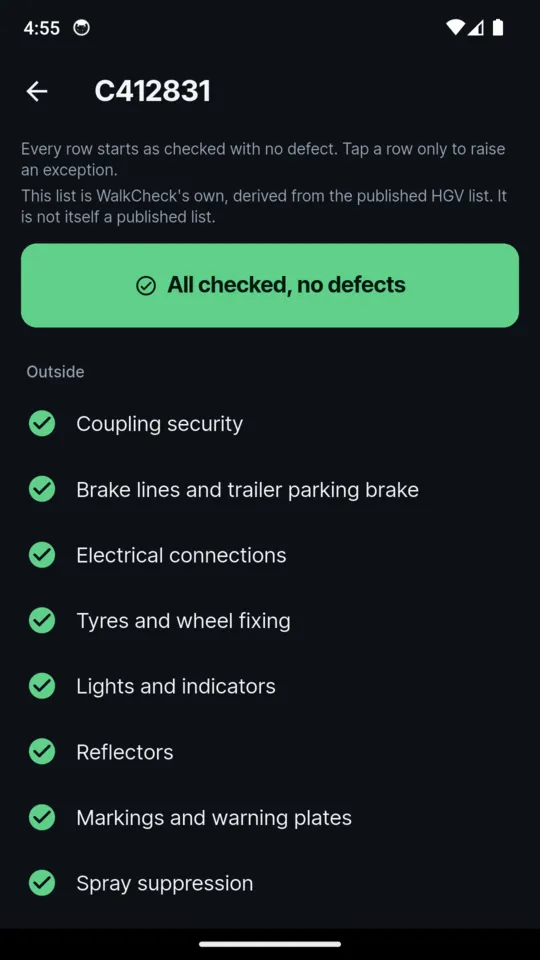
The whole item list for that vehicle type sits on one screen, grouped from the cab, inside and outside, everything already set to checked with no defect. Tap a row only to raise a defect or mark it not applicable today, then confirm. Large targets and high contrast, for one hand in the dark.
- HGV, bus or coach, van and trailer each have their own list; the HGV list follows the published DVSA item list and the screen says when a list is WalkCheck's own
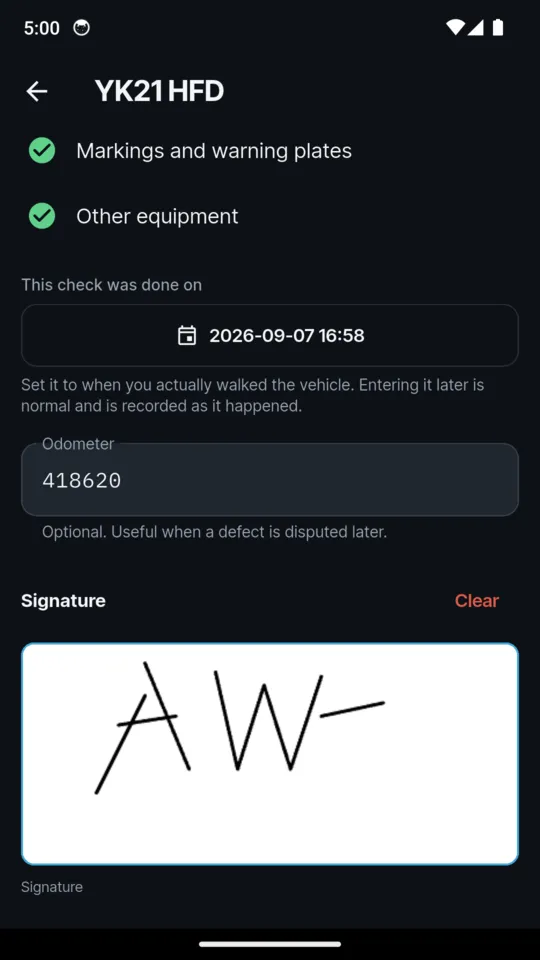
- An optional odometer and a signature on every check; an unsigned check is saved unsigned and the pack says so
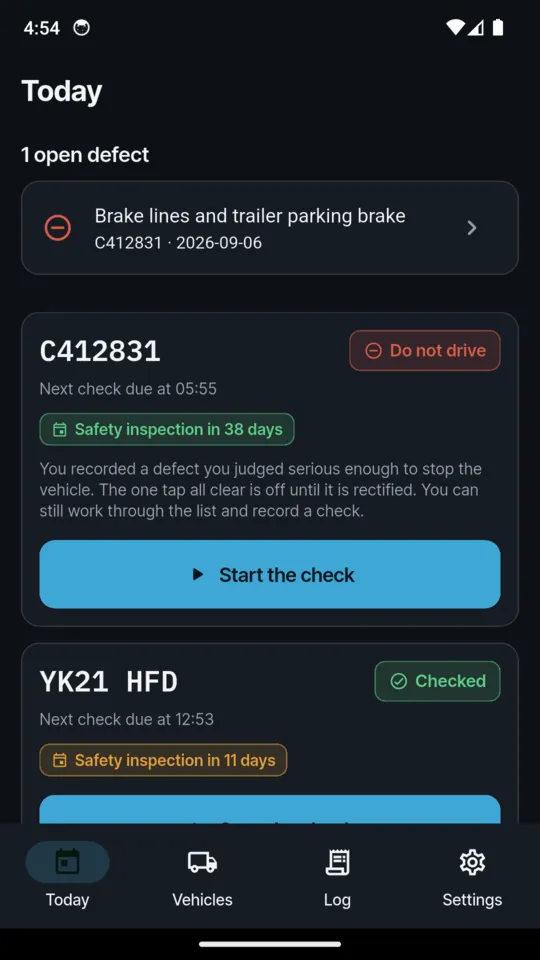
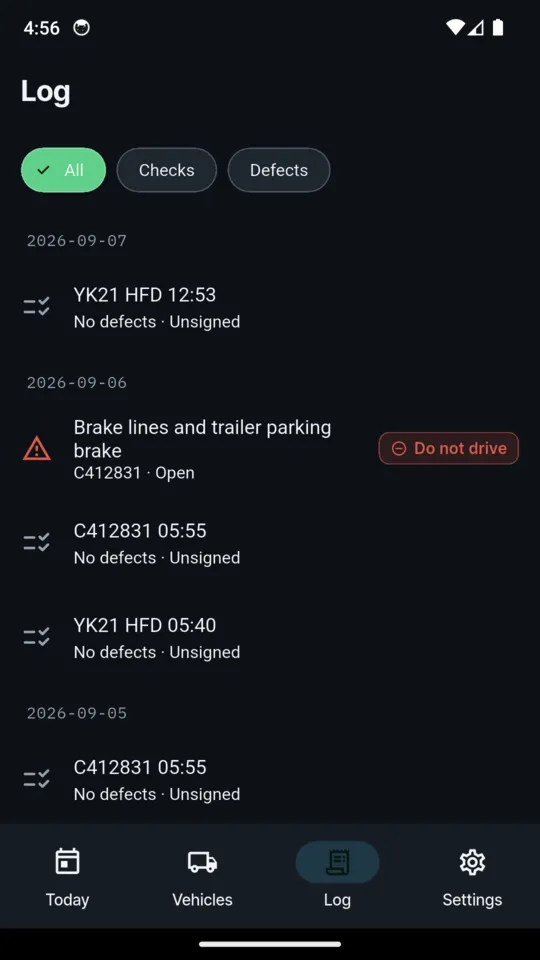
- A vehicle you marked do not drive loses the one-tap all clear until the defect is rectified; you can still work through the list and record a check
- The next check is due 24 hours after the last one, not at midnight, and a vehicle on arduous work can be set to 12, 8 or 6 hours
WalkCheck calculates the next due time from the last recorded check rather than resetting at midnight: after a check at 22:00 the next is due at 22:00 the following day, unless you set a shorter interval. That is the app's scheduling method, not a statement that any duty has been met. Guidance asks for at least one walkaround check in every 24-hour period the vehicle is used.
THE FIGURES IT STARTS WITH
Two retention settings and one interval, all yours to change
WalkCheck starts with these settings. You can change each of them, and the app never deletes a record on its own.
15 months
Defect reports and their rectification
UK guidance states this.
3 months
Nil-defect reports
UK guidance recommends this.
24 hours
Between walkaround checks
Guidance asks for at least one check in every 24-hour period the vehicle is used; set 12, 8 or 6 for arduous work.
WHAT IT KEEPS
The check, the defect and the fix
Entering it late is still entering it
"This check was done on" sits on the entry screen, not in an edit menu. Set it to when you actually walked the vehicle. The record is marked entered later, with no red badge and nothing blocked, and both moments are stored: when the check was done and when it was written down.
A defect found on the road
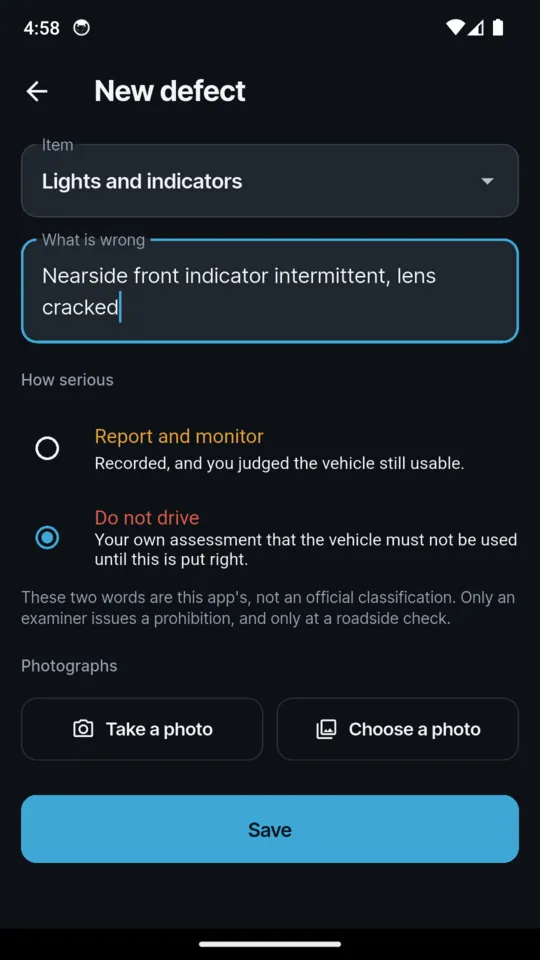
Report a defect now sits on the Today screen, so a wheel-nut indicator found at a services at two in the afternoon has somewhere to go. Each defect carries the item, what is wrong in your words, photographs, and how serious: report and monitor, or do not drive. Those two words are the app's own, not an official classification.
Rectification and sign-off
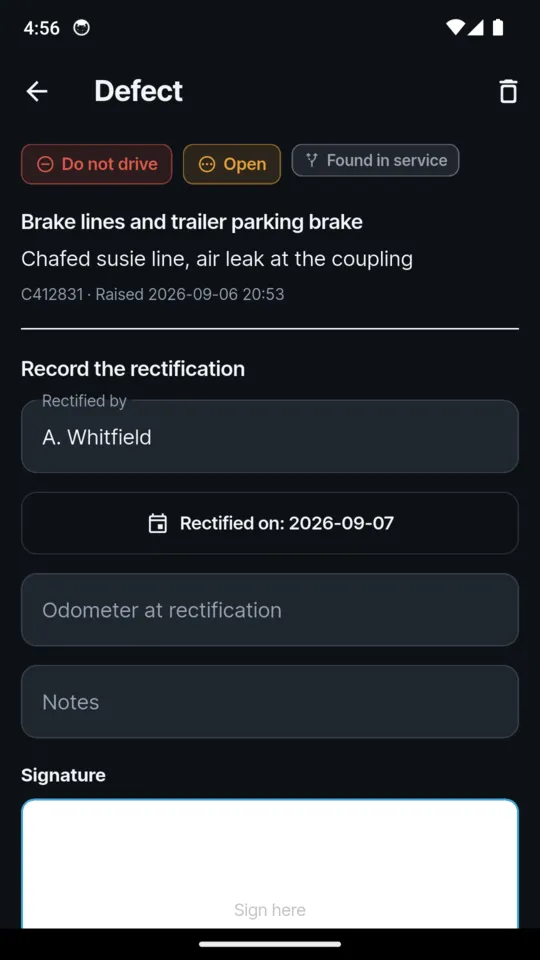
A defect stays open until it is rectified: who did it, when, at what odometer, a note and a signature. Open defects sit above everything else on Today, and a do not drive defect marks the vehicle out of service until it is closed. Reopen one if the repair did not hold.
Nil defects are records, not gaps
A clean check is stored as a record. WalkCheck starts with a 15-month retention setting for defect reports and three months for nil-defect reports, based on UK guidance that states the first and recommends the second. You can change either, it never deletes a record on its own, and it tells you before a record reaches its retention date and offers the pack.
The Inspection Pack
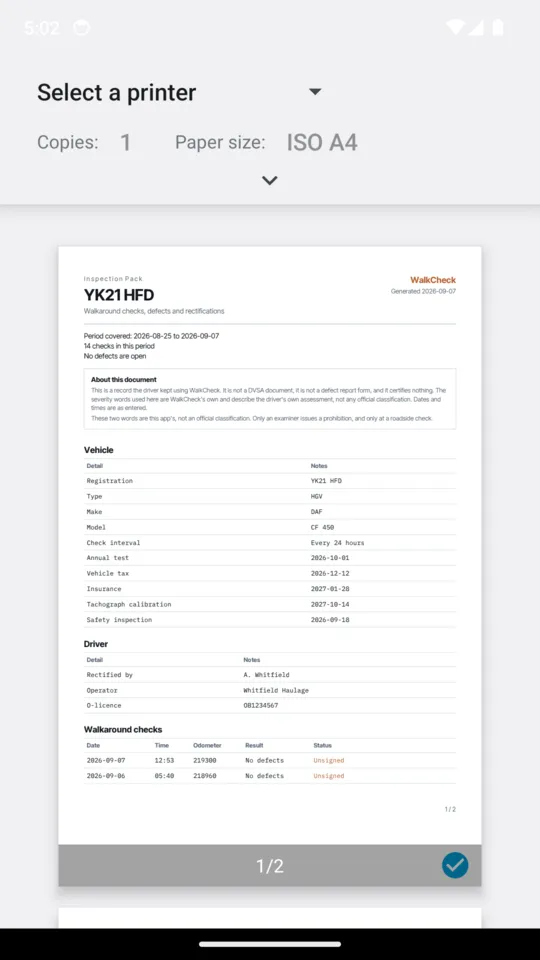
One PDF per vehicle for the period you choose, with the vehicle, the driver, and every check, defect and rectification in that period, each marked signed or unsigned and entered later where it was. The cover says how many defects are open and how many checks the period holds. Built on the phone and shared or printed from it.
Vehicle documents and reminders
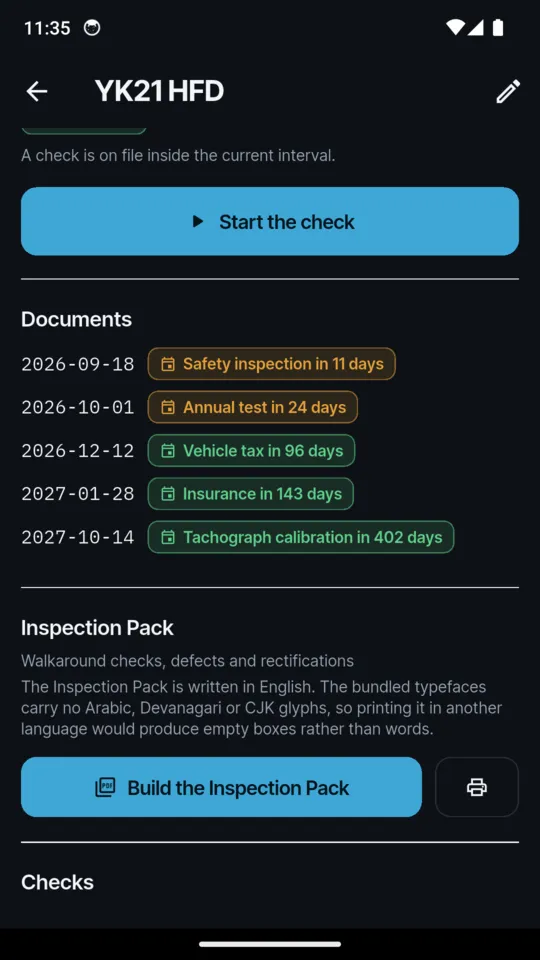
Annual test, vehicle tax, insurance, tachograph calibration and the next safety inspection, each counted down from the date you entered. The full plan adds reminders 30, 14, 7 and 1 days before each one. The daily check reminder is off until you switch it on.
The screens
Scroll sideways, or use the arrow keys
WHY IT WORKS THIS WAY
Built for the person whose name is on the record
It counts from your last check, not from midnight
WalkCheck calculates the next due time from the last recorded check rather than resetting at midnight, and the screen says which reading it uses. Guidance asks for at least one check in every 24-hour period the vehicle is used.
Report and monitor, or do not drive
The two words are WalkCheck's and describe your own assessment; they are not an official classification or a prohibition notice. Only an examiner issues a prohibition, and only at a roadside check. The pack says the same.
The record belongs to the driver
No operator account, no sign-in, no cloud and no signal needed. Save a backup file with your records and photographs, included on every tier, and take it with you.
It does not delete records on its own
The standard tier keeps one vehicle and every check and defect you like, with a three-month window over the log. Records outside the window are still on the phone and still in a backup; the full plan widens the window to the whole archive.
It certifies nothing
WalkCheck helps you keep the records the Guide to Maintaining Roadworthiness describes. It is not a DVSA document, not tachograph software and not an operator system, and the guidance it follows is UK guidance.
A small banner on the standard tier
The full plan removes it. Crash reports and usage statistics are sent so faults can be found and fixed.
PRICE
Standard, or the full plan
STANDARD
Onevehicle
- One vehicle
- Every check and defect you like
- A three-month window over your log
- Rectifications and signatures
- Document dates counted down
- The first page of the Inspection Pack, watermarked
- Saving a backup file
FULL PLAN
£24.99once
or £1.99 a month, or £9.99 a year
- The whole archive, not just the last three months
- Every vehicle and trailer you run
- The complete Inspection Pack
- Expiry reminders for every document
- Restore a backup onto a new phone
- No banner
Start the 14-day trial from inside the app when you choose, with no card and nothing to cancel. If a subscription lapses, every record stays on the phone; the log and the Inspection Pack return to the three-month window.
QUESTIONS
Before you install it
Is WalkCheck an official DVSA record?
No. It helps you keep the records the Guide to Maintaining Roadworthiness describes. The Inspection Pack is a record the driver kept, it is not a DVSA document or a defect report form, and it certifies nothing.
Is this fleet software?
No. There is no operator portal, no multi-driver accounts and no cloud. It is for the owner-driver and the one to five vehicle operator, and the record belongs to the driver.
I did the check at six. Can I enter it that evening?
Yes. Set the time the check was actually done and save it. The record is marked entered later, both moments are stored, and nothing is blocked or badged.
I check at 22:00 and run through the night. Is a second check due at midnight?
No. WalkCheck counts 24 hours from your last recorded check, not from midnight, so it shows the next check due at 22:00 the following day unless you have set a shorter interval.
What does the standard tier keep?
One vehicle, every check and defect you record, and a three-month window over your log. Records outside the window stay on the phone and in a backup; WalkCheck does not delete records on its own.
Does it do driver hours or tachograph downloads?
No. It is not tachograph software: no driver hours, no working time, no card download. It records tachograph calibration dates and, on the full plan, reminds you before they fall due.
The check, the defect and the fix, on your own phone
Android only. £1.99 a month, £9.99 a year or £24.99 once.