WatchLog
Service & Winder Log
Service history, winder rotation, and seconds-per-day accuracy — one record for every mechanical watch you own. Photo-backed, multi-currency, PDF export.
How It Works
Add the watch
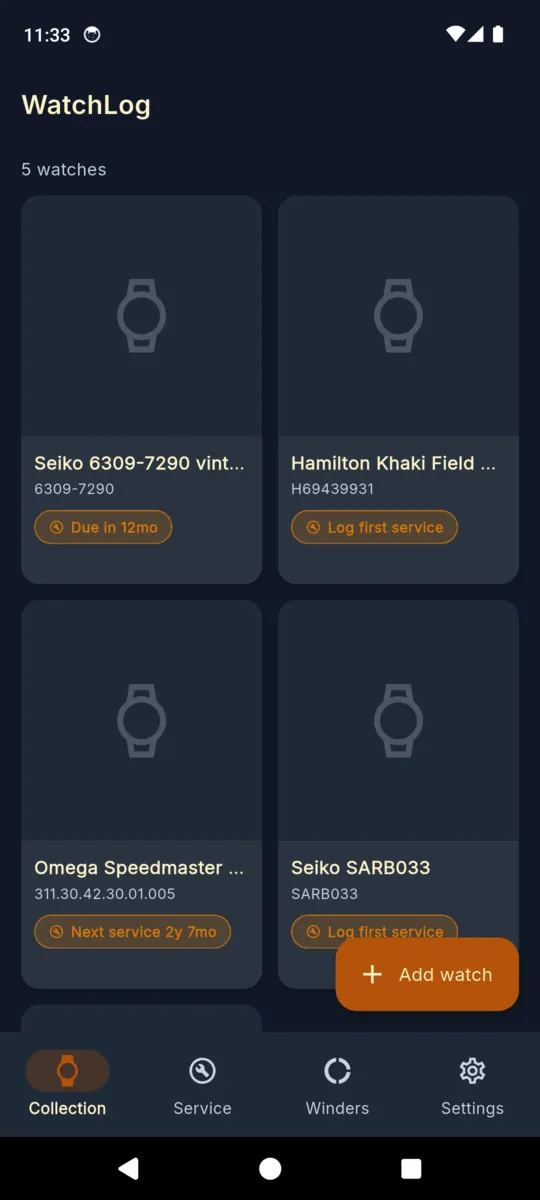
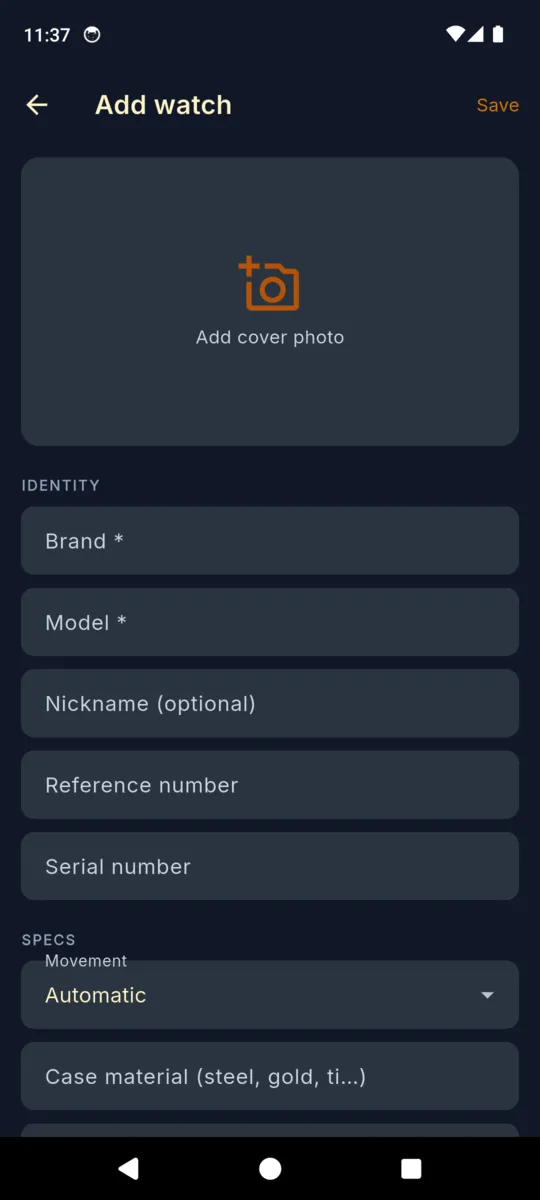
Brand, model, reference, movement, purchase date and price. Cover photo plus extras for dial, papers, and receipt.
Log every visit
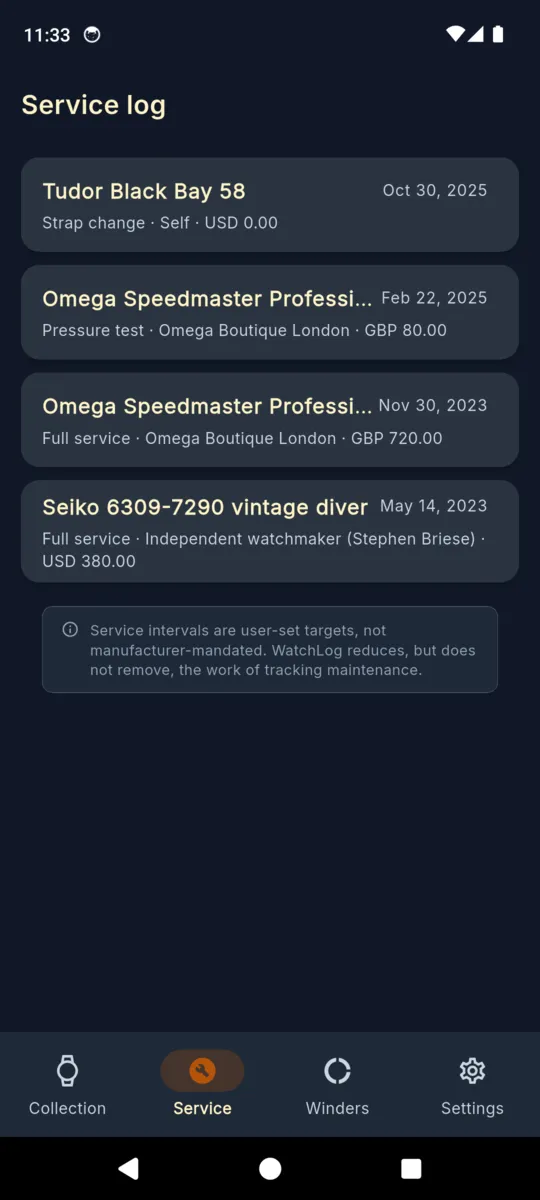
Service date, type, watchmaker, cost in any currency, notes. Snap the service receipt. Reminder 30 days before the next target service date.
Rotate & export
Assign watches to winder slots, set a rotation cadence, and export a one-tap PDF service-history report whenever you sell, insure, or hand off.
WatchLog in Action
Every Watch, Every Service, Every Slot
Watch Registry
Brand, model, reference, movement, case material, water resistance, serial, purchase date and price, current value estimate — plus cover photo and extras for dial, papers, receipt.
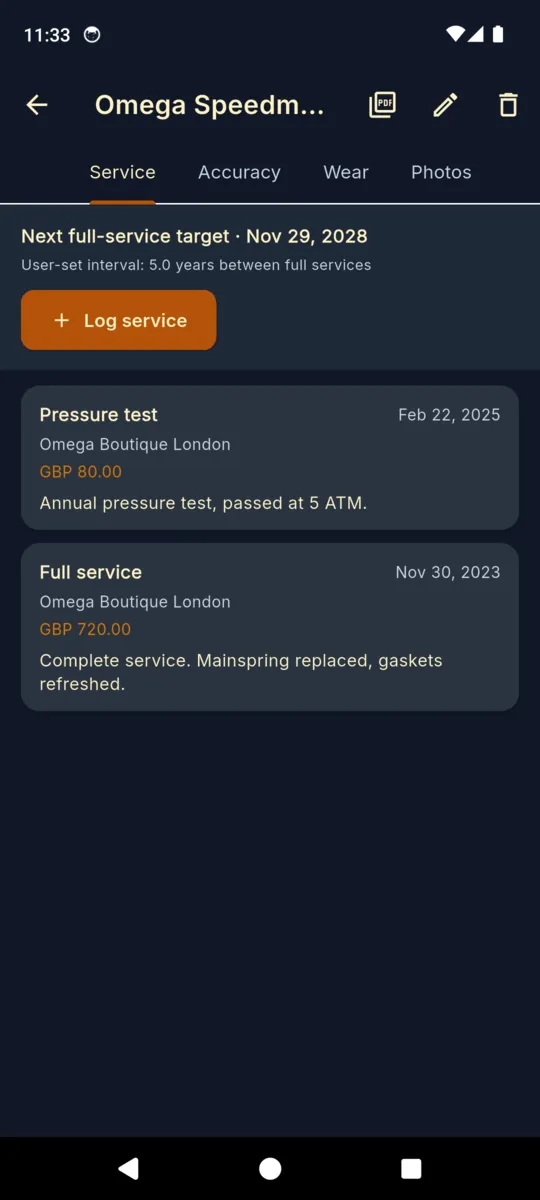
Per-Watch Service Log
Date, service type (full service, pressure test, regulation, crystal, strap, other), watchmaker, cost in any currency, notes, and photos of the receipt or service card.
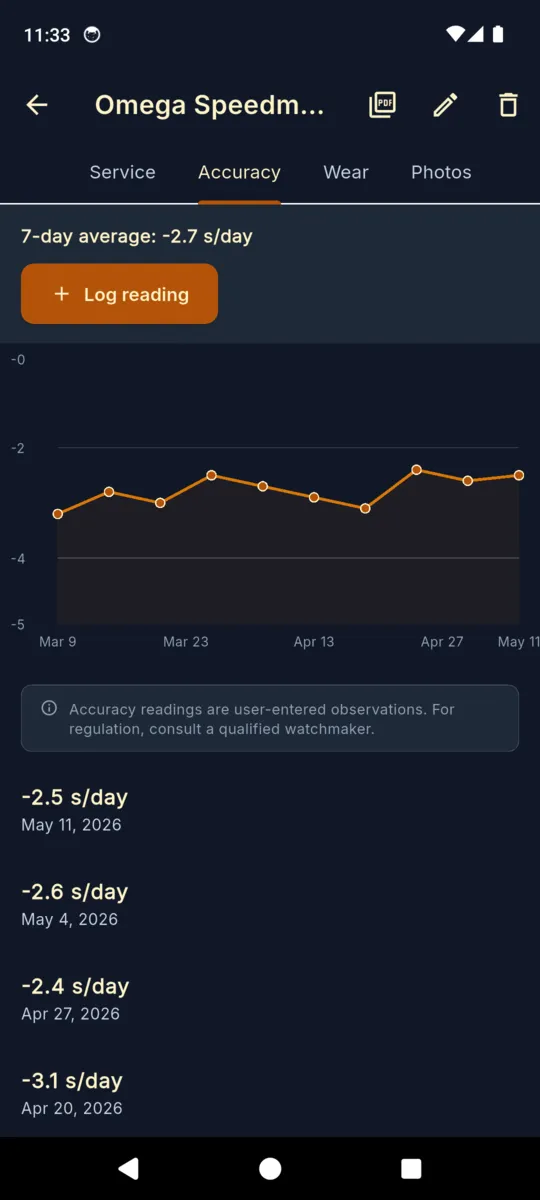
Accuracy Trend Chart
Log seconds-per-day deviation and watch the trend over months. A previously stable watch suddenly drifting is the early sign of a tired mainspring or regulator.
Winder Rotation Schedule
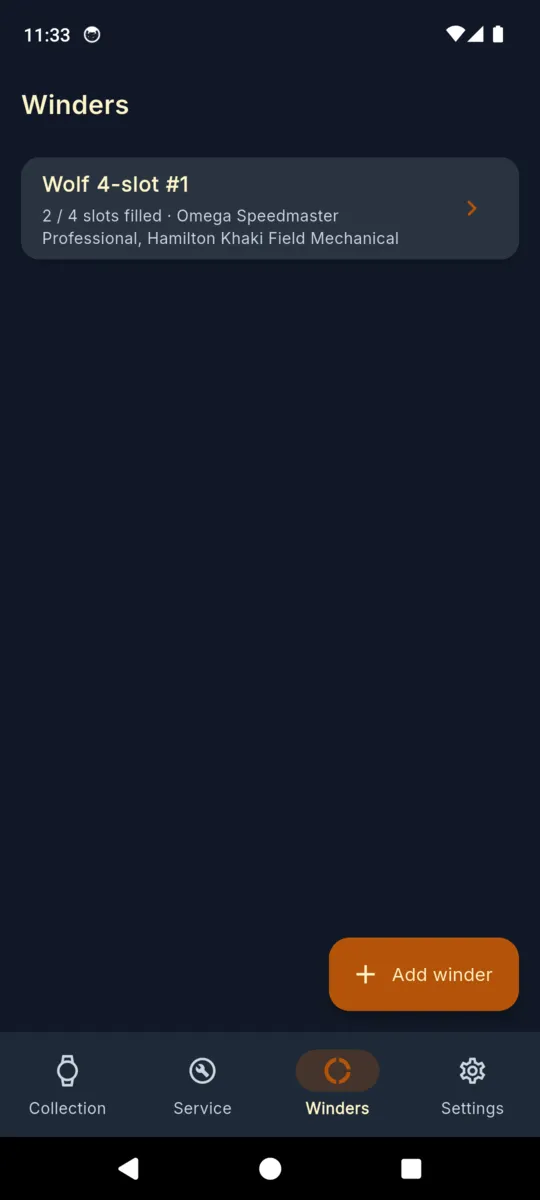
Declare your winders (Wolf, Orbita, generic), assign watches to slots with direction (CW/CCW/bi) and TPD, set a rotation cadence reminder, and keep past rotations in history.
Service-Due Reminders
Optional notifications 30 days before each watch's next target service date. Reminders re-arm automatically after a phone reboot — set them once, forget them.
User-Set Intervals
Default 5 years between full services and 1 year for pressure tests, fully editable per watch. Rolex 10, Omega 8, vintage 3 — your call, not the app's.
Tablet Master-Detail
On tablets the collection sits on the left and the active watch detail expands on the right. Skip the back-button shuffle when you're updating multiple watches in a row.
PDF Service-History Export
One-tap per-watch PDF with registry, every service entry, accuracy log, and embedded photos. The paperwork buyers, insurers, and watchmakers actually ask for.
Simple, Honest Pricing
Pay monthly, yearly, or once. Lifetime owners keep Premium forever.
Standard
Up to 3 watches, with ads
- Up to 3 watches
- Full service log per watch
- Service-due reminders
- Cover photo & receipt photos
- Local backup & restore
- Multi-currency
- Banner ads
WatchLog Premium
Lifetime — or $1.99/mo · $9.99/yr
- Everything in Standard, plus:
- Unlimited watches
- Ad-free
- Accuracy trend chart
- Winder rotation & slot assignments
- PDF service-history export
- Tablet master-detail layout
- Priority support
One missed service interval costs more than lifetime Premium. A full service on a mid-range automatic runs $400–$800. Catch the date before the movement does.
Common Questions
Frequently Asked Questions
How many watches can I track?
The Standard tier covers up to 3 watches with the full service log and basic registry — enough to try the workflow on your daily, your weekend piece, and one dress watch. Premium removes the cap entirely: track a 5-watch collection or a 50-piece vault. Watches you've already added stay accessible if you ever downgrade — only adding NEW watches above 3 is gated.
Are service intervals brand-mandated?
No — they are personal targets you set per watch. WatchLog defaults to 5 years between full services and 1 year for pressure tests, which roughly matches industry guidance for ETA/Sellita-based automatics. Adjust per watch: a Rolex owner might pick 10 years; an Omega owner 8; a vintage piece might want 3. WatchLog is a log, not an authority — always check your brand's current service recommendations.
Does it track winder rotation?
Yes. Declare your winders (Wolf, Orbita, Buben & Zorweg, generic 4-slot, etc.), then assign each watch to a slot with direction (CW, CCW, bi-directional) and TPD. Set a rotation cadence reminder so the watch on slot 1 doesn't sit there for nine months. Past rotation history is preserved so you can see when each watch was last on the winder.
Does it log seconds-per-day accuracy?
Yes. Per watch you can log timing entries with the seconds-per-day deviation and the date you measured it. WatchLog plots the entries on a trend chart so you can see when a watch starts drifting — a sudden +15 sec/day swing on a previously +2 sec/day watch is the early sign that the mainspring is fatiguing or the regulator needs a touch.
Can I export a service-history PDF for resale?
Yes. One-tap export produces a per-watch PDF with the registry info (brand, model, reference, movement, serial, purchase price), the full service log (every visit, every regulation, every strap change), the accuracy entries, and embedded photos of service receipts. Watch buyers care about paperwork — this is the paperwork.
Is my data private?
Yes. All data — watches, photos, service log, winder assignments — stays on your device. No account required, no cloud sync in v1. You can export a single zip backup at any time to save to Google Drive, Dropbox, or email it to yourself. Restoring the zip on a new device replaces everything, so your collection is portable but the publisher never sees it.
Does it work offline?
Completely. Every screen, every chart, every PDF export works without an internet connection. The only network calls are AdMob banners (Standard tier) and the IAP/restore-purchase round trip when you upgrade. Add a watch in a vault with no cell signal — works fine.
Is there a one-time price or only subscription?
Both. WatchLog Premium is sold as $1.99/month, $9.99/year, or a one-time $19.99 lifetime purchase. The lifetime price is roughly two years of yearly — chosen because collectors keep watches for decades and we'd rather sell the app the same way. Lifetime owners keep Premium even if pricing changes later.
Your Collection Deserves a Real Logbook
Download WatchLog and put every watch, every service, every rotation in one place.
Have questions? Get in touch
A Real Logbook for Mechanical Watch Collectors
Mechanical watch collecting has a paperwork problem. Every serious collector eventually ends up with a smudged notebook in a watch box, a Notes-app entry that says "Submariner serviced 2019?", and a spreadsheet that opened once and was never updated. WatchLog is the dedicated record system that lives in your pocket instead of in your filing cabinet — every watch, every service visit, every regulation, every rotation, every receipt photo, on the same screen as the watch it belongs to. It is not a market-price tracker, not a forum, not a buying guide. It is the logbook your great-grandfather kept on paper, ported into something you'll actually update.
Why Collectors Need a Service Log
The moment you sell a pre-owned mechanical watch, the buyer asks one question: when was it last serviced? Without a record, the watch is worth less. With a record — dated service entries, photographed receipts, watchmaker names, costs — the watch is worth more, sometimes by the four-figure delta between "running fine" and "fully documented." WatchLog turns the service paperwork into a one-tap PDF you can email a buyer, attach to a sale listing, or hand to an insurance adjuster after a loss. The same record helps you on the buy side: when you're considering a pre-owned piece, you know exactly what a real service history looks like, because you've been keeping one on your own watches for years.
Mechanical Movement Accuracy: Why Seconds-Per-Day Matters
A healthy mechanical movement runs within a published range — COSC certifies -4/+6 seconds per day, METAS certifies 0/+5, most mass-market automatics run ±15 — and a watch's seconds-per-day deviation tells you, more reliably than anything else, when something has changed. A watch that ran +3 sec/day for two years and is suddenly running +14 is not "fine, it's mechanical." The mainspring is fatiguing, the lubricants are breaking down, or the regulator has drifted. WatchLog's accuracy chart plots every timing entry you log against a horizontal zero line so the trend is impossible to miss. Catch it at +14 and you spend $400 on a regulation. Miss it and a year later you spend $900 on a service that should have been routine.
Winder Rotation Strategies for an Automatic Collection
If you own three or more automatic watches, the winder problem is real. A piece sitting unwound for six months drains lubricant from the pivots, particularly on older calibers. A piece left on a winder running the wrong direction for an asymmetrically-wound rotor accomplishes nothing. A four-slot winder with eight watches needs a rotation schedule. WatchLog's winder registry lets you declare each winder (Wolf 4-slot Cub, Orbita Sparta, Buben & Zorweg, generic), assign each watch to a slot with direction (clockwise, counter-clockwise, bi-directional) and TPD (turns per day, usually 650–900 depending on caliber), and set a cadence reminder so the watch on slot 1 swaps with the watch in the safe every two weeks. Past rotation history is preserved so you can prove to yourself that the Heuer hasn't been parked since March.
Service Intervals by Brand: Rolex, Omega, ETA, Sellita
There is no single right service interval. Rolex publishes a recommendation of roughly ten years for modern calibers, citing improved lubricants and tighter manufacturing tolerances. Omega published an eight-year recommendation around 2017 for Co-Axial Master Chronometer movements, down from the older five-year industry default. Watches built on ETA 2824/2892 or Sellita SW200/SW300 ebauches — which covers a huge swath of the $500–$5000 market — generally do best at five-to-seven years. Vintage watches with hardened lubricant or worn gaskets may need attention every three years. WatchLog defaults to a five-year full-service target and a one-year pressure-test target and lets you override per watch. The defaults are a starting point, not a ruling. Your watchmaker, your manual, and your wrist time are the real authorities.
Vintage Watches and the Records Buyers Actually Want
A vintage watch without provenance is a coin toss. A vintage watch with a service history — even a partial one — is a different category of object entirely. When you buy a 1970s Speedmaster or a 1960s Submariner pre-owned, the dealer who keeps records charges 20–40% more than the dealer who shrugs. The records that move price: original purchase paperwork (or the closest thing to it), every documented service visit since acquisition, who did the work, what was replaced (crystal, gaskets, mainspring, balance staff), and photos of the case-back service marks if the watchmaker engraved or stamped one. WatchLog lets you attach all of that to the watch record, including extra photo slots for the papers, the receipt, and the case-back. When you sell, the PDF speaks for the watch.
Insurance Documentation for High-Value Collections
Once your collection passes the value cap of a renter's or homeowner's policy (typically $1500–$5000 for a single piece, $2500–$10000 for jewelry in aggregate), you need a scheduled rider on the policy or a dedicated valuables policy. Insurers want serial numbers, model references, purchase prices, current values, and ideally photos. They also want updates when you buy, sell, or have a piece serviced — because a watch that's been freshly serviced is worth more than the same watch overdue. WatchLog stores everything an underwriter asks for and lets you export it as a PDF the day you renew the policy. If you ever file a claim, the same PDF is the evidence the insurer needs to write the check at full value instead of a low settlement.
Photographing Case-Back Service Marks and Receipts
Watchmakers historically engraved or stamped the inside of a case-back with the date of service — a small set of numbers near the rim, sometimes with a logo or initials. Many independent watchmakers still do it. Manufacturer service centers usually don't engrave the case-back but always issue a printed receipt or service card. Photograph both. WatchLog supports multiple photos per service entry: snap the case-back stamp before you put the watch back together (or ask the watchmaker to send a photo), snap the printed service card, and snap the polished piece if a refinish was part of the service. Years from now, when you're selling, the photos are stronger evidence than a typed line that says "serviced 2022."
Privacy, Offline, and Backups
WatchLog stores every watch, every photo, every service entry, every winder assignment locally on your device. There is no account, no cloud sync, no telemetry on your collection in v1. The only network traffic is AdMob banners (Standard tier only) and the in-app-purchase round trip when you upgrade. For backup, Settings > Export Backup produces a single zip file containing the full database and every photo — save it to Google Drive, attach it to an email, copy it to a USB stick. Restore replaces everything on the device, so your collection is portable across phones but the publisher never holds a copy.
For Record-Keeping — Not Watchmaker Advice
WatchLog is a logbook, not a service manual. It does not diagnose movements, does not certify accuracy, and does not replace the judgment of a qualified watchmaker. A drifting accuracy chart is a hint to ask a professional, not a self-service repair guide. A service interval is a target you set, not a manufacturer's mandate. For anything safety-critical (water resistance before a dive, structural integrity after a drop, authenticity disputes) consult a qualified specialist. WatchLog's job is to remember everything you did so you don't have to.