ASSEMBLY TYPES & THEIR READINGS

BackTest icon

BackTest

Backflow assembly types

Six assemblies, and the reason each one takes the readings it does.

An RP is not a DC with an extra part bolted on, and a vacuum breaker is not a small double check. Each assembly protects against something different, which is why the test in front of you changes shape when you change the type.

14-day trial, no card.
$1.99/mo, $9.99/yr or $24.99 once. Android.

  • RP · RPDA
  • DC · DCDA
  • PVB · SVB
  • Initial and final retest
  • Works offline
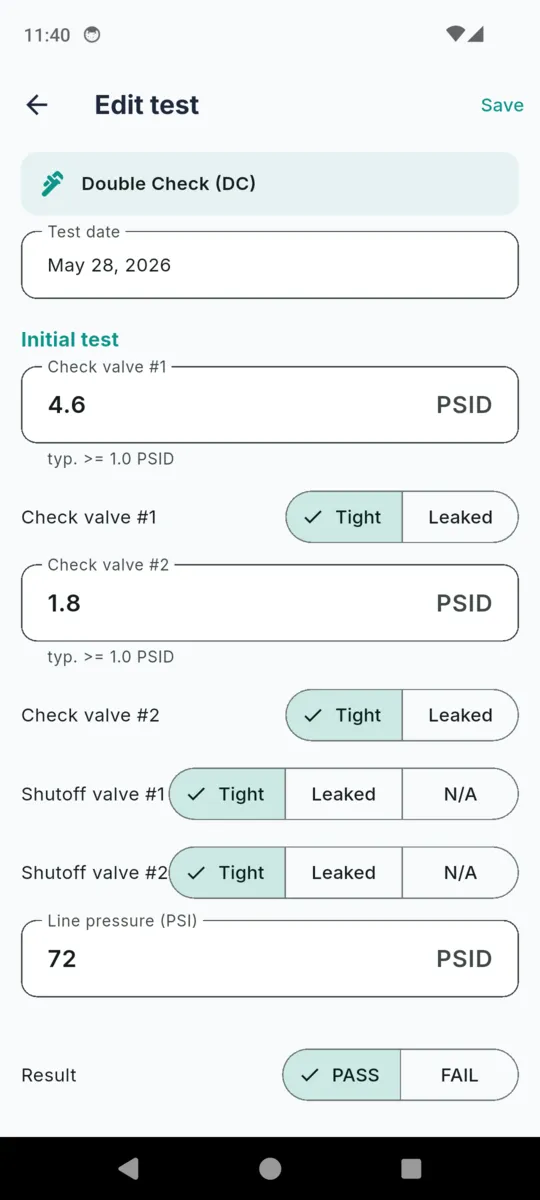
The BackTest edit test screen for a Double Check assembly with a test date, check valve number 1 reading 4.6 PSID marked Tight, check valve number 2 reading 1.8 PSID marked Tight, both shutoff valves marked Tight, a line pressure of 72 PSID and a PASS or FAIL result toggle

What each assembly actually is

Descriptions below are ordinary field practice, not a hazard table. Which assembly a particular service is allowed to have is your water purveyor's call, and it varies from one authority to the next.

RP Reduced Pressure Principle

Two independently acting check valves with a differential relief valve in the chamber between them. If either check starts to pass, the relief opens and dumps the zone to atmosphere rather than letting anything travel back toward the main.

Typically the assembly specified where the consequence of backflow is health-related — boiler make-up with treatment chemicals, process water, medical and laboratory services.

  • Check valve #1
  • Check valve #2
  • Relief valve

RPDA RP Detector Assembly

An RP with a metered bypass around it, so a small continuous flow shows up on a meter instead of passing unnoticed. Same protection, extra accounting.

Usually fire lines, where the purveyor wants unauthorised use or a slow leak to register somewhere.

  • Check valve #1
  • Check valve #2
  • Relief valve

DC Double Check

Two independently acting check valves in series, with no relief valve. Protection comes from redundancy: the second check is there for when the first one stops sealing.

Typically fitted where backflow would be a nuisance rather than a health risk — many irrigation, fire and general commercial services, depending on how the purveyor classifies the hazard.

  • Check valve #1
  • Check valve #2

DCDA DC Detector Assembly

A double check with the same metered bypass arrangement as an RPDA.

Again mostly fire lines, on services the purveyor has not classed as high hazard.

  • Check valve #1
  • Check valve #2

PVB Pressure Vacuum Breaker

A single spring-loaded check with an air inlet above it. Drop the supply pressure and the air inlet opens, breaking the siphon so nothing gets pulled back up the pipe.

Irrigation is the common one. It has to sit above the highest downstream outlet, and it does nothing about back-pressure — only back-siphonage.

  • Check valve
  • Air inlet

SVB Spill-resistant Vacuum Breaker

The same protection as a PVB, arranged so the assembly does not spill water when it is tested or when the air inlet operates.

Where a PVB would be right but the spillage would not be — indoors, in a plant room, or anywhere above something that should stay dry.

  • Check valve
  • Air inlet

Both shutoff valves and the static line pressure are recorded on every type, whichever of the readings above apply.

What a PSID figure is measuring

PSID is a pressure differential — the difference between two points, not a pressure against atmosphere. Every number on a backflow test is a differential across one component, and each component is being asked a different question.

A check valve holds a differential

The reading is how much backwards pressure the check will stand before it starts to pass. The first check on an RP is doing the heaviest work, which is why the field figure the app offers as a hint there is higher — 5.0 PSID against 1.0 for the second check and for the checks in a double check assembly. The valve is also given a condition alongside its number: tight, leaked, or not applicable.

A relief valve is timed by when it opens

On an RP or RPDA the relief valve is the whole point of the assembly, so the reading is its opening point rather than what it holds. It has to open while there is still a healthy margin under the first check, so the middle chamber is dumped before anything can travel the wrong way. The app's hint figure is 2.0 PSID.

An air inlet is the same idea in reverse

A vacuum breaker's air inlet opens as supply pressure falls, letting atmosphere into the line so the siphon cannot form. The reading is the differential at which it opens, hinted at 1.0 PSID. That is one of only two readings a PVB or SVB test produces, along with the single check.

Reading What it measures Hint shown in the app
Check valve #1 The differential the first check holds against reverse flow. RP and RPDA: typ. ≥ 5.0 PSID · DC, DCDA, PVB and SVB: typ. ≥ 1.0 PSID
Check valve #2 The same reading on the second check. RP, RPDA, DC and DCDA only. typ. ≥ 1.0 PSID
Relief valve The differential at which the relief starts to discharge. RP and RPDA only. typ. opens ≥ 2.0 PSID
Air inlet The differential at which the air inlet opens. PVB and SVB only. typ. opens ≥ 1.0 PSID

Those figures are the standard USC and ABPA field-test convention, and BackTest shows them as non-binding hints beside each box. They do not set the result. You mark PASS or FAIL yourself, because the criteria are your purveyor's and your state's — and only a state-certified tester may sign and file a report.
Why vacuum breakers are a shorter test

The four check-valve assemblies and the two vacuum breakers are not different sizes of the same thing. They answer different failure modes, and that is what the field set reflects.

An RP or a DC sits in the line and keeps working when the downstream side is pushed to a higher pressure than the main — a pump, a boiler, an elevated tank. A vacuum breaker does nothing about that. It handles the other direction: the supply drops, the line tries to suck backwards, and the air inlet breaks it by letting air in. That is why a PVB has to be mounted above everything it protects, and why nobody fits one on a service that can see back-pressure.

So when you set an assembly's type in BackTest, the test form rebuilds itself. Pick PVB or SVB and the second check and the relief valve disappear, and the remaining check is labelled simply Check valve rather than Check valve #1, because there is no second one to distinguish it from. Pick DC and the relief row goes but both checks stay. The report prints the same way: the rows that assembly takes, and no empty boxes suggesting you skipped something.

What every test records, whatever the type

Both shutoffs and the line pressure

Upstream and downstream shutoff valves each marked tight, leaked or not applicable, plus the static line pressure. These sit on every type.

The repair and the final retest

Fail the initial test and the record takes the cause, the repairs made and the parts used, then a second complete set of readings for the retest. One test record carries both, so the report shows the whole visit rather than two disconnected events.

The gauge you used

Make and model, serial number and calibration date, carried from your profile onto every test and editable per test if you swapped kits.

The tester block and signature

Your name, certification number and certifying state are snapshotted onto the test itself, with a signature captured on the phone. A signed test is voided with a reason rather than deleted.

The assembly it belongs to

Make, model, size, serial, where it is on site and what it serves. The test attaches to that record, so the history is per assembly rather than per address.

The next due date

Saving a test sets the assembly's next annual due date twelve months out, and it appears on the Due list once it falls inside thirty days.

The full picture of the app — customers, purveyors, the four report layouts and the report itself — is on the BackTest app page.

Why the type matters in the app

  • The form matches the hardware. A PVB is never asked for a relief valve reading.
  • The hint follows the type. First check on an RP hints 5.0 PSID; on a DC it hints 1.0.
  • The result stays yours. The figures are advisory; you mark PASS or FAIL.
  • The report prints what was taken. No blank rows for components the assembly does not have.
  • Repairs stay attached. Cause, repairs, parts and the retest live on the same record.
  • Everything works in a basement. No account, no signal, nothing leaves the phone unless you send it.

Questions

What is the difference between an RP and a DC?

A double check has two check valves and nothing else. A reduced pressure assembly adds a relief valve between them that dumps the middle chamber to atmosphere if either check stops holding, which is why it is the one specified for higher-hazard services.

Why does an RP take three readings and a DC only two?

The relief valve is a separate component with its own opening point, so it gets its own reading. Pick RP or RPDA in BackTest and the relief row appears; pick DC or DCDA and it does not.

Does BackTest walk me through a PVB test procedure?

No. It gives you the field set a PVB test produces — the air inlet opening point, the single check, both shutoffs and the line pressure — and records what you measured. The order of operations is your certification training and your purveyor’s, not the app’s.

Why does a PVB have no second check or relief valve on the form?

Because the assembly does not have them. A pressure vacuum breaker is one check and an air inlet, so BackTest hides the rows that do not exist rather than leaving blanks on the report.

Do the PSID figures in the app decide pass or fail?

No. They are the usual field-test figures shown as a hint beside each box, and the app calls them advisory. You set PASS or FAIL yourself, because the criteria belong to your purveyor and your state.

What happens when an assembly fails the initial test?

Tick repaired and the record opens up fields for the cause, the repairs made and the parts used, plus a second full set of readings for the final retest. Both sets stay on the same test.

Does the assembly type change the report layout?

The readings on it, yes — the report prints the rows that type takes. The layout comes from the template you pick: generic USC and ABPA, California, Florida, Texas, or one you build yourself.

BackTest helps you record backflow assembly tests and prepare a draft test report. It is not legal or compliance advice and does not guarantee that any report meets your water purveyor’s or state’s requirements. Test report content, accepted layout, pass/fail criteria, and filing deadlines are set by your water authority and state — review and adapt every field to your purveyor’s exact form before filing. Only a state-certified tester may sign and file a test report. You are responsible for the accuracy and sufficiency of your reports and for meeting all filing deadlines.

Set the type once, then just test

Add the assembly, pick RP, RPDA, DC, DCDA, PVB or SVB, and every test after that shows only the readings it takes.