BS EN 14960
The app uses 24 mph as the per-hire wind figure and expects at least six anchor points. Reach or pass 24 and the wind row turns into a warning that carries through onto the audit pack.
BOUNCY CASTLE SAFETY LOG

BounceLog
Hire safe. Stay covered.
Wind speed, internal pressure, how many anchors went in and what the hirer agreed to. BounceLog records that half hour for every hire and turns it into one PDF you can send if anybody ever asks.

14-day trial, then £1.99/mo,
£9.99/yr or £24.99 once. Android.
ONE HIRE, FRONT TO BACK
There is no recurring service interval in this app, because a hire is not a service schedule. It is one event, and almost everything that matters happens before you leave the field.
01
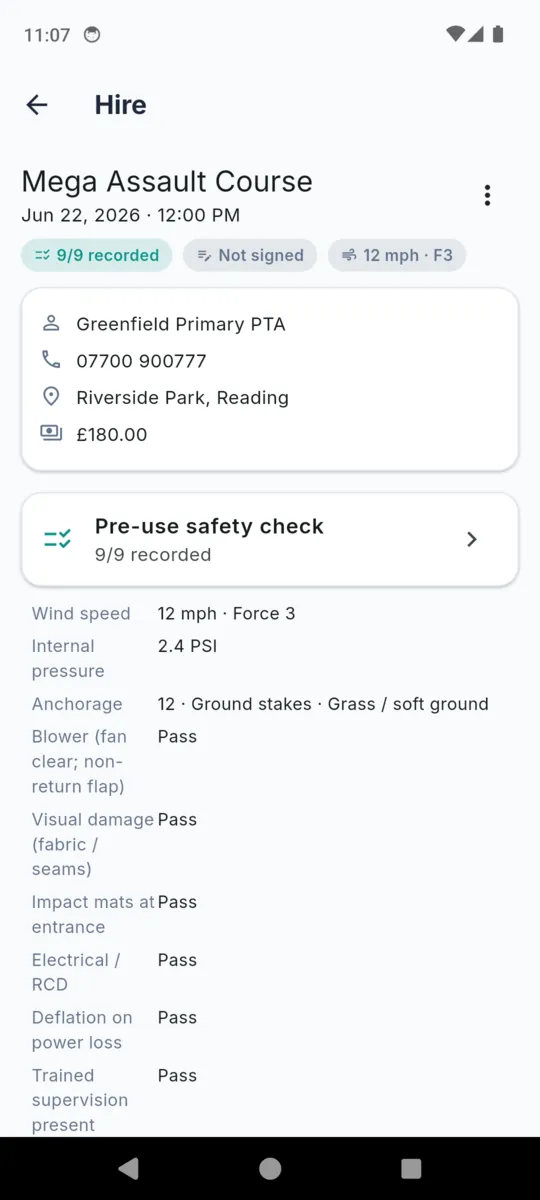
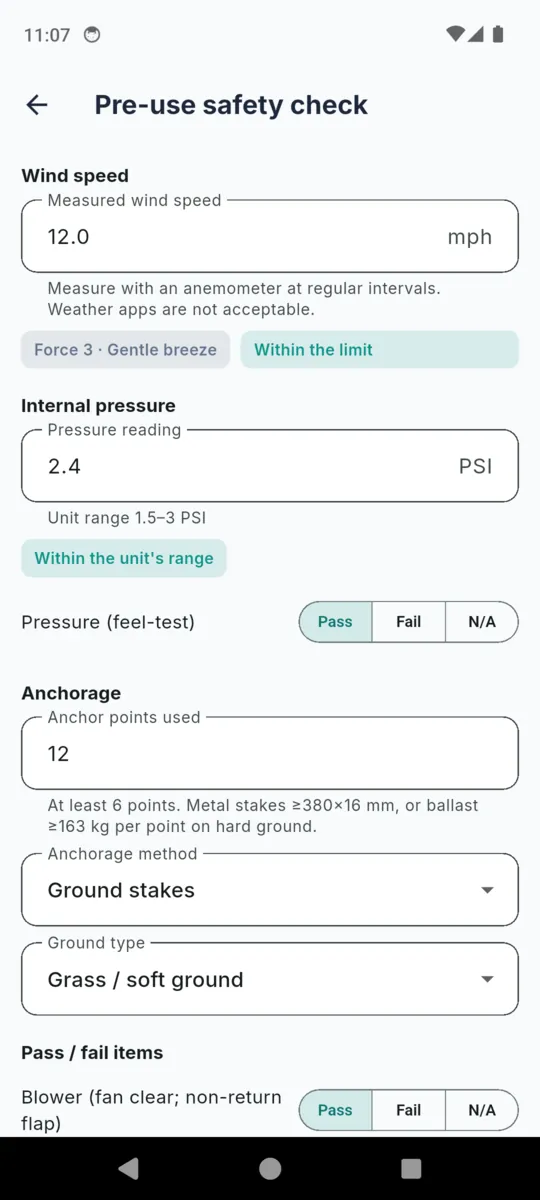
Type in the reading off the anemometer. The app puts a Beaufort force on it and, under BS EN 14960, tells you whether you are under 24 mph or over it. This is the measurement that can end the day.
Where the 24 mph wind speed limit comes from02
Enter the manometer reading and it is checked against the minimum and maximum you stored on that unit, in whatever unit you work in. No gauge on you? Record a documented feel test instead and it is marked as such.
03
How many points actually went in, by stakes, ballast, ground bolts or a mix, and onto grass, hard standing or indoors. Fewer than six and the record says so, on screen and on the PDF.
04
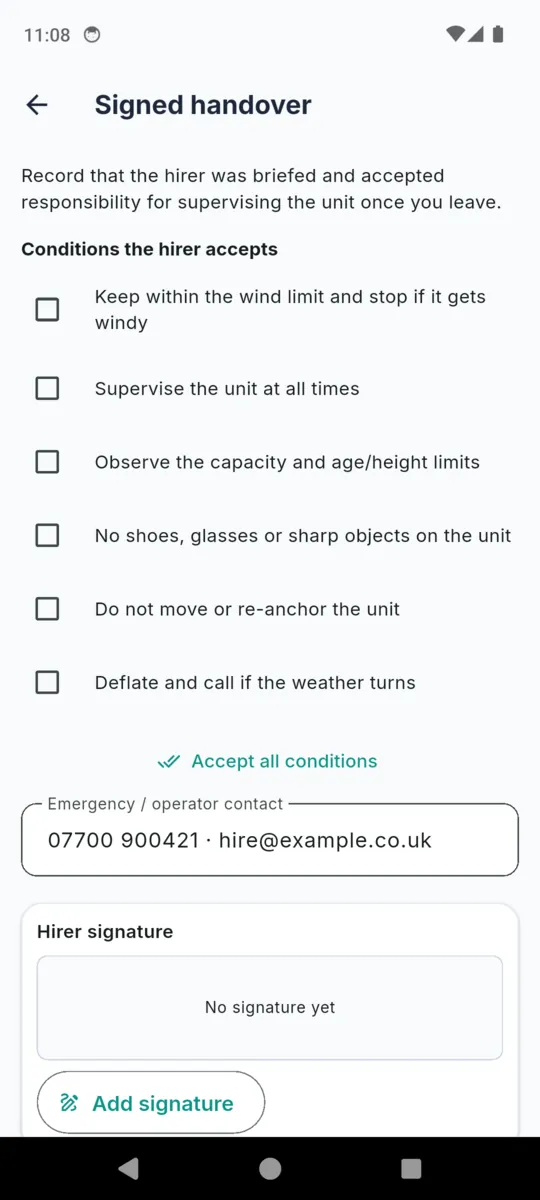
Six conditions read out and accepted, an emergency number, the hirer's signature and yours. From here on the unit is being supervised by somebody who signed for it.
PLUS SIX PASS / FAIL ITEMS ON THE SAME FORM
Each one is pass, fail or not applicable, and the app shows a plain count of how many of the core readings and items you recorded. It never shows a green "all safe" summary, because that is a verdict and this is a record.
It is the only reading on the form that can cancel a booking, so the app does something with it rather than just storing it. Type in the mph and you get the Beaufort force back immediately, plus a plain statement of where that sits against the limit for the standard you selected.
F0
up to 1 mph
Calm
F1
2 – 3 mph
Light air
F2
4 – 7 mph
Light breeze
F3
8 – 12 mph
Gentle breeze
F4
13 – 18 mph
Moderate breeze
F5
19 – 24 mph
Fresh breeze
F6
25 – 31 mph
Strong breeze
F7
32 – 38 mph
Near gale
The app uses 24 mph as the per-hire wind figure and expects at least six anchor points. Reach or pass 24 and the wind row turns into a warning that carries through onto the audit pack.
Switch to the Australian and New Zealand setting and BounceLog shows no numeric wind limit, because there is no single national figure to show. It still records your reading and its Beaufort force, and still expects six anchor points.
The form's own guidance is blunt about how to get the number: measure with an anemometer at regular intervals, and weather apps are not acceptable. Whatever the app displays, the manufacturer's operating manual and the published standard govern, and the wind decision is yours.
The handover screen exists to record that the hirer was briefed and accepted responsibility for supervising the unit once you leave. These are the six conditions, word for word as they appear in the app and on the PDF.
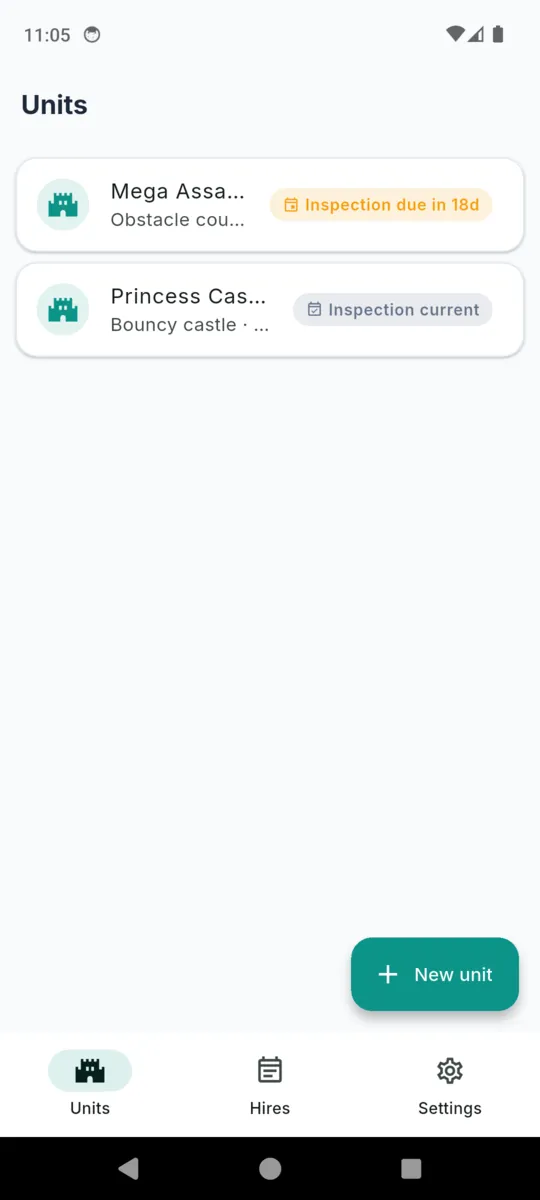
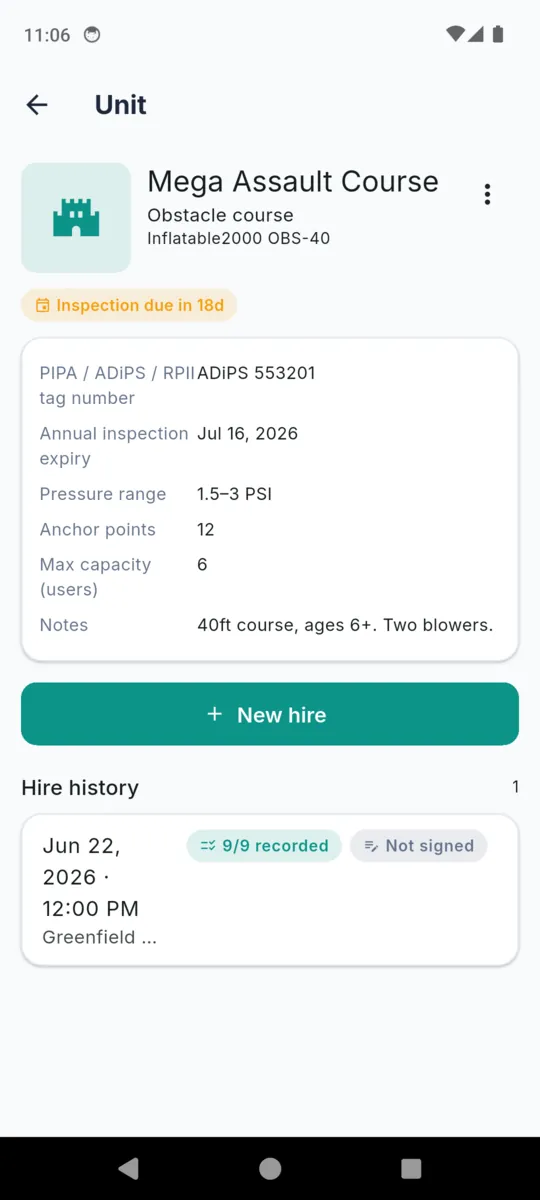
Five screens from the shipped build. The hirers, addresses and phone numbers in them are sample data.
Scroll sideways, or use the arrow keys
PDF · ONE PER HIRE
Headed Hire safety record, with the standard you were working to and the date it was generated. Inside, in this order:
Built on the phone, shared from the phone. The full disclaimer sits on the cover.
PER INFLATABLE
Fill it in once and every hire of that unit inherits it, which is what makes the pressure and anchorage checks mean anything.
The tag number and expiry are typed in by you and are not verified by the app. The annual inspection is a competent person's job.
Fourteen days of everything when you install it, no card. After that, carry on with the free tier or buy it once. Most operators take the lifetime: nothing renews and it stays unlocked.
Either way, hires you already recorded are never locked, hidden or deleted, and stay re-exportable. The free tier only stops you adding new ones past the cap.
LIFETIME
£24.99once
Or £1.99 a month, or £9.99 a year. Prices set in pounds sterling.
No. It records the checks you carried out and the handover you gave. It is not a safety inspection and does not replace the annual inspection by a competent person.
From the standard you pick in Settings. On BS EN 14960 the app uses 24 mph and warns you at or above it. On AS 3533.4.1 it shows no numeric limit, because there is no single national figure to show.
The form says not to. It asks for a measured reading taken at regular intervals, and a forecast for the nearest town is not that.
It compares it against the minimum and maximum you stored on that unit and tells you whether it is inside the range. If you did not take a numeric reading you can record a documented feel test instead.
No. You type the tag number and the annual-inspection expiry in yourself, and the app shows you when that date is near. It cannot verify either, and the annual inspection is still a competent person’s job.
Six conditions about wind, supervision, capacity, shoes and sharp objects, not moving the unit, and deflating if the weather turns. They sign on screen, you sign on screen, and both signatures print on the PDF.
Yes. Units, hires, checks, photos, signatures and PDFs are stored on the phone. A connection is only used to serve ads on the free tier.
Nothing you already recorded is locked, hidden or deleted. It stays readable and re-exportable. The free tier caps only new entries: one unit, five hires and one audit-pack export.
This is the notice the app shows on the check form, on the handover, on the PDF cover and in Settings, word for word:
BounceLog helps you record your own pre-use safety checks and handover for each hire. It is a record-keeping tool — it is not a safety inspection, does not certify that any inflatable is safe to use, and does not replace the annual inspection by a competent person (PIPA / RPII / ADiPS). You are responsible for following BS EN 14960 / AS 3533.4.1 and HSE guidance, for your anchorage and wind-speed decisions, and for the accuracy of every record. Always check the manufacturer's operating manual.
Links to the HSE, PIPA, RPII, ADiPS and the standards themselves are collected on the BounceLog resources page.
Put one unit in with its pressure range and anchor points, then run the check on site and see what the PDF looks like.