HARNESS INSPECTION LOG

GearCheck icon

GearCheck

Fall-protection & rigging gear log

Gear times out even when it passes.

A harness you inspected last week can still be finished, because the manufacturer's service life ran out four months ago. GearCheck keeps both dates against every item and lets the worse one decide.

14-day trial, then $1.99/mo,
$9.99/yr or $24.99 once. Android.

  • Records & Compliance
  • Android
  • Works offline
  • No account
  • 10 languages
GearCheck launch screen: orange harness webbing and a steel carabiner above the wordmark and the line Scan gear. Log inspections. Keep the record.

THE PART OTHER LOGS MISS

Two clocks, one item

Most inspection logs count one interval and reset it every time you sign. Fall-protection gear has a second date that never resets, and it is the one that catches people out.

01

The formal interval

Resets on the day you log a formal inspection. GearCheck defaults to twelve months for every gear type and lets you override it per unit, so a manufacturer that mandates six months wins.

Runs from
Last formal inspection
Never inspected
Dates from first use
Flags at
30 days out

02

The manufacturer service life

Runs from first use and never resets. When it is reached the item is overdue however recently it was inspected, and GearCheck says that on the record instead of quietly folding it into one status.

Runs from
First use, else manufacture
Wear-based gear
No clock shown at all
Flags at
60 days out

WHAT THAT LOOKS LIKE ON ONE HARNESS

  1. First use Jul 2015
  2. Last formal Jan 2026
  3. Next formal due Jan 2027
  4. Service life Jul 2025

The inspection is current and the harness is still finished. GearCheck marks it overdue, prompts you to remove it from service, and drops it off the worklist once you do.

Which gear gets a second clock

Soft goods age. Hardware wears. GearCheck encodes that difference rather than putting an expiry date on everything, because a chain sling with a made-up ten-year limit is worse than no limit at all. Both columns are defaults you can override on any unit.

Gear type Code Formal inspection Service life default
Full-body harness HAR Every 12 months 10 years
Lanyard / SRL LAN Every 12 months 10 years
Rope / rope grab RPE Every 12 months 10 years
Sling — synthetic SL-S Every 12 months 10 years
Connector / carabiner CON Every 12 months None — wear-based
Anchor / anchorage connector ANC Every 12 months None — wear-based
Sling — chain SL-C Every 12 months None — wear-based
Sling — wire rope SL-W Every 12 months None — wear-based
Other OTH Every 12 months None — wear-based

The ten-year defaults reflect common manufacturer practice for webbing and other soft goods. They are a starting point, not a rule: check the instructions that came with the item and change the number if it differs.

The checklist changes with the item

A harness and a wire-rope sling fail in completely different ways, so they do not share one generic set of tick boxes. Pick the gear type once when you register the unit and every inspection form after that shows the criteria for that type. Each item is marked pass, fail or not applicable, and those marks print on the report.

HAR Full-body harness

  • Webbing free of cuts, abrasion, burns
  • Stitching intact (no broken/pulled threads)
  • D-rings / attachment points sound
  • Buckles & adjusters work and hold
  • Manufacturer label present & legible
  • Impact indicator NOT deployed

SL-C Sling — chain

  • Links free of wear, stretch, gouges
  • Hooks & latches sound
  • Master link sound
  • Tag legible & WLL readable

SL-W Sling — wire rope

  • No broken wires beyond removal criteria
  • No kinks, birdcaging or crushing
  • No significant corrosion
  • End fittings sound
  • Tag legible & WLL readable
The full harness inspection checklist, item by item

Nine gear types are covered. The criteria stay in English in every language the app runs in, because translating a removal criterion changes what it means.

The app itself

Six screens from the shipped build. The names, sites and serial numbers in them are sample data.

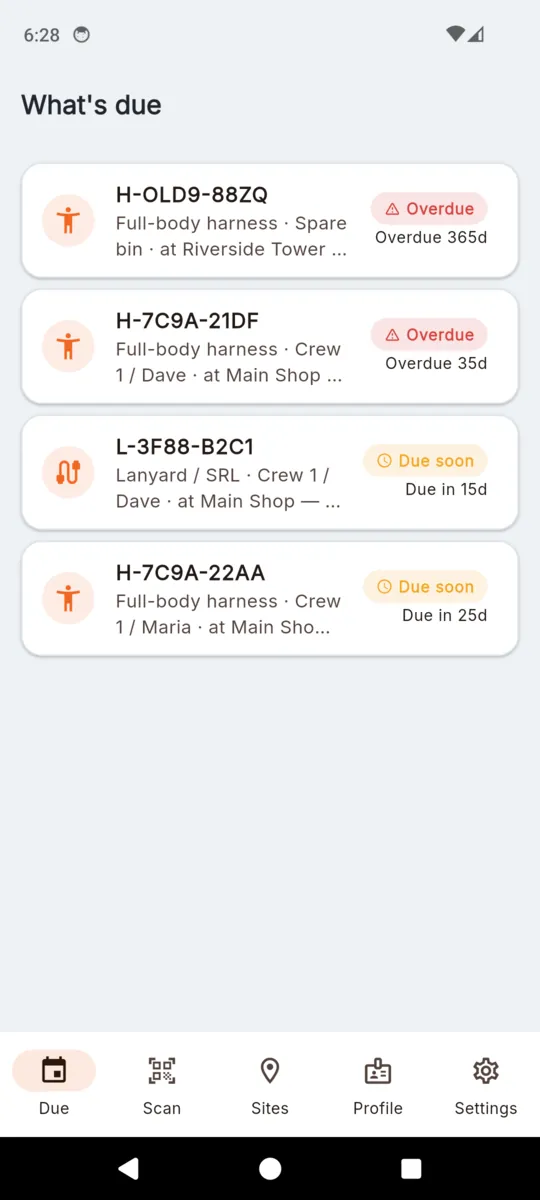
GearCheck's What's due list showing four gear items, two marked Overdue by 365 and 36 days and two marked Due soon in 15 and 21 days, each with its serial, type and site
What's due, worst first, across every site (sample data)
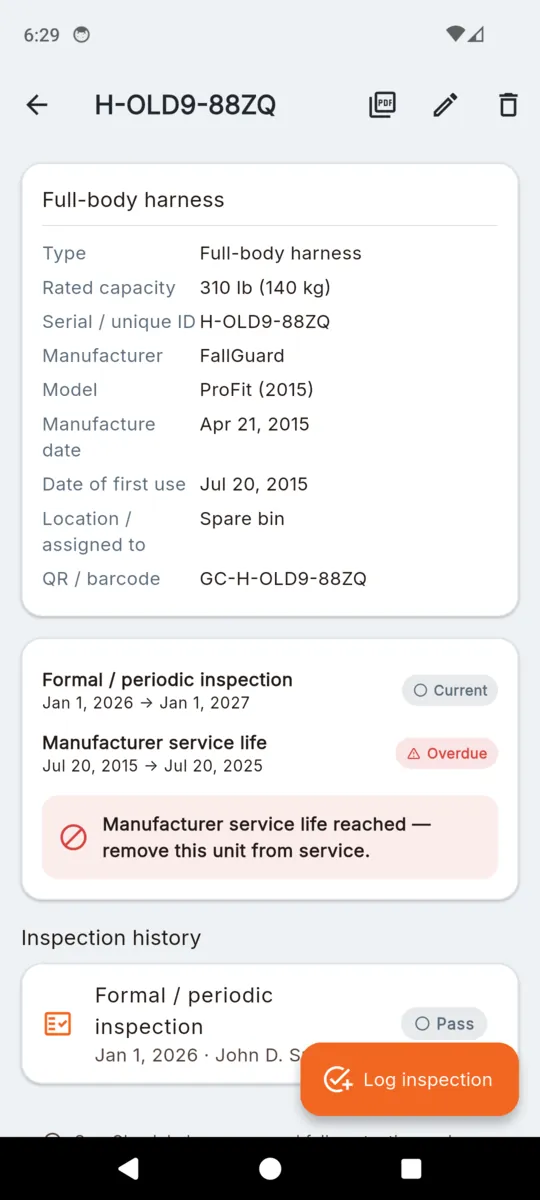
A full-body harness record in GearCheck showing rated capacity, serial, manufacturer, model, manufacture date, first-use date, location and scanned code, above the formal inspection and service-life rows
One harness: identity, dates, and both clocks (sample data)
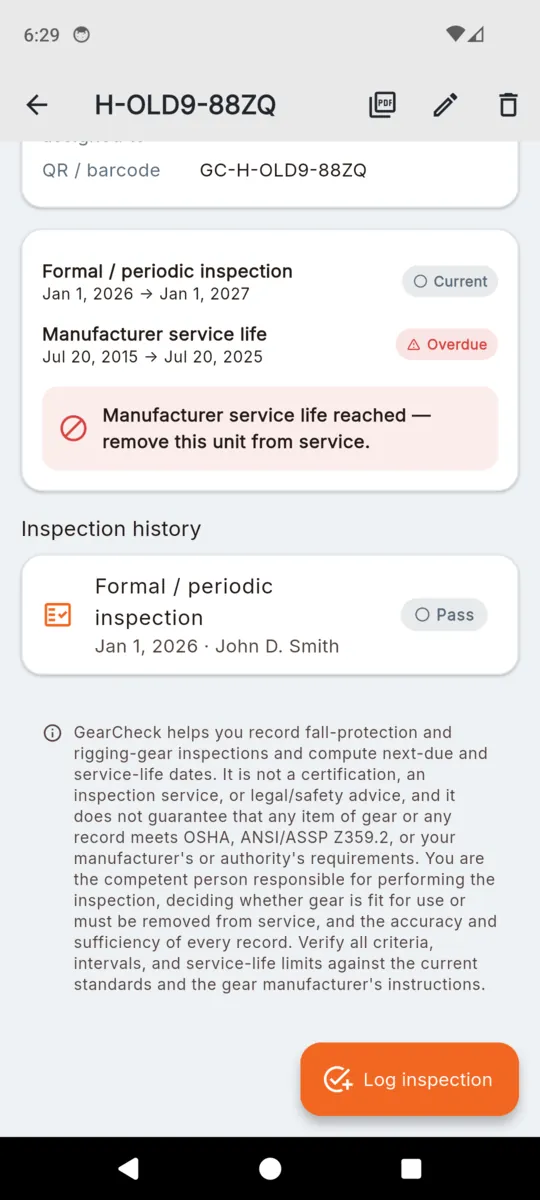
The same harness scrolled down to a red panel reading Manufacturer service life reached — remove this unit from service, with the inspection history below it and the full GearCheck disclaimer underneath
Service life reached, so the unit comes off the job whatever the inspection said
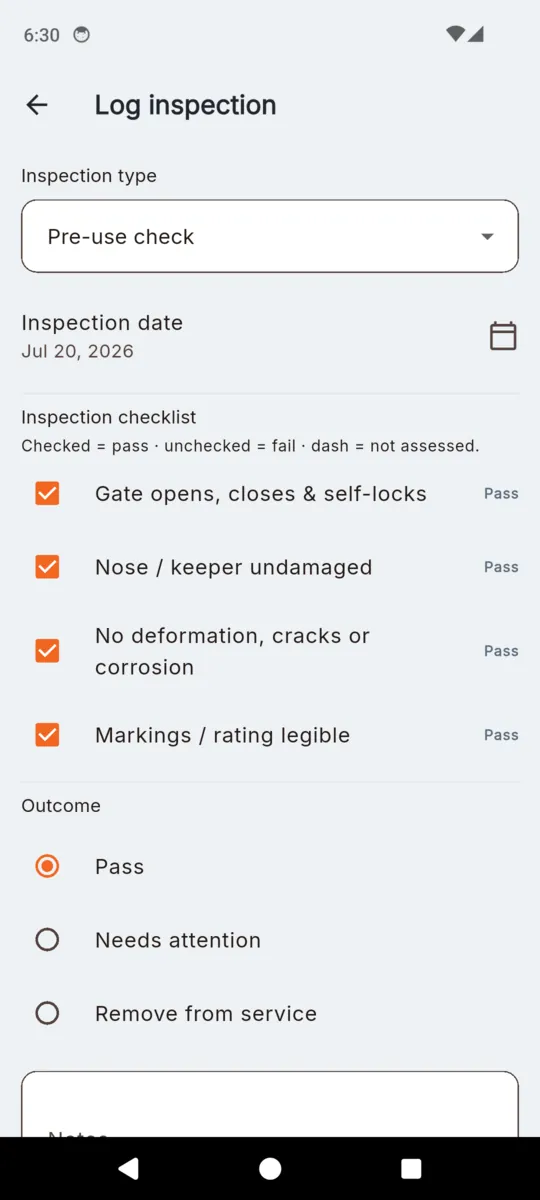
The Log inspection form in GearCheck with inspection type Pre-use check, a date field, the six harness checklist items each marked Pass, and the outcome choices Pass, Needs attention and Remove from service
Logging one inspection: the checklist matches the gear type
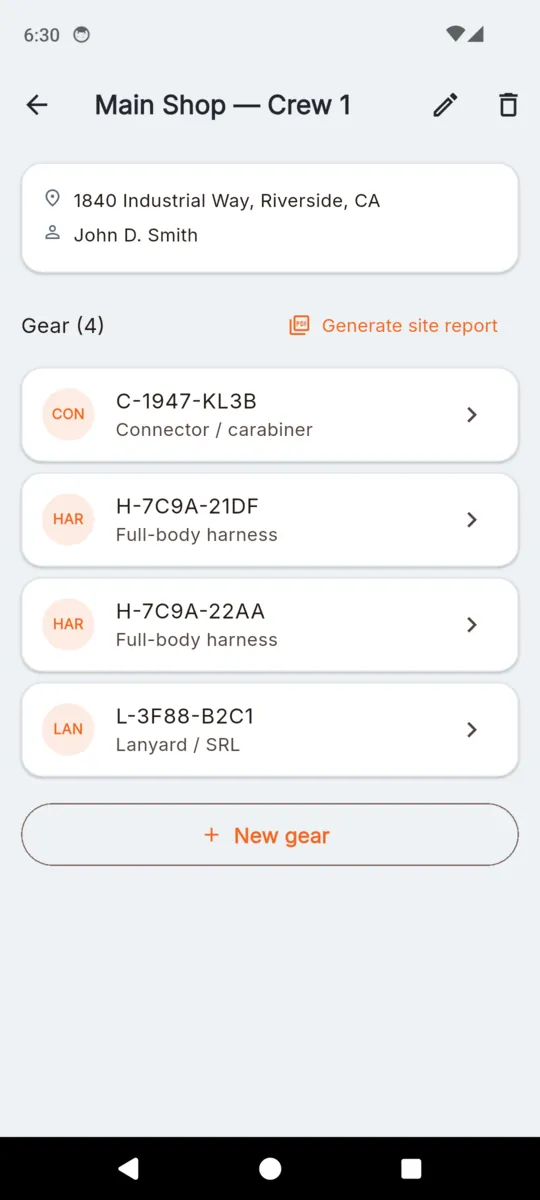
A GearCheck site called Main Shop — Crew 1 with its address and competent person, four gear items listed by serial and type, and a Generate site report button
A site or crew, its gear, and the report button (sample data)
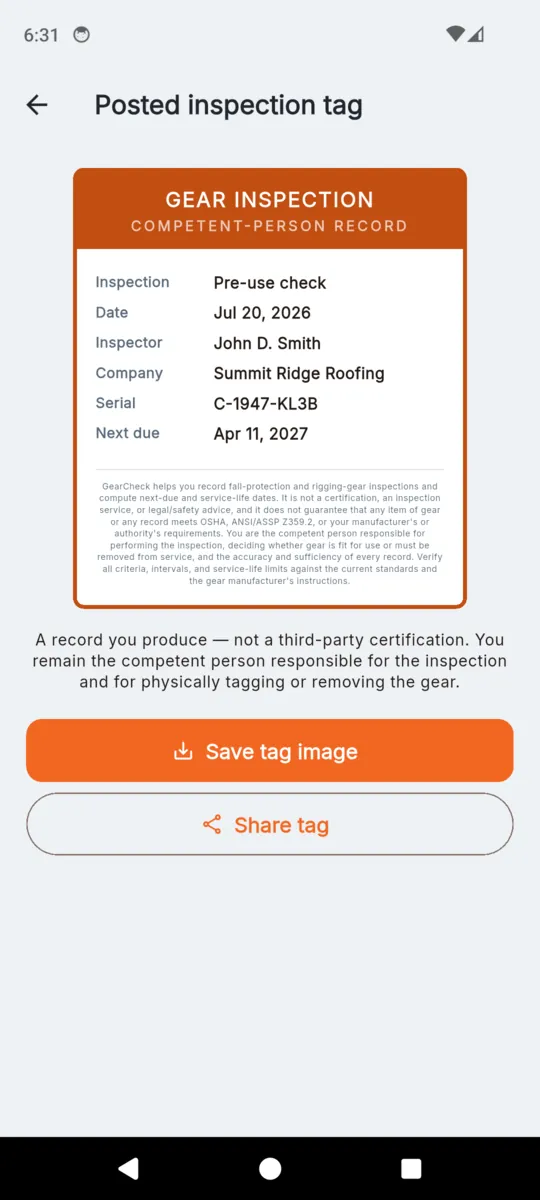
A posted inspection tag image headed GEAR INSPECTION, COMPETENT-PERSON RECORD, listing inspection type, date, inspector, company, serial and next due date above the disclaimer, with Save tag image and Share tag buttons
The tag image you post on the gear, or send on

What you can hand somebody

Three artefacts come out of the same records. Nothing uploads to make them.

TAG IMAGE

The posted tag

A card headed GEAR INSPECTION / COMPETENT-PERSON RECORD carrying the inspection type, date, inspector, company, serial and next formal due date, with the disclaimer along the bottom. Save it to the gallery or share it. A removal record prints no next-due date.

PDF · PER SITE

Site inspection report

Titled Fall-Protection & Rigging Gear Inspection Report. The cover carries the company, competent person, qualification, site, address, contact and item count, plus the disclaimer. Then a gear table of serial, type, location, last formal, next formal due, service life and status; the service history as date, service, outcome, technician and notes; a signature block; and the photos. Pages are numbered.

PDF · PER UNIT

Gear service history

One item, end to end: type, rated capacity, serial, manufacturer, model, manufacture and first-use dates, location, last formal inspection, next formal due, manufacturer service life and whether it has been removed from service, followed by every inspection logged against it and the photos.

Between the two clocks

  • Scan to open a unit. Point the camera at the QR or barcode on the gear and its history opens. An unknown code offers to register it. There is always a manual code box, so a scratched label never dead-ends you.
  • Pre-use and formal, kept apart. Both are logged against the unit, and only a formal inspection moves the formal clock.
  • Three outcomes, no green tick. Pass, needs attention, or remove from service. Nothing in the app is coloured like a safety verdict, because it is a record and not one.
  • Photos and a signature on the record. Attach damage photos, sign on screen, and both come through onto the report.
  • Location stamp, off by default. A switch on the inspection form captures coordinates for that one record. Leave it off and no location is read.
  • Everything on the phone. No account, no sync, no server. Ten languages, though the inspection criteria stay in English.

What it costs

Fourteen days of everything when you install it, no card. After that, keep going on the free tier or pay once and be done. The lifetime unlock is the one most people want: nothing renews and it stays unlocked.

Whichever you pick, records you already made are never locked, hidden or deleted. They stay readable and re-exportable. The free tier only stops you adding new ones past the cap.

  • Sites or crews1
  • Gear items10
  • New report PDFs1
  • Ads on the free tierBanner

LIFETIME

$24.99once

Or $1.99 a month, or $9.99 a year. Prices set in US dollars.

  • Unlimited sites and gear items
  • Unlimited site and per-unit PDFs
  • Full inspection history per unit
  • No ads
Get GearCheck

Questions

Does GearCheck certify that my gear is safe?

No. It records an inspection you perform and works out the next-due and service-life dates from what you entered. You are the competent person deciding whether gear stays in service.

What are the two clocks?

The formal inspection interval, which resets every time you log a formal inspection, and the manufacturer service life, which runs from first use and never resets. Whichever is worse sets the item’s status.

What if a type of gear has no service life?

Then GearCheck shows no second clock for it. Connectors, anchors, chain slings and wire-rope slings are wear-based, so the app leaves that row out rather than inventing an expiry date.

Can I change the intervals?

Yes. The formal interval and the service life are both overridable per unit, so a manufacturer that mandates six months wins over the default. Setting a service life of zero means that unit has none.

Does it work with no signal?

Yes. Sites, gear, inspections, photos, tags and reports are stored on the phone. A connection is only used to serve ads on the free tier.

Does it send me reminders?

No. GearCheck has no notifications. The due list is something you open, not something that pings you, and it sorts by whichever clock is closest.

What happens when the trial ends?

Nothing you already recorded is locked, hidden or deleted. It all stays readable and re-exportable. The free tier caps only new items: one site, ten gear items and one report.

Do I need an account?

No. There is no sign-up and no cloud copy. If you lose the phone, anything you have not exported goes with it.


What GearCheck is not

This is the notice the app shows on the inspection form, on the tag, on the PDF cover and in Settings, word for word:

GearCheck helps you record fall-protection and rigging-gear inspections and compute next-due and service-life dates. It is not a certification, an inspection service, or legal/safety advice, and it does not guarantee that any item of gear or any record meets OSHA, ANSI/ASSP Z359.2, or your manufacturer's or authority's requirements. You are the competent person responsible for performing the inspection, deciding whether gear is fit for use or must be removed from service, and the accuracy and sufficiency of every record. Verify all criteria, intervals, and service-life limits against the current standards and the gear manufacturer's instructions.

Start with the gear you are least sure about

Register one harness, put its first-use date in, and see which clock runs out first.