WATER TEMPERATURE MONITORING LOG
What a monitoring log records, point by point
A water temperature monitoring log is not one sheet. It is a schedule of assets — the sentinel outlets, the calorifier, the cold-water tank, the blending valves, the taps nobody uses — each on its own clock, each with a different thing measured at it. This page walks the whole set, with the reference line LegioCheck prints beside each reading and the cadence it starts from.
Back to LegioCheck →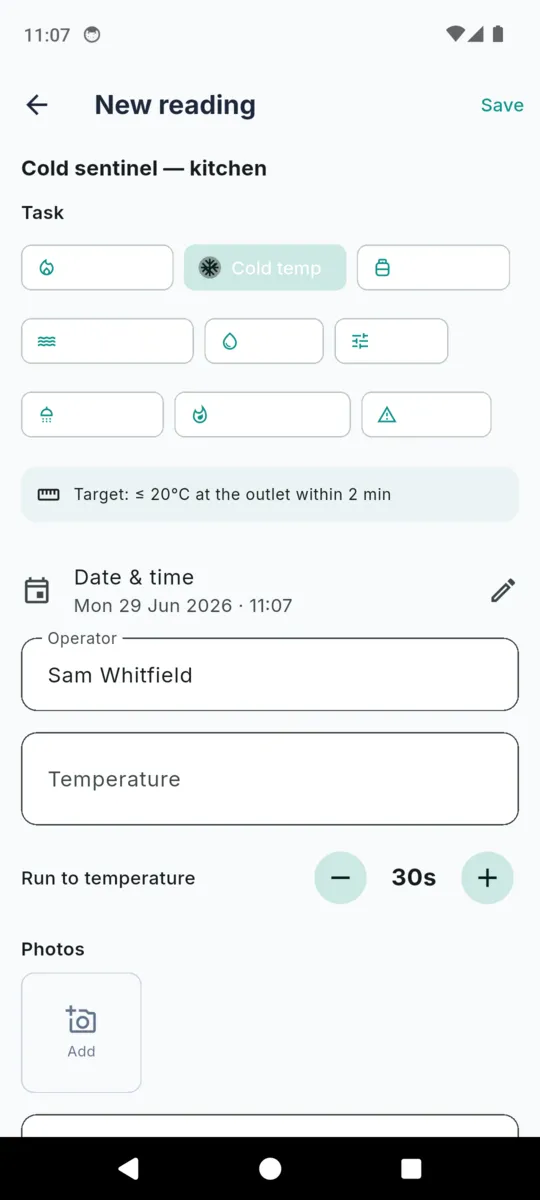
The log is the evidence, and it is written at the tap
Monitoring for Legionella control comes down to a small number of repeated, boring measurements taken at the same places on a rota. The measurements themselves take seconds. What makes the exercise worth anything is that they are written down at the time, against a named outlet, by a named person, so a run of them can be read as a trend rather than a pile of numbers.
Most sites lose this at the recording step rather than the measuring one. A clipboard that lives in a plant room, a photo of a clipboard, a spreadsheet typed up on a Friday from memory — all of them produce a log that reads as approximately true, which is exactly what a record is supposed not to be.
The other thing sites lose is the schedule. A monthly sentinel reading, a six-monthly tank check and a weekly flush do not fall on the same day, and a rota that only exists in somebody’s head fails the first time that person is on holiday.
This page is general information about water-hygiene recordkeeping, not legal or safety advice. The temperatures and frequencies below are the general guidance values LegioCheck prints as a reference; they are not requirements and they are not a control scheme. What your system needs is set by a competent person and your own risk assessment.
The assets, and what is taken at each
Eight asset types, each pre-set to a task and a cadence when you add it. The reference column is quoted exactly as the app prints it beside the field, and it is kept in English on every language the app runs in, because translating a guidance figure changes what it says.
| Asset | Task recorded | Reference the app prints | Cadence |
|---|---|---|---|
| Sentinel (hot) | Hot sentinel temperature The outlet furthest from the calorifier on the hot circuit. If the hot water is getting there, it is getting everywhere nearer. | ≥ 50°C at the outlet within 1 min | Monthly |
| Sentinel (cold) | Cold sentinel temperature The outlet nearest the incoming main on the cold side. It is the first place warming shows up, usually because a cold pipe is running past something hot. | ≤ 20°C at the outlet within 2 min | Monthly |
| Calorifier | Calorifier flow / return Two readings, not one. The pair tells you whether the whole circuit is turning over or whether the far end is sitting cool. | Flow ≥ 60°C · return ≥ 50°C | Monthly |
| Cold-water storage tank | Cold-water tank check A tank in a warm loft is the classic problem. The check is a temperature plus what you saw when you took the lid off — which is what the photo and notes fields are for. | ≤ 20°C throughout | Six-monthly |
| TMV | TMV service A blending valve is a mixing point sitting at exactly the wrong temperature. The log records that it was serviced, not a reading. | Service annually | Annual |
| Showerhead / spray | Showerhead descale Heads and hoses hold scale and biofilm and then aerosolise them. A tick and a date, with a photo if the head was in a state. | Descale / disinfect quarterly | Quarterly |
| Little-used outlet | Weekly flush The void room, the spare en-suite, the cleaner’s tap nobody turns on. Recorded as flushed or not flushed, with the minutes if you timed it. | Flush little-used outlets weekly | Weekly |
| Tap / outlet | Cold sentinel temperature Everything else on the schedule that is not a designated sentinel but is still on a rota. | ≤ 20°C at the outlet within 2 min | Annual |
A ninth task, thermal disinfection, is logged against whichever outlet it was carried out at, with a temperature and a hold time and the reference line ≥ 60°C held for 5 min. Every cadence above is the default the app suggests when the asset is added, and every one of them is changed on the outlet.
What one reading carries
The reading screen asks only for the fields that task uses. A calorifier is never asked for a run-to-temperature time, and a flush is never asked for a temperature.
Date and time
Stamped when you save, and editable if you are writing up an hour later.
Operator
Who took the reading. A log with no name against a line answers nothing later.
Temperature
The outlet temperature, on hot and cold sentinel readings and on a thermal disinfection.
Flow and return
Two figures, asked for on a calorifier and nowhere else.
Tank temperature
The cold-water storage tank reading.
Run-to-temperature
Seconds counted on a timer on the reading screen, on sentinel readings — because the reference line is about how fast, not only how hot.
Hold time
Minutes held, on a thermal disinfection.
Flush duration
Minutes, on a weekly flush.
Done
A completed flag for the tasks that are not a number: flush, TMV service, descale.
Within guidance
Set from the reference line for that task. Recorded on the reading, not decided by you at the tap.
Notes
What you saw, what you did, what needs someone else. This is the field an auditor reads.
Photos
Attached to the reading and carried into the export appendix.
Within, or outside — never a pass
When a reading has a reference line, the app records whether it sat within it and flags anything outside in amber, with a prompt to record the cause. There is no green tick and no red cross. A cold outlet running warm on a hot afternoon is a fact to be explained, not a failure to be graded, and the wording on the record stays neutral so that the explanation is the thing that gets written down.
A reading that falls outside is also where the defect register starts. A defect carries the cause, the action taken, the date it was raised and the date it was resolved, and it stays open on the record until that last date is filled in.
Walking the round
The reason a paper log survives is that it does not need you to find things. A digital one has to earn that, which is why the app does the round rather than the form.
- 1
The dashboard opens on what is due
Overdue first, then anything falling within the next seven days, then everything never monitored — across every property, not one at a time.
- 2
Start a round on a property
It queues that property’s due outlets in order and steps through them one at a time, showing which of how many you are on. Skip is a real button, because a locked room is a real thing.
- 3
Take the reading where you are standing
The task is pre-selected from the asset type, the reference line is printed above the field, and a timer on the screen counts the run-to-temperature seconds while the tap is running.
- 4
Finish, and the clocks reset themselves
Each outlet’s next-due date is set from its own cadence, so a weekly flush and a six-monthly tank check never end up on the same rota by accident. The round ends on a summary of anything that came in outside guidance.
What the record looks like when someone asks for it
One PDF per property, for whatever date range you pick, built on the phone. It is laid out the way a person reads a logbook rather than the way a database exports one.
-
Cover
Property, address, responsible person, client or landlord, the date range, and the operator and company. The disclaimer sits in a box directly underneath it.
-
Asset register
Every outlet with its type, location, whether it is a designated sentinel, and its cadence. This is the page that says what was supposed to be monitored.
-
Monitoring log
Grouped by task rather than by date, so all the hot sentinel readings read as one series. Each group prints its reference line, then the readings as date, outlet, reading, within guidance, and operator with notes. Anything outside is tinted.
-
Defect register
Cause, action taken, date raised, date resolved. Anything still open prints as open rather than being left blank.
-
Photo appendix and signature
Photos attached to readings and defects, up to twenty-four so the file stays emailable, then your captured signature above your name and company.
What this is not
LegioCheck is a record-keeping and scheduling tool. It is not a risk assessment, it does not set a control scheme, and it does not decide whether your system is safe. It reduces the paperwork around monitoring that a competent person has already specified.
LegioCheck helps you record and schedule Legionella monitoring tasks and keep your records. It is not a risk assessment, not legal or safety advice, and does not guarantee compliance with ACoP L8, HSG274, COSHH, or any regulation. The temperatures and frequencies shown are general guidance values — your system’s actual control scheme must be set by a competent person and your own risk assessment. You are responsible for the accuracy and sufficiency of your monitoring and records.
Background reading and the published guidance are collected on the LegioCheck resources page.
Questions
What goes on a water temperature monitoring log sheet?
The date and time, who took the reading, the outlet it was taken at, the value, whether it sat within the guidance value for that task, and a note. Everything else on the sheet exists to identify the property and the assets.
How often should water temperatures be recorded?
LegioCheck defaults sentinel outlets and calorifiers to monthly, cold-water tanks to six-monthly, showerheads to quarterly, TMVs annually and little-used outlets weekly. Those are starting points; the schedule for your system is set by your own risk assessment.
What are sentinel points?
The outlets chosen to represent the system: usually the furthest on the hot circuit and the nearest on the cold. They are monitored because if the extremes are behaving, everything between them probably is too.
Does the app tell me if a reading is a pass?
No. It marks a reading as within or outside the guidance value for that task, in amber rather than red or green, and asks you to record the cause. The judgement about what that means for your system stays with the responsible person.
Where do the temperatures shown in the app come from?
They are the general guidance values published for Legionella control in water systems, printed beside the field so the number is in front of you at the tap. They are reference lines, not limits the app enforces.
Can I keep the log without a signal?
Yes. Properties, outlets, readings, defects, photos and the PDF are all handled on the phone. There is no account and no cloud copy, so Settings writes a backup file you keep yourself.
General information about water-hygiene recordkeeping, not legal or safety advice. No temperature or frequency on this page is a requirement. Your system’s control scheme must be set by a competent person and your own risk assessment. LegioCheck reduces the paperwork around monitoring; it does not carry out a risk assessment and does not guarantee compliance with any regulation.
Keep the log where the tap is
Add the property, add its outlets, and walk the round with the reference line in front of you. 14-day full trial, no card. £1.99 a month, £9.99 a year, or £24.99 once.
