PROOF OF POSTAGE SCANNER

PostProof icon

PostProof

Scan Before It Fades

The receipt goes blank long before the claim window does.

Thermal till roll is printed with heat, so heat, sunlight and time take it away again. Six months on, the slip in the shoebox can be a clean white rectangle — and that is usually the week you need the tracking number. PostProof takes a photograph while it is still readable and reads every number off it.

£1.99/mo or £29.99 once.
14-day trial. Android.

  • Records & Productivity
  • Android
  • Works offline
  • 19 carriers
  • 10 languages
PostProof launch screen: a gold postage receipt behind a camera lens on a deep navy field, with the line Scan Before It Fades

TWO CLOCKS, RUNNING AGAINST EACH OTHER

One is the paper. The other is the deadline.

The paper

Nothing in the app can slow this down. Photographing the receipt on the day you post is the whole trick — after that the picture stops changing.

Day one 3 months 6 months 12 months
Illustrative. How fast a given receipt goes depends on the paper and where you keep it.

The deadline

Set the window your carrier works to — 6, 12 or 24 months — and every receipt carries its own countdown from the date it was posted. It turns amber for the last fortnight and says so plainly once it has gone.

182 days left to claim 11d left Claim window ended

A proof-of-postage record supports a claim. It does not decide one — whether a carrier pays is their rules and their call.

What proof of postage actually is

One receipt is usually several parcels

A Post Office run comes back as one long slip with everything on it. PostProof pulls out every tracking number it can find, not just the first, and you confirm the list on a review screen before anything is saved.

Each parcel then lives as its own line — carrier, service, price where the receipt itemises it, status, and a note for the buyer name or order reference. The receipt photo stays attached to all of them.

The Royal Mail tracking number format, and how it is spotted

Six ways a receipt gets in

Whatever shape the proof arrives in — paper, PDF, or a screenshot from the carrier's own app — it ends up in the same list.

Any plan

Take a photo

The ordinary path. Point the camera at the counter receipt, and text recognition runs on the image as soon as it lands.

Any plan

Choose from gallery

For the shot you already took at the counter and forgot about until the evening.

Paid

Live Scan

For the metre of till roll a Post Office run produces. Slide the phone down the receipt and every new tracking number is chipped on screen as it appears, with section photos captured on the way.

Paid

Batch import

Point it at a folder of receipt photos and work through them one review screen at a time.

Paid

PDF proof

A Royal Mail or Click & Drop PDF is kept as the original file, and its pages are rendered so the same text recognition can read them.

Paid

Digital proof

Screenshots from a carrier app: import several at once and PostProof pulls the tracking number, date and carrier out of each.

Nineteen carrier formats it recognises

PostProof knows the shape of these carriers' tracking numbers and the wording that turns up on their receipts, so it can usually name the carrier without being told. It has no partnership or connection with any of them; what it can do is open their public tracking page in your browser.

  • Royal Mail
  • Evri
  • DPD
  • Yodel
  • Parcelforce
  • Collect+
  • Amazon Logistics
  • InPost
  • DHL eCommerce UK
  • DX
  • USPS
  • UPS
  • FedEx
  • DHL Express
  • Canada Post
  • Australia Post
  • Deutsche Post
  • La Poste
  • Correos

In the app

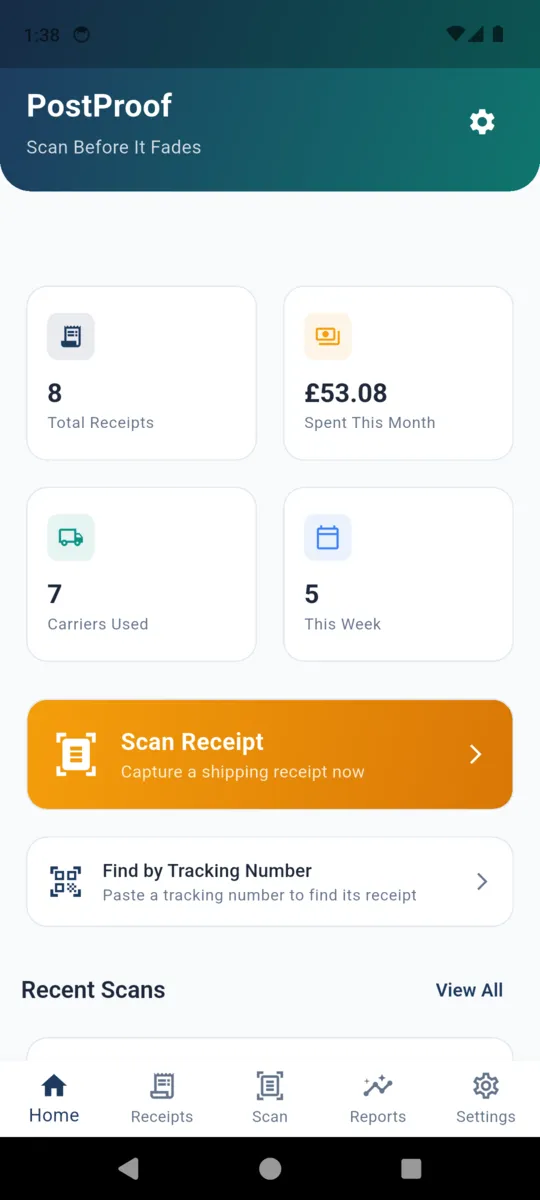
The PostProof home screen with tiles for total receipts, spend this month, carriers used and receipts this week, above a Scan Receipt button
Home, with the month's spend on it
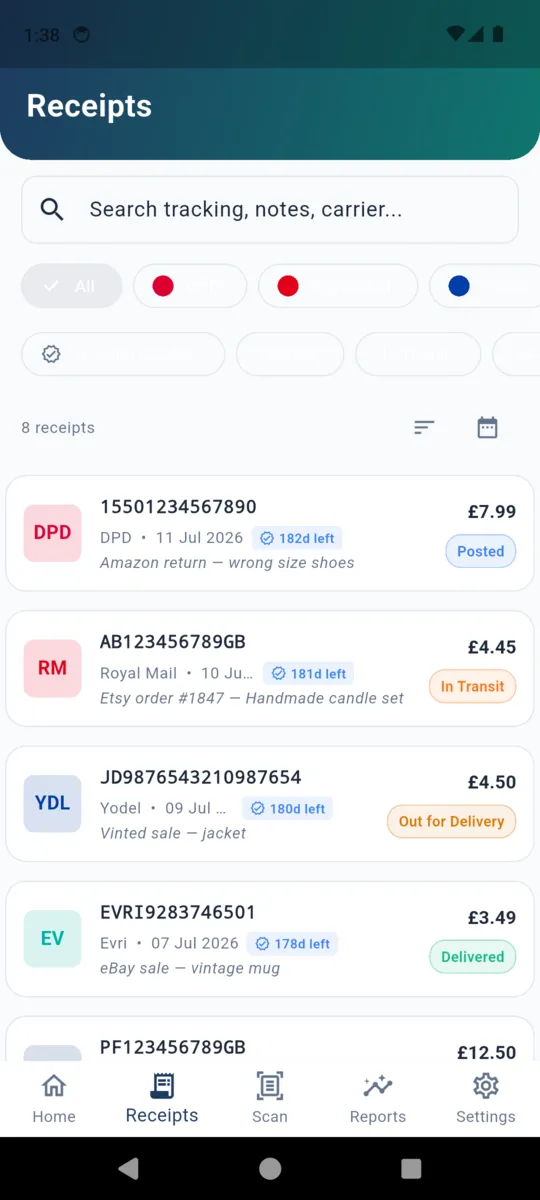
The PostProof receipts list showing five parcels with carrier badges, prices, status chips and days-left-to-claim counters
Every parcel, with its claim countdown
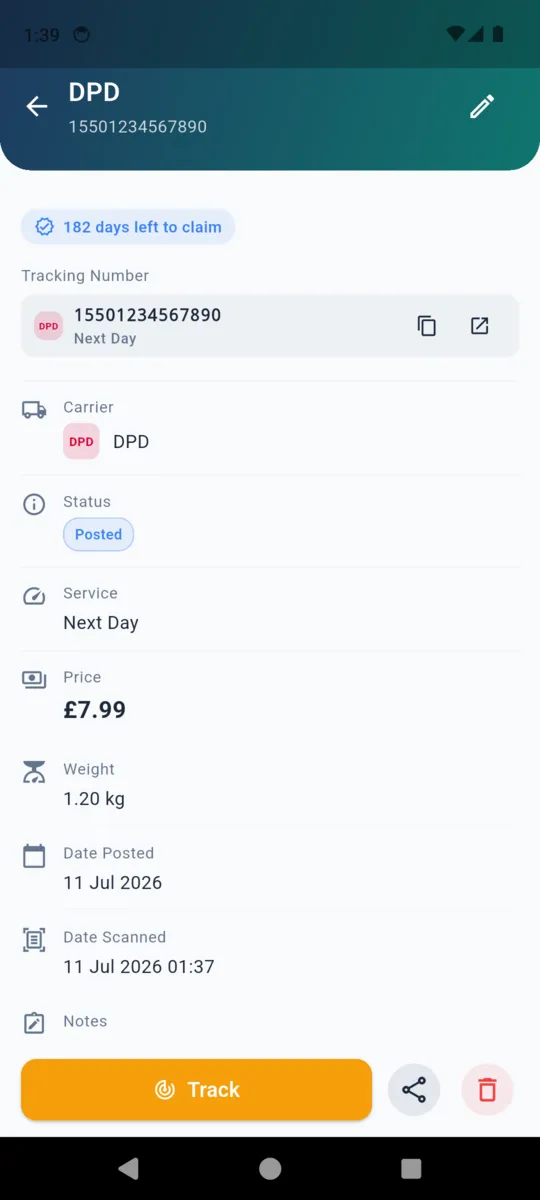
A PostProof receipt detail for a DPD parcel showing the tracking number, carrier, status, service, price, weight, date posted and a Track button
One parcel, and the button that tracks it
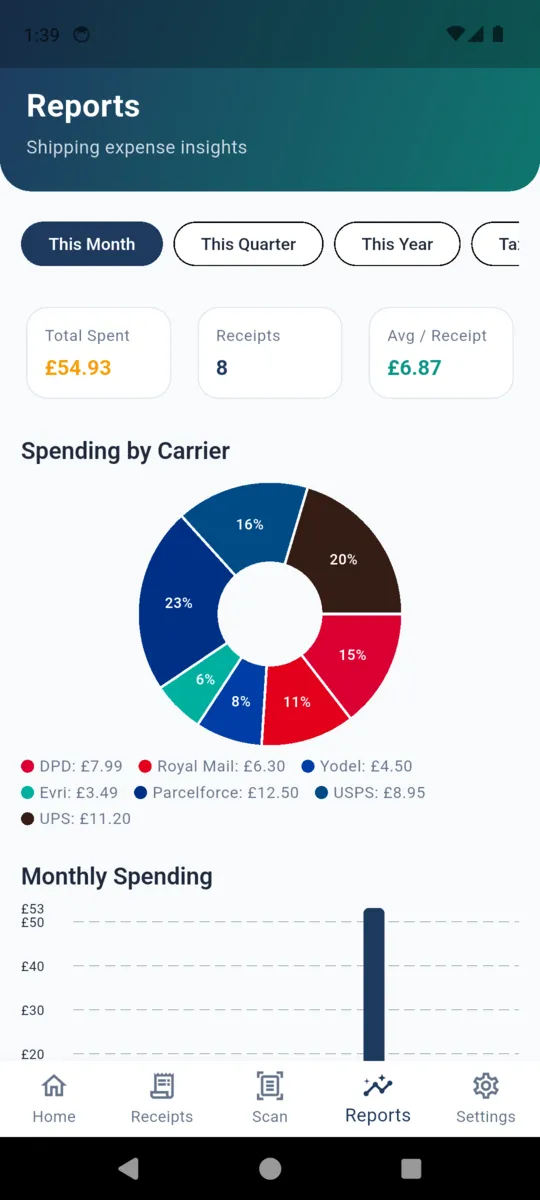
The PostProof reports screen with total spent, receipt count and average per receipt, a spending-by-carrier donut chart and a monthly spending bar chart
Reports, by month and by carrier
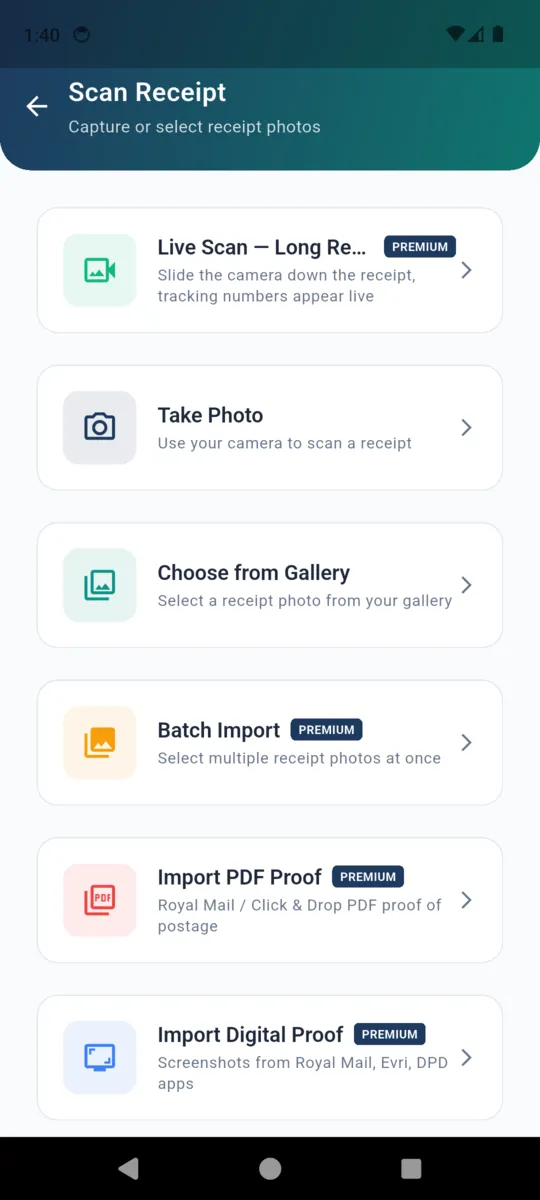
The PostProof scan screen listing Live Scan, Take Photo, Choose from Gallery, Batch Import, Import PDF Proof and Import Digital Proof
The six ways in, in one menu
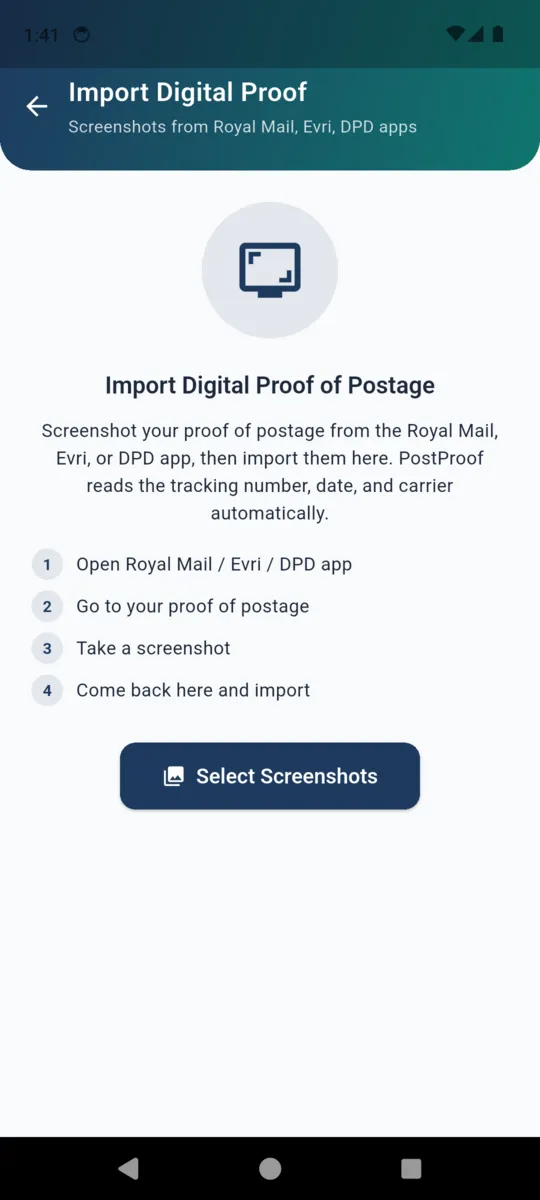
The PostProof digital proof import screen explaining how to screenshot a proof of postage in a carrier app and import it
Importing screenshots from a carrier app
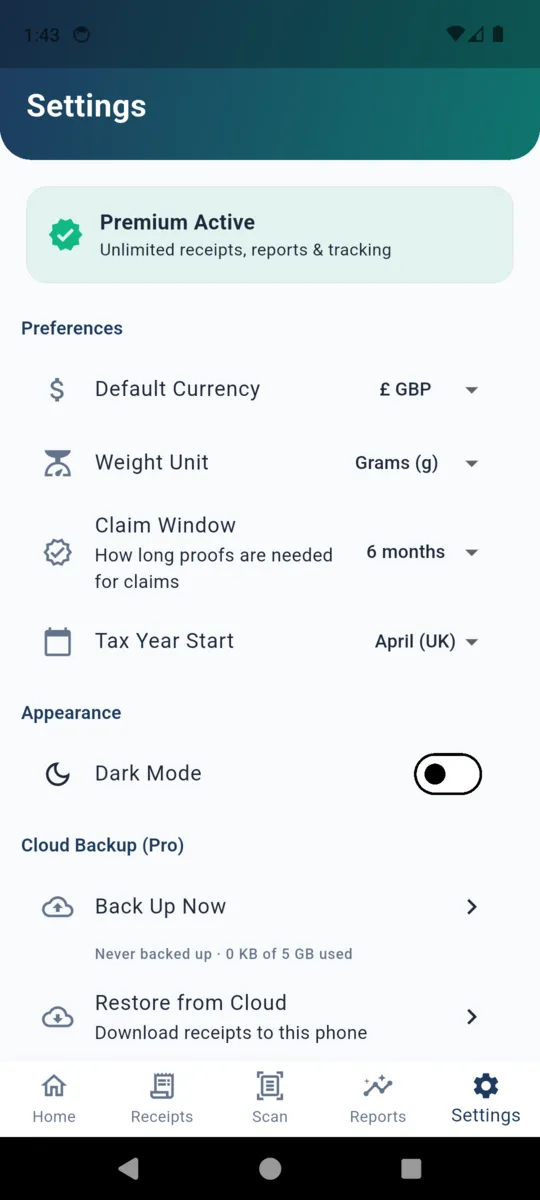
PostProof settings showing default currency, weight unit, a claim window of 6 months, tax year start, dark mode and cloud backup
Currency, claim window, tax year, backup

What the backup actually does

Most apps in this catalogue keep everything on the phone and stop there. PostProof is the exception, so it is worth saying exactly what it moves and where.

  • Every receipt becomes a document in your own private area of our Firebase project. Its photos and any imported PDF go into file storage under the same private id.
  • Photos are compressed to roughly 200KB on the way up. The plan holds 5 GB, and the app counts what you have used.
  • With backup on, each save uploads in the background. Deleting a receipt deletes it from the cloud too, and leaves a marker so Restore cannot bring it back.
  • Sign-in is anonymous and automatic — no email, no password. Link a Google account only when you want the backup to follow you to a new phone; an anonymous one is tied to the device it was made on.
  • Restore pulls the whole archive down onto a new install. Nothing is shared with anyone, and turning the feature off means nothing leaves the phone at all.

And it doubles as the postage book

The same records answer the other seller question: what did shipping cost this month.

  • Reports for this month, this quarter, this year or a tax year, with total spent, receipt count and average per receipt.
  • Spend broken down by carrier, and a monthly bar chart across the period.
  • A tax year that starts in the month you choose — April by default, because the app was built in the UK.
  • CSV export with date, tracking numbers, carrier, service, price, weight, status and notes; or a PDF expense report with the same table under the totals.
  • Prices in pounds, dollars, euros, Canadian or Australian dollars.

Why sellers keep it by the printer

  • Scanning beats typing. A sixteen-digit number is a mistake waiting to happen.
  • Search finds the parcel. By tracking number, by note, or by carrier.
  • Works in the queue. Text recognition runs on the phone, with no signal needed.
  • Sideways photos still read. Long receipts get shot in landscape; it rotates and tries again.
  • Ten languages. English, Spanish, French, German, Portuguese, Hindi, Arabic, Japanese, Korean and Chinese.
  • Both paid tiers are the same app. Cloud backup is in the £1.99 month as well as the £29.99 one-off.

PRICING

£29.99once

or £1.99 a month

Two tiers, both all-inclusive: unlimited receipts, every import route, reports, export and cloud backup. Every install gets 14 days of all of it.

Without a plan you keep 20 receipts and see ads — a banner, and one full-screen ad every fifth scan. Nothing you have already saved is taken away.

Get PostProof

Questions

Does PostProof guarantee my claim gets paid?

No. Whether a carrier accepts a claim is entirely their decision and their rules. PostProof only makes sure you still have a readable copy of the receipt and the tracking number when you go to make one.

Is it connected to Royal Mail, Evri or any carrier?

No. There is no partnership and no integration. PostProof recognises 19 carriers by the shape of their tracking numbers and the wording on their receipts, and it can open their public tracking page in your browser.

What if one receipt covers several parcels?

That is the normal case. Text recognition pulls out every tracking number it finds, you confirm them on a review screen, and each parcel is kept as its own line with its own service, price, status and notes.

What does the claim window countdown do?

You set 6, 12 or 24 months in settings. Each receipt then shows how many days are left, turns amber inside the last fortnight, and reads Claim window ended once it passes.

What does the cloud backup actually back up?

Each receipt becomes a document in your own private Firebase area, with its photos and any imported PDF stored alongside, up to 5 GB. It uploads in the background as you save, and Restore pulls everything back onto a new phone.

Do I have to make an account?

Not to use the app — it works entirely offline. Cloud backup signs in anonymously by itself, and you only link a Google account if you want the backup to survive moving to a different phone.


Photograph today's receipts tonight

Fourteen days of everything, no card. Start with the pile already in the drawer, while it still reads.