DEVICE INTAKE FORM

RepairProof
Repair shop tickets
Write down the state of the device before you open it.
Almost every repair dispute is one sentence: “it wasn't like that when I brought it in”. An intake form is how that sentence gets answered — ten functions checked, the existing damage marked on a diagram, the accessories listed, and a signature under all of it.

$1.99/mo · $9.99/yr · $24.99 once.
14-day trial. Android.
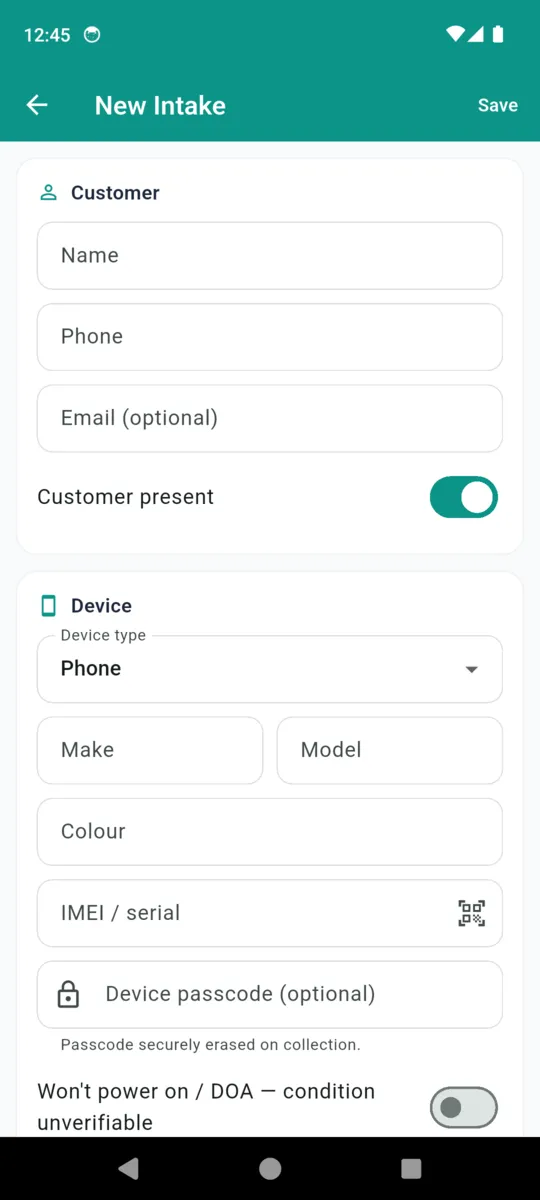
What the form asks for, in order
One screen, top to bottom, filled in with the customer standing there. It opens with who they are and what they brought, and it ends with them signing what you both just agreed the device looked like.
- 1 Customer. Name, phone, email if they want the receipt sent. A switch for whether they are present, and a “dropped by” name for when a partner or a courier brings it in.
- 2 Device. Type, make, model, colour, and the IMEI or serial — scanned off the box or the settings screen with the camera rather than typed in fifteen digits at a time.
- 3 Reported fault. What is wrong, in their words. Keeping it in their words matters when the fault you find is not the fault they described.
- 4 Functional state at drop-off. The ten checks below, each marked untested, working or faulty.
- 5 Condition diagram and photos. Existing damage placed on a front and back outline, plus intake photos.
- 6 Accessories, backup, quote. What came in with it, whether a backup was offered and taken, the quoted price and any deposit or diagnostic fee.
- 7 Terms and sign-off. Your terms on screen, and a signature drawn with a finger.
The ten checks, and why each one is on the list
These ship as the default checklist. Every one of them is something a customer can plausibly claim you broke, and something that takes about ten seconds to test while they are still at the counter. Add your own items, or edit the list once in settings so every future ticket starts from it.
| Check | Why it is on the form |
|---|---|
| Screen | Cracks, delamination, bleed, dead areas. The first thing anyone blames you for. |
| Touch | Whether the digitiser answers, and whether it answers everywhere. |
| Cameras | Front and rear. A lens that was already scratched is worth noting on the way in. |
| Buttons | Power, volume, mute. Cheap to test, expensive to be accused of. |
| Charging | Whether the port takes a cable and holds it. Often the reason it is on your bench. |
| Wi-Fi / cellular | Both radios. Antenna faults surface after a screen job and get pinned on it. |
| Audio / mic | Earpiece, speaker, microphone. Easy to knock loose, hard to argue about later. |
| Battery | Health and whether it holds anything. Sets expectations before the quote. |
| Fingerprint / Face | The sensor most likely to stop working after a screen or frame repair. |
| Sensors | Proximity, ambient light, rotation. The quiet ones nobody checks until they fail. |
Three states, and the middle one is the point
Each check is untested, working or faulty. Untested is the default and it is not a gap in the form — it is the correct answer for a phone that will not power on, and it says so out loud. There is a separate switch for exactly that case, labelled “won't power on / DOA — condition unverifiable”, and it prints on the receipt as the intake state so nobody has to interpret a page of blanks.
Marking a check faulty on the way in is the single most useful thing on this form. A camera that was already dead when it arrived is a two-second tap now and a lost afternoon later.
Marking the damage that was already there
The condition diagram is two outlines, front and back. Tap where the damage is and pick what it is; the mark is stored as a position on that panel, so it lands in the same place on screen and on the printed receipt. Each mark can carry a short note if the position alone does not say enough.
| Mark | What it is for |
|---|---|
| Crack | Glass already broken, front or back, before you touched it. |
| Scratch | Surface marks on the screen, the frame or the rear panel. |
| Dent | Corner drops and frame damage — the thing that makes a screen hard to seat. |
| Dead pixel | A defect in the panel that has nothing to do with the repair. |
| Water damage | Corrosion or a tripped indicator. Changes what you are willing to promise. |
The receipt prints both panels with the marks on them and a line listing which types were used, so it reads without the app.
Accessories, backup and the passcode
Accessories are a set of taps: case or cover, SIM tray, charger, cable, box, or something else. They print as a line on the receipt, which is the answer to the question about the missing charger three weeks later.
Backup status has to be set before the ticket will save — taken, declined, or the customer backed it up themselves. It is a required field on purpose, because “we were never told to back it up” is the second most common dispute after existing damage, and the fix is asking every single time.
A device passcode can be stored, and it is handled separately from everything else. It goes into the Android Keystore rather than the app's own database, it never appears on the printed receipt, and it is erased automatically when the ticket is marked collected.
What the customer actually signs
Above the signature pad sits a block of terms. The app ships a starter set covering the things most shops want said — that a diagnostic fee is not refundable, that parts carry only the supplier's warranty, that data loss is the customer's risk and they were told to back up, that liquid-damaged and previously-opened devices are worked on at the owner's risk, and that uncollected devices may be treated as abandoned after ninety days. It ends by saying that signing confirms the recorded condition of the device.
That text is a starting point, not a contract written for you. Edit it to what your shop actually offers, in your own words, and it will then appear on every ticket. Whatever wording is on screen at the moment they sign is the wording stored against that ticket and printed on that receipt, so changing your terms later does not rewrite an old one.
The receipt itself comes out as a PDF headed Device Intake Receipt, with your logo and ticket number, the customer and device columns, the reported fault, the intake state and backup status, the checklist table, the diagram, the accessories, any parts and charges, the intake photos, the terms as signed, and the signature with its date. When the device goes back out, a collection receipt prints the same way with the after photos and a second signature.
Shown inside the app
RepairProof produces your own business records and lets you present your own terms. It is not legal advice, does not author your terms, and does not guarantee the enforceability of any agreement or the completeness of any inspection.
Read it that way and it does what it is good at. A signed intake form does not stop somebody making a claim and it settles nothing on its own. What it does is reduce the number of disagreements that come down to two people remembering the same phone differently, which on a busy bench is most of them.
Why do it on a phone rather than a pad
- The same checks every time. A form cannot be in a hurry and skip the sensors.
- Photos attach to the ticket. Not to a camera roll that nobody goes back through.
- IMEI scanned, not typed. Fifteen digits is fifteen chances to make a typo.
- Backup cannot be skipped. The ticket will not save until the question has been answered.
- Passcodes handled properly. Keystore, never printed, erased on collection.
- Searchable afterwards. Find an old ticket by customer, device or IMEI.
Questions
What should a phone repair intake form include?
Customer and device details, the reported fault, the functional state of ten things before you open it, a marked diagram of existing damage, the accessories handed over, the backup status and a signature.
Why record a function as untested rather than working?
Because on a phone that will not power on you cannot know. Untested is an honest answer and a defensible one. Ticking everything as working is neither.
How does the damage diagram work?
Tap a front or back outline where the damage is and pick crack, scratch, dent, dead pixel or water damage. Each mark can carry a note, and all of them print on the receipt.
Where is the device passcode kept?
In the Android Keystore, not in the app database. It never appears on the printed receipt and it is erased automatically when the ticket is marked collected.
Whose terms does the customer sign?
Yours. A starter set is provided so the field is not blank on day one, and you are expected to replace it with the wording your own shop uses.
Does a signed intake form stop a dispute?
No. It reduces the number of arguments that come down to two people remembering a phone differently. It is a record you made, not a shield, and it is not legal advice.
Check the next one in properly
Fourteen days of everything, then fifteen saved tickets and five open at a time stay free. Tickets you have already written are never locked away.