Served
The only outcome that completes service. It opens the manner-of-service field and the name of whoever actually took the documents, and moves the case to Served.
PROCESS SERVER LOG
ServeLog
Process Server Log
Hardly anyone gets served on the first knock. ServeLog keeps the whole chain for an address — the hour you went, what happened, where you were standing, who answered — and then builds the return-of-service draft out of that chain instead of asking you to write it all again from memory.

14-day full trial, no card.
$1.99/mo · $9.99/yr · $24.99 once.
The thing a return of service turns on is diligence: how many times you went, and whether you varied the hour. Two evenings and a Saturday morning is a different story from three Tuesdays at six.
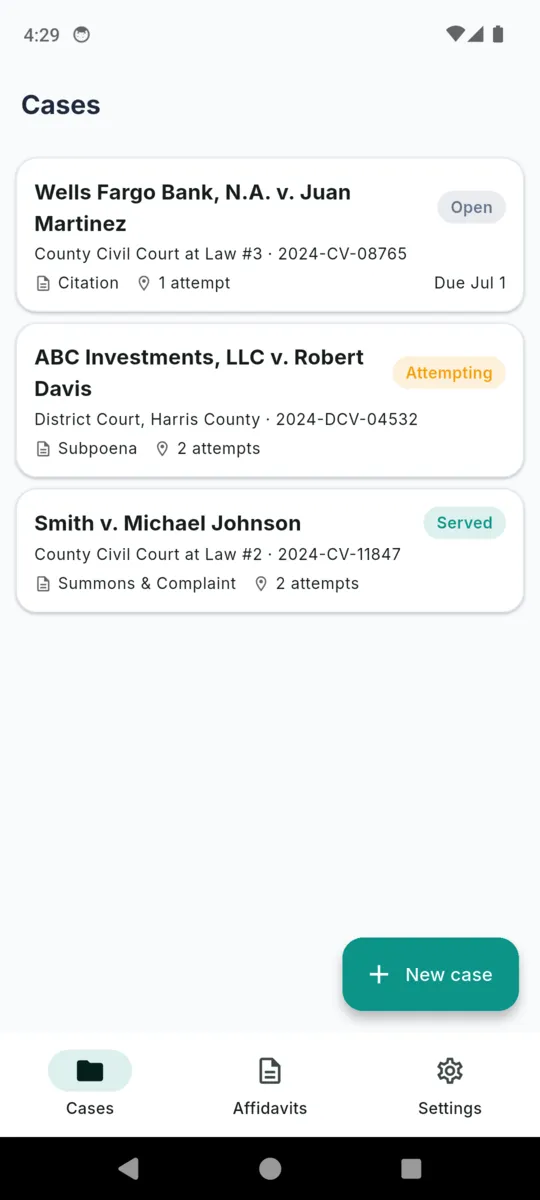
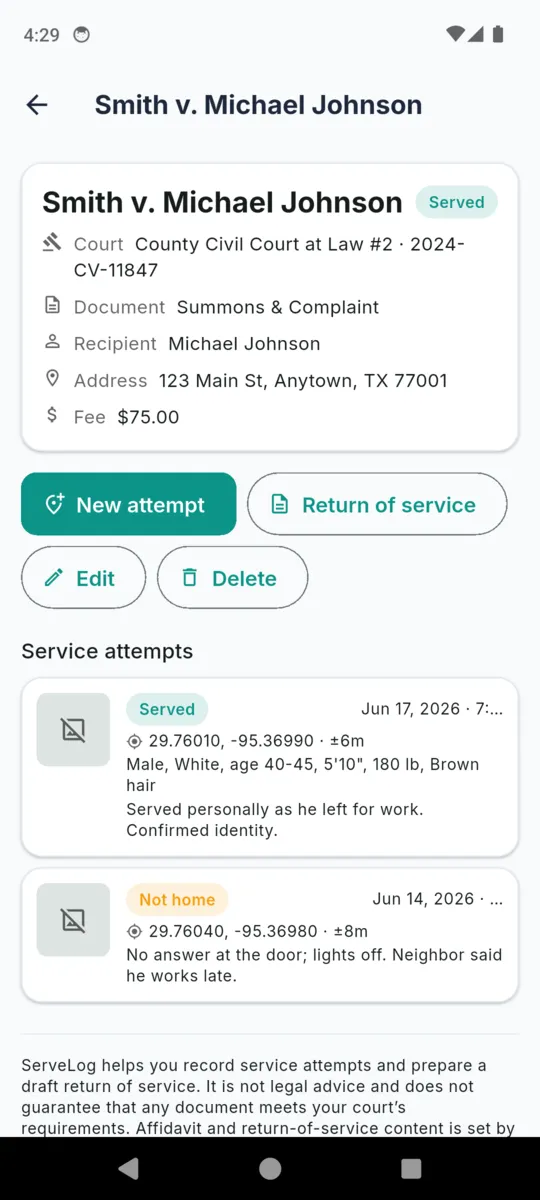
So a case is not one record with a date on it. It is a header — court, cause number, plaintiff and defendant, document type, recipient, service address, deadline, fee — with an ordered chain of attempts underneath, each its own entry. The status follows the chain by itself: the first non-served attempt moves an open case to Attempting, and a served attempt moves it to Served.
Every address on this page and in every screenshot is sample data shipped with the app.
29.76040, -95.36980 · ±8 m
No answer at the door; lights off. Neighbour said he works late.
29.76041, -95.36978 · ±6 m
Vehicle absent. Weekend morning tried on purpose after two evenings.
29.76010, -95.36990 · ±6 m
Personal · to the named defendant
Male, White, age 40–45, 5’10”, 180 lb, brown hair
Served personally as he left for work. Identity confirmed.
Three attempts across eight days, at 18:40, 09:15 and 07:05.
That spread is the part that gets read. ServeLog holds it whether or not you remember to write it down anywhere else.
Every attempt takes exactly one of these. They are fixed words rather than free text, so a chain reads the same in six months as it did on the doorstep, and so the attempt table in the return prints something consistent.
The only outcome that completes service. It opens the manner-of-service field and the name of whoever actually took the documents, and moves the case to Served.
The default, because it is the common one. The first time you file one, an open case moves to Attempting.
They were there and would not take it. A different fact from nobody answering, and worth being a different word in the file.
What a chain starts to look like after several visits at deliberately different hours. Recorded as your own characterisation, in a field of its own.
The address itself is wrong. Each attempt stores the address as actually attempted, so moving to a new one does not rewrite the history at the old one.
For the visit that fits none of the five above. The notes field carries the meaning.
A case carries its own five states on top of that — open, attempting, served, closed and unable to serve — so a matter you have given up on is distinguishable from one you are still working.
A single form, most of it optional, because the attempt where nobody came to the door needs three fields and the attempt where you handed the papers over needs all of them.
DATE AND TIME
Yours to set, with a date picker and a time picker, so an evening of three addresses can be written up afterwards at the correct hours. The app separately keeps the moment the record was created.
GPS STAMP
Optional, and never automatic. You tap it, the app explains what it is about to do, and it takes one foreground fix — latitude, longitude and an accuracy in metres — which you can clear again. Background location is never requested.
ADDRESS AS ATTEMPTED
Pre-filled from the case and editable per attempt. The door you actually knocked on is recorded even when it is not the address on the paperwork.
PHOTOS
From the camera or the gallery, attached to that attempt and carried into the return of service if you tick them. Backing out of the form deletes the ones you had just added.
DESCRIPTION OF THE PERSON
A collapsed block of eight fields — sex, race, approximate age, height, weight, hair, distinguishing marks, and their relationship to the named party. That last line is the one that matters for substituted service.
ONLY ON A SERVED ATTEMPT
Two more fields appear: the manner of service — personal, substituted, posted, mail, corporate or other — and the name of whoever actually took the documents, which is often not the defendant.
Two screens from the shipped build, filled with the sample cases. Scroll the strip sideways, or tab to it and use the arrow keys.
Open a return of service on a case and the fields arrive already filled from what you logged. Every one stays editable — this is a head start, not a lock — and the attempts are listed with tick boxes so you decide which of them belong in the document.
WHERE EACH FIELD COMES FROM
They share one neutral field set. What differs is the note pinned to the top of the editor and the default declaration wording, and that note exists to send you to the real rule rather than to stand in for it.
One A4 PDF, rendered off the main thread and shared through Android. It opens with the case caption and the disclaimer, then a table of the fields you filled — empty ones are simply left out — then the attempt table with date and time, outcome, GPS with its accuracy, and a detail line carrying the manner, the recipient, the person description and your notes. Then the declaration, your signature image and your name. The scaffold’s own warning prints at the foot in italics, and any photos you ticked follow on a second page.
A draft stays a draft until you mark it finalised, and the last file it produced is kept against the record.
Said plainly, so none of it is a surprise after you install it.
Fourteen days of everything on install, no card asked for. After that the free tier holds three cases, ten attempts in total and one return of service, and shows a banner ad.
Paying lifts those three counts and takes the ad out. It does not unlock features held back from you — the GPS stamp, the photos, the person description, the scaffolds and the PDF are all in the app either way. Everything already written stays readable and editable if a subscription lapses, and a live case is never frozen.
Get ServeLogFULL ACCESS
Short answers, including the ones about what it will not promise.
No. Whether service is good is decided by your state, county and court rules, not by an app. ServeLog records what you did and when, and helps you draft the return. It is not legal advice.
No. They are fill-in scaffolds with neutral field labels and a per-state note pointing at the real rule. You have to match your court’s own form and wording before you file anything.
Yours, at the moment you tap it. It is a one-off foreground fix on an attempt you are already writing, with an accuracy figure attached. The app never asks for background location and never tracks anyone.
Yes. The date and time on an attempt are yours to set, so you can write up the evening’s three doors when you get home. The app separately keeps the moment the record was created.
The case caption, the disclaimer, a table of the fields you filled, a table of the attempts you ticked with their times, outcomes and GPS, then your declaration, your signature and your name. Photos follow on a second page.
Yes. Cases, attempts, photos and the PDF all run on the device. There is no account and no server, so nothing you log leaves the phone unless you share a file yourself.
Nothing you have written is hidden or deleted. The free tier keeps three cases, ten attempts and one return of service, and the paywall only appears when you try to add a new one above that.
ServeLog helps you record service attempts and prepare a draft return of service. It is not legal advice and does not guarantee that any document meets your court’s requirements. Affidavit and return-of-service content is set by your state, county, and court — review and adapt every field to your jurisdiction’s exact form and wording before filing. You are responsible for the accuracy and sufficiency of your filings. Reference material for servers is collected on the ServeLog resources page, and the ClearStack privacy notice covers what the app stores.
Put the three doors in before you get home, stamp the ones that need it, and let the return of service build itself when the chain finally lands.