TINNITUS DIARY & REPORT
TinnitusLog
Log tinnitus spikes. Spot triggers.
The thing you take to the appointment.
"It has been worse lately" is hard for an audiologist to work with. A few weeks of dated entries, each with a loudness, a pitch, an ear, a duration and whatever you had tagged that day, is not. TinnitusLog exists to turn the first into the second, and then to get out of your way.

From $1.99/month. Android.
A diary, not a treatment. TinnitusLog does not mask, does not play white noise or sound therapy, and cannot make tinnitus quieter. It is not a medical device. Consult a healthcare professional for diagnosis and treatment — that line is the app's own, and it is printed on the front of every report it generates.
One spike, in about fifteen seconds
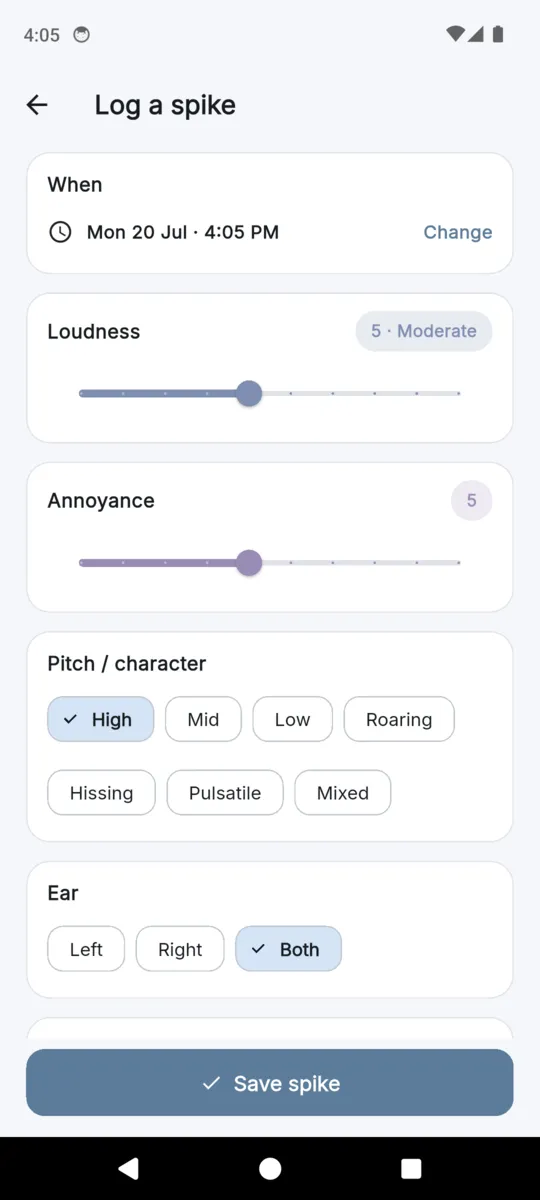
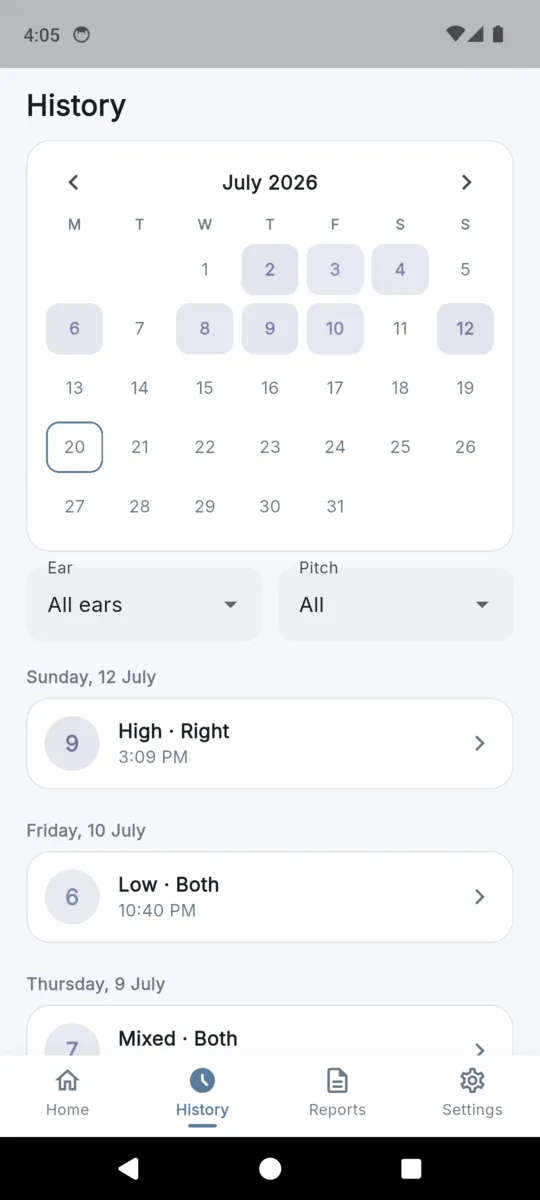
A spike is the event you want to remember: it got louder, or it changed, or it arrived out of nowhere. The log screen opens on the time and works down. Everything below the time can be left where it is.
| When | Defaults to now; change it if you are catching up later. |
|---|---|
| Loudness | A slider, 1 to 10. |
| Annoyance | A second slider, 1 to 10. Loud and annoying are not the same thing. |
| Pitch or character | High, Mid, Low, Roaring, Hissing, Pulsatile, Mixed. |
| Ear | Left, Right or Both. |
| Duration | Seconds, Minutes, Hours, All day, or Constant and worse. |
| Triggers | Any number from the list below, plus your own. |
| Notes | Free text. Optional. |
Loudness
The ramp runs pale blue to deep lavender. It never turns red, and a quiet day never turns green — nothing in this app tells you a reading is good or bad.
Pitch or character
- High
- Mid
- Low
- Roaring
- Hissing
- Pulsatile
- Mixed
Seven options, because "ringing" covers very different things and the difference is the sort of detail a clinician asks about.
How long it lasted
- Seconds
- Minutes
- Hours
- All day
- Constant, worse
Buckets rather than a stopwatch. You are recalling, not measuring.
Thirty triggers, ready to tag
Seeded on first run so there is nothing to set up. Tag as many as apply to a spike, or none. Add your own and they sit alongside these. Tagging something is a note that it happened, not a claim that it caused anything.
Diet
- Caffeine
- Alcohol
- Salt / high-sodium
- Nicotine
- Dehydration
- MSG
- Aspartame
Sleep
- Too little sleep
- Poor sleep quality
- Irregular schedule
Stress
- Acute stress
- Anxiety spike
- Work stress
Noise
- Loud-noise exposure
- Concert / venue
- Headphones (loud/long)
- Power tools
- No hearing protection
Physical
- Jaw clench / TMJ
- Neck tension
- Teeth grinding
- Exercise strain
- Blocked ear / wax
Medication
- Ototoxic medication
- New medication
- Missed medication
Environment
- Allergies / congestion
- Sinus / cold
- Weather / barometric change
- Altitude / flight
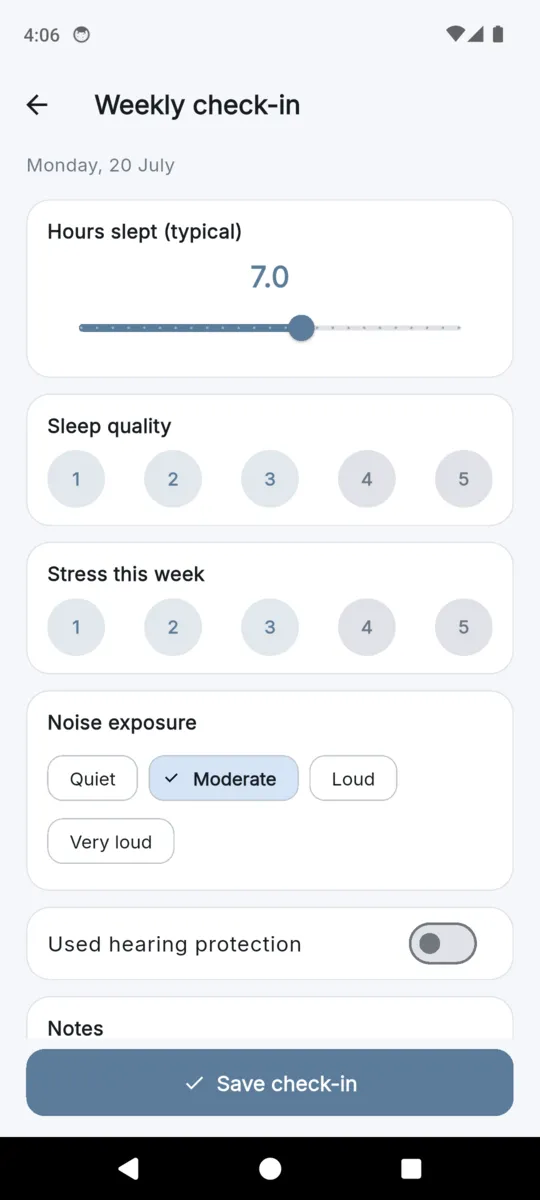
The optional weekly check-in sits next to them: hours slept, sleep quality, stress, noise exposure, and whether you wore hearing protection. Once a week, never daily, and skipping it costs you nothing. Medications can be listed too, kept as plain labels — the app does not classify them or advise on them.
The seven trigger categories, and what sits in eachThe report is the point
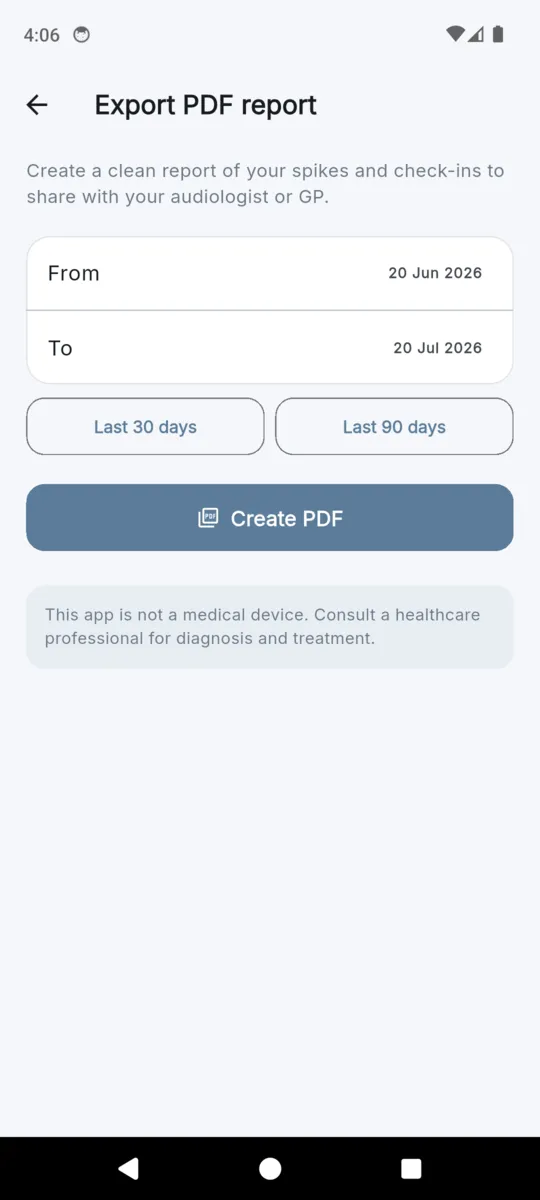
Pick a date range, or tap Last 30 days or Last 90 days, and the app builds a PDF you can email or hand over. This is what comes out, in this order.
- 01
Header
The title "Tinnitus Diary Report", the date range you chose, and when it was generated.
- 02
Disclaimer
A boxed line, before anything else: this app is not a medical device, consult a healthcare professional for diagnosis and treatment.
- 03
Summary
Spikes logged, average loudness out of ten, and a count by pitch. Descriptive figures only, with nothing inferred from them.
- 04
Spikes
A table: date and time, loudness, pitch, ear, duration, triggers. One row per spike, in order.
- 05
Weekly check-ins
A second table: week of, hours slept, sleep quality, stress, noise exposure, hearing protection.
- 06
Notes
Anything you wrote against a spike, listed at the end.
The summary is descriptive on purpose: a count, an average loudness, a tally by pitch. The app does not tell your audiologist what it thinks is going on, because that is their job and it does not have the training. A spreadsheet export and a full JSON backup sit beside the PDF in Settings.
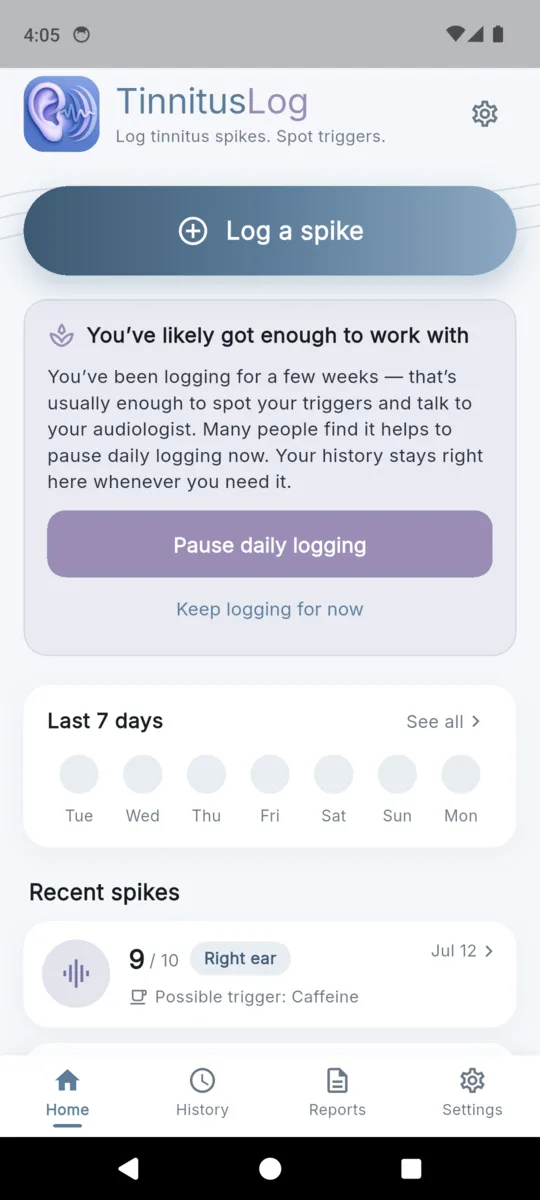
You've likely got enough to work with
You've been logging for a few weeks — that's usually enough to spot your triggers and talk to your audiologist. Many people find it helps to pause daily logging now. Your history stays right here whenever you need it.
The card as it appears on the home screen, word for word.
An app that asks you to stop
Most tracking apps want you back tomorrow. This one is built for a season, and it says so in onboarding: some people find tracking helps them spot triggers; others find that focusing on tinnitus daily makes it louder. Log when it helps you, and pause when it doesn't.
So after three weeks of logging and at least eight spikes, the card above appears. Choose to pause and it does not come back. Choose to keep going and it waits a month before mentioning it again. Either way nothing is deleted and the history is one tap away.
There is no streak counter anywhere in the app, and no badge for logging every day. There is one optional weekly reminder, off by default, and it is worded as an invitation rather than a demand: "A quiet moment to note sleep, stress and noise — only if it helps."
Support and hearing-health links live inside the app too, pointing to Tinnitus UK, the American Tinnitus Association and Find a Helpline.
Ten languages, inside the app
Not a translated store page over an English app. The interface itself ships in ten languages and follows whatever your phone is set to, including right-to-left Arabic. The Play listing is translated to match.
Reports and exports carry a bundled font, so names, notes and non-Latin scripts come out as themselves in the PDF rather than as question marks.
- English
- Español
- Français
- Deutsch
- Português
- हिन्दी
- العربية
- 日本語
- 한국어
- 简体中文
The app itself
Scroll sideways, or use the arrow keys
Pricing
Everything is open for fourteen days from install, with no card and no sign-up. After that, logging spikes stays free with no cap, your history stays readable, the weekly check-in and the medication list keep working, and you get one PDF to try.
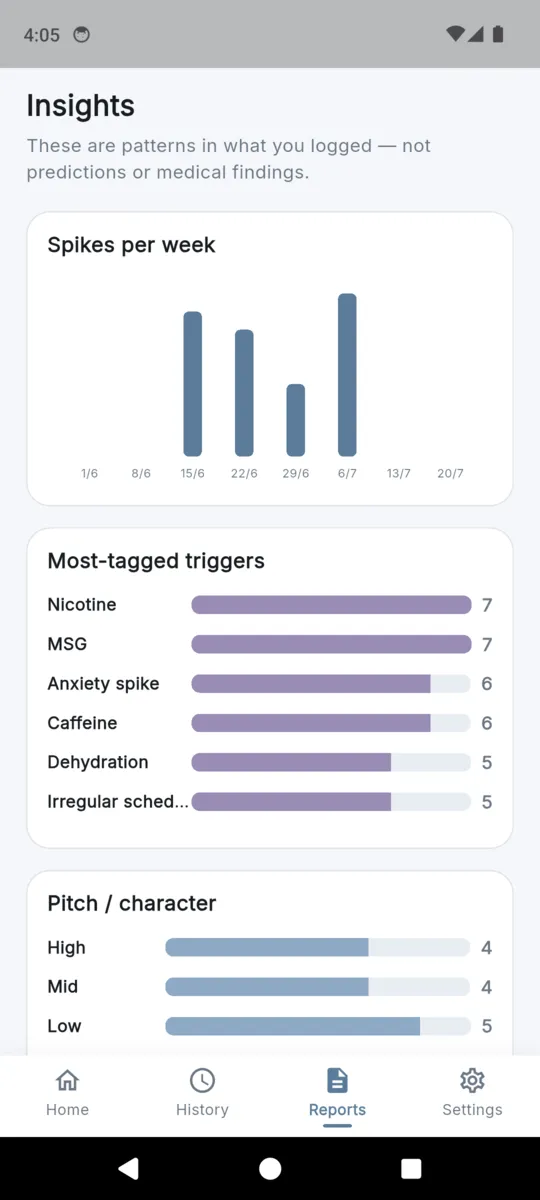
- Pro adds The Insights tab, unlimited PDF reports and the CSV export, and it removes the ads.
- Your history is never locked Not on the free tier, not ever. Every spike you logged stays readable and you can keep logging new ones.
- The backup is free A full JSON copy of everything, exportable from Settings on any tier.
Questions
Does TinnitusLog make tinnitus quieter?
No, and it does not try to. There is no masking, no white noise, no sound therapy and no treatment programme in this app. It is a diary. It records what you noticed and turns it into a report you can hand to a clinician.
Why does the app suggest I stop using it?
Because for some people daily logging keeps attention on the sound. After about three weeks and eight spikes, a card appears saying you have probably got enough to work with and offering to pause daily logging. Your history stays exactly where it is.
What goes into one spike entry?
When it happened, loudness and annoyance each on a scale of one to ten, the pitch or character, which ear, roughly how long it lasted, any triggers you want to tag, and a note. It takes seconds and everything except the time is optional.
What is in the PDF?
A header with your date range, the not-a-medical-device disclaimer, a descriptive summary, a table of every spike with its loudness, pitch, ear, duration and triggers, a table of weekly check-ins, and your notes. It is built for an audiologist or GP appointment.
Is it really translated, or only the store page?
The app itself. Ten languages ship inside it — English, Spanish, French, German, Portuguese, Hindi, Arabic, Japanese, Korean and Simplified Chinese — and the store listing is translated to match. The app follows your phone language.
Are there streaks or reminders?
No streaks anywhere, by design. There is one optional weekly check-in reminder, off by default, which fires quietly on a Sunday evening if you turn it on. Nothing nags you to log daily.
Where does my data live, and what does Pro cost me?
On the phone, with no account and no sync. Logging spikes is free forever and your history is never locked. Pro adds the Insights tab and the exports, and you can back everything up to a JSON file for nothing at any time.
Read how the app handles your data in the privacy policy.
Log the next one while you remember it
A few weeks of entries, one PDF, and a conversation with your audiologist that starts somewhere useful.