TINNITUS TRIGGERS

TinnitusLog
Tinnitus triggers
Thirty things worth writing down, and one thing worth not concluding.
A trigger in TinnitusLog is a label you put on a spike you have already logged. It says what was going on. It does not say what caused anything, and neither does the app — the card on the home screen reads possible trigger, and that hedge is doing real work.

Logging spikes and tagging triggers is free.
Android. Ten languages.
What a trigger is here, and what it is not
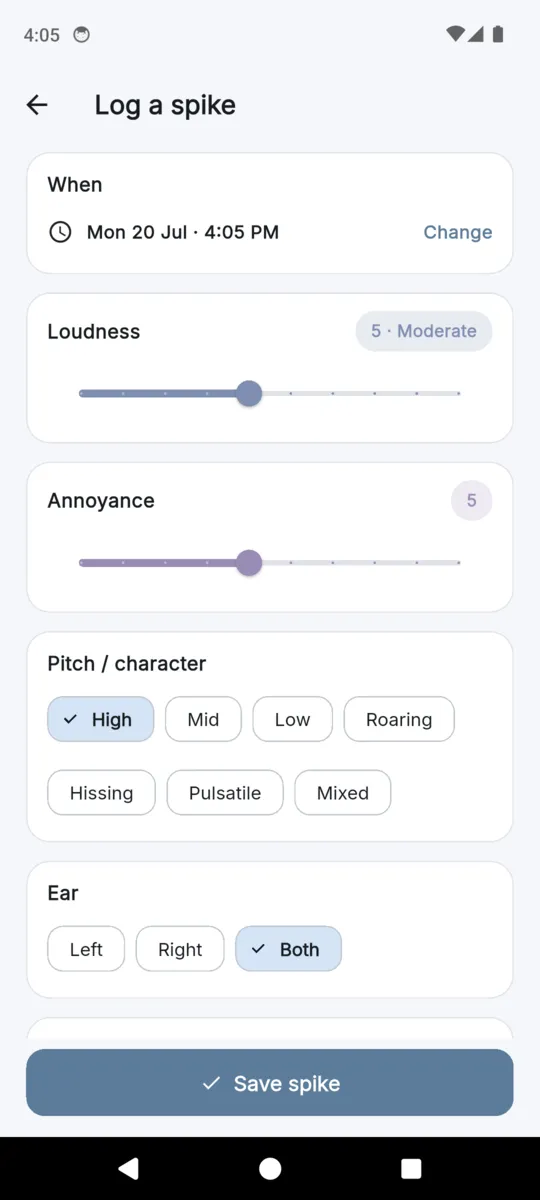
You log a spike — when it happened, how loud it was, how annoying it was, the pitch, which ear, roughly how long it went on — and then you tag whatever was going on. Any number of tags, or none. That is the entire mechanism.
What it produces is a set of co-occurrences: a tag and a spike that share a timestamp. That is a long way from a cause, and the distance matters. Tinnitus does not always follow an exposure immediately, you cannot tag the things you did not think to notice, and you are far more likely to tag the thing you already suspect. A diary is good at recording; it is not an experiment, and the app does not pretend it is one.
That is why the list below is a prompt sheet rather than a set of findings. Its job is to make you write down the specific thing at the time, so that six weeks later you are handing someone a record instead of a recollection.
The 30 triggers, in full
These are seeded on first launch and every one of them can be tagged for free. They are grouped only so the picker is navigable — a category carries no weight of its own.
Diet 7
- Caffeine
- Alcohol
- Salt / high-sodium
- Nicotine
- Dehydration
- MSG
- Aspartame
Things you consumed. Worth writing down with a rough time, because what you ate at eleven and what you noticed at four are easy to stop connecting after a week.
Sleep 3
- Too little sleep
- Poor sleep quality
- Irregular schedule
The night before, rather than the day of. The optional weekly check-in records hours slept and sleep quality separately, so these tags and that check-in can be read side by side.
Stress 3
- Acute stress
- Anxiety spike
- Work stress
Distinguished by shape: a single acute event, an anxiety spike, or the ongoing work kind. They are worth keeping apart because they do not look the same across a month.
Noise 5
- Loud-noise exposure
- Concert / venue
- Headphones (loud/long)
- Power tools
- No hearing protection
What went into your ears, and whether anything was protecting them. The most concrete category, and usually the easiest to remember accurately a day later.
Physical 5
- Jaw clench / TMJ
- Neck tension
- Teeth grinding
- Exercise strain
- Blocked ear / wax
Jaw, neck and ear. These are the ones people most often forget to mention in a clinic, and they are the ones a clinician most often asks about.
Medication 3
- Ototoxic medication
- New medication
- Missed medication
A plain label on the diary entry, so a change in medication sits on the same timeline as everything else. Doses and prescriptions are not recorded anywhere in the app.
Environment 4
- Allergies / congestion
- Sinus / cold
- Weather / barometric change
- Altitude / flight
Things around you rather than things you did. Pressure, congestion and altitude are the usual reasons a bad week has no obvious explanation in the other six categories.
Your own, and the eighth category
Nothing about the seeded list is fixed. Add a trigger from the log screen with a name and a category, and it joins the picker permanently. The category dropdown carries the same seven plus an eighth, Other, for the ones that belong nowhere — a specific room, a particular commute, a named food. Custom triggers are counted exactly like seeded ones and cost nothing.
What the app will say about them, and what it will not
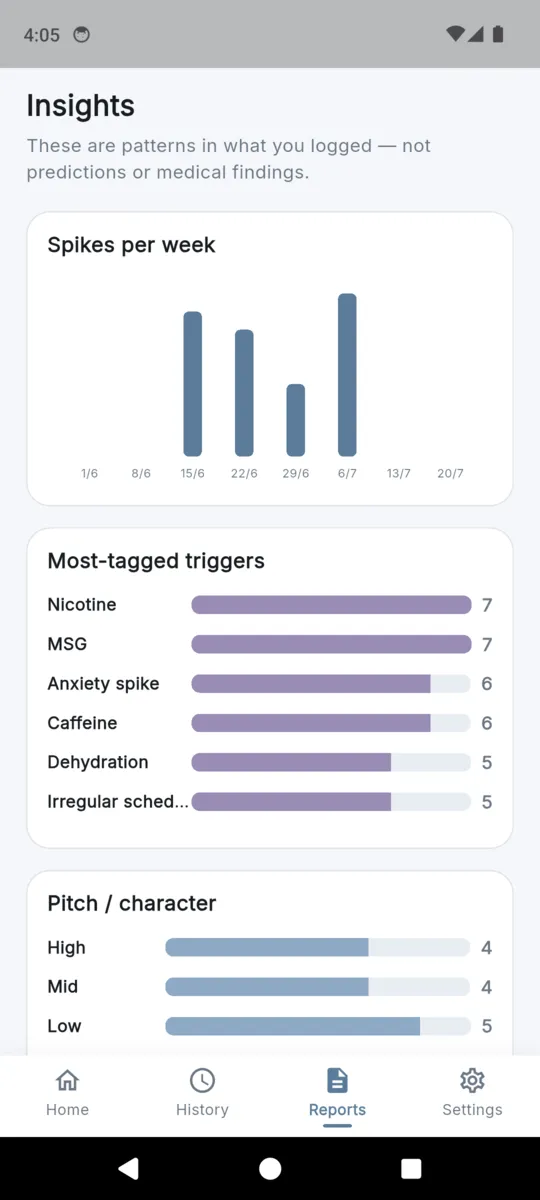
The Insights tab tallies how many times each trigger has been tagged and shows the top six as a simple list with counts. It is a frequency count of your own tagging, which is the honest description of it, and the screen carries this line above everything on it:
These are patterns in what you logged — not predictions or medical findings.
Two further observations appear if you also fill in the optional weekly check-in. They compare the average loudness of the spikes you logged after short-sleep nights against longer ones, and in weeks with loud noise exposure against quieter weeks. Both are written in the past tense, about what you logged, and both refuse to say anything at all until there are at least two spikes on each side of the comparison. Where the averages are close, the app says they looked similar rather than reaching for a story.
There is no prediction, no risk score, no ranking of which trigger matters most, and no advice generated from any of it. Insights also stays hidden until three spikes exist, because a chart drawn from two entries is theatre.
Taking it to an audiologist
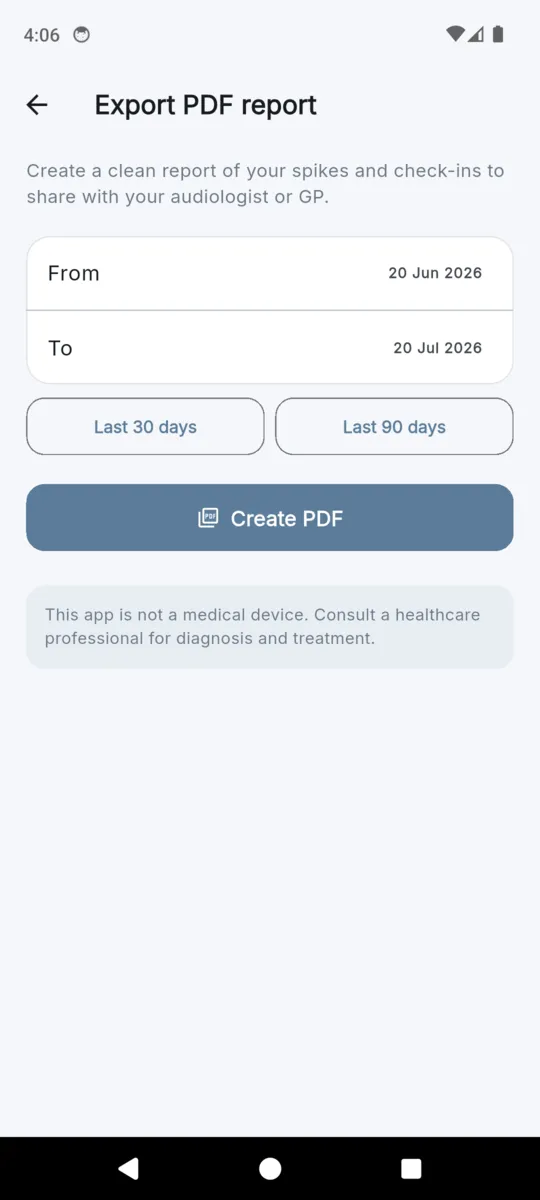
This is what the tagging is for. Pick a date range and the app builds a PDF: the not-a-medical-device notice in a box before anything else, a descriptive summary, a table with one row per spike carrying its loudness, pitch, ear, duration and the triggers you tagged, a second table of weekly check-ins, and your notes at the end.
It is deliberately plain. A clinician gets more from six weeks of dated rows than from a confident-looking chart the app invented, and a plain table is something they can read in the two minutes an appointment gives them. Everything also exports as CSV, and a complete JSON backup of your data is free at any time.
Knowing when to stop
TinnitusLog is one of the few trackers that will ask you to use it less. After about three weeks of logging and at least eight spikes, a card offers to pause daily logging on the grounds that you probably have enough to work with. Nothing is deleted and your history stays where it is. There are no streaks anywhere in the app, and there is no daily reminder to log.
The reason is on the first screen you ever see, and it is worth repeating exactly:
Some people find tracking helps them spot triggers; others find that focusing on tinnitus daily makes it louder. Log when it helps you, and pause when it doesn’t.
Where the data lives, and what it costs
On the phone. No account, no sign-in, no sync, and nothing about your spikes or your triggers leaves the device unless you export it yourself. Logging spikes and tagging triggers is free for as long as you use the app, and your history is never locked behind a payment.
The Insights tab and the exports are the paid part: $1.99 a month, $9.99 a year, or $19.99 once. The first PDF is free either way, so you can see exactly what your clinician would be handed before deciding.
Where a trigger goes on, and where it comes out
Questions
What counts as a tinnitus trigger in this app?
A label you attach to a spike you already logged. It records what was going on, not what caused anything. The app calls it a possible trigger and never states that one thing produced the other.
How many triggers does TinnitusLog come with?
Thirty, across seven categories: diet, sleep, stress, noise, physical, medication and environment. You can add your own, and an eighth category called Other exists for the ones that fit nowhere else.
Does the app work out which trigger is causing my tinnitus?
No. It counts how often you tagged each one and shows the top six. That is a record of what you noticed and chose to tag, not a finding, and the app says so on the same screen.
Will tracking triggers make my tinnitus quieter?
This is a diary. There is no masking, no sound therapy and no treatment in it, and nothing here can reduce tinnitus. What it produces is a record you can take to a clinician.
Does logging triggers cost anything?
No. Logging spikes and tagging triggers is free for as long as you use the app, and your history is never locked. The Insights tab and the exports are the paid part.
What do I actually hand to my audiologist?
A PDF for a date range you pick: the not-a-medical-device notice, a descriptive summary, a table of every spike with its loudness, pitch, ear, duration and triggers, your weekly check-ins, and your notes.
Elsewhere
Start the record before the next appointment
Log a spike, tag what was going on, and repeat only when it helps. Six weeks of that is a better conversation than trying to remember in the chair.