The batch and where it started
What the food is, the time it went in, and the temperature it went in at. Hot holding is typically 135°F or above, which is where the app's hot-hold station default range of 135 to 170°F begins.
TWO-STAGE COOLING LOG
TruckTemp
Two-stage cooling log
Cooling is the one part of a temperature log that is arithmetic rather than paperwork, and it is the part inspectors read first. This page sets out the 135, 70 and 41 °F chart, what actually counts as a passed stage, and what TruckTemp writes down while the batch comes down.

14-day trial, no card.
$1.99/mo, $9.99/yr or $24.99 once. Android.
Cooked food that is going to be held cold has to get through the warm middle of the temperature range quickly. The FDA Food Code splits that journey into two stages with separate deadlines, and TruckTemp encodes exactly those figures.
| Stage | From | To | Time allowed | Deadline |
|---|---|---|---|---|
| Stage 1 | 135°F | 70°F | 2 hours | Hour 2 |
| Stage 2 | 70°F | 41°F | 4 more hours | Hour 6 |
Stage 1
Measured from the moment the batch comes off the heat, not from when you remember to start the timer.
Stage 2
The deadline is six hours from the same start. Reaching 70°F early does not buy you a fresh four hours.
Six hours is the whole budget
The two windows are not independent allowances that you can spend in any order. Stage 1 is due at hour 2 and stage 2 at hour 6, counted from the same moment the food came off the heat.
135, 70 and 41°F are FDA Food Code defaults, and they are what the app uses. TruckTemp does not decide whether your jurisdiction has adopted that edition of the code, or how long you have to keep the records. Your local health department does.
A cooling log is only worth keeping if it is honest about near misses, so the rules TruckTemp applies are deliberately unforgiving. There are four of them, and they are the whole engine.
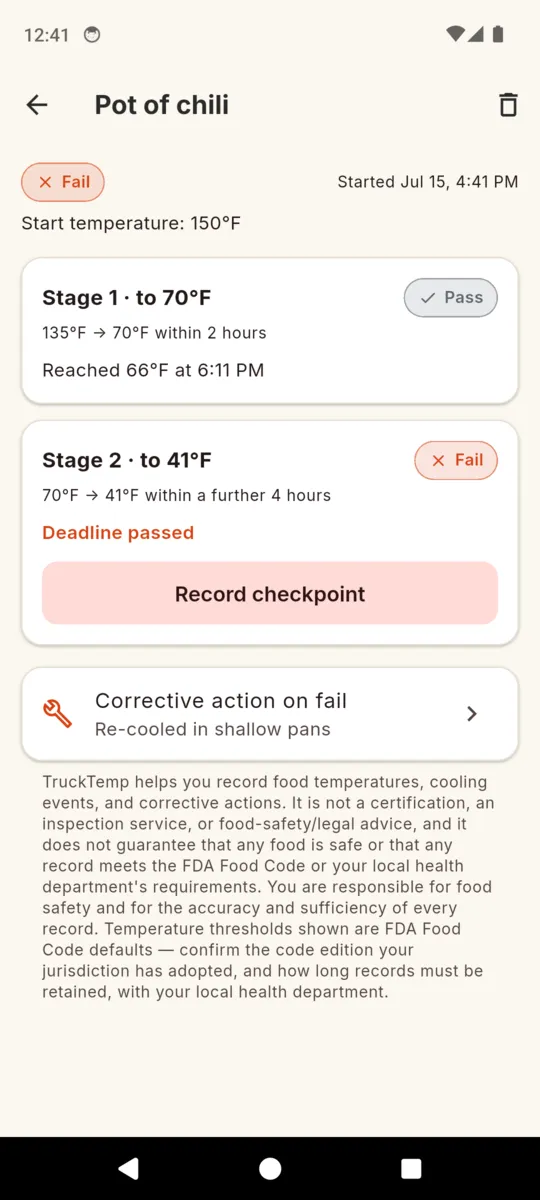
A checkpoint passes when the temperature you recorded is at or under the target and the reading was taken at or before that stage's deadline. Miss either half and the stage is a fail. A reading of 68°F taken at two hours and twenty minutes is a failed stage 1, not a passed one, because the food's history between those two points is exactly what nobody can vouch for.
Before the deadline, an empty checkpoint reads In progress. After it, the same empty checkpoint reads Fail. The app does not leave a stage running indefinitely just because nobody typed anything into it, because an eternal In progress is how a log quietly stops meaning anything.
This is the detail most hand-written cooling charts get wrong. The 41°F deadline is the start time plus six hours. If a batch reaches 70°F in forty minutes, the second stage is still due at hour six, not five hours and forty minutes later. Getting through stage 1 quickly buys you a safer margin, not extra time.
One failed stage makes the whole event a fail. The event reads Pass only when stage 1 and stage 2 have both passed, and anything else while the clocks are still live reads In progress. Each stage keeps its own result on the record, so a fail shows which half of the cool-down went wrong rather than just marking the batch bad.
TruckTemp also schedules two backstop notifications on a live event: roughly fifteen minutes before the 70°F deadline and roughly thirty minutes before the 41°F one, and only for checkpoints you have not already recorded. They are deliberately inexact, so the app never asks Android for the exact-alarm permission. The countdown on the event itself is the part meant to keep you honest.
Starting an event takes a name and a starting temperature. Everything after that is two readings and, if it went wrong, one answer about what you did.
What the food is, the time it went in, and the temperature it went in at. Hot holding is typically 135°F or above, which is where the app's hot-hold station default range of 135 to 170°F begins.
The temperature you measured and the clock time you measured it at, kept separately so the record shows the real reading rather than just a tick. The stage's own Pass or Fail sits beside it.
The same pair again for the second stage, judged against the six-hour deadline. If you never recorded it and the deadline has gone, this is the stage that shows Fail.
A failed event takes an action the same way an out-of-range reading does: discarded, moved to another unit, adjusted thermostat, reheated, re-cooled in shallow pans, or continued monitoring. The problem and the response end up in the same record.
A free-text line for the thing the fields cannot capture: the ice bath, the pan depth, the delivery that arrived mid-cool-down. It prints with the event.
Cooling events belong to a truck, trailer or prep kitchen, so a two-vehicle operation keeps two separate cooling logs and two separate PDFs rather than one mixed pile.
The six corrective actions DiscardedMoved to another unitAdjusted thermostatReheatedRe-cooled in shallow pansContinued monitoring
Pick a period — the last 7, 30 or 90 days, or all time — and the Cooling Event Log comes out as a PDF headed with the thresholds it was judged against: 135°F to 70°F within two hours, to 41°F within six.
Each event prints as a row: the food, the time and temperature it started at, what you recorded at each checkpoint, and the status. The cover page carries the unit name, its permit number, the jurisdiction you entered, the period, and the disclaimer at the foot of this page. It shares straight out of the phone, so it can go to an inspector's email without a laptop.
Failed cooling events also appear in the separate Corrective Actions report, next to out-of-range readings, each with the action you took. That short report is usually the one somebody actually wants when they ask what happened on a particular day, and it is the reason recording the failure honestly is worth more than leaving the event blank.
Everything is stored on the phone. There is no account and no cloud copy, and no connection is needed to start an event, record a checkpoint or build the PDF — you can read the full picture of what the app does on the TruckTemp app page.
It is the two-stage cooling window in the FDA Food Code. Cooked food comes down from 135F to 70F within the first two hours, and from there to 41F by the end of hour six. TruckTemp uses those figures as its defaults.
No, and this is where cooling logs usually go wrong. Both deadlines are measured from the start of the event, so stage 2 is due at hour 6 whether you hit 70F at hour one or at hour two.
The stage fails. A checkpoint only passes if the number is at or under target and the reading was taken at or before the deadline. Logging 68F twenty minutes late does not rescue stage 1.
Once the deadline passes with nothing recorded, that stage flips to Fail rather than sitting on In progress. A log that quietly waits forever reads badly to anyone auditing it later.
It schedules a backstop notification about 15 minutes before the 70F deadline and about 30 minutes before the 41F one, for checkpoints you have not recorded yet. The countdown in the app is the primary cue.
Yes. Set the unit in Settings and the app converts on entry and on display. Every temperature is stored in Fahrenheit underneath, so a Celsius entry is never compared against a Fahrenheit target.
No. TruckTemp records what you measured and when. It does not inspect, certify, or promise that a record satisfies your health department. Confirm the code edition and record retention locally.
TruckTemp helps you record food temperatures, cooling events, and corrective actions. It is not a certification, an inspection service, or food-safety/legal advice, and it does not guarantee that any food is safe or that any record meets the FDA Food Code or your local health department’s requirements. You are responsible for food safety and for the accuracy and sufficiency of every record. Temperature thresholds shown are FDA Food Code defaults — confirm the code edition your jurisdiction has adopted, and how long records must be retained, with your local health department.
Name the batch, enter the temperature it came off at, and let the app hold both deadlines while you get on with service.