APPLICATION RECORD

TurfLog
Spray record keeping
Every field on a spray record, and what each one is doing there.
A TurfLog application record is one page: who sprayed, where, what for, how much ground, at what times, in what weather, with which products. This is that page taken apart line by line, in the order it prints.

Fourteen days free, everything unlocked.
Android. Works with no signal.
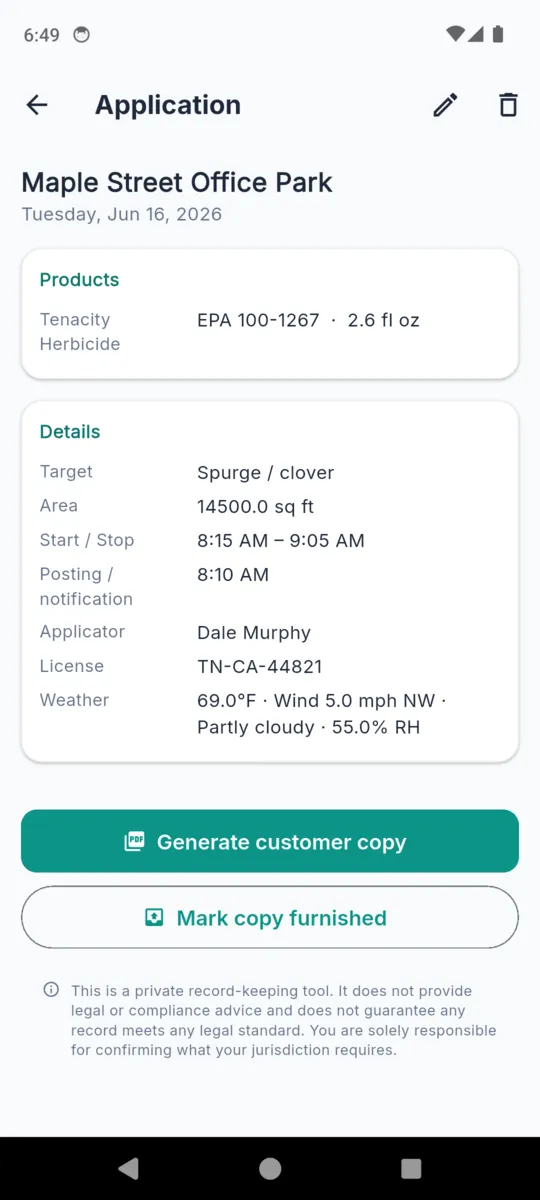
The ten lines above the product table
The customer copy prints in a fixed order, and a field that was left empty is simply left out rather than printed blank. Only the site, the date and at least one product are required to save; everything else earns its place on the sheet by being filled in.
| Line | What it is for |
|---|---|
| Date | The day the application was made. Everything else on the sheet hangs off it. |
| Site | The customer property, picked from your saved sites rather than retyped each visit. |
| Address | Carried from the site record, so the sheet says which property without you touching it. |
| Applicator | Who held the wand. On a two-man crew this is the line that tells you which of you it was. |
| License | The applicator licence or certification number, saved once in settings. |
| Target | The pest, weed or disease you were treating. The reason the application happened at all. |
| Area treated | A number plus its unit — square feet, acres, square metres or hectares. |
| Start / Stop | When spraying began and ended, which is what a re-entry question comes back to. |
| Posting / notification | The time signs went up or the customer was told, kept separate from the spray times. |
| Weather | Temperature, wind speed and direction, sky and humidity, joined into one line. |
Applicator name and licence number are stored once in settings and drop into every new application, so a solo operator never types them again.
The weather line is typed, not fetched
TurfLog has no weather service behind it. Temperature, wind speed, wind direction and sky are four boxes you fill in, and humidity joins them if you enter it. They print as a single line, separated by dots, in whichever units you chose in settings — Fahrenheit and miles per hour, or Celsius and kilometres per hour.
Filling them in yourself is slower than a lookup and considerably more accurate. What the nearest airport reported is not what the wind was doing across the seventh green, and a record that says so is worth more than one that quotes a station eleven miles away.
The product table
Below the header lines sits a table headed “Products applied”, with one row per product and four columns. A tank mix with three things in it prints as three rows.
| Column | What goes in it |
|---|---|
| Product | The brand name as it appears on the jug. Saved products remember their spelling, so the same name comes out the same way on every sheet. |
| EPA Reg. No. | The registration number printed on the label. It is free text with no lookup behind it, which means a UK approval number or any other national number goes in the same column even though the heading uses the US term. |
| Rate | The strength you mixed to, with its unit. This is the number that answers “was it applied at label rate?”. |
| Amount | How much of the product actually went out on this job. Rate is intent; amount is what left the tank. |
A dilution can also be stored against a product line. It shows on the line in the app but is not one of the four printed columns, so put anything a customer must read into the notes instead.
Saved products
A product you use every week does not want retyping. Save it once with its registration number, its usual rate and its unit, and it becomes a preset you pick from a list. The registration number is the field most worth getting right at that moment, because it is the one that will be copied onto every sheet after it.
Two documents come out of the same data
The customer copy covers a single application. It carries your business name in the header, the ten lines, the product table, any notes, and the job photos if you took some. This is the sheet that gets left on the kitchen table or emailed the same evening, and the home screen flags applications that have not had one produced yet.
The annual record covers a date range you choose. It opens with the range and a count of applications, then prints one block per job: the site, the date, the target, and that job's product table. A year of work comes out as a single document to hand over or file, without you assembling anything.
Both carry the same footer text, and both are generated on the phone. Photos are downscaled before they go in so a job with a dozen shots still produces a file that will send over a patchy connection.
What this is, and what it is not
TurfLog gives you a consistent place to write down what you did and a consistent sheet to print from it. That is the whole job. What has to be recorded, in what detail, how long it is kept and who is entitled to ask for it varies by state and by country, and can vary again by the licence you hold. None of that is decided by an app, and nothing here should be read as a statement of your obligations.
Shown inside the app and printed on every PDF
This is a private record-keeping tool. It does not provide legal or compliance advice and does not guarantee any record meets any legal standard. You are solely responsible for confirming what your jurisdiction requires.
The practical read: use it to make sure a record exists and is legible, then check the fields against whatever your own regulator publishes. A record that is complete and consistent is a much better starting point than a memory and a pile of receipts.
Why keep it in the app
- Same fields every time. A form beats a notebook because it cannot forget the posting time.
- Filled in at the truck. No signal needed. Everything is stored on the phone.
- Products typed once. Presets carry the registration number and the rate forward.
- A year in one file. Pick a date range and the annual record assembles itself.
- Customer copies tracked. The home screen flags jobs that still owe the customer a sheet.
- Readable in the sun. A high-contrast mode for a screen held over a mower deck.
Questions
What goes on a pesticide application record?
TurfLog prints the date, the site and address, the applicator and licence number, the target pest, the area treated, start and stop times, the posting time, the weather, and a table of every product used.
What are the four product columns?
Product, EPA Reg. No., Rate and Amount. Product and the registration number identify what went down; rate is the strength you mixed to and amount is how much of it you actually used.
Is there a product database to pick from?
No. You type a product once and save it as a preset with its registration number and rate, then pick it on later jobs. The registration number is free text, so a non-US number goes in the same box.
Does the app fetch the weather for me?
No. Temperature, wind speed, wind direction and sky are fields you fill in yourself, which is what keeps them honest and what lets the record be written up after the fact.
Does this make me compliant?
No. TurfLog is a private record-keeping tool. What has to be recorded, how long it is kept and who may ask for it varies by state and by country, and confirming that is on you.
What can I print?
A customer copy for a single application, and an annual record covering any date range you pick, which lists every application in that window with its products.
Write the next one up before you leave the site
Fourteen days of everything, then three sites and twenty-five applications stay free. Records you have already written are never locked away.