TEAM ATTENDANCE REGISTER

ClubDues
Attendance
Take the register in the time it takes to walk the touchline.
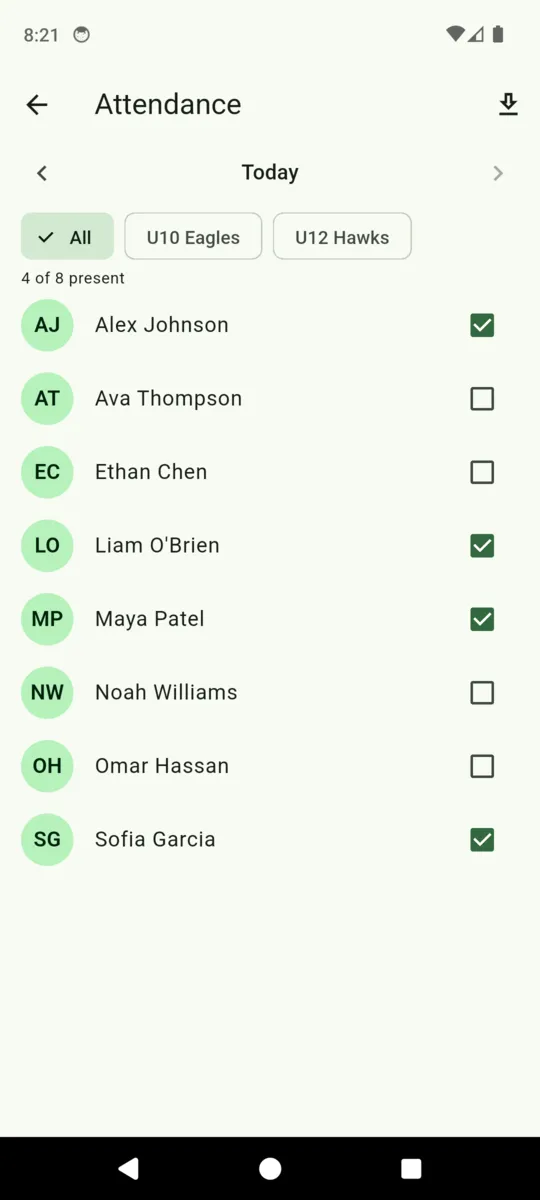
Open Attendance, tap the box beside each player who turned up, and the count at the top moves. Narrow it to one team when only that squad is training. Nothing to write down, and nothing to type up when you get home.

$19 a month per club, after a 30-day trial.
Android.
How the register works
A register that takes longer than the warm-up does not get filled in. This one is a list of names with a box beside each, and it saves as you tap — there is no submit button and no session to start first.
One tap per player
Every player on the roster appears with their initials and their name. Tap the box and they are marked present for that day; tap it again and the mark comes off. Above the list a line reads how many of the squad are in — four of eight, eleven of fourteen — which is usually the only number a coach wants at that moment.
The record is day-level: present or not, nothing more. ClubDues does not ask for arrival and departure times or a staff signature, because a football club is not a nursery and making coaches enter timestamps is how a register stops being used by week three.
Any day in the past year
Arrows either side of the date step back and forward a day at a time. Tapping the date itself opens a picker that reaches back a full year. Future dates are not selectable, so you cannot mark a session that has not happened.
That one-year window is what makes the register survive real life. Tuesday's session can be filled in on Thursday from the car park, and a season's worth of history stays reachable if a parent asks how many sessions their child actually made.
Filter to one team
If the club has teams, a row of chips sits across the top: All, then one per squad. Pick U12 Hawks and the list shows only the Hawks — and, importantly, the present count recalculates against that squad rather than the whole club. Three of the U12s is a useful number; three of the club is not.
Ninety days out to a spreadsheet
The download button in the top corner exports the last 90 days as a CSV: one row for each player on each day they were marked present, with the date and their name. It goes through your phone's share sheet, so it can land in an email to the committee, in Drive, or straight into Sheets or Excel.
That covers most of the reasons a club needs a register on paper — a grant application, a safeguarding query, a parent who wants to know whether their child is turning up. The roster and the payment ledger export the same way, so the whole season leaves as three files.
Who can see it
Only the club's staff. Anyone you invite with a staff code gets the roster and the register; billing stays with whoever owns the account. Parents have no login at all — the only ClubDues surface they ever touch is a Stripe payment page, so the register is never something they can browse.
Why it gets used
- The whole squad on one screen. Names, boxes, and a count. No forms and no submit button.
- Backfill a session you missed. The date picker reaches back a full year.
- The count follows the filter. Pick a team and the number is that team's, not the club's.
- The season leaves as a spreadsheet. Ninety days of the register, one row per player per day.
- Staff only. Parents have no login, so the register stays inside the club.
- Included in the one price. $19 a month per club covers it, however many players you have.
Questions
How do coaches take attendance on a phone?
Open the Attendance screen and tap the box beside each player who turned up. The header counts how many of the squad are present. There is nothing to save.
Can I mark attendance for a past session?
Yes. The arrows step back a day at a time, and tapping the date opens a picker that reaches back a year. Future days cannot be selected.
Can I take the register for one team only?
Yes. Team chips run across the top of the screen. Pick a squad and both the list and the present count narrow to it.
Can I get attendance out as a spreadsheet?
Yes. The download button exports the last 90 days as a CSV — a row per player per day — through your phone's share sheet.
Do parents see the attendance record?
No. Parents have no ClubDues login at all; the only thing they ever see is a Stripe payment page. The register stays with the club and its staff.
Does attendance change what a player is charged?
No. The register and the dues are kept separate. Attendance records who turned up; billing runs off the dues plans you set.
Take the register at the next session
Add the squad, open Attendance, and start tapping. The trial runs 30 days and asks for no card.