COLLECTING CLUB DUES ONLINE

ClubDues
Payments
Collect club dues online without asking a single parent to install anything.
A parent gets a link, taps it, and pays by card on a Stripe page. Behind it, ClubDues charges on your club's own Stripe account, takes its platform fee out of that payment, and writes the result into your ledger.

$19 a month per club, after a 30-day trial.
Android.
Four steps to the first payment
- 1
Connect the club to Stripe
Tap Set up payouts on the home screen. Stripe asks for the club's details and its bank account. It takes about five minutes, and the account that comes out of it belongs to the club.
- 2
Write down what you charge
Dues plans hold your prices: a monthly membership, a season registration fee, a tournament levy. Weekly, monthly and yearly plans recur. Anything else is a one-off you can send whenever you need it.
- 3
Send the link
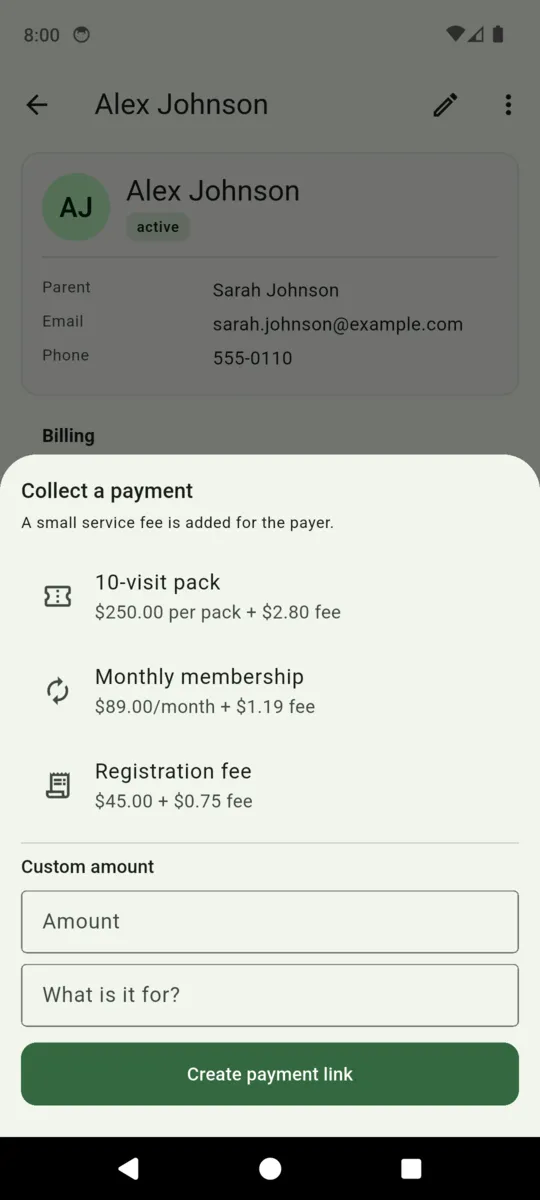
Open a player, tap Collect a payment, and pick a plan or type an amount and what it is for. ClubDues creates the link and hands it to your phone's share sheet, so it goes out by text, WhatsApp or email — whatever you already use.
- 4
Watch it land
When the parent pays, Stripe tells the app. The payment appears in the Money tab with a status against it, and a monthly plan turns into a recurring charge that renews without anybody being asked again.
What the parent actually sees
A link, and then a Stripe-hosted card page in their browser. There is no ClubDues login for parents, no download, no password to forget, and nothing for them to keep. The charge is made on the club's own Stripe account rather than on ours, so it is the club they are paying, not a middleman.
That is the part that decides whether a club can actually leave Venmo behind. Anything that asks thirty families to create an account will not survive contact with a Tuesday evening. A link they can tap on the touchline will.
What each payment costs
The platform fee is 1% of the payment plus 30 cents, and it is written next to every plan in the collect sheet before you send anything. By default it is added to the parent's total as a separate service fee line. Switch that off in Settings and the same amount comes out of the club's share instead.
| What you are charging for | Club's price | Fee | Parent pays |
|---|---|---|---|
| Registration fee | $45.00 | $0.75 | $45.75 |
| Monthly membership | $89.00 | $1.19 | $90.19 |
| Season or tournament fee | $250.00 | $2.80 | $252.80 |
Stripe charges its own card processing fee on top of this, set by Stripe under the club's agreement with them. The platform fee above is the ClearStack part, and it is the column that appears in the CSV export.
Where the money sits
Each club gets its own Stripe account, created in the club's name during setup. Payments are charged directly on that account, so the balance and the bank details are the club's. ClearStack takes its platform fee out of each payment and never holds a balance on the club's behalf.
The practical consequence is that Stripe's relationship is with the club. Verification checks, disputes and refunds are handled in the club's own Stripe dashboard, on Stripe's terms, and that is where the settlement schedule for the account lives too.
Dues that keep coming in
A plan set to monthly, weekly or yearly becomes a Stripe subscription the moment a parent completes the first payment. After that it renews on its own. The Recurring tab in the Money screen lists every live plan and what they add up to, so you can see the club's regular income in one number.
Changing a plan's price affects new sign-ups only — a family already paying keeps the price they signed up at until you cancel and re-send. Cancelling stops the plan at the end of the period the parent has already paid for.
When a card is declined
The player appears under Needs attention on the home screen and the plan is marked past due, so the first thing you see in the morning is who to have a word with. ClubDues does not email parents for you and does not retry the card by itself; anything automatic there is configuration in the club's own Stripe account.
What this gets a club
- Nothing for parents to join. A link, a card page, done. No account, no app, no password.
- Charged on the club's own account. ClearStack takes a fee from each payment and holds no balance.
- The fee is visible first. Every plan in the collect sheet shows what it carries.
- Monthly dues renew themselves. You ask once, and the plan carries on until it is cancelled.
- The books come out as a spreadsheet. Every payment exports to CSV with its platform fee in its own column.
- One price, no seat count. $19 a month per club, whether you have 30 players or 300.
Questions
How do I collect club fees online?
Connect the club to Stripe, save your prices as dues plans, then open a player and create a payment link. Send it however you already message parents, and they pay by card.
Do parents need to download an app?
No. The link opens a Stripe-hosted card page in whatever browser they already use. There is no ClubDues account for parents and nothing to install.
Who holds the money?
The club does. Charges are made on the club's own Stripe account and settle to the club's bank. ClearStack takes a platform fee from each payment and never holds a balance.
What is the fee on a payment?
1% plus 30 cents. A $45 registration carries 75 cents and a $250 season fee carries $2.80. Stripe's card processing fee is separate, under the club's own agreement with Stripe.
Can dues charge automatically every month?
Yes. A monthly plan becomes a Stripe subscription once the parent completes the first payment, and it renews on its own until you or they cancel it.
What happens if a payment fails?
The player shows up under Needs attention on the home screen and the plan reads past due. ClubDues does not send reminders or retry the card for you.
Send the first payment link this week
Connect the club to Stripe, save what you charge, and pick a player. The trial runs 30 days and asks for no card.