GRADING FEES

DojoDues
Grading fees
Invoice a whole grading class in one action.
Grading day is the one bill in a martial arts school that is not monthly. Everyone testing owes the same amount on the same date, and chasing it student by student is where the evening goes. DojoDues takes one description, one amount and a list of names, and schedules an invoice against each of them.

$19 a month per school, after a 30-day trial.
Android.
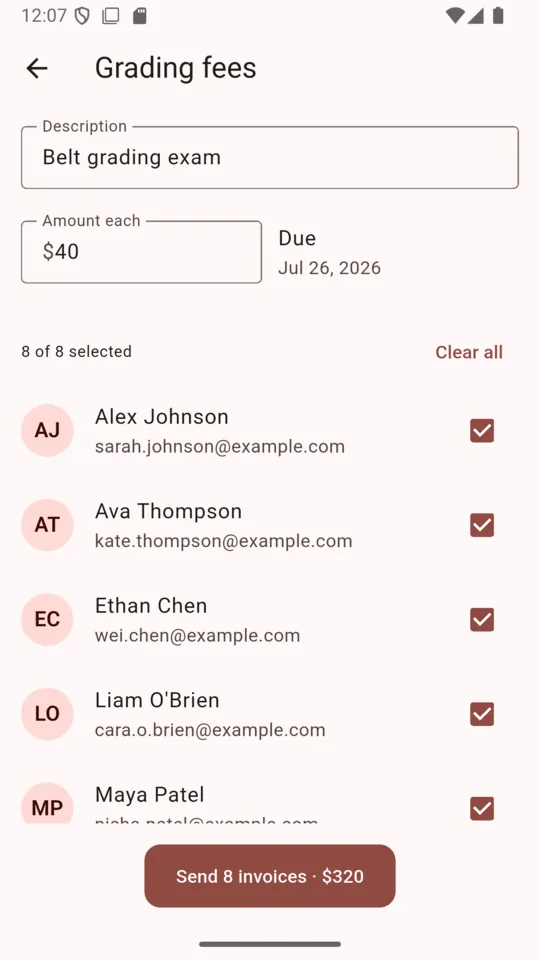
Four fields and a list of names
- 1
Open Grading fees
It sits on the More tab. The tile is named for the belt module: a school with ranks switched on sees Grading fees, and the same screen is called Batch invoices in the clubs that have no ladder.
- 2
Say what it is and what it costs
A description, an amount each, and a due date. The description is what the parent will read on the invoice, so write it the way you say it out loud — Belt grading exam, Yellow to orange test, September grading. The due date starts fourteen days out and can be moved anywhere up to a year ahead.
- 3
Tick everyone testing
The list is your active students, each with the email the invoice would go to. Select all takes the whole class; untick the two who are not ready. A student with no email on file reads no email, cannot invoice and cannot be ticked at all, which is the app refusing to schedule something it has no way to deliver.
- 4
Send once
The button counts the run back to you before you commit to it — Send 8 invoices, $320.00 — and the confirmation says how many were scheduled. Up to five hundred students can go in a single run.
Scheduled is not the same as sent
This is the part worth understanding before your first grading day. Pressing send does not email anybody. It writes one scheduled invoice per student and stops there. A job runs at 06:00 UTC every day, picks up every scheduled invoice that has reached its due date, and only then creates the real thing on Stripe: a hosted invoice on your school's account, with seven days to pay. Stripe emails it to the parent and sends its own reminders after that.
So you can set up a grading run three weeks out, on the evening you actually have the list in front of you, and nothing lands in a parent's inbox until the date you chose. It also means an invoice dated for today goes out on the next morning run rather than the moment you tap the button.
| Status | When | What it means |
|---|---|---|
scheduled | The moment you press send. | A row per student, holding the description, the amount, the due date and nothing else. No email has gone anywhere yet, and you can still void it. |
sent | On the due date, after the 06:00 UTC run. | The row has become a real Stripe hosted invoice on your school account. Stripe emails it to the parent with seven days to pay, and chases it with its own reminders. |
overdue | Seven days past the due date, unpaid. | The status flips so the run can be read at a glance. The invoice stays live and payable; nothing is cancelled and nothing is escalated. |
blocked | After five failed attempts. | The school was not payment-ready, or the parent record could not be resolved, on five separate days. The row stops retrying so it cannot hold up anyone else. |
If the daily run fails part-way through creating an invoice, the next run picks up the same one rather than starting a new one, so a parent cannot be emailed the same grading fee twice.
The arithmetic on a grading day
The platform fee is 1% of each invoice plus 30 cents. It is charged per invoice, not per run, so a class of eight at $40.00 looks like this.
- Grading fee, each
- $40.00
- Students testing
- 8
- Invoiced in total
- $320.00
- Platform fee per invoice
- $0.70
- Platform fee on the run
- $5.60
By default that fee is added to the parent's invoice as its own Service fee line, so the school banks the full $40.00. Turn the pass-through off in Settings and the same amount comes out of the school's share instead. Stripe's card processing fee is separate and set by Stripe, under your school's own agreement with them.
Whose money it is
Your school gets its own Stripe account, created in the school's name during setup. Grading invoices are raised on that account, so the balance and the bank details are yours. ClearStack takes its platform fee out of each payment and never holds a balance on the school's behalf.
The practical consequence is that Stripe's relationship is with your school. Refunds, a disputed grading fee, and the payout schedule for the account are handled in your own Stripe dashboard on Stripe's terms, not by us.
Changing your mind
A student who pulls out of a grading can have their invoice voided, whether it is still scheduled or already sent. Voiding marks the row void and voids the invoice on Stripe too, so nothing further is emailed. An invoice that has already been paid cannot be voided — that is a refund in your Stripe dashboard, and deliberately not a button in a phone app.
What this will not do for you
It does not decide who grades. You tick the names, and promoting a student to the next belt is a separate, deliberate action on their record afterwards. Attendance is never counted toward a rank, because a computer should not be the thing that says a child is ready to test.
It also does not put grading fees on a recurring plan. Monthly dues are a different mechanism in DojoDues — a Stripe subscription started from a payment link — and a grading fee is a one-off that you raise when the date is set.
Why it is built this way
- One amount, one date, one action. Grading fees are identical across a class. The screen assumes that.
- Set it up weeks early. Scheduling now and emailing on the due date are separate things.
- Stripe does the chasing. A hosted invoice with seven days to pay, and Stripe's own reminders.
- Nobody gets billed twice. A part-failed run resumes the same invoice rather than raising a new one.
- Charged on the school's own account. ClearStack takes a fee per invoice and holds no balance.
- One price, whatever the class size. $19 a month per school, thirty students or three hundred.
Questions
How do I invoice a whole grading class at once?
Open Grading fees from the More tab, type what the fee is for, enter one amount, pick a due date, and tick everyone testing. One button invoices the lot. You do not open a single student record.
Does the invoice go out the moment I press send?
No. Pressing send schedules it. A job at 06:00 UTC each day turns every invoice that has reached its due date into a Stripe hosted invoice, and Stripe emails it with seven days to pay.
What does it cost to collect a grading fee?
1% plus 30 cents per invoice. A $40 grading fee carries 70 cents, so a class of eight costs $5.60 to collect. Stripe charges its own card fee separately, under your school agreement with Stripe.
Can I invoice a student with no email address on file?
No. That student shows as no email, cannot invoice, and cannot be ticked. Add the parent email to the student record and they become selectable straight away.
Can I cancel a grading invoice after scheduling it?
Yes, unless it has already been paid. Voiding it marks the row void and voids the invoice on Stripe too, so nothing further is emailed to that parent.
Does DojoDues decide who is ready to grade?
No, and it should not. You tick the students. Promoting a belt is a separate deliberate action on the student record, and attendance is never counted toward a rank.
Set up the next grading run tonight
Connect the school to Stripe, add your students with a parent email each, and the grading screen is ready. The trial runs 30 days and asks for no card.