PAT TEST CERTIFICATE

What actually goes on a PAT test certificate

A portable appliance test certificate is a short document doing one job: saying who tested what, with which instrument, what was measured, and what the tester concluded. This page walks the whole thing — the header block, the ten result columns, the signature — a field at a time, and shows a specimen laid out the way PATBook prints it.

Back to PATBook
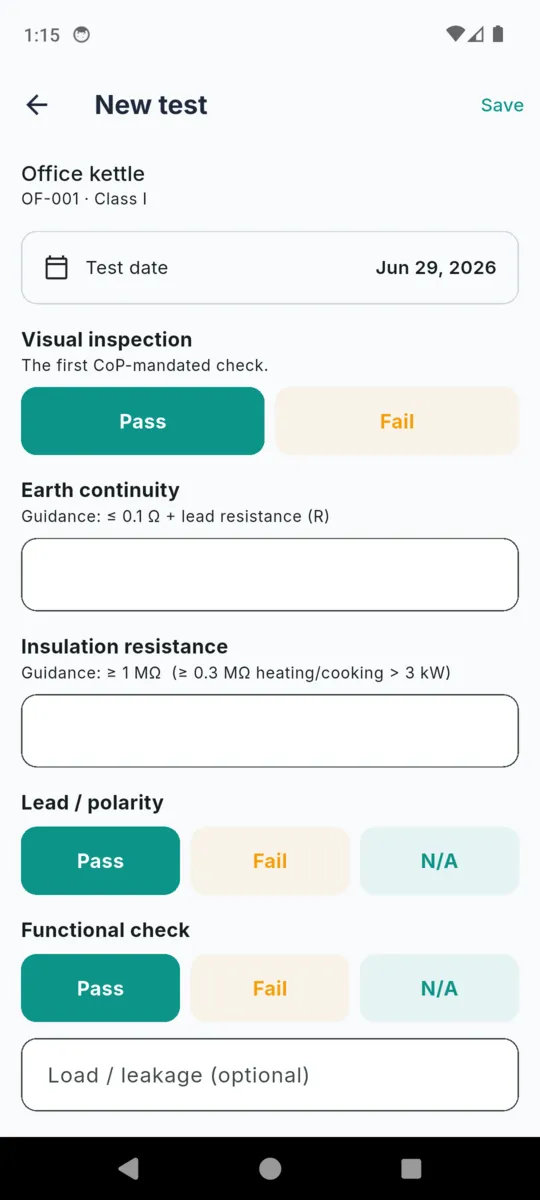
The PATBook new test form with visual inspection, earth continuity, insulation resistance, lead polarity and functional check fields, each showing its guidance figure
Every certificate column starts life as a field on this form

A certificate is a list of what you measured

There is no one legal form for a PAT certificate, which is why every testing firm’s looks slightly different and why the search for a template turns up forty of them. What they all share is a shape: a header that identifies the site, the tester and the instrument, then one row per appliance carrying the checks and readings taken on it, then a signature.

The header is the part people skimp on and the part that matters most a year later. A page of readings with no instrument named and no signature under it evidences almost nothing. The rows are the easy part — they come straight off the meter — but the columns have to be the same ones every year or the document cannot be compared with the last one.

The rest of this page is the field list. Take it as the ruling for a spreadsheet, hand it to whoever designs your paperwork, or use an app that already has it as a form.

The header block

Eight rows, printed as a two-column table above the results. Site and date of test are always there; the rest print when the field is filled in, so a certificate never carries an empty row for something you do not record.

Row What goes in it Comes from
Site The place the appliances live, not your own address. It is the first thing a reader looks for and the thing a filed certificate is found by. Site record
Client Who the certificate is for — the landlord, the managing agent, the company that pays. Left out when the site is the client. Site record
Address The full address of the site. On a multi-building client this is what separates one certificate from the next. Site record
Date of test The day the testing was done, written the day the document is produced. Automatic
Tester The person who did the work. A certificate with no name on it answers no question anyone will later ask. Tester profile
Company The trading name the work was done under. Tester profile
Competency Your qualification, in your own words — a City & Guilds number, a scheme membership, whatever you would be asked to evidence. Tester profile
Test instrument The make, model or serial of the tester you used. This is the line an auditor comes back to years later, long after the meter has been replaced. Latest test

Under the header, one line of arithmetic: how many appliances were tested, how many passed and how many failed. It is the only number on the document the app works out for itself, and it is a count, not a verdict.

The ten result columns

One row per appliance, carrying that appliance’s most recent test. Anything on the register that has never been tested does not appear — an untested appliance has nothing to certify.

  1. 01

    Asset ID

    The tag on the appliance.

    Unique within the site, so the same kettle is the same row next year. Typed, or read off a barcode or QR label with the phone camera. It is what makes a certificate comparable to last year’s instead of a fresh list of nouns.

  2. 02

    Description

    What the thing is.

    Kettle, extension lead, floor fan, laptop charger. Plain words beat catalogue names — the person reading the certificate is standing next to the appliance, not holding a purchase order.

  3. 03

    Class

    Class I, Class II or Class III.

    Earthed, double-insulated, or SELV. This is not decoration: it decides which of the next two columns can carry a number at all. The class is stored against the test as it stood on the day, so re-classifying an appliance later never rewrites an old certificate.

  4. 04

    Visual

    Pass, Fail or N/A.

    The inspection that finds most faults — damaged flex, a cracked casing, the wrong fuse, a plug that has been got at. It comes first on the form because it comes first in practice.

  5. 05

    Earth Ω

    Earth continuity in ohms.

    Class I only. Class II and Class III appliances are never asked for it and the column prints an em dash instead. The app shows the Code of Practice guidance line under the field as you type; it does not compare your reading against it.

  6. 06

    Insul. MΩ

    Insulation resistance in megohms.

    Asked for on Class I and Class II. The guidance figure printed under the field changes with the class, and with heating or cooking loads. Class III appliances take neither reading.

  7. 07

    Polarity

    Pass, Fail or N/A.

    The lead check. N/A is a real answer here and is printed as one, rather than being quietly left blank.

  8. 08

    Function

    Pass, Fail or N/A.

    The switch-on check. A load or earth-leakage figure in milliamps can be recorded alongside it if you take one; the certificate prints the check, and the reading stays on the test record.

  9. 09

    Result

    PASS or FAIL.

    Your determination, in bold, tinted so it reads at a glance. Nothing in the app works it out from the readings above — it is the one column that is entirely a judgement, and it is yours.

  10. 10

    Next due

    The retest date.

    Set from the interval you chose on the test, and editable when the risk assessment says something else. It is the column that turns a certificate into a diary entry for next year.

A specimen, filled in

Five appliances at one site: two Class I, a Class II, a Class III, and one failure. The layout is the one the app prints, down to the tinted failure row and the footer line on every page.

Portable Appliance Test Certificate

Sample data

Generated 14/07/2026

PATBook helps you record portable-appliance test results and prepare a certificate and asset register. It is not a substitute for competent inspection and testing, and it does not determine, compute, or guarantee whether any appliance is safe. PASS/FAIL is your professional judgement based on your own visual inspection and instrument readings. Test methods, pass limits, and retest intervals must follow the current IET Code of Practice and your own risk assessment. You are responsible for the accuracy and sufficiency of every record and certificate you produce.

Certificate details

Site
Northgate Offices
Client
Northgate Estates Ltd
Address
12 Northgate, Leeds LS1 0AA
Date of test
14/07/2026
Tester
A. Tester
Company
Northern Electrical Services
Competency
City & Guilds 2377
Test instrument
Seaward PrimeTest 250+ · S/N 41182

Test results

Tested 5 · passed 4 · failed 1

Asset ID Description Class Visual Earth Ω Insul. MΩ Polarity Function Result Next due
OF-001Office kettleClass IPass0.04 Ω4.2 MΩPassPassPASS14/07/2027
OF-002MicrowaveClass IPass0.07 Ω2.9 MΩPassPassPASS14/07/2027
OF-004Laptop chargerClass IIPass18.6 MΩN/APassPASS14/07/2028
OF-007Floor fanClass IFail0.09 Ω3.1 MΩPassFailFAIL14/08/2026
OF-011Desk lamp (SELV)Class IIIPassN/APassPASS14/07/2030

A. Tester

Tester signature · A. Tester · Northern Electrical Services

Competency: City & Guilds 2377

PATBook — record-keeping & certificate-preparation tool. PASS/FAIL is the tester’s professional judgement; this is not a guarantee an appliance is safe. Page 1 of 1


The disclaimer above is not page furniture. It is the same wording the app shows under every test you record, in Settings and during onboarding, and it is what stops the document being read as an approval.

The document that goes with it

A certificate says what happened on one visit. An asset register says what is at the site and when each thing falls due, sorted so the nearest date is at the top. Most sites want both, and they are produced from the same records.

Register column What it carries
Asset ID The same tag as the certificate, so the two documents line up row for row.
Description An appliance taken out of use prints with “(out of service)” after its description.
Make / model Whatever of the two you filled in, joined with a space. Blank is normal on a kettle and useful on a drill.
Class Class I, II or III, as the appliance stands now rather than as it stood at any one test.
Location Floor, room, department. On a large site this is the column that turns a list into a route.
Last tested The date of the most recent test, or an em dash where there has never been one.
Next due When it falls due. An appliance out of service prints an em dash instead, because it is not due for anything.
Result The result of that last test, so an old failure is visible without opening anything.

The same register as a spreadsheet

The register also exports as CSV, with make and model split into their own columns so a spreadsheet can sort on either. Anything containing a comma is quoted. This is the part that means the records are never stuck inside one app.

Asset ID,Description,Make,Model,Class,Location,Last tested,Next due,Last result,Status

What the document does not do

It does not certify that an appliance is safe, and no format of words on it can. The testing is the work; the certificate is the record of it. PATBook prepares the record — it does not test anything, it does not compare a reading against a limit, and it never fills in the result column for you.

  • The guidance figures are printed, not applied. The Code of Practice line sits under the earth and insulation fields as you type so you are not checking a laminated card on the van dashboard. Nothing compares your number to it.
  • PASS and FAIL are typed, not derived. The app stores what you entered and carries it onto the certificate. It has no opinion about whether that was right.
  • Retest dates are a suggestion you set. Intervals in the UK are risk-based rather than fixed, which is a longer subject with its own page.
  • Test methods and pass limits are yours. They follow the current IET Code of Practice and your own risk assessment, and the document says so on its first page.

Background reading is collected on the PATBook resources page.

How the certificate gets made

Four steps, all of them on the phone, none of them needing a signal or an account.

  1. 1

    Fill the tester profile once

    Name, company, competency, default instrument and a signature drawn on the screen. Every certificate after that carries them without being asked again.

  2. 2

    Add the site and its appliances

    Asset IDs typed, or scanned off a barcode or QR label. A scan that matches an existing tag recalls that appliance straight into a new test rather than making a duplicate.

  3. 3

    Log a test at the socket

    Visual, then the readings your instrument gives you, then polarity and function, then your result and the interval. Notes and photos attach to the test, and stay on the record rather than on the certificate.

  4. 4

    Take the PDF

    One tap on the site. The certificate is rendered on the phone from the tests you logged that day and shared straight from it. On the standard tier it carries a small “made with PATBook” watermark.

Questions

What has to be on a PAT test certificate?

There is no single legal form. In practice a certificate identifies the site and the tester, names the instrument used, and then lists each appliance with its asset ID, description, class, the checks and readings taken, the result and the retest date.

Is a PAT certificate a legal document?

It is a record of testing, not a licence or an approval. It evidences that inspection and testing were carried out and what was found. Whether that satisfies a duty holder, an insurer or an inspector is their judgement, not the document’s.

Who signs the certificate?

The person who did the testing. PATBook prints your captured signature above a rule, with your name, company and competency underneath, so the document says who stands behind it.

Does the certificate say whether an appliance passed?

It prints the PASS or FAIL you entered. PATBook never derives a result from the readings. The guidance figures shown next to the earth and insulation fields are there to be read, not applied.

What about appliances that failed?

They stay on the certificate, with the row tinted so it is not missed on a printout. Take one out of use and it also drops off the retest list, while its history stays intact.

Can I get the data out as a spreadsheet?

The asset register exports as CSV alongside its PDF, with ten columns including make and model split apart. The certificate itself is a PDF, built and shared from the phone.

The certificate, already built

Every field on this page is a row on one form in PATBook, and the PDF is one tap from the site. 14-day full trial, no card. £1.99 a month, £9.99 a year, or £24.99 once.