ELECTRONIC NOTARY JOURNAL
Is an electronic notary journal acceptable?
The honest answer is that it depends on who commissioned you, and that you should ask them rather than an app’s marketing page. What this page can do is tell you exactly what to ask, and give you the eight checks that separate a real electronic journal from a notes app with a seal on the icon.
Back to NotaryLog →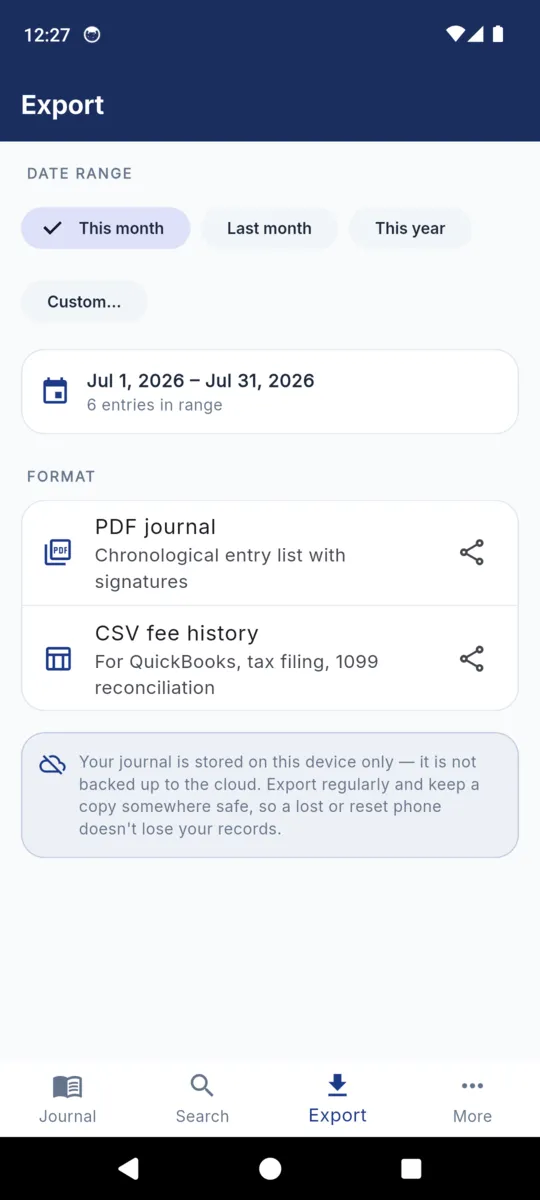
Ask before you switch, not after
Journal rules are set state by state, and they have not moved at the same speed. Some states have written electronic journals into their rules and say what one has to do. Some say nothing at all. Some describe a bound book with sequentially numbered pages in terms no app can satisfy, whatever it claims.
Silence is the awkward case, because it is neither permission nor prohibition. Reading it as a yes is a decision you make alone and defend alone. The office that commissioned you answers this in a phone call, and the answer is worth having in writing.
Four questions worth asking in that call:
- May the required journal be kept electronically at all?
- If so, what must it do — tamper-evidence, retention period, backups, a specific format?
- Does an electronic journal replace the paper one, or sit alongside it?
- What happens to the electronic record when the commission ends — surrender, deposit, or keep?
Until you have those answers, keep the book. Running both for a month costs you a few minutes an appointment and settles the question with evidence rather than hope.
Two different questions get mixed up here. An electronic journal is about how you keep the record. Remote online notarization is about how the act itself is performed, over video, with a signer who is not in the room. A state can permit one and not the other.
NotaryLog is a journal. It records acts you performed; it does not perform them, does not verify identity for you, and is not a remote notarization platform.
Eight things to check before you trust an app
Assume the answer is yes and you may keep the record electronically. That still leaves the harder question, which is whether this particular app deserves your record for the next seven years.
-
Where the record actually lives
On the device, on someone’s server, or both. A journal held on a company’s server is a journal you can be locked out of by a lapsed card or a closed account.
Good sign: they can say where it is in one sentence.
-
Whether it works with no signal
Basements, farm kitchens, hospital rooms, car parks. An app that needs a connection to save an entry will fail you on the appointment you most want recorded.
Good sign: it saves with aeroplane mode on.
-
Whether an entry can be silently removed
A record you can quietly delete is a record with very little weight. The whole value of a journal is that it is awkward to change after the fact.
Good sign: entries are voided and marked, never erased; edits are dated.
-
Whether you can get all of it out
In a format you can still read in a decade without the app, without a subscription, and without asking anyone’s permission.
Good sign: a PDF and a plain CSV, on demand, at no extra charge.
-
Whether the signature is taken at the time
A signature collected later, or typed, is not the thing the journal is asking for. It has to be given by the person in front of you during the act.
Good sign: the signer signs on the device, in the appointment.
-
Whether it is encrypted and locked
A journal holds names, addresses, credential numbers and sometimes photographs. On a phone that goes everywhere with you, the screen lock is not enough on its own.
Good sign: encrypted at rest, plus its own PIN and biometric unlock.
-
Whether anyone else can read it
Accounts and sync mean support staff, subpoenas served on the vendor, and breaches you will hear about late. Ask what the company itself can see.
Good sign: no account, and a privacy notice that says so in plain words.
-
What happens if the app goes away
Companies close, apps get pulled from stores, phones are lost in taxis. Your obligation to produce the record does not go anywhere.
Good sign: your exports already answer this, because you make them.
How NotaryLog answers each one
Including the place where the honest answer is a weakness rather than a feature.
| Check | NotaryLog |
|---|---|
| Where the record lives | On the phone, in an AES-encrypted database. The key is generated on the device and held in the operating system’s keychain, not inside the database. No server copy exists. |
| Offline | Entirely. Writing, searching, exporting and locking all work with no connection. A connection is used only to serve ads on the free tier. |
| Removing an entry | There is no delete in the shipped app. You void an entry: it stays in the journal, marked with the date it was voided, and still prints in the export. Editing a saved entry stamps it as edited. |
| Getting it out | A PDF journal and an 18-column CSV, for this month, last month, this year or two dates you pick, through the system share sheet. No export charge, no cap. |
| The signature | Drawn on the phone during the appointment with a finger or a stylus, under a prompt written in English and Spanish, and printed into the PDF beneath the entry. |
| Locked | A PIN of your own, optional fingerprint or face unlock, and a one-off recovery code plus a security question for the day the PIN goes out of your head. |
| Who else can read it | Nobody. There is no account and no sync, and journal content is never transmitted. The app does send crash and usage diagnostics to Google Firebase; those never contain entry data. The privacy notice sets out the detail. |
| If the app goes away | Your exports are ordinary PDF and CSV files that open without NotaryLog. Nothing in them depends on the app still existing. |
| The weakness | One device, one copy. There is no cloud backup, so anything you have not exported is lost with the phone. The app nudges you after 30 days without an export, but the habit is yours to keep. |
What going electronic does not fix
Software changes how the record is kept. It does not change what is being recorded, and it is worth being blunt about the gap.
- It does not make a notarization valid. The act is valid because of what you did at the table, not because of where the note about it ended up.
- It does not decide your state’s rules. NotaryLog has no fee caps, no required-field checking, and no opinion on which acts need an entry.
- It does not improve a bad identification decision. A carefully typed record of the wrong judgement is still the wrong judgement, recorded neatly.
- It does not remove the retention obligation. It reduces the effort of meeting one. The years you have to keep the record are set elsewhere and do not shorten because the record is now a file.
- It does not back itself up. On this app in particular, the export you file somewhere else is the backup, and there is no second copy until you make one.
None of that is an argument against an app. It is an argument for treating the switch as a change to a compliance process rather than a change of stationery — which mostly means asking first, running both for a while, and exporting on a schedule you actually keep.
Questions
The ones asked before the switch, not after.
Is an electronic notary journal allowed?
It depends on where you are commissioned. Some states have written electronic journals into their rules, some are silent, and some describe a bound book. Ask your commissioning authority before switching.
Is an electronic journal the same as remote online notarization?
No. A journal is how you keep the record; remote notarization is how the act is performed. A state can allow one and not the other. NotaryLog is a journal, not a notarization platform.
Can I keep a paper book and an app at the same time?
Yes, and it is the sensible way to change over. Run both for a month, compare what each one captures, and keep the paper book until you have a clear answer.
What if the app company disappears?
Your exports are the answer. A PDF and a CSV open without NotaryLog and will still open in a decade, which is why exporting regularly matters more than the app you chose.
Does NotaryLog upload my journal anywhere?
No. The journal stays on the device. The app sends crash and usage diagnostics to Google Firebase, and those never contain entry content.
This page is general information about notarial recordkeeping, not legal advice. Whether an electronic journal is acceptable, and on what terms, is set by your commissioning authority and differs by state. NotaryLog reduces the paperwork around a notarial act; it does not make one valid and it does not guarantee compliance with any state’s rules.
Keep reading
GUIDE
Notary journal requirements
Why the journal exists, what a complete entry generally contains, the mistakes that cause trouble later, and how long to keep it.
GUIDE
Notary journal template
The full field list with what belongs in each one, the standard act and ID options, and one entry filled in end to end.
GUIDE
Right of rescission calendar
Three business days counted the way Regulation Z counts them, a worked example over a holiday weekend, and the observed-holiday trap.
THE APP
NotaryLog
The offline journal itself: the anatomy of an entry, the real screens, and what the PDF and CSV exports contain.
An electronic journal that stays on your phone
No account, no sync, no server copy — and a PDF or CSV of any period whenever you need to hand the record over. $39.99 once, or $3.99 a month, with a seven-day trial of everything whenever you want to start it, and no card.
