NOTARY JOURNAL REQUIREMENTS
What a notary journal has to record
There is no single national answer — journal rules are set state by state, and a few states set none at all. But where a journal is required the elements are broadly the same, and the reasoning behind them does not change. This is what a complete entry contains, why each part is in there, and what tends to go wrong.
Back to NotaryLog →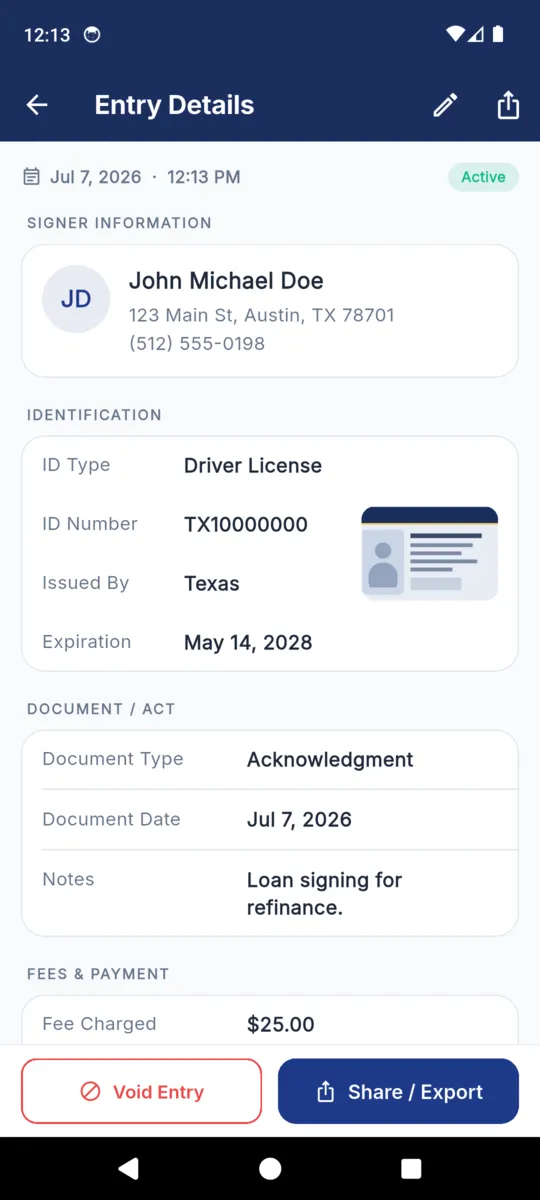
Why the journal exists at all
The certificate you complete goes with the document and leaves your hands the moment the signing ends. The journal is the part that stays. It is the only contemporaneous record that the act happened the way you say it did, kept by the one person in the room whose job was to watch it happen.
It protects the notary first. When a signature is later challenged — a disputed deed, a contested power of attorney, a refinance that unravels — the questions are always the same two: did this person appear in front of you, and how did you know who they were. Memory is not evidence. An entry written at the table is.
It is also the record a commissioning authority can ask to inspect, and in many places the record you must still be able to produce years after your commission has lapsed. A journal is not a formality you keep for the year you are in. It is the thing you will be asked about long after you have forgotten the appointment.
What a complete entry contains
Eleven elements, in roughly the order a signing produces them. The first seven turn up in most rule sets that require a journal at all; the last four differ sharply from one state to the next, and two of them are restricted in places rather than required.
- Date and time of the actCommon to most rules
- The moment the signer appeared in front of you — not the date printed on the document, which is often earlier and occasionally much earlier.
- Type of notarial actCommon to most rules
- Acknowledgment, jurat, oath or affirmation, copy certification, signature witnessing. Where the rules count acts rather than appointments, a package containing six acknowledgments produces six entries.
- The documentCommon to most rules
- Its type or title, and its own date where it carries one. Enough that you could identify the instrument again without having a copy of it.
- The signerCommon to most rules
- Their full name as it appears on the identification, and usually an address. A phone number is rarely required and is often the only thing that lets you reach the person a year later.
- How you established identityCommon to most rules
- Personal knowledge, a credible witness, or a credential. If it was a credential: what kind, who issued it, its expiry, and its number where you are permitted to keep one.
- The signer’s signatureCommon to most rules
- Signed into the journal itself, at the time, by the person in front of you. A signature collected afterwards is worth very little, because the whole point of it is that it was given at the moment of the act.
- The fee chargedCommon to most rules
- Including nothing, when you charged nothing. Travel is normally recorded separately, because in most places it is not the notarial fee and is not capped the same way.
- A thumbprintState-dependent
- Some rules require one for particular instruments, typically those affecting real property. Others never mention it. A few restrict it. Do not start taking prints because an app offers the field.
- Where the act took placeState-dependent
- Rarely required in a fixed office; much more relevant to mobile work, where the answer to “where did this happen” is a different address every time.
- A copy of the identificationState-dependent
- This one runs in both directions. Some places expect it; others restrict or prohibit keeping images of a signer’s credential. Confirm which applies to you before you photograph a licence.
- Sequence and tamper-evidenceState-dependent
- Paper rules tend to specify a bound book with numbered pages, so that a removed page is obvious. Electronic rules tend to speak about tamper-evidence and retention instead. They are two answers to the same worry.
Which of these applies to you is not ours to say. Requirements vary by state, and so do the things a state will not let you record. Your commissioning authority is the source. NotaryLog records what you type and does not check it against any state’s list.
The parts that cause trouble later
None of these are exotic. They are the ordinary shortcuts a busy week produces, and they all cost the most at the exact moment the record matters.
-
Writing it up in the evening
An entry reconstructed from a diary at nine at night is a memory, not a contemporaneous record — and its value in a dispute drops accordingly.
Write it while the signer is still in the chair.
-
One line for a whole appointment
Six acts, one line, one fee. It reads fine in the moment and reads like a gap when somebody asks which document the acknowledgment covered.
One entry per act, wherever your rules count acts.
-
Scribbling out a mistake
A journal with an obliterated line invites the exact question you were trying to avoid: what did that say before.
Correct visibly. Leave the original readable and date the change.
-
Recording the credential loosely
“DL” on its own, with no issuer and no expiry, tells a reviewer nothing about whether the identification was actually valid on the day.
Type, issuer, expiry — and the number where you may keep it.
-
Photographing ID because you can
Some states restrict keeping images of a signer’s credential. A feature being available is not permission to use it.
Check first, and switch the feature off if the answer is no.
-
Letting the record go missing quietly
A lost, stolen or destroyed journal frequently carries its own notification duty, and the duty usually has a deadline measured in days.
Know what yours is before it happens. Keep a copy somewhere else.
How long you keep it
Retention is set by the same authority that sets the rest, and it is measured in years rather than months — sometimes a decade, and frequently a period that outlasts the commission that produced the entries. Resigning, letting a commission lapse or moving state does not usually end the obligation; in several places it starts a separate one about where the record has to be deposited.
Two practical consequences follow. The first is that whatever holds the journal has to outlast a phone, a laptop and a job change. The second is that the storage has to be somewhere you would still find it in seven years, which rules out the folder you made last Tuesday.
If the record lives on a phone, exports are the retention plan. NotaryLog keeps the journal on the device with no cloud copy, so the PDF or CSV you export and file elsewhere is the copy that survives a lost handset. The app nudges you after 30 days without an export for exactly that reason.
Where each element lives in NotaryLog
Only the signer’s name is required. Everything else is optional, because a field list that fits one state’s rules fits the next state’s badly.
| Element | In the app |
|---|---|
| Date and time | Written when you save the entry, and shown on the entry and in the export. |
| Type of act | Six standard options — acknowledgment, jurat, oath or affirmation, copy certification, signature witnessing, loan package — plus anything you type. |
| The document | Document type, document date, and a free-text note in your own words. |
| The signer | Full name (the one required field), plus address and phone. |
| Identification | Driver licence, state ID, passport, military ID, credible witness or personal knowledge — with number, issuing authority and expiry date. |
| Signature | Drawn on the phone with a finger or stylus, under a prompt written in English and Spanish, and printed into the PDF. |
| Fee | Fee and travel fee in separate fields, with a payment method and a running subtotal. |
| Thumbprint | An optional photo attached to the entry. Nothing is captured unless you ask. |
| ID image | Optional, and behind its own switch in your profile so you can turn it off entirely where keeping one is restricted. |
| Location | Coordinates plus the street address they resolve to. It can tag new entries automatically, be cleared per entry, or be switched off. |
| Corrections | Editing stamps the entry as edited. Voiding keeps it, marks it with the date, and still prints it in the export. |
| The copy you keep | PDF journal or 18-column CSV, for a month, a year or two dates you pick. |
Questions
Short answers to the ones that come up most.
Is a notary journal required everywhere?
No. Some states require every commissioned notary to keep one, some require it only for certain acts, and a few leave it to you. Your commissioning authority is the place to check.
Should I record a fee if I charged nothing?
Record it as no charge rather than leaving it blank. A blank field reads like an omission a year later; an explicit zero reads like a decision you made.
How many entries does a loan package need?
That depends on whether your rules count notarial acts or appointments. Where they count acts, each acknowledgment or jurat in the package is its own entry.
Can I correct a mistake in an entry?
Correct it visibly rather than obliterating it. In NotaryLog an edit stamps the entry as edited, and voiding keeps the entry in the journal marked with the date.
Does NotaryLog check my entries against my state’s rules?
No. It records what you type and never judges it. There are no fee caps, no required-field checks and no view on which acts need an entry.
This page is general information about notarial recordkeeping, not legal advice. Requirements differ by state and change. NotaryLog reduces the paperwork around a notarial act; it does not make one valid and it does not guarantee compliance with any state’s rules.
Keep reading
GUIDE
Notary journal template
The full field list with what belongs in each one, the standard act and ID options, and one entry filled in end to end.
GUIDE
Electronic notary journal
Whether an app is acceptable where you are commissioned, and the eight things to check before you trust one with your record.
GUIDE
Right of rescission calendar
Three business days counted the way Regulation Z counts them, a worked example over a holiday weekend, and the observed-holiday trap.
THE APP
NotaryLog
The offline journal itself: the anatomy of an entry, the real screens, and what the PDF and CSV exports contain.
Write the entry at the table
NotaryLog holds the signer, the identification, the document, the fee and the signature on one screen, offline, and exports the period whenever somebody asks for it. $39.99 once, or $3.99 a month, with a seven-day trial of everything whenever you want to start it.
