NOTARY JOURNAL TEMPLATE

A notary journal entry, field by field

If you came looking for a template, this is it — not a PDF to print, but the whole field list, what belongs in each one, and two entries filled in end to end. Rule it into a bound book, put it in a spreadsheet, or use the app that already has it as a form.

Back to NotaryLog
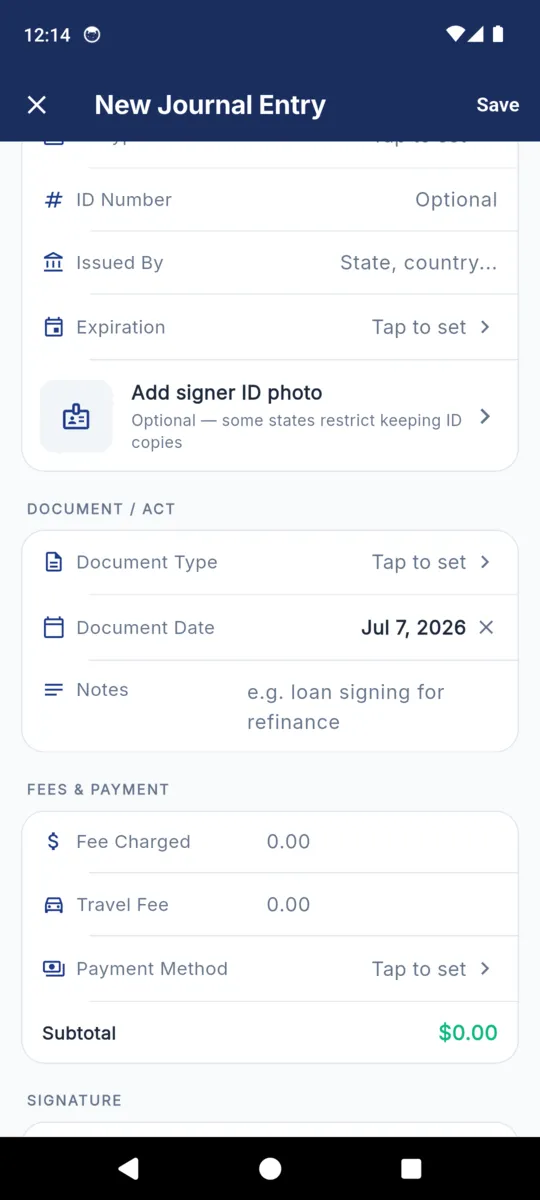
The New Journal Entry form in NotaryLog showing the identification fields, an optional signer ID photo row, the document and act fields, and a fees block with a running subtotal
The same fields, as the app’s entry form

Twenty-two fields, in eight blocks

Three of them fill themselves in. One is required. The rest are there because some state somewhere expects them, and left empty where yours does not — a template that suits one state’s rules suits the next state’s badly, so nothing here is forced.

Field What goes in it Filled by
The act
Date and time Written when the entry is saved. The moment the signer appeared, not the date on the document. Automatic
Signer
Full name As it appears on the identification you accepted. Required
Address Where the signer lives, not where the signing happened. Optional
Phone Rarely required. Frequently the only way to reach them a year later. Optional
Identification
ID type Driver licence, state ID, passport, military ID, credible witness, personal knowledge — or your own wording. Optional
ID number Where you are permitted to keep one. Some states restrict this. Optional
Issued by The issuing authority, not the country you are standing in. Optional
Expiration The date on the credential, which is how a reviewer knows it was valid on the day. Optional
Document and act
Document type Acknowledgment, jurat, oath or affirmation, copy certification, signature witnessing, loan package — or your own wording. Optional
Document date The date on the instrument, when it carries one. Optional
Notes Anything the fields do not cover: which package it belonged to, who was present, why a signer was refused. Optional
Fee and payment
Fee charged The notarial fee. Record a zero rather than leaving it blank. Optional
Travel fee Kept separate, because in most places it is not the notarial fee. Optional
Payment method Cash, cheque, card, a payment app, invoiced, or no charge. Optional
Where it happened
Latitude Captured on request, or automatically on new entries. Optional
Longitude Stored alongside the latitude, to six decimal places. Optional
Resolved address The street address the coordinates resolve to — the part a person can read. Optional
What you captured
Signature Drawn on the phone at the time, under a prompt in English and Spanish. Optional
Thumbprint A photo attached to the entry. Nothing is taken unless you ask for it. Optional
Signer ID photo Behind its own switch, so it can be turned off where keeping images is restricted. Optional
Status
Edited at Stamped the first time you change a saved entry. Automatic
Voided at Stamped when you void. The entry stays and still prints in the export. Automatic

The standard options

Three of the fields are pick-lists rather than free typing, which is what stops the same act being spelled four ways across a year of entries. Two of the three also accept your own wording, for the cases where your state words something differently.

Notarial act / document type

  • Acknowledgment
  • Jurat
  • Oath / Affirmation
  • Copy Certification
  • Signature Witnessing
  • Loan Package
  • Other — type your own

How identity was established

  • Driver License
  • State ID
  • Passport
  • Military ID
  • Credible Witness
  • Personal Knowledge
  • Other — type your own

Payment method

  • Cash
  • Check
  • Card
  • Zelle / Venmo / Cash App
  • Invoiced
  • No Charge

Two entries, filled in

The same template, used twice. One is a mobile signing with travel and a thumbprint; the other is five minutes at a desk with no fee at all. Both are complete entries — the difference is which optional fields earned their place.

Mobile acknowledgment

Sample data

Date and time
2026-07-07 12:13
Signer
John Michael Doe
Address
123 Main St, Austin, TX 78701
Phone
(512) 555-0198
ID type
Driver License
ID number
TX10000000
Issued by
Texas
Expiration
2028-05-14
Document
Acknowledgment
Document date
2026-07-07
Notes
Loan signing for refinance.
Fee
$25.00
Travel fee
$50.00
Payment
Cash
Location
123 Main St, Austin, TX 78701
Captured
Signature, thumbprint
Status
Active

Desk jurat, no charge

Sample data

Date and time
2026-07-09 09:40
Signer
Sarah Elizabeth Smith
Address
Phone
ID type
Personal Knowledge
ID number
Issued by
Expiration
Document
Jurat
Document date
2026-07-09
Notes
Affidavit of residence. Signer known to me since 2019.
Fee
$0.00
Travel fee
Payment
No Charge
Location
Captured
Signature
Status
Active

The first entry, once it is exported

The CSV writes one line per act, in the column order the export uses. Values containing a comma are quoted; a value a spreadsheet would try to evaluate is escaped first, so a name beginning with a dash stays a name.

2026-07-07 12:13,John Michael Doe,"123 Main St, Austin, TX 78701",(512) 555-0198,Driver License,TX10000000,Texas,2028-05-14,Acknowledgment,2026-07-07,25.00,50.00,Cash,"123 Main St, Austin, TX 78701",30.267200,-97.743100,,Loan signing for refinance.

The last two columns are the voided flag — empty here, because this entry is active — and the note. The PDF carries the same entry laid out to read, with the signature and thumbprint printed underneath it.
If you would rather keep it on paper

Nothing here argues you should not. A bound book has no battery and nothing to log into, and where the rules describe numbered pages in a sewn binding, a printed sheet in a folder is not the same thing. If that is your position, use this page as the ruling for the columns and buy the book.

  • Keep the order. Date and time, signer, identification, document, fee, signature. An entry read in a different order every time is an entry that gets read wrong.
  • Give the signature real room. A 15mm strip produces a scrawl that proves nothing. It is the field most often squeezed and the one most often asked about.
  • Number the pages, and never remove one. The numbering is the tamper-evidence; a gap in it says more than the missing page did.
  • Leave the ID image column out. A photocopy loose in a book is a different risk from a photograph on an encrypted phone, and some states restrict keeping one at all.
  • Decide the correction rule before you need it. A single ruled line, initialled and dated, keeps the original readable. Blocking a line out does not.

The one thing paper cannot do is answer a request quickly. When the question is about a single signing from three years and eleven hundred entries ago, a search box is the whole difference — which is the argument for keeping it electronically, and the reason to check first whether that is accepted where you are commissioned.

Questions

The ones that come with the word “template”.

Is there a blank notary journal template I can print?

Not from us. The field list on this page is the template: rule the same columns into a bound book with numbered pages, or use an app that already has them as a form.

Which fields are actually required?

In NotaryLog, only the signer’s name. What your state requires is a separate question with a different answer in each state — ask your commissioning authority.

Does the signer sign the journal as well as the document?

Where a journal is required, yes. The document signature is the act. The journal signature is your record that the person who signed it was in front of you.

What do I write for a package with several documents?

Where your rules count acts, one entry per act. The notes field is where you name the package, so the entries still read as one appointment.

Can I add an act or ID type that is not in the list?

Yes. Both lists accept free text, so an act your state words differently goes in exactly as your state words it.

This page is general information about notarial recordkeeping, not legal advice. What your state requires, permits and forbids in a journal entry is set by your commissioning authority. NotaryLog reduces the paperwork around a notarial act; it does not make one valid and it does not guarantee compliance with any state’s rules.

The template, already built

Every field on this page is a row on one screen in NotaryLog, with the pick-lists filled in and the signature pad a tap away. $19.99 once, or $3.99 a month, after a seven-day trial with no card.
