GeneratorLog
Runtime, Service & Fuel Log
Engine hours, oil changes, Q-tests, fuel stabilizer, outages — a single paper trail for your backup generator. Standby or portable, every brand.
How It Works
Register your generator
Name, brand, model, fuel type, starting hour-meter reading. Standby or portable, gasoline or propane — any make.
Log service & hours
Oil changes, filters, plugs, Q-tests, fuel stabilizer, battery checks — every job tied to engine hours, not the calendar.
Export PDF history
Multi-page service report for warranty, insurance, resale, or your generator tech's first visit. Email or share in two taps.
GeneratorLog in Action
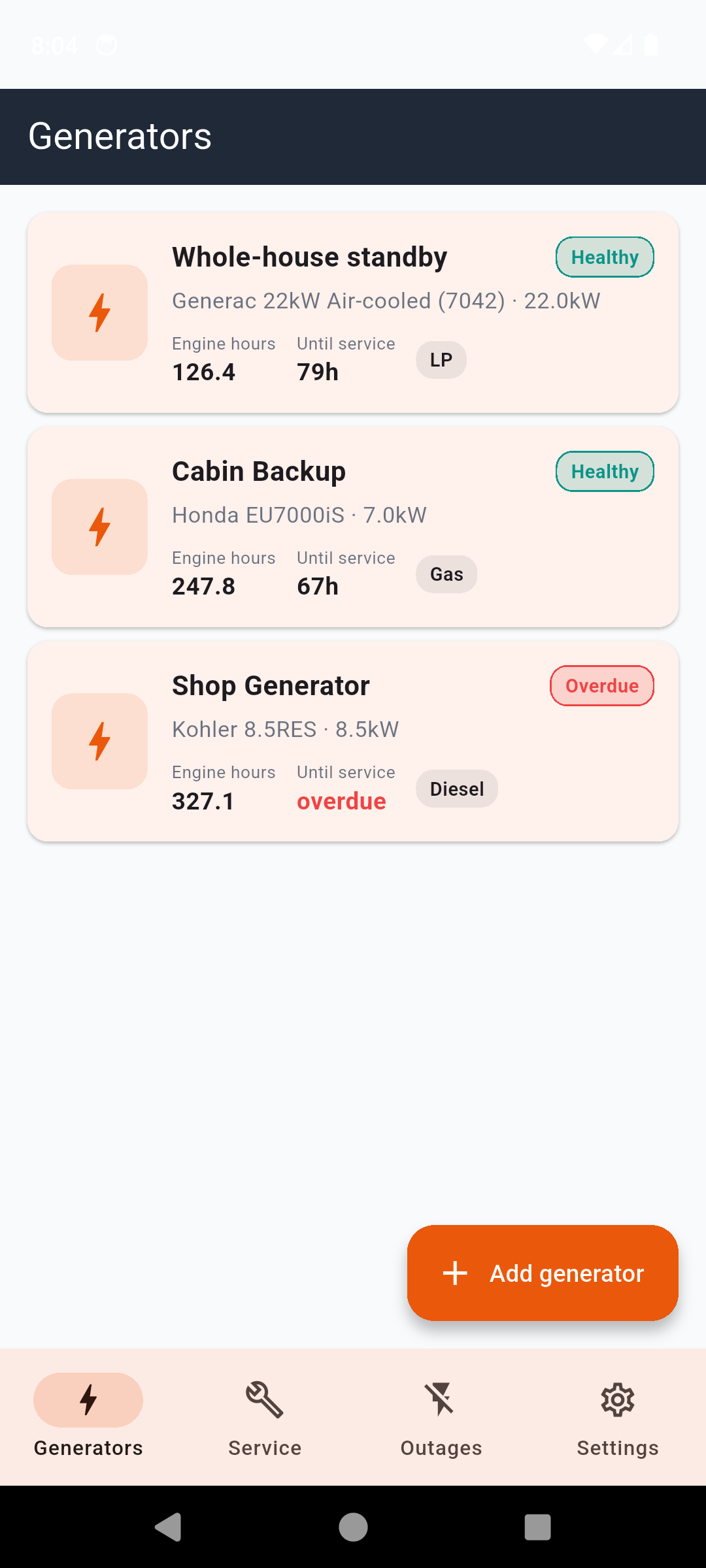
Your generators — one screen, every unit
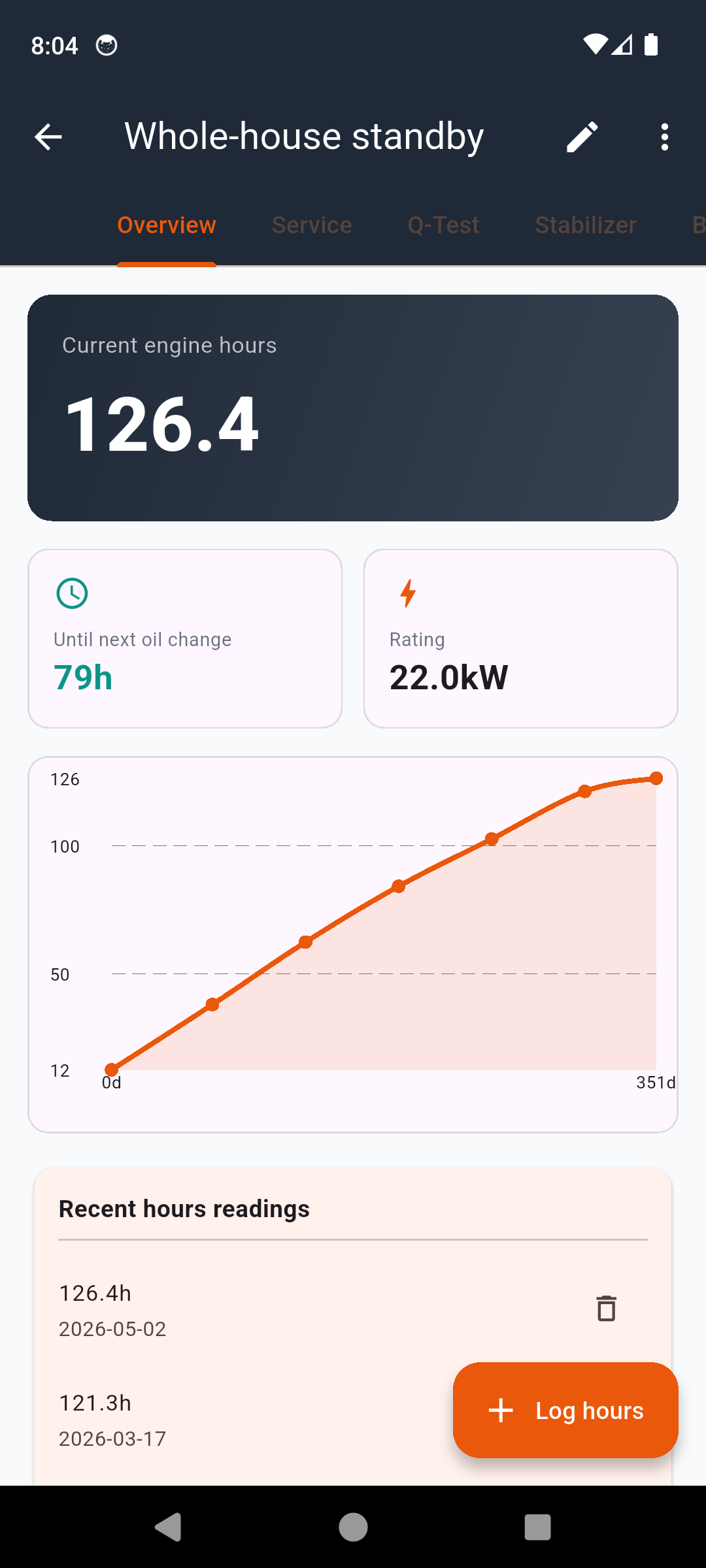
Detail — engine hours, next service due
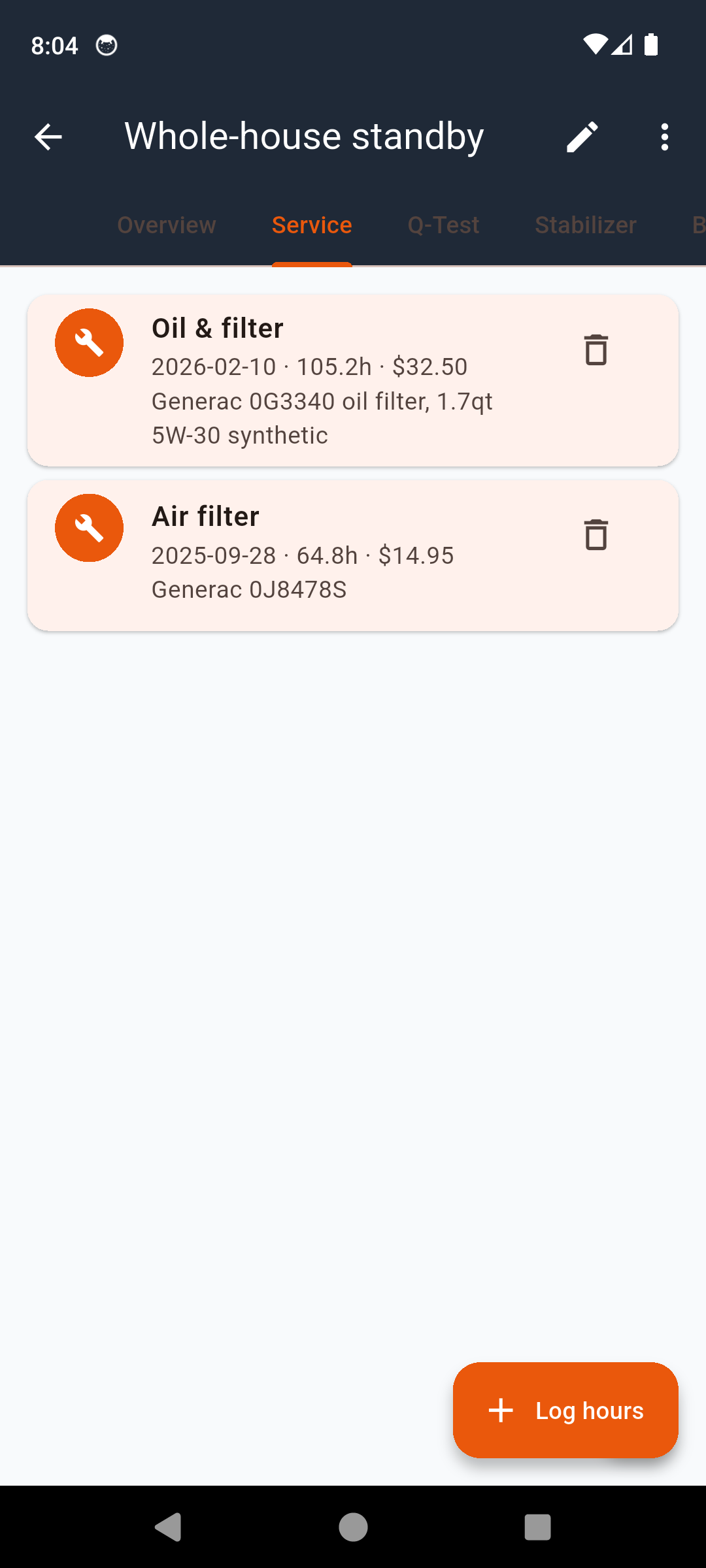
Service log — oil, filters, plugs, coolant
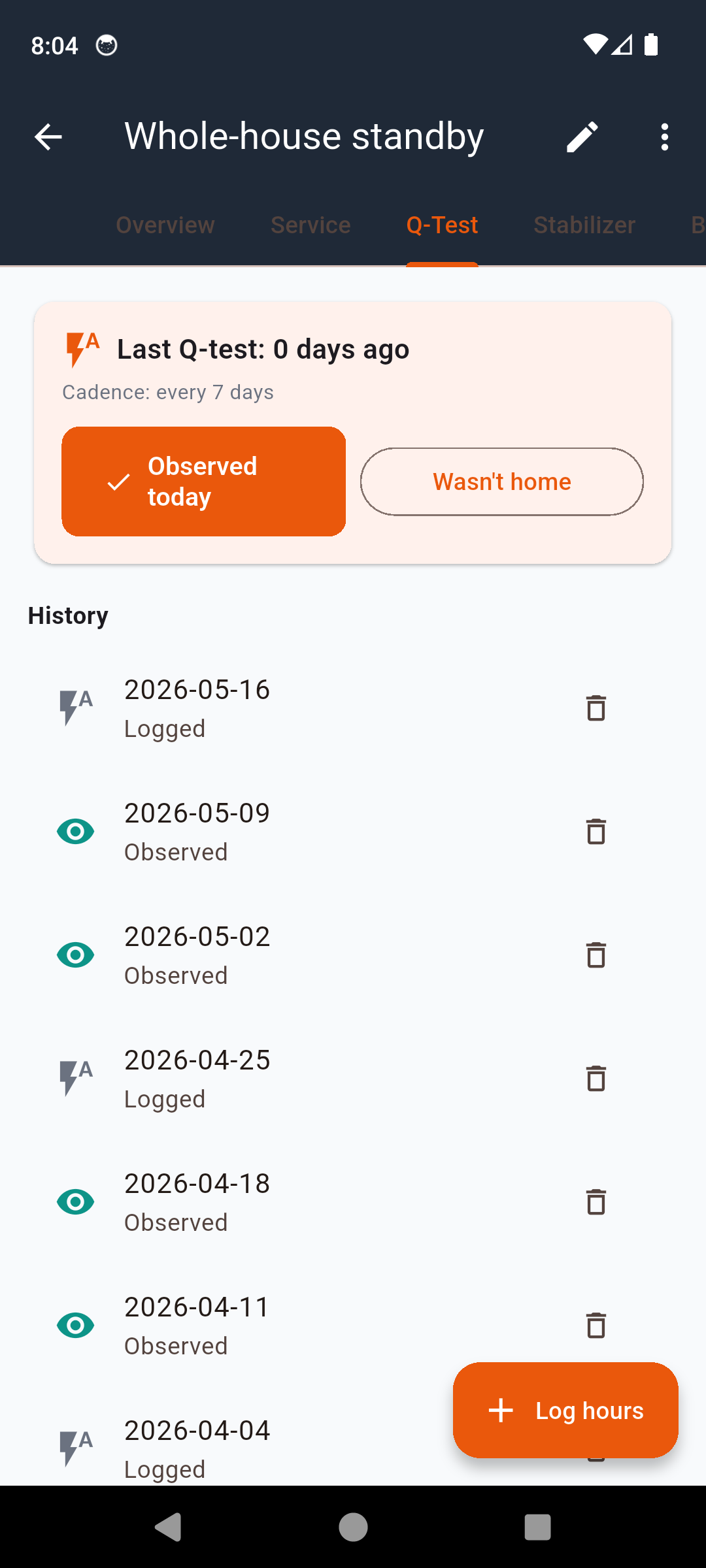
Q-Test — weekly auto-exercise paper trail
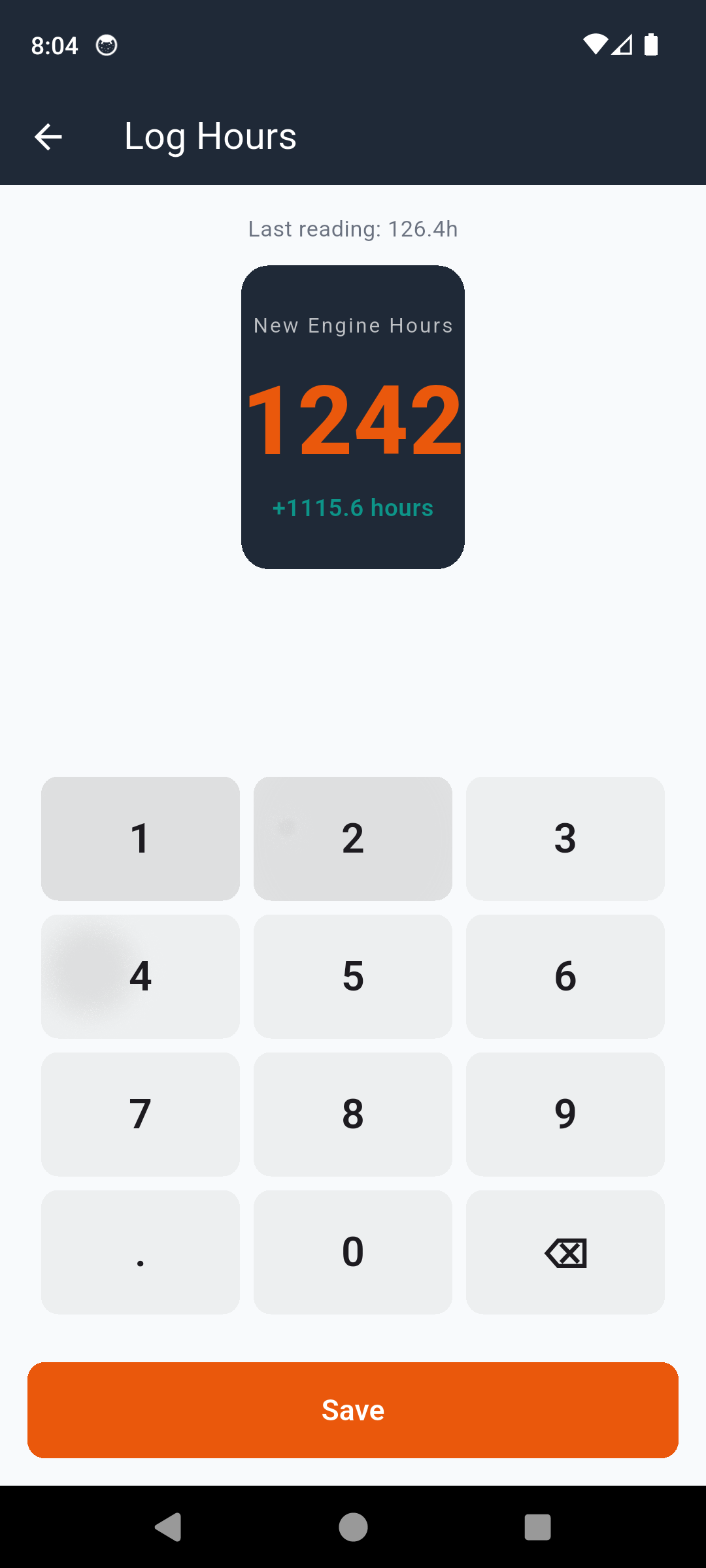
Hour-meter log — chart runtime over years
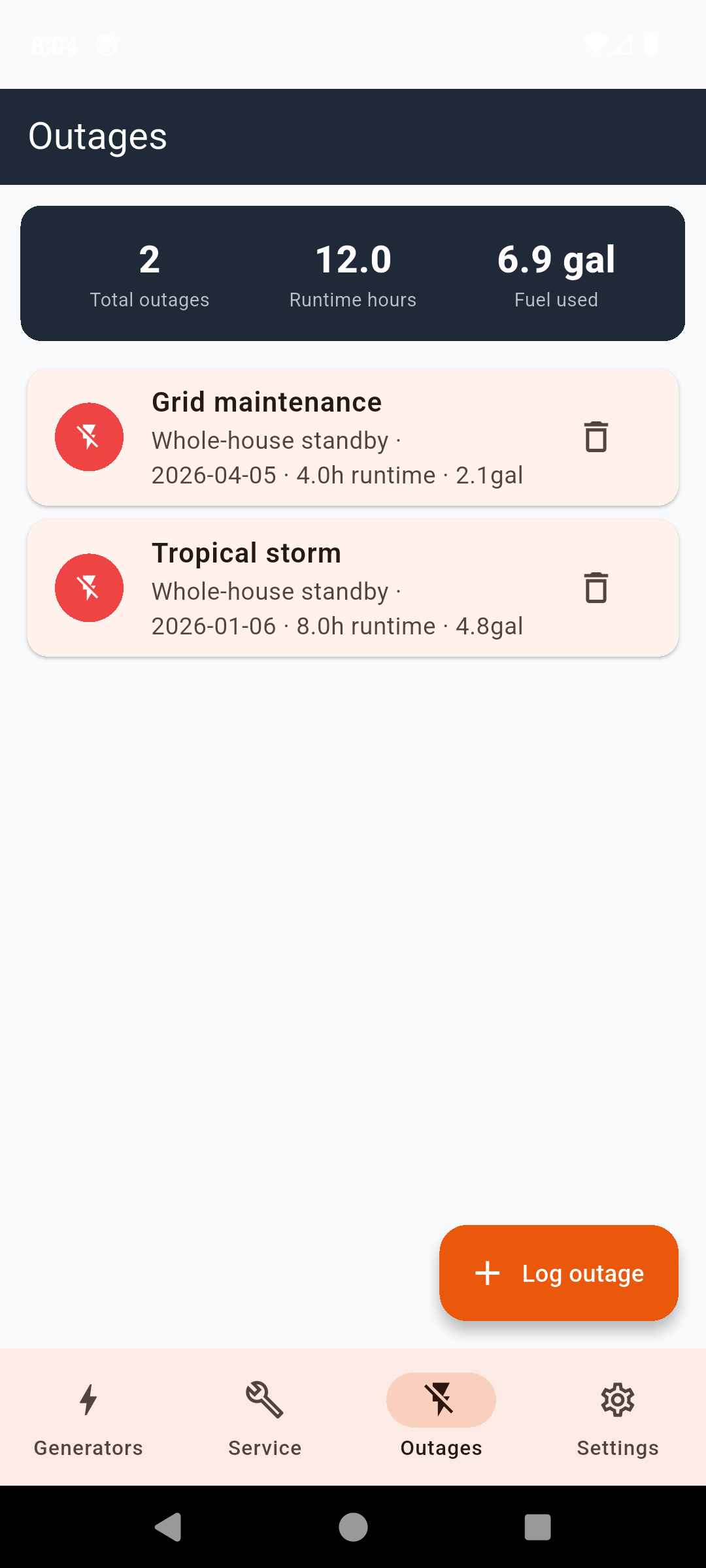
Outage log — runtime & fuel used per year
Every Service, Every Hour, On The Record
Multi-Generator Register
Track every unit — primary home standby, portable backup, jobsite or RV genny. Pro removes the one-generator cap.
Engine-Hours Log
Record each hour-meter reading. Chart runtime over months and years. Spot a unit that's running far more than expected.
Service Log Tied to Hours
Oil, filters, plugs, air cleaner, valve adjustments, coolant, fuel filters — every service tied to engine hours, not calendar dates.
Q-Test (Weekly Exercise)
Standby auto-exercise log — confirm the weekly cycle ran, note duration, flag abnormal observations (smoke, knock, no-start).
Fuel Stabilizer Tracker
Each stabilizer addition by date, fuel type, treated quantity, brand. Reminder cadence configurable — gasoline goes stale fast.
Outage Log
Start and end times, runtime hours consumed, fuel used, cause. Per-year totals show what your generator actually did for you.
PDF Service History
Multi-page report — every generator, every service, every outage. Useful for warranty, insurance claims, resale, or a new tech.
Hours-Based Reminders
Get notified before the next oil change is due, based on your latest hour-meter reading — not a calendar that ignores actual runtime.
Pick The Plan That Fits
14-day full trial on every install. Monthly, yearly, or a single lifetime payment.
Standard
After trial — one generator, with ads
- One generator
- Twenty service entries
- Engine-hours log
- Service log & Q-test log
- Fuel stabilizer & outage log
- Calendar-based reminders
- Banner & interstitial ads
GeneratorLog Pro
Lifetime — or $1.99/mo · $9.99/yr
- Everything in Standard, plus:
- Unlimited generators
- Unlimited service entries
- Hours-based service reminders
- PDF service-history export
- Share via email
- Ad-free
- Priority support
One missed oil change can cost more than a Pro lifetime. A seized engine on a 7kW portable runs $400+ in parts and labor. GeneratorLog tracks the hours so the reminder lands before the damage does.
Common Questions
Frequently Asked Questions
Will GeneratorLog work with my brand of generator?
Yes. GeneratorLog is brand-agnostic — register any generator with a name, model, fuel type, and a starting hour-meter reading. Generac, Kohler, Cummins, Briggs & Stratton, Honda EU, Westinghouse, Champion, Predator, Pulsar, DuroMax, Wen — portable or standby, gasoline, propane, diesel, natural gas, dual-fuel. You define the service intervals; the app doesn't lock you into a manufacturer's schedule.
How are oil change reminders calculated?
Reminders are tied to engine hours, not the calendar. Set your interval — typically 50 hours for portable generators or 100-200 hours for standby — and GeneratorLog notifies you before the next service is due based on your latest hour-meter reading. The calendar-based fallback is also available for time-based jobs like annual battery checks.
What is the Q-Test (Quiet Test) log for?
Standby generators auto-exercise weekly to keep the engine lubricated and the battery charged. The Q-test log lets you confirm each weekly cycle ran, log the duration, and flag any abnormal observations (no-start, loud knock, exhaust smoke). Over months and years you get a paper trail of unit health you can hand to a service tech or insurance adjuster.
Does it track fuel stabilizer additions?
Yes. Log each stabilizer addition by date, fuel type, treated quantity, and brand (Sta-Bil, Star Tron, PRI-G, etc.). For stored gasoline and ethanol-blended fuel that's the difference between a generator starting on the first pull during an outage and a no-start with gummed-up jets. Reminder cadence is configurable.
Can I export a service history PDF?
Yes — Pro unlocks a multi-page PDF report covering every generator, every service entry, all outages, Q-tests, fuel logs, battery checks, and hour-meter history. Useful for warranty claims, resale, insurance, or handing to a generator service technician on the first visit.
Does the app work offline?
Completely. Everything stores locally on your device. No account, no cloud sync requirement, no analytics on your log data. Useful in a power outage when your cellular tower is also down — the app still opens, the log still works, the PDF still exports.
What does it cost?
Every install gets a 14-day full trial. After that the standard tier covers one generator and twenty service entries with banner ads. Pro is $1.99/month, $9.99/year, or a one-time $24.99 lifetime — pick whichever model fits you. Pro unlocks unlimited generators, unlimited entries, PDF history export, hours-based service reminders, and removes ads.
Is this a replacement for my generator's manual?
No. GeneratorLog is a log — a record-keeping app — not a service substitute. Always follow your generator's manufacturer manual for service intervals, fuel specifications, and safety procedures. The app helps you remember what you did and when; it doesn't tell you what to do.
Your Generator Has A Memory Now
Stop guessing when the last oil change was. Download GeneratorLog and start the paper trail.
Have questions? Get in touch
A Runtime Log Your Generator Doesn't Have But Definitely Needs
The hour meter on the side of your generator counts up. It does not tell you when the next oil change is due. It does not remember the last time you ran fuel stabilizer through the carburetor. It does not flag the weekly Q-test that didn't fire two months ago because the controller battery had drifted out of spec. GeneratorLog is the log book your generator never came with — engine hours, service jobs, fuel additions, weekly exercises, outage durations, all in one place, all tied to the hour meter and not to a calendar that doesn't know whether the unit ran for ten hours or ten minutes this month.
Why Generator Owners Need a Runtime Log
The single biggest cause of a standby generator failing when grid power drops is a service it was overdue for. Oil that exceeded its hour interval and turned to varnish. A fuel filter that gummed up because the stabilizer cadence drifted. A battery that hadn't been load-tested in three years and couldn't crank the engine on a cold morning. Manufacturers publish service intervals in engine hours — 100 hours for many standby units, 50 hours for portable Honda EUs, 200 hours for some larger Generac units — but the hour meter only counts; it never warns. A runtime log is the warning. Without it you are betting your refrigerator, your sump pump, and your medical equipment on memory.
Oil-Change Intervals Are in Hours, Not Months
Your owner's manual specifies the oil interval in engine hours. A standby generator that runs a 20-minute Q-test every week accumulates roughly 17 hours of runtime a year just from exercising — plus whatever real outages add. A portable that powers a job site for an 8-hour day every weekday adds 40 hours a week. The same calendar reminder that's fine for the standby generator (annual oil change) leaves the portable a thousand hours overdue. GeneratorLog ties every service entry to the hour-meter reading at the time, so the next-service-due math is correct regardless of how much the unit actually ran since the last job.
Fuel Stabilization for Stored Gasoline and Diesel
Pump gasoline starts breaking down within 30 days; ethanol-blended fuel even faster. The light hydrocarbons evaporate, leaving the gummy residue that clogs carburetor jets and fuel filters. Sta-Bil, Star Tron, PRI-G, and similar treatments push the stable-storage window out to a year or more, but only if applied correctly — treat the fuel BEFORE storage, dose by volume, and run the generator long enough to draw stabilized fuel through the entire fuel system. GeneratorLog logs each stabilizer addition by date, fuel type, treated quantity, and brand so you know which tank is treated, when it was treated, and whether it's still inside its safe window. Diesel has its own concerns: water contamination, microbial growth, and the gradual loss of cetane number — different tracking, same principle.
Quarterly Load Testing
Standby generators that only run unloaded weekly Q-tests slowly accumulate carbon and unburned fuel in the cylinders — "wet stacking" in the diesel world. The fix is periodic loaded operation: a 30-minute run under at least 30-50% of rated load every quarter, typically by transferring real household loads onto the generator via the ATS or by hooking up a portable load bank. GeneratorLog's Q-test and runtime logs make it obvious when the unit hasn't seen meaningful load in months — you can see at a glance whether the last 10 exercise cycles were all under 20 minutes and unloaded, and schedule a real load test before the next outage forces one on you.
Why Standby Generators Fail When You Need Them
The first 30 minutes of a multi-day outage is where most standby failures surface. Battery couldn't crank — battery was four years old, never load-tested. Engine started then died — fuel filter clogged after two years on the same filter. Engine ran 8 hours then stopped — coolant level low, low-coolant lockout engaged, owner never noticed because the unit had never run more than a 20-minute Q-test. Every one of those failures is preventable, and every one of them is a service entry that was overdue. GeneratorLog's purpose is to make the overdue service visible BEFORE the outage, not after.
Photographing the Name Plate and Manual
The serial-number plate on your generator is the first thing you'll need when calling a service tech or filing a warranty claim — and it's invariably on the back, behind the unit, where reading it in the rain at 2 a.m. is its own ordeal. Attach a photo of the data plate to your generator's record in GeneratorLog the day you set up the app. While you're at it, photograph the model-specific page of your owner's manual that lists service intervals and capacity charts. Both are now in the PDF service history you can email to anyone, anytime, without going behind the unit again.
Propane vs Gasoline: Different Storage Math
Propane doesn't degrade in storage the way gasoline does — a sealed tank will hold usable fuel for decades. That removes the fuel-stabilizer cadence entirely, but introduces a new failure mode: regulator and supply-line integrity. The pressure regulator on a propane-fired standby generator typically has a service or replacement interval (often 5 years for the primary regulator, 10 for the secondary). Gasoline portables have the opposite tradeoff — short fuel storage window, no regulator concerns. Dual-fuel generators inherit both sets of failure modes. GeneratorLog lets you set custom service intervals per generator so the propane standby gets a regulator-check reminder and the portable gasoline genny gets a stabilizer reminder, without either reminder bleeding onto the other unit.
Multi-Generator Households and Properties
A surprising number of users have more than one generator — the home standby plus a portable for the workshop, the RV genny plus a jobsite unit, or the primary plus a backup-to-the-backup. Each unit has its own service interval, its own fuel, its own runtime, and its own paper trail. The Pro tier removes the one-generator cap so each unit gets its own record, its own reminders, and shows up in the PDF history under its own header. Rental property owners use the same pattern for the genny on each property; small contractors track their fleet of portable units the same way.
For Estimation — Always Follow the Manufacturer Manual
GeneratorLog is a record-keeping tool. Service intervals, fuel specifications, ambient-temperature operating ranges, and emergency procedures all live in your generator's owner's manual and supplementary service documents — those are the source of truth, not this app. The log helps you remember what you did and when. It doesn't tell you what to do, and it doesn't substitute for licensed service work on a high-voltage standby unit. Always follow your manufacturer's guidance and local code.