


NOTARY JOURNAL & FEE LOG

NotaryLog icon: a gold notary seal with a navy centre

NotaryLog

Notary Journal & Fee Log

When someone asks about a signing from two years ago, you have an answer.

Write the act down while the signer is still at the table — who they were, how you identified them, what they signed, what you charged, their signature on the glass. It stays on your phone, encrypted and searchable, and comes back out as a dated PDF or a spreadsheet whenever somebody asks.

Seven-day trial, no card. Then $3.99 a month,
or once for $19.99 on Play and $39.99 on the App Store.

  • Records & Productivity
  • Android · iOS, phone & tablet
  • Works offline
  • No account
  • English
The NotaryLog opening screen: a gold notary seal on deep navy, the name NotaryLog, and the line “Your record, your responsibility.”

Sooner or later, somebody asks

A journal is not paperwork for its own sake. It is the thing you reach for when a signature gets questioned, when your commissioning authority wants to see your records, or when the year’s income has to be added up. Three requests, and what you hand over.

01

“We’re looking at a loan package your client signed last July. What ID did you take?”

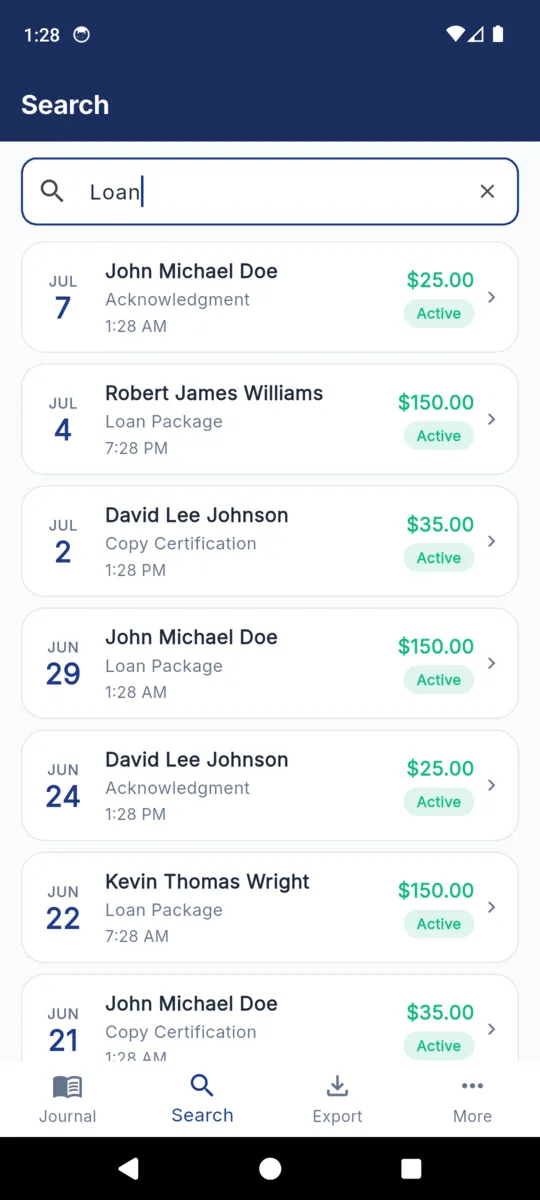
Search the signer’s name, the document type, the ID number or a phrase from your own notes. The entry opens with the credential you accepted, its issuing authority and expiry, the document date, and the signature captured at the table.
02

“Send us your journal for the period, please.”

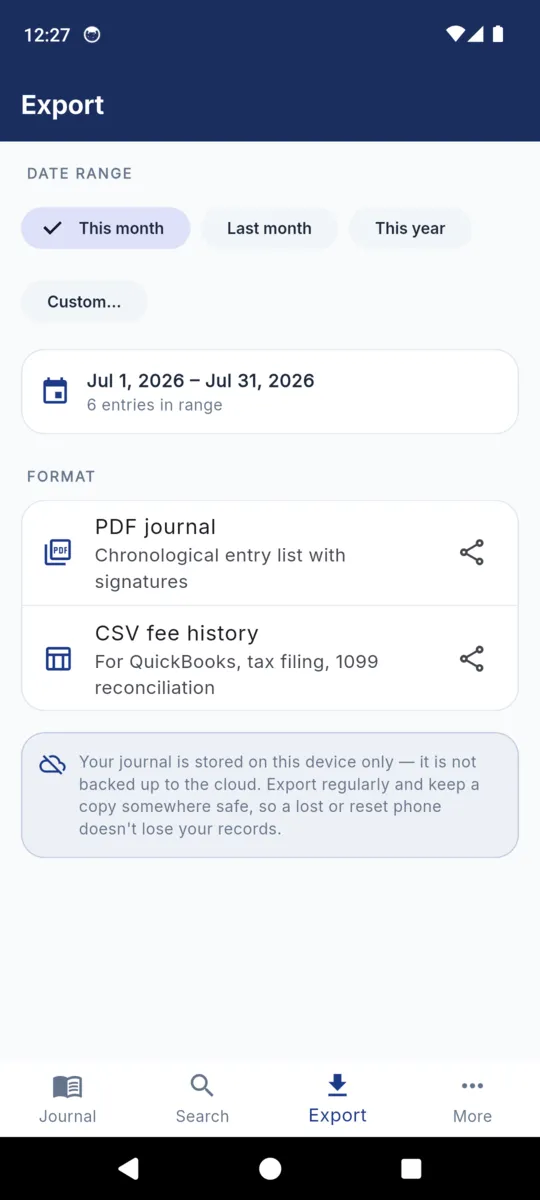
Export, pick the range, take the PDF. Entries print in date order with signer, identification, document, fees, any location line and the captured images. Voided entries are printed and marked voided rather than quietly dropped.

03

“I need your notarial income for the tax year.”

The CSV: one row per act, eighteen columns, fee and travel fee and payment method in their own fields. It opens in a spreadsheet, and it carries a byte order mark so accented names survive the trip.

NotaryLog keeps the record. Whether that record satisfies your state is a question for your commissioning authority — the rules differ, and the app does not judge them for you.

Anatomy of one entry

Everything below sits on a single screen, in this order. Only the signer’s name is required — what your state expects on an entry is not what mine does, so the rest is yours to fill in or leave alone.

  1. 1 Signer Full name, and optionally the address and phone number you took.
  2. 2 Identification How you satisfied yourself: driver licence, state ID, passport, military ID, credible witness, personal knowledge, or something you type in. Plus the number, who issued it, and when it expires.
  3. 3 Document and act Acknowledgment, jurat, oath or affirmation, copy certification, signature witnessing, loan package — or your own wording. With the document’s date and a free-text note.
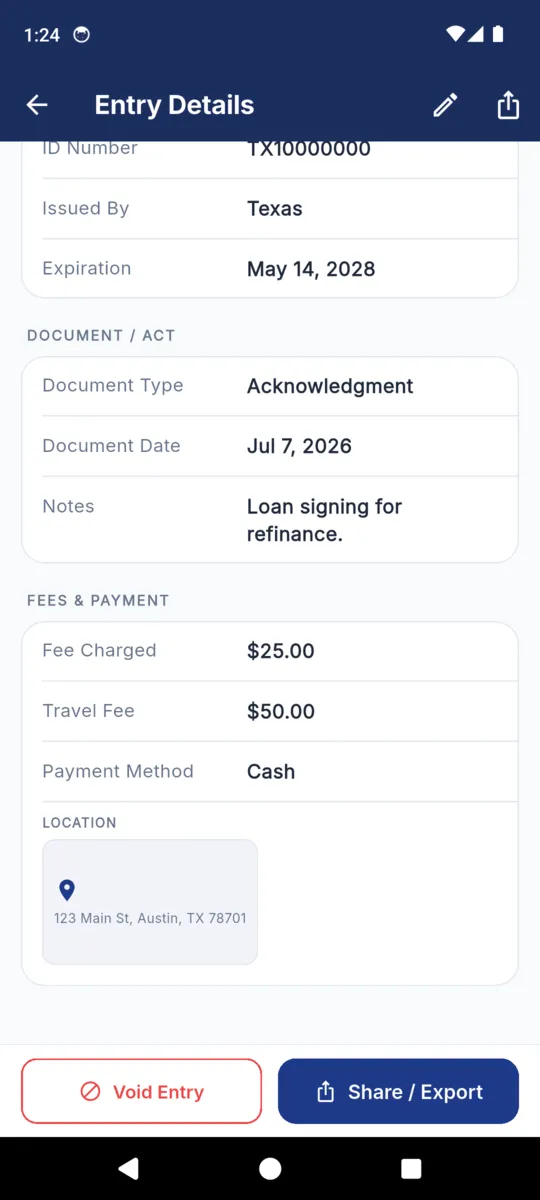
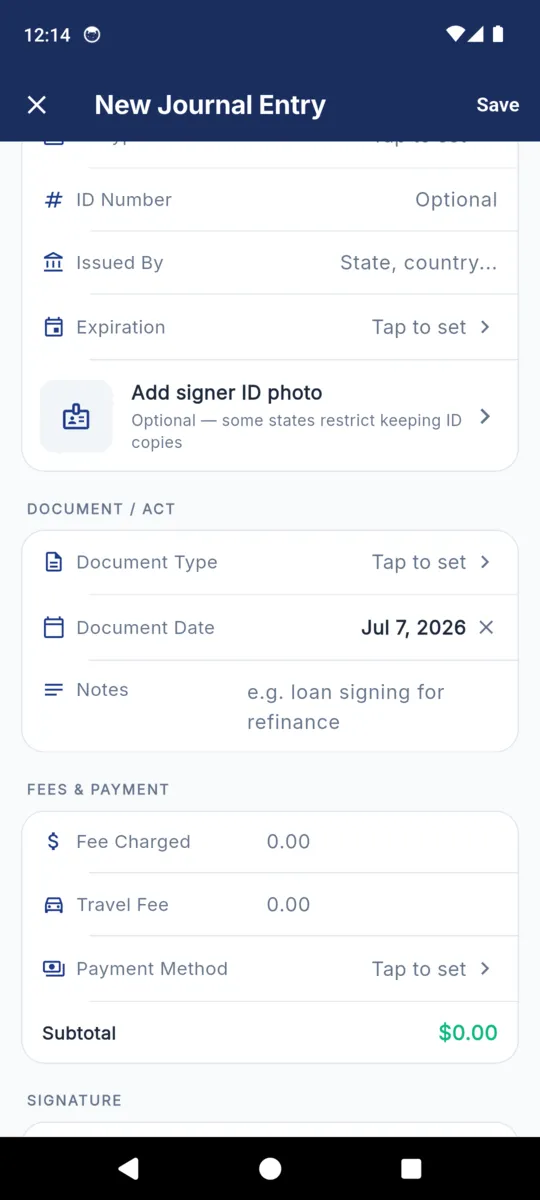
  4. 4 Fee and payment Fee charged, travel fee, and how it was paid: cash, cheque, card, a payment app, invoiced, or no charge. A subtotal adds up as you type.
  5. 5 Where it happened Coordinates plus the street address they resolve to — the part that matters when the signing was at a kitchen table two towns over. It can tag new entries automatically, and it can be cleared or switched off.
  6. 6 What you captured The signature, drawn on the phone with a finger or a stylus under a prompt written in English and Spanish. Optionally a thumbprint photo, and optionally a photo of the signer’s ID — that one has its own switch, because some states restrict keeping ID copies.
  7. 7 Status The timestamp is written when you save. Editing stamps the entry as edited. Voiding keeps it, marks it with the date it was voided, and does not use up a free entry slot.

The app itself

Six screens from the shipped build, filled with sample entries. Scroll the strip sideways, or tab to it and use the arrow keys.

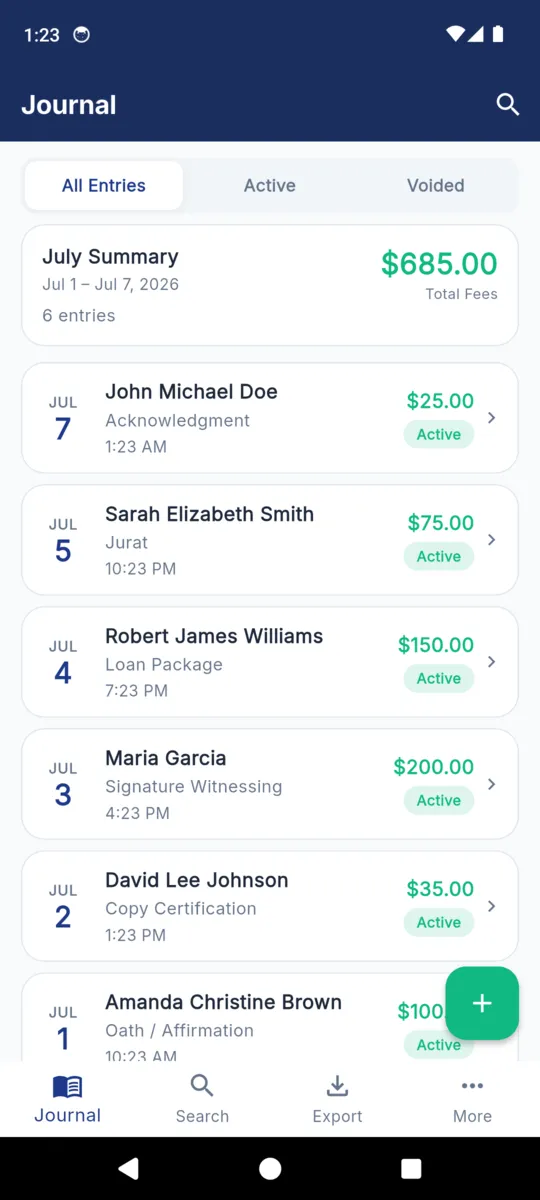
  • The NotaryLog journal listing six entries under a July summary card reading $685.00 total fees, each row showing the date, signer, act type and fee
    The journal, newest first, with the month’s count and fee total on top (sample data)
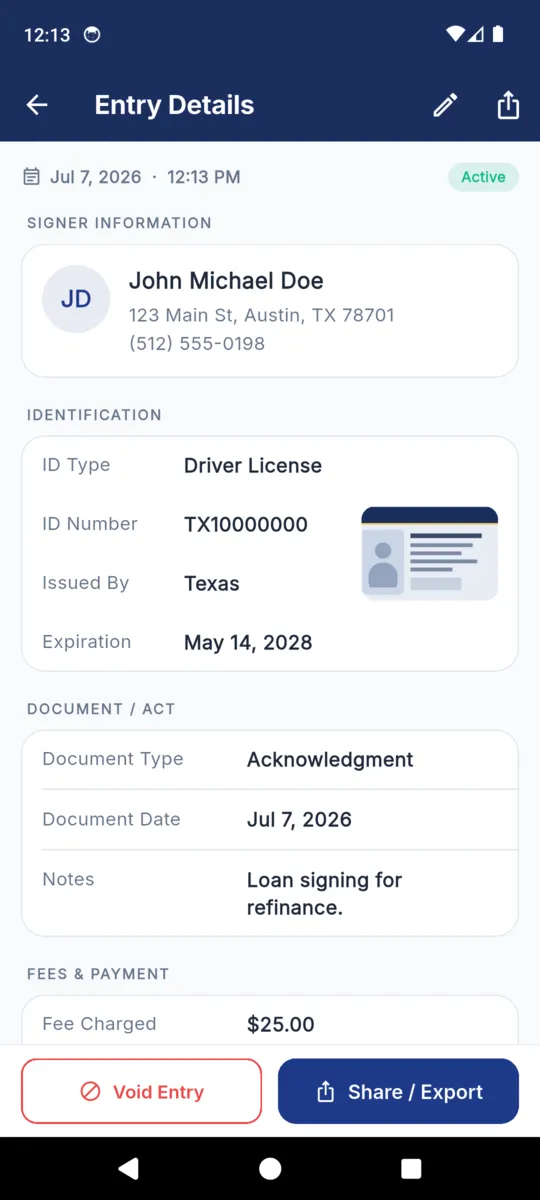
  • A NotaryLog entry detail: signer name, address and phone, then ID type, ID number, issuing authority and expiry, then document type, document date and notes
    One entry: signer, identification, document and act (sample data)
  • The same NotaryLog entry scrolled down to the fees and payment block showing a $25.00 fee, a $50.00 travel fee and cash payment, above a location card with a street address
    Further down the same entry: fees, payment method, and where it was signed (sample data)
  • The New Journal Entry form in NotaryLog, with the identification fields, an optional signer ID photo row, document and act fields, and a fees block showing a running subtotal
    Writing a new entry, with the subtotal adding up as you go
  • Searching NotaryLog for the word Loan, with seven matching entries listed by date, signer, act type and fee
    Searching across signers, documents, ID numbers and notes (sample data)
  • The NotaryLog export screen with this-month, last-month, this-year and custom range chips, a PDF journal option, a CSV fee history option, and a note that the journal is stored on the device only
    Export: pick a range, take the PDF journal or the CSV fee history

What comes out the other end

Two files, both produced on the device and both leaving through the system share sheet. The PDF is the journal a person reads. The CSV is the same acts as columns, for whoever does your books.

The CSV, column by column

Eighteen columns, one row per act, in the order below. A value a spreadsheet would try to evaluate is escaped before it is written, so a name beginning with a dash stays a name.

  1. created_at
  2. signer_name
  3. signer_address
  4. signer_phone
  5. id_type
  6. id_number
  7. id_issued_by
  8. id_expiration
  9. document_type
  10. document_date
  11. fee
  12. travel_fee
  13. payment_method
  14. gps_address
  15. gps_lat
  16. gps_lng
  17. voided
  18. notes

Ranges are this month, last month, this year, or two dates you pick. Photographs are downscaled before they go into the PDF, and the whole file is rendered off the main thread, so a year of entries does not freeze the phone.

A bound book, or this

Paper still works. It has no battery, no update, and nothing to unlock. What it does not have is a search box — and when the request is about one signing from three years ago, that is the whole difference.

THE PAPER BOOK

  • Nothing to charge, nothing to log into.
  • Sequential by its nature — pages are numbered and bound.
  • One copy, which you carry to every appointment.
  • Finding an old act means turning pages until you reach it.
  • Sharing a period means a photocopier.
  • Water, a car boot in August, and a house move are all real risks.

NOTARYLOG

  • Type a name, a document type, an ID number or a note, and the list narrows.
  • Voided entries stay visible; edits are stamped with a date.
  • A date range becomes a PDF or a spreadsheet in two taps.
  • The database is AES-encrypted, key held in the device keychain.
  • PIN lock, plus fingerprint or face unlock, with a recovery code you keep.
  • No signal needed. A basement conference room works the same as a driveway.

And the things it does not do

  • No cloud, no sync, no account. Anything you have not exported lives on that one phone. After 30 days without an export the app says so.
  • It does not know your state’s rules. No fee caps, no required-field checking, no view on which acts need an entry.
  • It does not make a notarization valid. It reduces the paperwork around one. That is all.
  • English only. The rest of the app is not translated. The signature prompt is the one bilingual piece, in English and Spanish.

What it costs, and what that changes

Seven days of everything when you install, with no card asked for. After that, the free tier keeps 50 active entries and shows ads.

Paying lifts the cap and takes the ads out. It does not unlock features held back from you: the signature pad, the thumbprint, the ID photo, the location tag, the PDF and CSV export and the PIN lock are all in the app whether you pay or not. Voiding an entry does not use up a free slot, and entries you have already written stay readable and exportable if the trial ends.

PREMIUM

$19.99once

or $3.99 a month · $39.99 once on the App Store

  • Unlimited journal entries
  • No ads
  • Nothing renews on the one-time price
  • Everything already written stays readable
Get NotaryLog

Questions

Short answers. The guides above go further.

Does NotaryLog satisfy my state’s journal requirement?

It does not promise to. NotaryLog is a recordkeeping tool, not legal advice. Journal rules differ by state, and whether an electronic record meets yours is a question for your commissioning authority.

Where is my journal kept?

On your phone, in an AES-encrypted database whose key sits in the device keychain. There is no account, no cloud copy and no sync.

What happens if I lose the phone?

Anything you have not exported goes with it. The app nudges you to export after 30 days without one. Keep the PDF or CSV somewhere safe.

What is in the PDF export?

Entries in date order for the range you pick: signer, identification, document, fees, payment, any location line, and the signature, thumbprint or ID photo. Voided entries are printed and marked voided.

Can I delete an entry?

You void it. The entry stays in the journal, marked voided with the date, and still appears in exports. Editing an entry stamps it as edited.

What does paying actually unlock?

Unlimited entries and no ads. Signature, thumbprint, ID photo, location tag, PDF and CSV export and the PIN lock are all in the app either way.

NotaryLog is a recordkeeping tool, not legal advice. It reduces the paperwork around a notarial act; it does not make one valid, and it does not decide your state’s rules for you. The NotaryLog privacy notice sets out what the app stores and what it does not.

Log the next one properly

Install it before your next appointment, write the entry while the signer is still in the chair, and export the month whenever somebody asks for it.