PrintVault
3D Printer Filament Manager & Print Log
Track every spool, log every print, and know your real cost-per-print. 30 brands pre-loaded, barcode scanner, multi-printer, AMS/MMU friendly — offline.
How It Works
Add your spools
Brand, material, color, weight, price. 30 brands and 11 materials pre-loaded. Scan the barcode once for next-time recall.
Log each print
Six required fields, optional slicer settings, photos. Under 60 seconds. Duplicate the last print for repeat batches.
See real cost
Filament cost + electricity = true cost-per-print. Success rate, filament consumed, prints per month — all on one dashboard.
PrintVault in Action
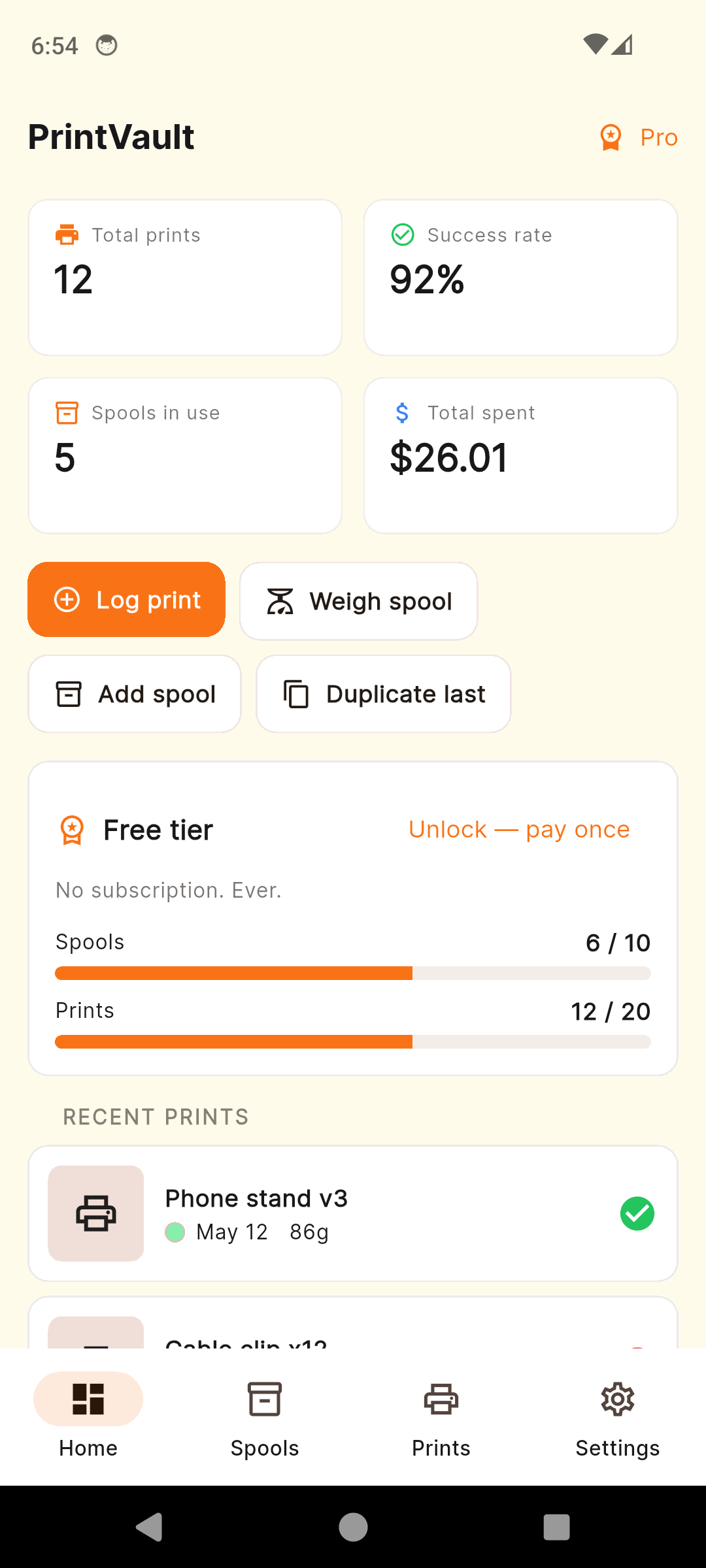
Dashboard — spools, prints, cost at a glance
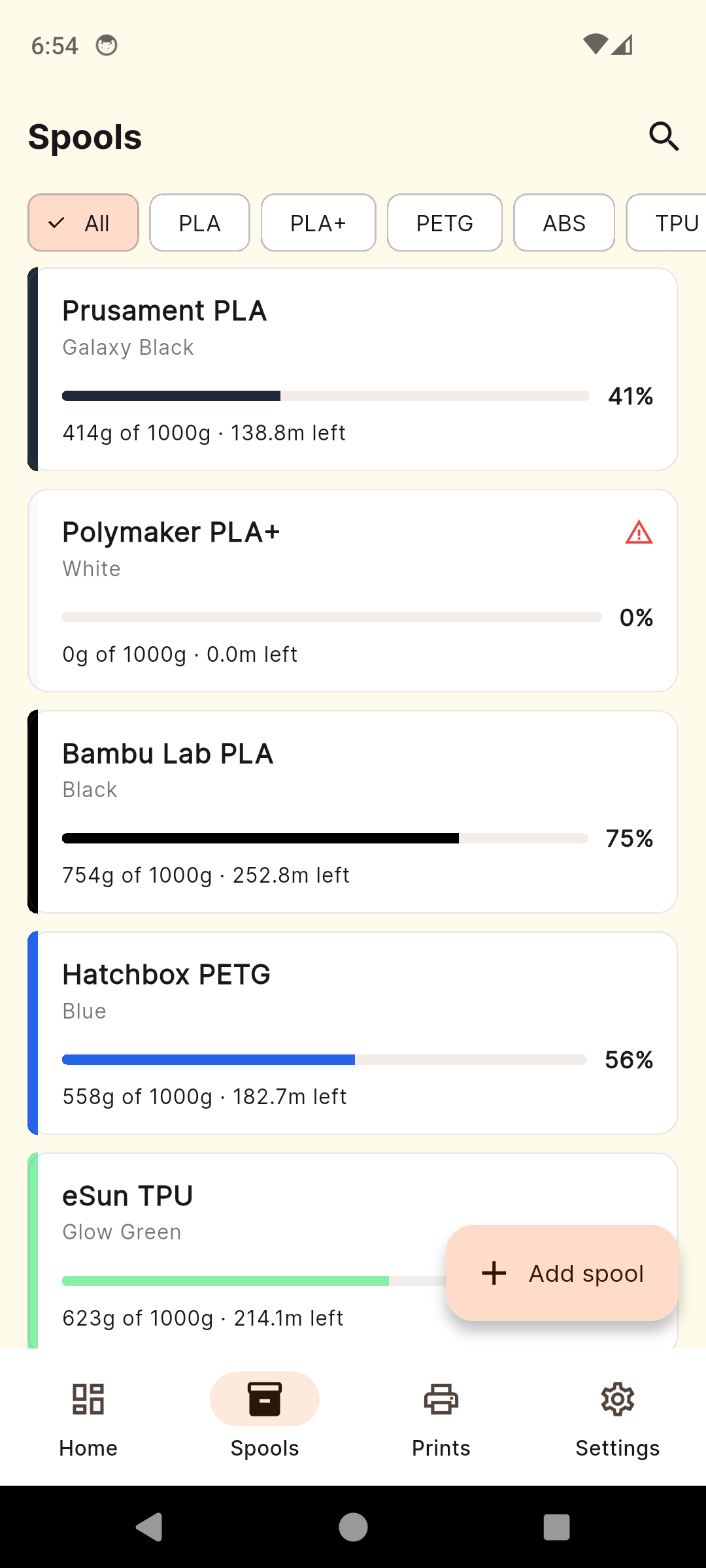
Spools — your full filament inventory
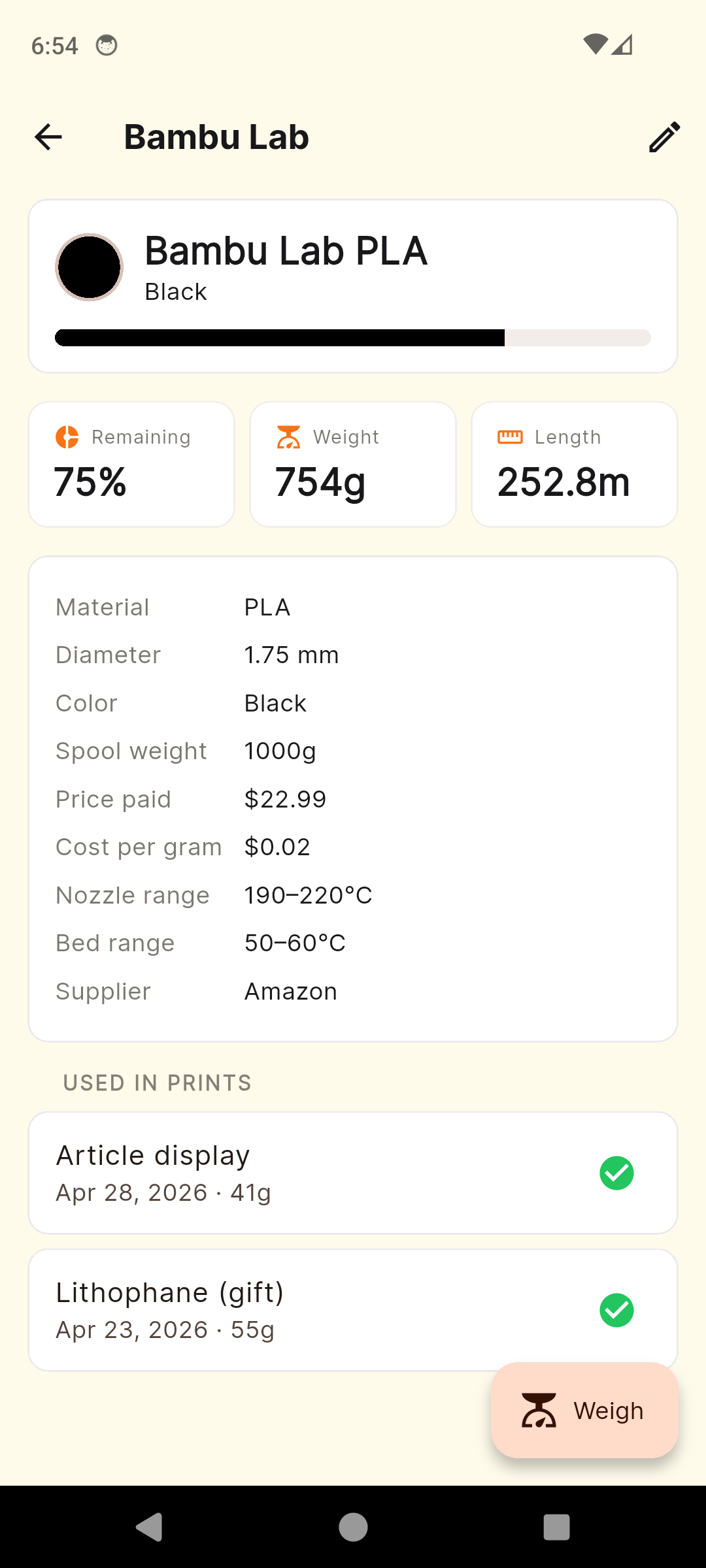
Spool detail — grams + meters left
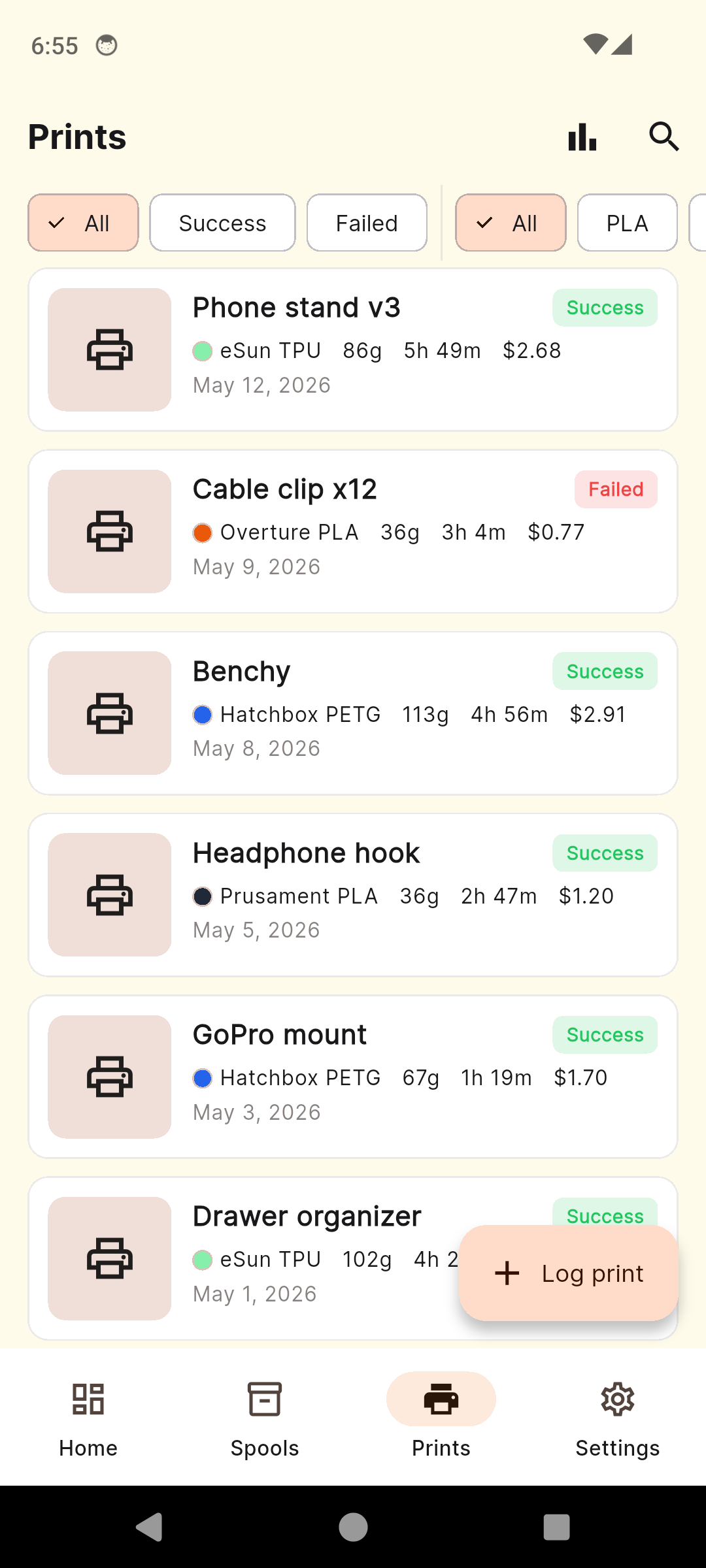
Prints — every job, every photo
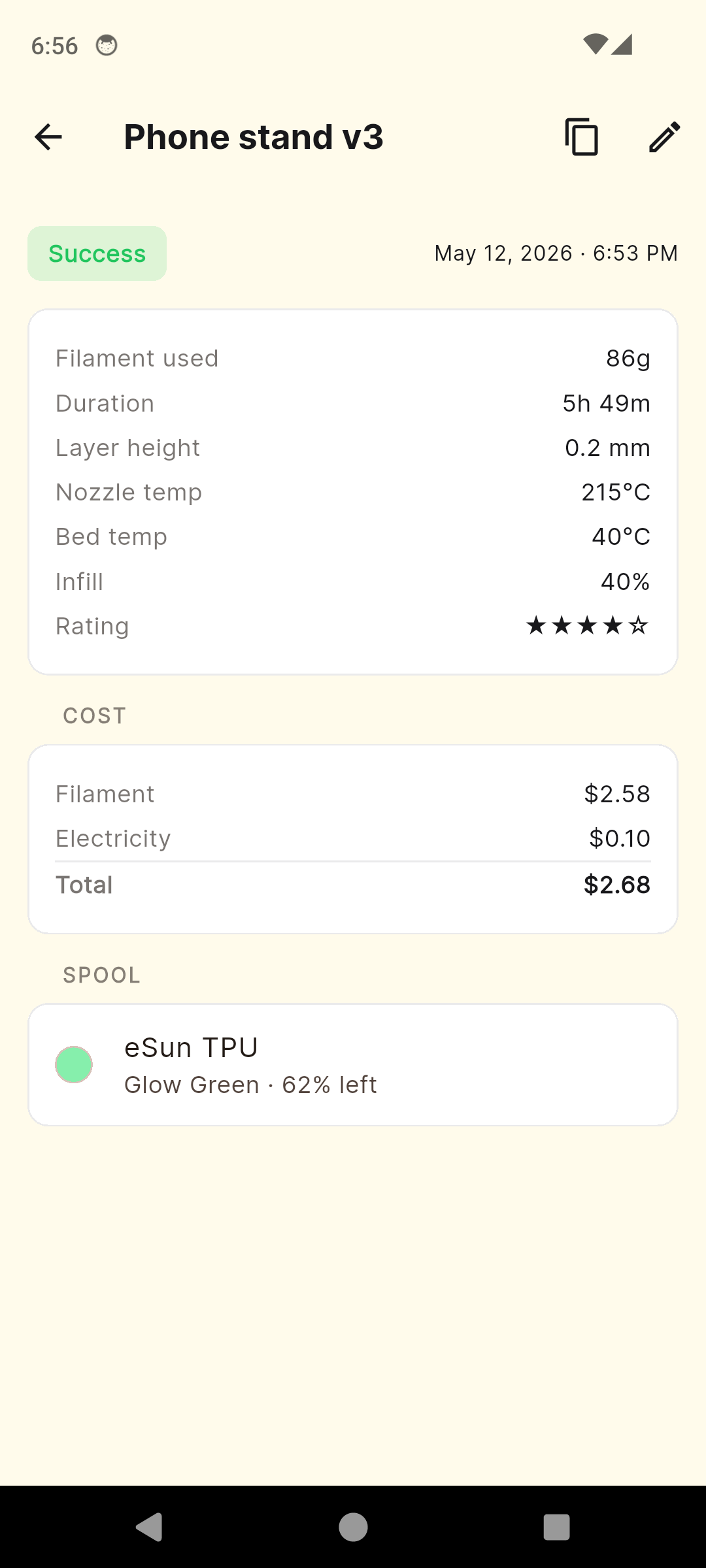
Print detail — full cost breakdown
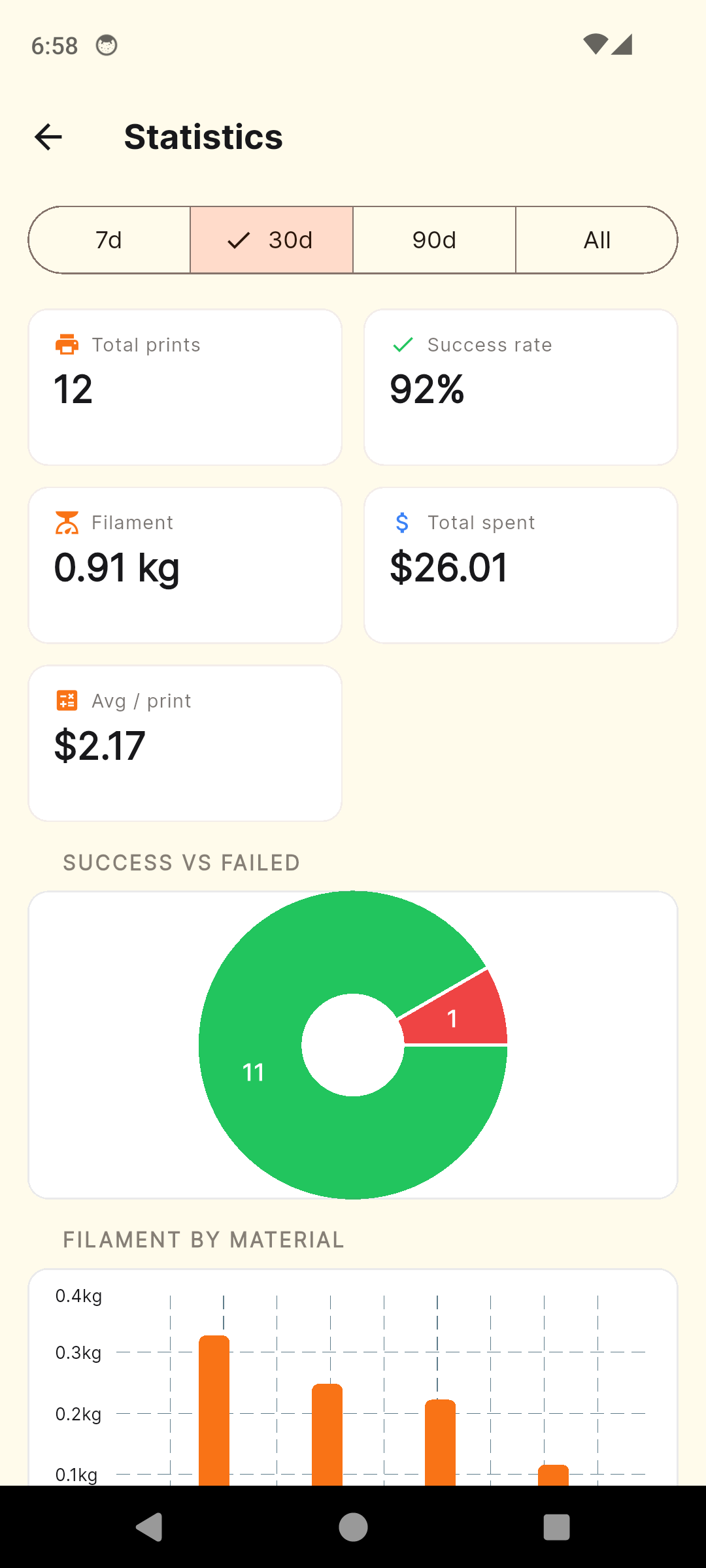
Stats — success rate, cost over time
Everything Your Filament Shelf Needs
Spool Inventory
Brand, material, color, weight, price per spool. 30 brands and 11 materials pre-loaded (Bambu Lab, Prusament, Hatchbox, eSun, Polymaker).
Grams + Meters Remaining
Weigh the spool, enter the gross weight, get grams left and estimated meters for 1.75 mm or 2.85 mm filament. History per spool.
Two-Screen Print Log
Six required fields on screen one, optional slicer settings on screen two. Logging a print takes under 60 seconds. Duplicate-last-print in one tap.
Photos Per Print
Snap before/after photos as you log. Tap to zoom on the print detail. Build a visual history of what you've actually printed.
Statistics Dashboard
Success rate, filament consumed by material, cost over time, prints per month. Filter 7 / 30 / 90 / all-time.
Dry Box Tracking
Mark each spool as in dry box, sealed bag, or open. Pull the freshest stock first and stop guessing which roll has been on the shelf too long.
Cost-Per-Print
Filament cost (price ÷ grams used) plus electricity (your kWh rate × wattage × hours). True numbers for Etsy and client work.
Barcode + Multi-Printer
Scan a spool's barcode once for next-time recall. Track per-printer success rate and total hours across every printer in the workshop.
Simple, Honest Pricing
No subscription. Pay once, own it forever.
Standard
Full app, capped tier
- Up to 5 spools
- Up to 10 logged prints
- Brands, materials, color picker
- Grams + meters remaining
- Barcode scanner
- Cost-per-print calculator
- Statistics dashboard
- Banner + interstitial ads
PrintVault Premium
One-time purchase — yours forever
- Everything in Standard, plus:
- Unlimited spools
- Unlimited print log
- Ad-free
- Slicer presets (PLA Standard, PETG High Detail)
- Photo gallery per print
- CSV + JSON export
- Priority support
One ruined PETG print costs more than Premium. PrintVault pays for itself the first time you realise a spool's been on the shelf too long, or you price a sale based on real cost instead of a guess.
Common Questions
Frequently Asked Questions
Which filament brands and materials are included?
30 brands ship pre-loaded — Bambu Lab, Hatchbox, Overture, Polymaker, eSun, Prusament, SUNLU, Anycubic, Creality, Elegoo, Inland, MatterHackers, AMOLEN, GEEETECH, and more. 11 materials are built in (PLA, PLA+, PETG, ABS, ASA, TPU, Nylon, PC, PVA, HIPS, Wood-fill). If a brand isn't listed, add it once and it sticks — every spool you log from then on can pick it from the dropdown.
How does the grams-remaining tracking work?
Weigh the spool on a kitchen scale, type the current gross weight into PrintVault, and the app subtracts the empty-spool tare for that brand to give you grams of filament left. It also estimates meters remaining for your filament diameter (1.75 mm or 2.85 mm). You can update the weight any time — after a print, after a swap, after a humidity check — and the spool detail screen shows the full history.
Does PrintVault calculate cost-per-print?
Yes. Enter your printer wattage and your local kWh rate once, and every print pulls filament cost from the spool (price per gram × grams used) plus electricity (kWh × hours × wattage). The print detail shows the full breakdown — filament, electricity, total — so you know exactly what a print actually cost before you list it on Etsy or hand it to a client.
Does it work with multiple printers and dry boxes?
Both. Add each printer once with a name, model, and wattage — every print log lets you pick which printer ran it, and the stats dashboard shows per-printer success rate and total hours. Dry boxes are tracked at the spool level: mark a spool as 'in dry box', 'sealed bag', or 'open' so you can pull the freshest stock first and stop guessing which roll has been on the shelf too long.
Can I log multi-color or AMS / MMU prints?
Yes. A single print entry can reference multiple spools — log a Bambu Lab AMS or Prusa MMU print with one spool per slot, and the per-spool grams-used field debits each one individually. The cost-per-print rolls all of them up. Most hobbyist print loggers can only track one filament per print; PrintVault was built around the assumption that multi-color is the default now, not the exception.
Does the barcode scanner need an internet connection?
No. The scanner uses your phone camera and stores barcodes locally — scan once on the first log, and next time you scan the same spool the app jumps straight to it. There's no online database lookup, no account, no telemetry. It works on a Wi-Fi-free workbench.
Is there a subscription?
No. Premium is a single $4.99 in-app purchase. It removes ads, lifts the free-tier caps (5 spools, 10 prints) to unlimited, unlocks slicer presets, CSV/JSON export, and the photo gallery per print. Pay once, own it forever, no recurring charges.
What about CSV export and data ownership?
All data lives on your device in a local Hive database — no cloud, no account. Premium adds CSV and JSON export so you can open your spool inventory in Excel, Google Sheets, or Numbers, and back it up wherever you like. If you uninstall the app or move phones, restore from your last export file and you're back where you were.
Stop Guessing What's On The Shelf
Download PrintVault and turn your filament pile into a tracked inventory.
Have questions? Get in touch
The Filament Pile, Tracked: A 3D Print Manager Built For Real Workshops
If you have more than three printers' worth of filament on a shelf, you have already lost track. A half-roll of black PLA from one brand looks identical to a half-roll of black PLA from another, and the only way to tell which one cost £18 and which one cost £36 is to weigh both, dig through receipts, and guess. PrintVault is the phone-side log that turns that pile into an inventory. Every spool gets a record — brand, material, color, opening weight, price — and every print debits the spool it came from in grams. After a few weeks of logging, the dashboard knows more about your filament stock than you do.
Why Hobbyist 3D Printers Lose Track of Filament
The Bambu Lab P1S landed in 2023, the Prusa MK4 in 2024, and the Ender 3 V3 KE put a £200 multi-material printer on every workbench. A typical hobbyist garage now runs two or three machines, and a colour-swap weekend turns 12 spools into 20 by Sunday night. The bins fill up. Half-rolls migrate between drawers and dry boxes. A spool that was bought as "Hatchbox Galaxy Black" in March is, by August, an unlabelled cylinder that may or may not be PETG. PrintVault solves the bookkeeping side of the problem — not the storage side, but the knowing-what-you-have side — by giving every roll a record before it ever gets used.
Cost-Per-Print Math For Etsy And Client Work
Anyone who has tried to list a print on Etsy hits the same wall: a 12-hour print at 22 grams sounds cheap until you actually do the math. Filament cost is price-per-gram times grams used. Electricity is wattage times hours times your local kWh rate. Failed prints get amortised across the wins. PrintVault does the arithmetic for you — enter your printer's wattage once, your kWh rate once, and every logged print returns a true cost. Filament, electricity, total. Now you know whether your £8 listing is a £3 profit or a 20p loss before you ship it.
Humidity, Dry Boxes, And Filament Shelf Life
PLA absorbs water at about 0.5% by weight per week in a humid garage. PETG drinks even faster. Nylon is a disaster within 48 hours of opening. Wet filament prints stringy, brittle, and pock-marked, and the only reliable defence is sealed storage with desiccant. PrintVault tracks each spool's state — in dry box, sealed bag, or open — and shows the open-date so you can rotate the freshest stock to the front. It is not a moisture sensor; it is the bookkeeping layer that tells you which roll has been exposed for six weeks and probably needs an hour in a dehydrator before its next print.
From Notion Pages And Spreadsheets To A Phone Log
Most printer owners try to track their filament once. They build a Google Sheet, a Notion database, or a one-page table in Apple Notes. It works for two months and then it doesn't, because logging a print at the printer means walking to the laptop, opening the file, finding the right row, updating the grams. The friction kills it. PrintVault moves the whole loop onto the phone you are already holding while the print runs — six fields, two screens, under 60 seconds. The logging happens because it is easier than not logging, not because you have promised yourself you will be diligent this time.
Gram-Level Accounting Without a Scale Obsession
You do not need to weigh every spool every print. The accurate way to track filament use is to weigh the spool roughly once a week — or whenever you switch to a different roll — and let PrintVault interpolate everything in between from the slicer's gram estimate. The app stores the empty-spool tare for each brand so the math is honest: gross weight minus tare equals filament weight, and that minus the next reading equals what you used. Over a month the per-print estimates and the actual scale readings converge, and you stop having to think about it.
Batch Ordering And When To Restock
The Statistics dashboard knows how much of each material you actually go through. If you burned through 1.8 kg of PETG in May and a 1 kg roll in June, June was a low month — but May plus April plus March averages to a kilo every five weeks, which means your two-roll PETG stash will run out in mid-August. PrintVault does not auto-order — it just tells you what your real burn rate is so the next Amazon basket goes in before you are mid-print on a Sunday night and out of black filament. The numbers are right there, broken down by brand and material, on a real chart.
Multi-Printer Households And Maker Spaces
Most loggers assume one printer. PrintVault assumes you have an Ender 3 Pro that runs the rough stuff, a Bambu P1S for the production prints, and a resin printer you bought in a moment of weakness and then ignored. Each printer gets a name, model, wattage, and its own success-rate stat. The stats dashboard lets you see whether the P1S really is more reliable than the Ender (it is), and how many hours each one has put in this month. Maker spaces sharing a fleet of printers can use one PrintVault install per machine, or one shared install where every print picks the printer that ran it.
AMS, MMU, And The Multi-Colour Default
A print log written in 2019 assumed one spool per print. A print log written in 2025 has to assume four — because the Bambu AMS, the Prusa MMU, and the Anycubic ACE all multi-feed by default, and a single "log a print" entry has to debit four spools at once. PrintVault was built around this from day one. A multi-colour print entry references one spool per slot, and the grams-used field debits each of them individually. The cost-per-print rolls all of them up. If a single roll runs out mid-print, the swap is logged against the same print so the math stays honest.
Offline, Local, And Yours
Every spool record, every print log, every photo lives on the phone in a local Hive database. No account. No cloud sync. No telemetry on what you are printing. The barcode scanner uses the camera and an on-device decoder — no lookup, no internet call. Premium adds CSV and JSON export so you can move your data to a spreadsheet, a backup drive, or a new phone whenever you like. PrintVault is a filament logbook with your name on the cover, not a SaaS that holds your inventory hostage.