









































































































































































How to Make a Reusable AI Prompt Template
Turn a prompt that already worked into a template: find the words that change, name the blanks, fence off pasted text, add examples and test it per model.

To make a reusable prompt template, take a prompt that already gave you an answer you kept, use it a second time, and note which words you had to change. Replace those words with named blanks such as {topic} and {audience}. Then freeze the rest, word for word.
The freezing is the step most people skip, and it matters more than it looks. In Sclar and colleagues’ ICLR 2024 paper on prompt formatting, changes to formatting alone, with the meaning held constant, moved accuracy by up to 76 points on LLaMA-2-13B.
Why the wording you got right should stop moving
That figure came from open-source models doing few-shot tasks, not your next email draft. Its direction is the useful part. The authors found the sensitivity “remains even when increasing model size, the number of few-shot examples, or performing instruction tuning.”
Google says the same thing in plainer words. Its Gemini guide notes that different words or phrasing “often yields different responses from the model even though they all mean the same thing.” OpenAI’s guide calls model output non-deterministic and prompting “a mix of art and science.”
Put those together and retyping a good prompt from memory is a re-roll. You keep the topic, which you remember, and lose the structure, which you do not: the line telling it to skip the introduction, the word limit, the order of the sections. A template exists to stop that loss.
1. Start from a prompt that earned its keep
Never build a template on a blank page. Build it on a prompt whose output you used, sent, pasted into a document or shipped.
Anthropic offers a quick test for whether a prompt is clear enough to keep: show it to a colleague with minimal context on the task, and if they would be confused, the model will be too. Run it on the raw prompt before adding a single blank, because a template multiplies whatever is in it, vague parts included.
An illustrative example, invented for this guide: a café owner whose review reply came out well and who wants that quality every time.
You are replying to a Google review for Fernside Bakery, a small café.
Write 60 to 90 words in warm, plain English. Thank Priya by name.
She said the queue was slow on Saturday. Apologise once and say we have
added a second till for weekends. Sign off as Tom, owner.
2. Use it again and circle what changed
The second use tells you where the blanks go. Run the same job for a different review and mark every word you edited. In the example, that is the reviewer’s name, the complaint, the fix and maybe the sign-off. The bakery name, the word count and the tone line did not move, and they are the parts that made the first reply good.
Expect few blanks. PromptVault ships a library of 55 ready-made prompts, and counting the distinct blanks in each one gives 15 with one, 13 with two, 21 with three, 5 with four and a single prompt with five. Forty-nine of the 55 have three or fewer.
Marking more than half the words means a different prompt each time, not a template.
3. Name each blank for what it holds
Call it {reviewer_name}, never {Priya}. The first still makes sense in six months. The second is last Tuesday’s answer stuck in the template, and the next person to fill it will not know whether it is meant to change.
Use the same names across all your templates, never {audience} in one and {reader} in the next. Anthropic gives the same advice for the XML tags that wrap content, asking for “consistent, descriptive tag names across your prompts,” and the reasoning carries over. You will search for these names later.
Then pick one brace style and keep it. Anthropic’s Claude prompting best practices write placeholders as {{ANNUAL_REPORT}}, in double braces. PromptVault reads single braces. A mixed library goes wrong quietly: PromptVault’s parser picks up the inner {topic} inside {{topic}} and asks you for it, but the outer pair stays, so the filled text arrives as {sourdough starters} with a brace on each side. Strip one pair when you bring a template across.
With named blanks, the café template reads as below. The review itself is still missing; step 4 adds it.
You are replying to a Google review for Fernside Bakery, a small café.
Write 60 to 90 words in warm, plain English. Thank {reviewer_name} by name.
Apologise once for the problem they raise and say what we have done: {fix}.
Sign off as {owner_name}, owner.
4. Fence off anything you paste in
A blank that takes a name is safe. A blank that takes a whole customer email, a contract clause or a page of notes needs a fence, so the model can tell where your instructions stop and the pasted material starts.
All three large vendors say to mark those boundaries. OpenAI writes that XML tags “can help delineate where one piece of content (like a supporting document used for reference) begins and ends.” Anthropic says tags help Claude parse prompts that mix “instructions, context, examples, and variable inputs.” Google’s guide is the strictest about consistency: use XML-style tags or Markdown headings, then “choose one format and use it consistently within a single prompt.”
So the café example gets its last blank. The review goes inside tags at the top, and the request below names the tags:
<review>
{review_text}
</review>

You are replying to the Google review above for Fernside Bakery, a small café.
Write 60 to 90 words in warm, plain English. Thank {reviewer_name} by name.
Apologise once for the problem raised in the <review> tags and say what we have done: {fix}.
Sign off as {owner_name}, owner.
A review that contains its own demands (“call me back”) is now plainly material, not part of your request.
5. Put long material where the model reads it best
Placement stops being a detail once a blank can hold thousands of words.
Liu and colleagues’ Lost in the Middle study in TACL found performance was often highest when the relevant information sat at the beginning or end of the context, and that it “significantly degrades” when the model has to use information from the middle, even for models built for long contexts. Anthropic’s guide, writing about inputs of 20,000 tokens or more, says to put long documents near the top, above the query and instructions, and reports that queries at the end “can improve response quality by up to 30 percent in tests.”
The vendors’ advice is not identical. OpenAI suggests keeping the parts you reuse at the start of a prompt, partly because that is what its prompt caching rewards, with varying context near the end.
My working rule for chat templates: short blanks can sit wherever they read naturally. A blank that takes a long document goes in tags at the top, and the actual question goes at the bottom, after it. Microsoft’s guidance for Azure OpenAI adds that models can show recency bias, and suggests experimenting with repeating the instructions at the end. For a long-document template, one closing sentence restating the task costs almost nothing.
6. Write the output format into the fixed part
Say what you want, not what you are banning. Anthropic’s example swaps “Do not use markdown in your response” for “Your response should be composed of smoothly flowing prose paragraphs.” Give the reason as well, since Anthropic says explaining why an instruction matters helps Claude “deliver more targeted responses.” In the café template, “under 90 words, so the reply never runs longer than the review it answers” does more work than “be brief,” because the model can now judge the edge cases itself.
Two more habits from Microsoft’s prompt engineering techniques for Azure OpenAI suit templates. Give the model an out, such as “respond with ‘not found’ if the answer isn’t present,” so an empty or irrelevant blank produces a flag rather than an invented answer. And prime the output: end the prompt with the first words of the answer, like “Here’s a bulleted list of key points:” followed by a dash, and the list format tends to follow.
7. Keep two or three worked examples inside it
Examples are fixed text, not blanks, and Anthropic calls them “one of the most reliable ways to steer Claude’s output format, tone, and structure.”
Google’s prompt design strategies for Gemini are blunt about it: “We recommend to always include few-shot examples in your prompts.” The same page warns that with too many, the model “may start to overfit the response to the examples,” and asks for a consistent format across all of them, down to the white space, newlines and XML tags.
Anthropic suggests three to five examples, wrapped in example tags so they are not mistaken for instructions. OpenAI asks for a diverse range of inputs.

Diverse is the word to take seriously. If both of your example replies answer complaints about queues, every reply the template writes will drift toward queues. Pick one happy review, one complaint and one odd case, such as a review that is mostly about a different shop.
8. Test it with three fillings that disagree
Before you file the template, fill it three ways: an easy case, an awkward case and a nearly empty one. The awkward case finds the instruction that only worked for the original. The nearly empty one shows whether your out from step 6 fires.
Run those tests in the assistant you will use it with. The ICLR paper found that format performance “only weakly correlates between models,” which means a layout tuned in one chat window is not proven in another. Google calls prompt engineering iterative and its own templates “starting points,” which is the right attitude toward yours.
Leave a blank visibly unfilled when you test and read what the model does with a literal {fix} in the text. PromptVault leaves a skipped blank in place on purpose, so a field you forgot shows up in the pasted text instead of vanishing.
9. Date it, and test again when the model changes
A template that works today was measured on one model. OpenAI’s prompt engineering guide warns that “even different snapshots of models within the same family could produce different results,” recommends pinning production apps to a specific snapshot such as gpt-4.1-2025-04-14, and suggests building tests that measure prompt behavior “when you change and upgrade model versions.” Anthropic says much the same: where its guide names a specific model, treat the technique as measured on that model and re-check it before applying it to another.
Pinning a snapshot is a developer setting. In a chat app, the practical substitute is a note on the template saying which model it was tested on and when. When the assistant updates, rerun your three test fillings before you trust the old output.
Developers get one more instruction from the same guide: OpenAI is deprecating its reusable prompt objects and says to store production prompts in application code.
Where your templates live once you have a dozen
Chat history is a poor filing cabinet. It holds the filled versions, not the template.
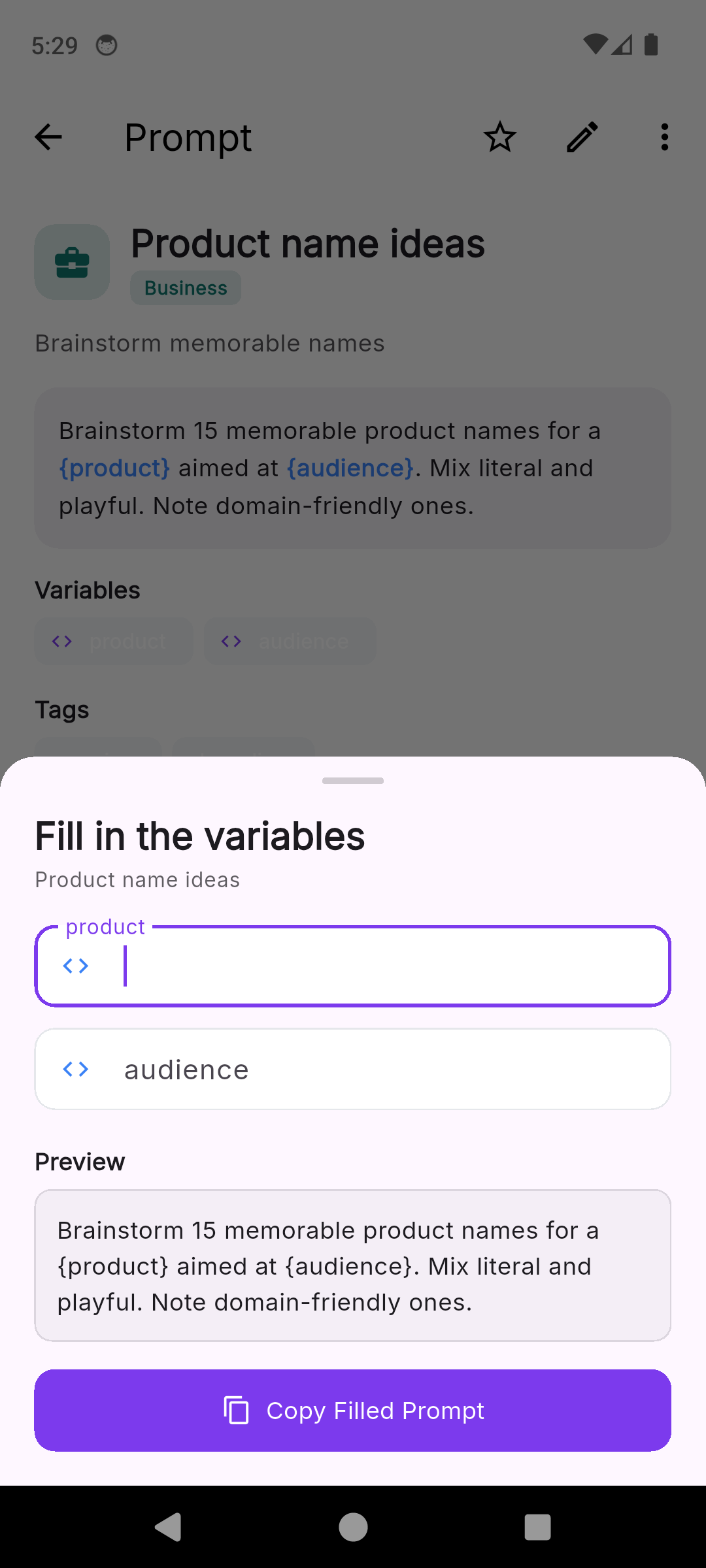
In PromptVault, a word in curly braces becomes a blank, and copying a prompt with blanks opens a sheet titled Fill in the variables, with one field per blank in the order they appear in the text, the first one already focused. A preview underneath rewrites as you type, and Copy Filled Prompt puts the finished text on the clipboard for you to paste into whichever assistant you use. The saved template never changes. A blank used four times is asked for once. The full parsing rules are on the page about prompt template variables.
The description and tag fields are where the step 9 note goes. Search reads the title, description, body and tags, so tagging every Claude-tested template with the model name brings them all up at once when it updates. There is no version history, so when you change a template that worked, save the new wording as a separate prompt and keep the old one until the new one has passed its tests. The unlock adds export of the whole collection to one JSON file, which is how a library of tested templates survives a lost phone.
When a template is the wrong tool
Some prompts should stay one-offs. A question you will ask once does not need blanks. Neither does a long back-and-forth where each message depends on the last answer, since the context you would template is the conversation itself.
The test from step 2 still applies. If the circled words outnumber the frozen ones, you are writing a new prompt each time, and the honest move is to save the best one as an example rather than force blanks into it.
Pick the prompt you retyped most this week and put it through steps 2 and 3 tonight: circle what changed, name the blanks, and save it somewhere you can search. If your phone is where you keep that kind of thing, PromptVault, an AI prompt manager that fills the blanks as you copy, is one way to start the collection.
Common questions
What is a prompt template?
A prompt you have already tested, with the few words that change between uses replaced by named blanks such as {topic} or {audience}. The instructions, the output format and any examples stay fixed, so each use only changes the parts that are meant to change.
Should prompt variables use single or double curly braces?
Whichever your tool reads. Anthropic's own documentation writes placeholders as {{DOUBLE_BRACES}}, while some prompt managers read single braces. Pick one style and use it in every template, because a template written for one syntax and filled by a tool expecting the other can leave stray braces in the finished text.
How many examples should a prompt template include?
Anthropic suggests three to five for best results with Claude. Google recommends always including some, but warns that too many can make Gemini overfit to them. For a template you use daily, two or three short examples in an identical format is a sensible place to start.
Will the same template work in ChatGPT, Claude and Gemini?
Often, but not reliably. A 2024 ICLR study found that how well a prompt format performs only weakly correlates between models, and OpenAI notes that even snapshots of one model family can produce different results. Test the template in each assistant you use it with and note the result on the template.
Photos: RDNE Stock project / Pexels , RDNE Stock project / Pexels