















































































































































































Should a Phone Repair Shop Ask for the Passcode?
When a repair tech needs a customer's passcode, when Galaxy and Pixel repair modes make it unnecessary, and how to hold and delete one if you do take it.

Ask for it only when the job cannot be checked without it. On many phones the answer is now no, because the owner can switch on a repair mode before handing the device over. Samsung’s Maintenance mode runs on Galaxy devices with One UI 5 or higher. Google’s Repair Mode covers Pixels on the Android 14 December 2023 update or later, and Google’s help page tells owners not to share their PIN with the technician. Apple’s service page says neither Apple nor its authorised providers will ask for an iPhone passcode.
So for a battery, a charge port or a cracked screen, start from no. A fault that lives in the software, or behind Face ID, changes the question to something harder: how you hold the code, who sees it, and when it goes.
What happened when researchers handed theirs over
In August and September 2021 a team from the University of Guelph walked into eleven repair businesses across three Canadian cities with a laptop and a story about a dying battery. They picked that job on purpose. On the Asus model they used, the battery came out through the back panel and the BIOS reported its health, so nobody needed to log in to Windows to do or check the work.
Ten of the eleven asked for the password anyway.
What happened to the password next is the part to read slowly. Three of the five small local shops stuck it on a note on the laptop itself. Two regional chains printed a label with the customer’s name, phone number and password and stuck it on the laptop and its charger, where any member of staff could read it. Not one business displayed a privacy policy, and where there were terms to sign, they covered only one thing: the shop was not liable for lost data, and backing up was the customer’s job.
A second round used planted laptops with a disabled audio driver, another fault that needs no access to anyone’s files, and logging software running in the background. Across 16 repairs, technicians went through personal data in six and copied it to an external drive in two. In one case that included a file containing passwords. In three of the six, the technician then cleared Windows’ list of recently opened files. The full paper, No Privacy in the Electronics Repair Industry, was accepted to the 44th IEEE Symposium on Security and Privacy, and any shop owner could read it in an evening.
It was a study of laptops, and a small one. The counter conversation is the same with a phone, though, and so is the sticky note.
Why techs ask in the first place
Not to snoop, mostly. When the researchers asked why the password was needed, the national chains said every repair required it as part of the paperwork. Four local shops gave the reason any honest tech would: they wanted to check their work before handing it back. Two regional and two local shops agreed to do the battery without it, but said they could not then verify the repair and would not answer for its quality.
That last position is reasonable. It only works if it is written down.
On an iPhone there is also a mechanical reason. Apple’s platform security guide lists the moments when Face ID or Touch ID will not unlock a phone and only the passcode will, and two of them land on every repair bench: the device has just been turned on or restarted, or it has not been unlocked for more than 48 hours. You disconnect the battery to work inside, so the phone you reassemble is a phone that wants its passcode. Without it you cannot reach Face ID settings or place a test call through the earpiece.
And guessing is not an option. With the iPhone’s Erase Data setting switched on, ten wrong passcodes in a row wipe the device. Nobody wants to be the shop that tried the customer’s birthday.
Which jobs can be finished without it?
More than most counter staff assume.

A locked phone shows you a lot. The display lights and shows the lock screen, so you can check for dead pixels, tint and backlight bleed. Touch registers on the passcode keypad and the emergency dial pad, which covers a good part of the panel if you are methodical. The camera opens from the lock screen on both platforms. The charging indicator answers the charge port question. Volume and power buttons do their jobs locked.
What a locked phone hides: Face ID and fingerprint enrolment, earpiece audio on a real call, Wi-Fi and mobile data behaviour inside apps, and any fault the customer describes as “it does this weird thing when I open WhatsApp”. Those are the jobs where a passcode, or a repair mode, earns its place.
A sensible rule for the ticket: if every function on your intake checklist can be tested from the lock screen, do not ask.
What Samsung Maintenance mode does for the bench
On a Galaxy phone the owner does the work before the phone leaves their hand. Maintenance mode restarts the device into a separate account. Samsung’s support page says the mode will hide the owner’s photos, videos, contacts and messages, and that apps and data created while it is on are deleted automatically when Maintenance mode is disabled. The tech gets a working phone to test with, and the owner’s life is not on it.
Three details matter at the counter. It needs One UI 5 or higher. It needs a lock screen, and the phone prompts the owner to set one if they have none. And getting out of it takes the owner’s PIN, pattern, password or fingerprint, so the phone has to come back to them, or they have to come back to it, before the job is finished. Tell them that at drop-off, not at collection.
Pixel Repair Mode works the same way, with one exception
A Pixel needs the Android 14 December 2023 update or later and at least 2 GB of free space to use it, and Google states plainly that the mode removes the need to wipe and restore a phone around a repair. Changes made while it is on are not kept when the owner exits.
The exception is written into Google’s Repair Mode instructions: if the repair replaces a part that affects storage, the technician must delete the phone’s data even with Repair Mode on. A board swap is not a screen swap. Whoever books that job in needs to say so before the phone leaves the customer’s hand, and the backup conversation has to happen there too.
And the iPhone?
Apple’s service guidance describes no mode that hides the owner’s data. What it has published is a position. On the page that tells customers how to prepare an iPhone or iPad for service, Apple says neither it nor its authorised providers will ask for the device passcode or Apple Account password. Where some software support does need the passcode entered, Apple tells the owner to stay present while the technician has access.
Find My is the other half. On iOS 26 or earlier, Apple says it might not be able to service a device unless Find My is turned off. From iOS 27, the Ready for Repair option keeps Find My on through an eligible repair instead. Neither is described as hiding photos or messages from the person holding the unlocked phone.
So an iPhone repair without the passcode tends to mean testing what you can on the lock screen, then testing the rest with the customer at collection: they unlock it, you run through Face ID and a call, they watch you do it.
Here is how the three compare.
| Galaxy (Maintenance mode) | Pixel (Repair Mode) | iPhone | |
|---|---|---|---|
| What the owner does first | Turns the mode on, phone restarts | Turns the mode on, phone restarts | Backs up; turns Find My off on iOS 26 or earlier |
| Minimum software | One UI 5 | Android 14, December 2023 update | Ready for Repair needs iOS 27 |
| Owner’s data hidden from the tech | Yes | Yes | No such mode described |
| Passcode needed to finish | Owner’s, to exit the mode | Owner’s, to exit the mode | Owner’s, for anything past the lock screen |
| Known catch | Settings vary by carrier and software version | Storage-related parts mean a wipe | Every reboot asks for the code |
If you do take it, where does it go?
Not on the phone. Not on the bag, the charger, the ticket stub or a whiteboard.

That sounds obvious until you read the Guelph numbers again: the most common storage method among the small shops was a sticky note on the device. The US Federal Trade Commission’s guide for businesses tells employers to explain to staff why it is against company policy to post passwords near their workstations. A customer’s passcode on a note on the bench is the same mistake with someone else’s bank account behind it.
Keep it in one place, out of sight of anyone who is not working on that device, and somewhere that does not print. If your intake form is paper, that means a separate slip in a locked drawer, matched to the ticket by number, and shredded at collection. If it is a spreadsheet, it means a column you will forget to clear.
How long can you keep a customer’s passcode?
Until the device goes home. Then it should not exist.
In the UK, the Information Commissioner’s Office puts the storage limitation principle in one line: you must not keep personal data for longer than you need it. The same guidance says to erase or anonymise data you no longer need. The FTC’s version, for US businesses, is two of its five principles: scale down and keep only what you need, then pitch what you no longer need.
There is no legitimate reason to know a customer’s passcode the day after they collect. If the phone comes back under warranty, ask again.
Is browsing a customer’s phone a crime?
In the UK it can be. Section 1 of the Computer Misuse Act 1990 makes it an offence to cause a computer to perform any function intending to access data, where the access is unauthorised and the person knows it. On indictment the maximum is two years in prison, a fine or both.
The word doing the work is unauthorised. A customer who hands over a passcode so you can test a camera has authorised testing the camera. That is not the same as permission to open their photo gallery, and the Guelph technicians who zoomed in on thumbnails would struggle to argue it was. Other countries have their own computer misuse and privacy laws, so read the one where your shop trades, and make sure every person behind your counter understands where the line sits.
Put the refusal on the ticket
Some customers will say no. The Guelph survey found something odder: every respondent who was asked for a PIN gave it, and more than half of those asked to share or remove one were unsure whether the repair even needed it. People hand it over because the person behind the counter asked.
When the code is not given, the intake record should say so, in the same breath as what that means for testing. List the functions you will check on the lock screen and mark the others untested, not working. Note that the customer chose not to share the code and agreed to test the rest at collection. If they come back saying the earpiece has been quiet since your screen job, you have a record made before the work began, signed by them, showing that the earpiece was never tested in your hands.
The same goes for the backup. Note whether it was offered, taken or declined. A disclaimer on its own does less than you might hope, as our piece on what a repair ticket disclaimer can and cannot do explains for a different trade, and a dated record of the conversation does more.
How RepairProof handles the passcode field
RepairProof’s device intake form has a passcode field, and it is optional. Most of what this article argues for is how the field behaves.
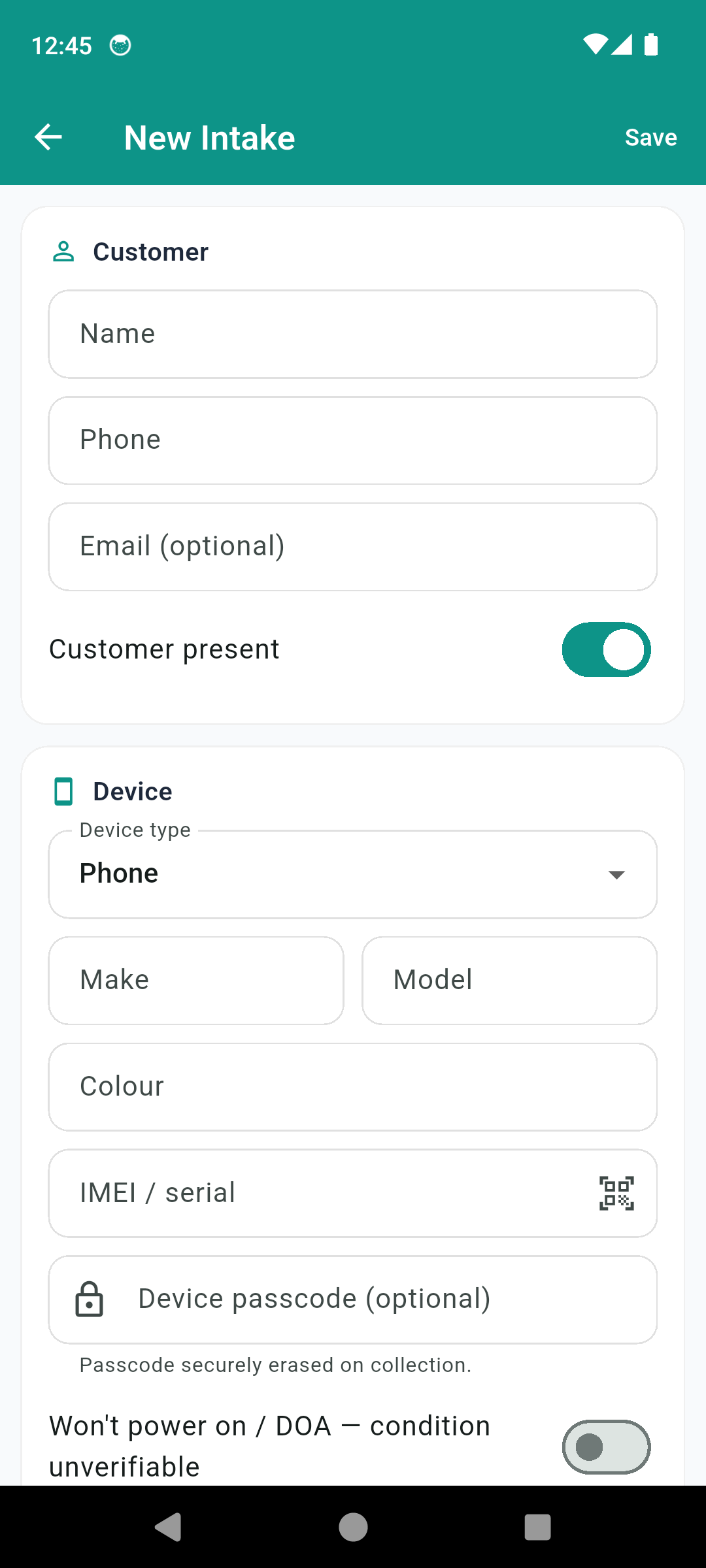
A passcode typed into it goes into secure storage backed by the Android Keystore, not into the app’s ticket database. It never prints on the intake receipt or the collection receipt. The ticket shows a lock button that reveals the code when the tech taps it, and marking the ticket collected erases it, with no setting to keep it. Deleting a ticket erases it too.
The rest of the intake does the record-keeping described above. The functional checklist starts every item at untested, so screen, touch, cameras, buttons, charging, Wi-Fi and cellular, audio and microphone, battery, fingerprint or face, and sensors each have to be marked works or faulty by hand. There is a switch for a phone that will not power on, which records its condition as unverifiable. The ticket cannot be marked collected until the backup conversation is recorded as offered and taken by the shop, declined, or done by the customer. The customer signs the shop’s own terms on the screen, and the PDF intake receipt prints the checklist, the backup status and those signed terms. On the paid tier that receipt carries your shop’s name in place of the app’s watermark, and there is no cap on saved tickets.
Nothing here is legal advice. Data protection and computer misuse rules differ by country, so check the regulator where your shop trades before you write a passcode policy.
If your counter runs on paper slips and a sticky-note habit, start by moving the next booking onto a record that keeps the code off the bench and deletes it at pickup: RepairProof, a phone repair intake log for repair techs.
Common questions
Do phone repair shops need your passcode to fix a screen?
In most cases, no. The glass can be replaced and much of the result checked from the lock screen: the display lights, touch registers on the keypad, the camera opens and the phone charges. Face ID, the earpiece on a call and anything inside the apps need the phone unlocked, which is where a repair mode or the customer unlocking it at collection comes in.
What is Samsung Maintenance mode?
A setting on Galaxy phones and tablets running One UI 5 or higher that restarts the device into a separate account, so photos, messages and contacts stay hidden from whoever handles it. A lock screen is required to turn it on, and the owner's PIN, pattern, password or fingerprint is needed to leave it. Anything created while it is on is deleted when it is turned off.
Does the iPhone have a repair mode like Samsung and Pixel?
Not one that hides the owner's data in the way Maintenance mode and Repair Mode do. Apple's own service guidance says neither Apple nor its authorised providers will ask for the passcode, and that the owner should stay present if a technician needs them to enter it. Ready for Repair, on iOS 27 or later, keeps Find My on during an eligible repair rather than hiding personal data.
How long should a repair shop keep a customer's passcode?
Only until the job is done. The UK regulator's storage limitation guidance says personal data must not be kept longer than it is needed, and the US Federal Trade Commission tells businesses to keep only what they need and dispose of the rest. For a passcode, that points to deleting it the moment the device is collected, and never writing it on the device, the bag or the ticket.
What should a shop do if the customer refuses to give the passcode?
Take the job anyway when the repair allows it, and write down what could not be tested. Mark those functions as untested on the intake record, note that the customer chose not to share the code, and offer to test the rest with them at collection. That record protects the shop if a fault is reported later.
Can a repair technician get in trouble for looking through a customer's phone?
In the UK it can be a criminal matter. Section 1 of the Computer Misuse Act 1990 makes it an offence to access data on a computer knowing that the access is unauthorised, with up to two years in prison on indictment. Being handed a passcode to test a camera is not permission to open the photo gallery. Other countries have their own laws, so check the one where you trade.
Photos: Tima Miroshnichenko / Pexels , energepic.com / Pexels , Tara Winstead / Pexels